







Types of Cash Registers Explained for Small Business Success in 2025

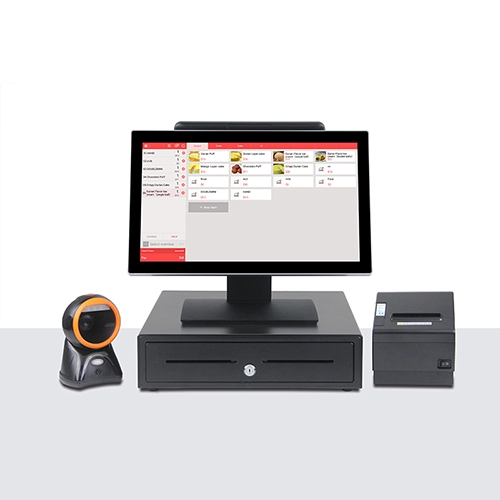
Why Cash Register Types Matter for Your Business
Choosing the right cash register type is more than just picking a device to handle transactions. It directly impacts your business efficiency, customer experience, and overall profitability. Whether you’re running a small boutique or a bustling retail chain, the type of cash register you use can shape how smoothly your checkout process flows.
Different businesses have distinct needs—from simple cash drawers for small retailers to advanced point of sale systems with inventory tracking and contactless payment tills. Understanding these needs means you can select a cash register that boosts accuracy, speeds up transactions, and offers seamless integration with your existing operations.
Here’s why the right cash register matters:
- Improved Checkout Speed: Faster processing keeps lines moving and customers happy.
- Better Inventory Management: Advanced registers help track stock in real time, preventing shortages.
- Accurate Sales Reporting: Detailed reports empower smarter business decisions.
- Enhanced Payment Flexibility: Modern systems handle cash, cards, mobile, and contactless payments effortlessly.
- Scalability for Growth: The right system supports your business as it expands from small setups to larger environments.
Ignoring these factors might result in missed sales, frustrated customers, or costly errors. To dive deeper into the differences and benefits, check out our guide on cash register systems for high-demand retail environments.
By understanding your options, you position your business to run more smoothly and respond confidently to customer needs and market shifts.
The 5 Main Types of Cash Registers Explained
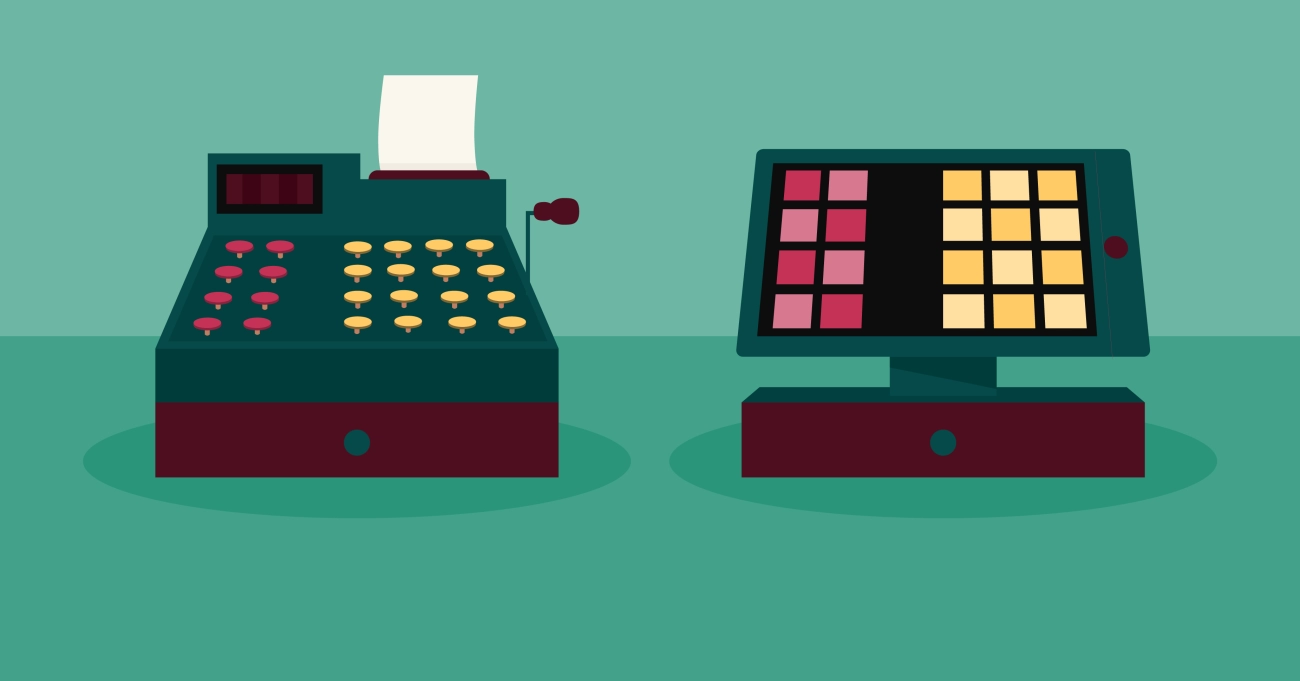
Traditional Mechanical Cash Registers
Traditional mechanical cash registers are the classic choice many think of when picturing a cash drawer. These durable, manual machines function without electricity, using mechanical buttons and a lever to record sales and open the cash drawer.
Why consider traditional mechanical registers?
- Simple and reliable: They don’t require software updates or connectivity, making them ideal for businesses in areas with limited power or internet access.
- Built for cash handling: Mechanical registers emphasize basic cash management, without inventory tracking or advanced sales reporting.
- Low upfront cost: For small businesses or startups focusing mainly on cash transactions, these are often the most affordable option.
However, these traditional mechanical cash registers lack modern features like barcode scanning, contactless payment support, or integration with cloud-based POS software, which can be important as your business grows.
If you are running a small retail shop or a food stand where transactions are straightforward and primarily cash-based, this could be a good fit. But for businesses looking to invest in inventory tracking registers or seamless retail checkout hardware, electronic or POS systems might be better.
For a deeper understanding of how cash registers work and the right options for your setup, check out how does a cash register system work.
traditional mechanical registers suit simple cash handling needs but might fall short in flexibility and added functionality needed for today’s dynamic business environment.
The 5 Main Types of Cash Registers Explained 2 Electronic Cash Registers ECRs
Electronic Cash Registers (ECRs) are a popular choice for many small to mid-sized businesses across the United States. Unlike traditional mechanical registers, ECRs combine basic computing power with retail checkout hardware to speed up transactions and help with simple record-keeping.
What Makes Electronic Cash Registers Different
- Digital display and keypad for fast, accurate input
- Capable of handling multiple payment types, including cash, credit cards, and sometimes contactless payment tills
- Usually equipped with basic inventory tracking registers that monitor stock counts, which is key for retailers who want to avoid running out of popular products
- Often include functions like tax calculation, sales reporting, and adding discounts directly on the machine
These features make ECRs much more efficient than older mechanical models, especially for businesses aiming to balance ease of use with some digital functionality.
Benefits of ECRs for Small Businesses
- Affordable and easy to maintain compared to full POS systems
- Intuitive enough for quick staff training
- Ideal for stores or cafes that need straightforward checkout solutions without complex integrations
If you’re running a small shop or looking for reliable small business cash drawers, ECRs strike a great balance. However, unlike more advanced POS systems, they may lack deeper features like cloud-based software or detailed customer data analytics.
For those curious about evolving retail technology solutions and hardware, check out the detailed overview of types of POS hardware to see how ECRs fit in with other options.
Considerations When Choosing an Electronic Cash Register
While ECRs offer value and simplicity, consider these key points:
- Does the ECR support your preferred payment methods, including contactless?
- Will it integrate with your existing inventory system or software?
- Check the size and durability of the cash drawer—important for busy retail environments
- Look for models with easy reporting features to keep your business insights organized
Electronic cash registers remain a solid choice for many local businesses, especially those who want to modernize without jumping straight to complex POS systems. They bring together reliability, speed, and enough tech to keep your checkout smooth and your books in order.
The 5 Main Types of Cash Registers Explained Point of Sale POS Systems

Point of Sale (POS) systems are a huge step up from traditional cash registers and electronic cash registers (ECRs). These systems combine hardware and software to create a complete retail checkout solution. They’re designed not just to handle sales but to manage inventory, track customer data, and support multiple payment types, including contactless payment tills.
What Makes POS Systems Stand Out
Unlike simple ECRs, POS systems offer a flexible and powerful platform. They can be set up on a touchscreen terminal, a tablet, or even a mobile device. This adaptability makes them perfect for a variety of businesses—from small local shops to larger retail chains. The software often includes features like:
- Inventory tracking registers that update stock levels in real-time
- Sales reporting and analytics that help you make smarter business decisions
- Integration with other tools like accounting and customer loyalty programs
Benefits for US Businesses
For most US businesses, especially retail and hospitality, POS systems are the go-to choice because they support popular payment methods—credit/debit cards, mobile wallets, and contactless payments. They also improve speed and accuracy at checkout, which is critical during busy hours. Plus, many POS platforms offer cloud-based POS software, giving you the ability to access your sales data anytime, anywhere.
Things to Consider
While POS systems are powerful, they can be more expensive than traditional or electronic cash registers. You’ll want to factor in:
- Initial setup and hardware costs
- Monthly fees for software or cloud services
- Training for staff to use the system efficiently
But for businesses looking for more than just a cash drawer, POS systems provide a modern, scalable solution that grows with your business.
The 5 Main Types of Cash Registers Explained 4 Mobile Portable Cash Registers
Mobile portable cash registers, often called mobile POS terminals, are a game-changer for businesses that need flexibility and mobility. These compact, lightweight devices can be used anywhere — from pop-up shops and food trucks to outdoor markets and busy retail floor sales. Since these devices often work through smartphones or tablets, they provide retail checkout hardware that’s easy to carry and set up.
Why Mobile Portable Cash Registers Stand Out
- Flexibility: You’re not tied down to a counter. Mobile registers move with your sales flow.
- Contactless Payments: They support modern payment methods, including contactless payment tills, making checkout faster and safer.
- Real-time Inventory Tracking: Many include options for inventory tracking registers, helping you keep tabs on stock without extra steps.
- User-Friendly Interfaces: The touchscreen and app-driven design means simple setup and easy training for you and your staff.
Ideal for Local Businesses in the US
If your business operates in various locations throughout the day, like catering services, farmer’s markets vendors, or small retailers looking to expand sales channels, mobile portable cash registers are a perfect fit. They combine convenience and efficiency without the bulk or expense of larger traditional machines.
Key Considerations
- Look for mobile POS systems that integrate smoothly with your existing sales and inventory processes.
- Ensure solid connectivity, whether through Wi-Fi or cellular data, to avoid missed sales.
- Choose devices compatible with popular US payment methods, including EMV chip cards and mobile wallets like Apple Pay or Google Pay.
In short, mobile portable cash registers bring your checkout process right to your fingertips, keeping your business agile and your customers happy.
The 5 Main Types of Cash Registers Explained Specialized Cloud Based Cash Registers
Specialized cloud based cash registers are quickly becoming the go-to choice for many businesses in the US, especially those looking for flexibility and easy scalability. Unlike traditional cash drawers or electronic cash registers ECRs, these systems operate primarily through cloud based POS software. This means your sales data, inventory tracking registers, and even customer info are stored securely online and accessible from anywhere.
Key Features of Cloud Based Cash Registers
- Remote Access and Management: Managers can monitor sales, manage inventory, and run reports on the go, right from a smartphone or laptop.
- Automatic Updates: No more manual software upgrades; the system updates itself to improve functionality and security.
- Integrated Payment Options: Supports contactless payment tills and multiple payment methods, making checkout faster and safer for customers.
- Customizable for Different Business Sizes: From small business cash drawers to multi-location retail checkout hardware, cloud based registers scale easily to fit your needs.
- Seamless Integration: Many cloud POS systems sync with accounting tools, employee scheduling apps, and other business software to streamline operations.
Why Choose a Cloud Based Register
Choosing a specialized cloud based cash register means you get more than just a checkout tool—it becomes a business management hub. If your business needs real-time insights, remote access, and easy payment options in one system, a cloud based POS could be the right fit. Plus, it’s future-proof as it evolves with new tech trends and customer expectations.
For more information on the benefits and options of modern cash registers, check out What is a Modern Cash Register and explore Affordable Cash Register Systems With Warranty to find solutions that fit your budget and needs.
How to Choose the Right Cash Register Type for Your Business
Picking the right cash register type is crucial for smooth operations and happy customers. It’s not one-size-fits-all — your choice depends on your business size, industry, and how you want to handle sales and inventory.
Assess Your Business Needs
Start by looking at how your business runs daily:
- Transaction volume: High traffic means you may need a faster, more robust point of sale system or cloud based POS software with quick checkout and easy inventory tracking.
- Inventory management: If tracking stock is a priority, consider electronic cash registers ECRs or POS systems that offer built-in inventory features.
- Mobility and space: For businesses on the go, mobile portable cash registers or mobile POS terminals are perfect for flexible, anywhere sales.
- Payment types: Make sure your cash register supports what your customers use — from cash and cards to contactless payment tills.
Consider Your Budget and Scalability
- Upfront cost vs. ongoing fees: Traditional mechanical registers might cost less upfront but lack features. Cloud-based systems may have monthly fees but scale better as your business grows.
- Ease of use: Pick a system that fits your team’s technical comfort level. Too complex can slow down checkout, but too simple might not meet your needs.
Focus on Features That Matter
- Sales reporting and analytics: Knowing what sells best helps you plan smarter.
- Integration capabilities: Can your cash register sync with your accounting tools, e-commerce, or loyalty programs?
- Security: Protecting your sales data and customer info is essential, especially with cloud-based cash registers.
Test Before You Buy
If possible, demo different systems or ask for a trial period. This can reveal how well the register fits your workflow.
Choosing the right cash register type means balancing your business needs with features, cost, and ease of use. Whether you lean towards a traditional mechanical register, a reliable electronic cash register ECR, or the latest cloud based POS software, the best choice is the one that helps your business run smoother, not harder.
Common Mistakes to Avoid When Buying a Cash Register
Choosing the right cash register type can make or break your retail checkout experience. To help your business run smoothly, here are the most common mistakes to avoid when purchasing a cash register:
1. Ignoring Your Business Needs
Many businesses grab a fancy point of sale system or cloud based POS software without considering what fits their daily operations. Ask yourself:
- How many transactions do I process daily?
- Do I need inventory tracking registers?
- Will mobile or contactless payment tills make checkout faster?
Buying a cash register that doesn’t match your business size or sales volume can lead to wasted money and headaches.
2. Overlooking Integration Capabilities
If you already use accounting or inventory software, make sure the electronic cash register ECRs or POS systems you consider sync seamlessly with those platforms. Otherwise, you’ll spend extra time on manual updates, increasing chances for errors.
3. Neglecting Payment Methods
Your customers expect fast and flexible payment options. Avoid cash registers that don’t support modern payment forms like contactless payment tills or mobile wallets. That can slow checkout and turn potential buyers away.
4. Skipping User-Friendliness Checks
A complex or confusing system frustrates your staff and slows checkout lines. Make sure the register or POS software is intuitive, with clear menus and easy navigation. Training time should be minimal.
5. Not Considering Scalability
Don’t buy a register that works only for today. Your business will grow, and your system should easily handle added features, products, or terminals. Look for scalable point of sale systems or mobile POS terminals that grow with you.
6. Forgetting About Support and Warranty
A premium cash register solution is only as good as the support behind it. Check if the provider offers reliable customer service, regular software updates, and warranties. This saves you costly downtime later.
7. Overpaying for Unnecessary Features
It’s tempting to pick a high-end cash register loaded with bells and whistles. But if you’re a small business with simple needs, stick with basic but reliable traditional mechanical registers or affordable ECRs. This cuts costs while covering essentials.
By avoiding these mistakes, you’ll secure the right cash register type that fits your business today and tomorrow — keeping your transactions smooth and customers happy.
SDLPOS Your Partner for Premium Cash Register Solutions
When it comes to finding reliable cash register types tailored to your business needs, SDLPOS stands out as a trusted partner in the United States. Whether you run a small local shop, a busy retail store, or a growing franchise, SDLPOS offers a full range of retail checkout hardware and software solutions designed to simplify your sales process and boost efficiency.
Why Choose SDLPOS for Your Cash Register Needs
- Wide Selection of Cash Registers: From traditional mechanical registers to the latest cloud based POS software, SDLPOS provides options that fit every business size and style.
- Customized Solutions: They understand that every business is unique. That’s why SDLPOS helps you select the right cash register type, whether you need a simple small business cash drawer or an advanced inventory tracking register integrated with your system.
- Latest Technology Support: SDLPOS supplies electronic cash registers ECRs, mobile POS terminals, and contactless payment tills so you can stay ahead of trends and meet customer expectations.
- User-Friendly and Reliable: Solutions from SDLPOS are known for being easy to use, reliable, and backed by solid support and training. This means less downtime and a smoother checkout experience for your staff and customers.
Support and Service You Can Count On
Choosing a cash register is just the start. SDLPOS provides ongoing support including setup, maintenance, and software updates. This ensures your system keeps running flawlessly and you get the most from your investment.
Partner with SDLPOS for Growth
By selecting SDLPOS as your cash register supplier, you tap into a partner focused on your business growth. Their expertise in POS system comparisons and extensive product lineup means you always get smart, cost-effective solutions.
Make SDLPOS your go-to source for premium cash register solutions that enhance your business operations and help you serve your customers better.


