







Receipt vs Label Printer Comparison Guide for Speed Durability and Cost

Understanding the Basics: What Are Receipt Printers and Label Printers?
If you’ve ever checked out at a store or received a shipping package, you’ve seen the work of receipt printers and label printers. But what exactly are these devices, and how do they differ?
Receipt Printers Defined
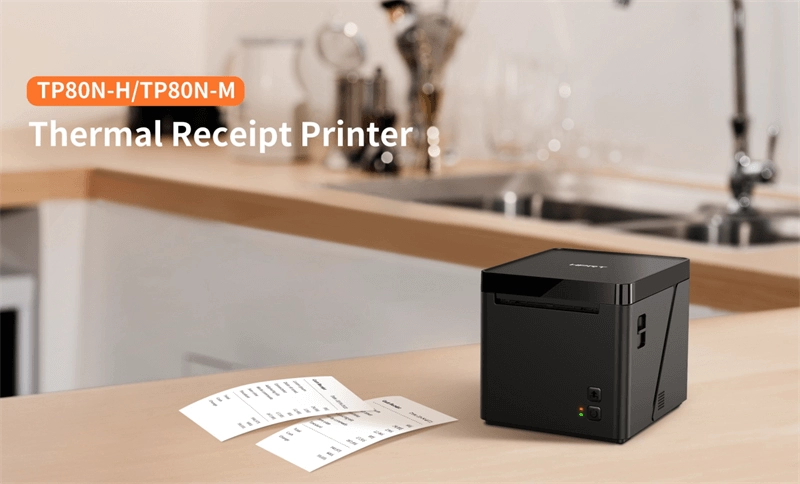
Receipt printers are specialized printers designed to print sales receipts, tickets, or order confirmations quickly and clearly. These devices are commonly found at retail checkouts, restaurants, and any point-of-sale (POS) environment. They typically use thermal receipt paper rolls, producing crisp text and simple graphics like logos or QR codes. Their main goal? Fast, reliable printing for short-term documents intended to be handled and often discarded.
Label Printers Defined
Label printers, on the other hand, create adhesive labels used for product identification, shipping, inventory, or compliance. These devices print on various materials like paper, plastic, or synthetic films and often employ either direct thermal or thermal transfer printing technologies. Label printers focus on durability—printing barcodes, serial numbers, or shipping info meant to last throughout handling, storage, and transit.
Quick Visual Aid: Comparing Receipt vs Label Printers
| Feature | Receipt Printer | Label Printer |
|---|---|---|
| Primary Use | Printing sales receipts | Printing adhesive labels |
| Media Type | Thermal receipt paper rolls | Label stock (paper, synthetic) |
| Durability Needed | Short-term, disposable | Long-term, resistant to wear |
| Print Content | Text, logos, simple graphics | Barcodes, serial numbers, product info |
| Common Settings | Retail stores, restaurants | Warehouses, shipping, healthcare |
Understanding these core differences will help you figure out which printer suits your needs and where to invest—for performance, durability, and cost-effectiveness. Let’s dive deeper into the specifications next to see these printers side by side.
Head-to-Head Comparison: Key Specs and Performance
Here’s a quick side-by-side look at receipt printers vs. label printers on the key specs and performance points that matter most:
| Feature | Receipt Printers | Label Printers |
|---|---|---|
| Printing Technology | Mostly direct thermal printing | Direct thermal or thermal transfer |
| Media Types | Thermal paper rolls (receipts) | Thermal or coated label materials |
| Build Quality | Generally lightweight, designed for POS counters | More rugged, built for industrial or shipping use |
| Speed | High speed (up to 300mm/s typical) | Moderate speed, varies by label size |
| Durability of Prints | Short-term, receipts fade over time | Long-lasting barcode and shipping labels |
| Connectivity | USB, Ethernet, Bluetooth, Wi-Fi | USB, Ethernet, Wi-Fi, sometimes serial ports |
| Integration | Easy with POS systems and cash registers | Designed for inventory management and shipping software |
| Size & Portability | Compact, even portable wireless models | Bulkier for desktop or industrial use |
| Power Options | Mostly powered by AC adapters, some offer battery-powered versions | Mostly AC powered, few with portable options |
What This Means For You
- Receipt printers excel in speed and smooth POS integration, making them perfect for quick checkouts.
- Label printers focus on durable, high-quality output for barcodes and shipping labels, built to last through handling and scanning.
If you want a full breakdown of matching your printer to your business needs, check out our guide on retail POS vs. restaurant POS systems, which dives into hardware compatibility and integration.
Cost Breakdown: Initial Investment vs. Long-Term Savings
When comparing receipt printers and label printers, the initial investment can vary widely depending on the brand, features, and printing technology. Typically, basic thermal receipt printers are more affordable upfront, often costing less than label printers, especially those built for industrial use. Label printers, particularly ones with direct thermal and thermal transfer capabilities, usually come with a higher sticker price due to their versatile media compatibility and durability.
However, the ongoing costs matter just as much. Receipt printers rely on thermal paper rolls, which are relatively low-cost but need frequent replacement. Label printers, on the other hand, use a variety of media such as vinyl labels, tags, or durable barcode label sheets, which can be pricier but may last longer depending on the application. Also, thermal transfer label printers require ink ribbons that add to ongoing expenses.
Maintenance costs differ as well. Receipt printers generally have fewer moving parts and experience less wear, leading to lower servicing fees. Label printers, especially industrial label applicators, may need more frequent maintenance due to the complexity of handling thicker media and ribbons.
Looking at total ownership costs, businesses should weigh the upfront price against supplies and maintenance over time. For high-volume shipping labels or durable barcode printing, investing in a robust label printer could offer better value. Conversely, retail environments focused on quick thermal receipt printing might benefit from a lower-cost, low-maintenance receipt printer.
For a deeper dive on integrating printers with your point of sale system and balancing hardware investments, exploring the POS hardware comparison can offer practical insights into long-term savings and efficiency.
Real-World Applications: Which Printer Fits Your Industry?

Choosing between a receipt printer and a label printer largely depends on the industry and the specific tasks at hand.
Retail and POS Checkouts
Thermal receipt printers are a staple here, perfect for fast, reliable printing of receipts, order slips, and transaction records. They’re tightly integrated with POS systems and cash register accessories, helping speed up checkouts in busy stores. For businesses looking to upgrade or stabilize, exploring options in POS for high traffic stores can be a game changer.
Warehousing and Logistics
Label printers dominate in warehousing environments due to their ability to print durable barcode labels, shipping tags, and inventory markers that withstand handling and environmental conditions. Industrial label applicators paired with robust label printer durability ensure accuracy and longevity of shipping and storage labels.
Hospitality and Food Service
Receipt printers are common here, often wireless thermal printers that handle order tickets and customer receipts. Customization options allow for branding and order details right on the ticket. Label printers can also be used for food packaging and shelf labeling to meet health and safety standards.
Healthcare and Compliance
Label printers are essential for durable barcode printing on patient wristbands, medication labels, and specimen tracking, helping maintain strict compliance requirements. Their ability to handle a variety of media types is crucial for accuracy and safety in clinical settings.
Case Study Teaser
Many businesses combine both printers to cover their needs. For example, a grocery store might use thermal receipt printers at checkout and barcode label makers in the backroom for inventory—a blend maximizing operational efficiency.
Customization Note
Both printer types offer customization in label or receipt sizes, print quality, and connectivity options, allowing businesses to tailor solutions to their workflows.
If you’re unsure which to choose, consider your top priorities: speed and integration for retail checkouts, durability and barcode compatibility for logistics, or compliance-grade printing for healthcare. Our POS hardware experts can help evaluate your needs and recommend the right setup.
Pros, Cons, and Common Pitfalls to Avoid

Receipt Printer Pros and Cons
Pros:
- Fast printing speeds designed for quick checkout lines.
- Compact size fits easily at POS counters.
- Uses affordable thermal paper rolls, lowering ongoing costs.
- Great for printing receipts, transaction records, and simple barcodes.
- Seamless POS system integration, making it ideal for retail and hospitality.
Cons:
- Prints mainly on thermal paper, which can fade over time.
- Limited media versatility—mostly just narrow-width receipts.
- Not suitable for durable or heavy-duty labeling needs.
- Less effective if you need detailed labels with graphics or long-lasting prints.
Label Printer Pros and Cons
Pros:
- Prints on a variety of media, including durable, weather-resistant labels.
- Supports barcode label maker functions ideal for shipping, inventory, and compliance.
- Offers direct thermal and thermal transfer options for flexible durability.
- Better suited for warehousing, healthcare, and logistics with long-lasting prints.
- Can handle different sizes and types of labels, from small price tags to large shipping labels.
Cons:
- Usually bulkier and less portable compared to receipt printers.
- Higher upfront cost with more expensive consumables like label rolls or ribbons.
- Slower speeds depending on print quality and media type.
- Requires more setup and maintenance compared to simple receipt printers.
Common Pitfalls to Avoid
- Choosing the wrong media type: Selecting a receipt printer when durable labels are needed results in faded or illegible prints.
- Ignoring connectivity needs: Make sure your printer matches your POS system or scanner to avoid integration headaches.
- Overlooking total cost: Don’t focus just on the upfront price—consider long-term supplies, maintenance, and downtime.
- Forgetting printer speed: In busy environments, a slow printer can bottleneck checkout or shipping.
- Neglecting durability requirements: Receipt printers aren’t made for harsh environments; label printers typically offer more rugged builds.
Avoiding these mistakes ensures you pick a printer that fits your operation, cutting downtime and improving efficiency. For tips on boosting your business’s POS setup, check out how cash registers improve business efficiency.
Choosing the Right Option: Step-by-Step Decision Framework
Picking between a receipt printer and a label printer starts with a clear look at what you actually need. Here’s a simple framework to help you make the right choice:
1. Audit Your Printing Needs
- What kind of printing do you rely on most? Receipts for transactions, or labels for shipping and inventory?
- Consider the volume—how many prints per day?
- Think about the media type: thermal paper rolls for receipts or durable label stock for barcodes and shipping.
2. Balance Budget and Scalability
- Don’t just look at the upfront cost—factor in ongoing supplies like thermal paper or labels and maintenance needs.
- Plan for growth. Will your print volume increase? Does the printer scale with your business?
3. Test Drive Before Buying
- Whenever possible, run a test print on the actual hardware. Check print speed, clarity, and ease of use.
- Confirm compatibility with your existing POS system or warehouse software to avoid integration headaches.
4. Explore Alternatives and Features
- Some POS hardware offers wireless receipt printers or industrial label applicators that might suit your setup better.
- Look for features like barcode scanner compatibility or multi-function devices if you want to consolidate your workspace.
5. Make the Call to Action
- Once you narrow down your options, reach out to suppliers who specialize in your industry’s POS hardware needs.
- For expert guidance and reliable products, check out our recommended best POS hardware suppliers in North America.
- Remember, the right printer saves you time and money, so invest wisely.
By following these steps, you’ll confidently choose a printer that fits your business perfectly—whether it’s for speedy receipt printing or durable barcode label making.


