







Touch POS vs Keypad POS Comparison for Speed Durability and Cost

Understanding the Basics: What Are Touch POS and Keypad POS Systems?
When choosing a point-of-sale (POS) system, it’s important to know the difference between Touch POS and Keypad POS systems. Both help businesses process sales, but they work very differently.
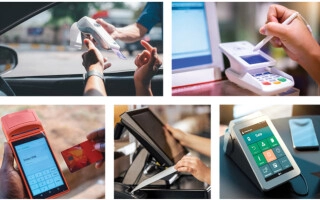
Touch POS systems use sleek, screen-based interfaces that feel similar to using a smartphone or tablet. You tap, swipe, and select icons directly on a touchscreen. These systems are designed to be intuitive, visually engaging, and easy to update with new software features.
On the other hand, Keypad POS systems feature traditional physical buttons and numeric pads with tactile feedback you can feel with each press. They rely on mechanical keys for number entry and function selection, making them familiar and straightforward, especially for cash-heavy transactions.
A quick look back:
- Keypad POS systems have their roots in the 1980s, evolving from classic cash registers used at retail counters.
- Touch POS systems emerged around the 2010s, as touchscreen technology became more affordable and widespread, quickly gaining popularity for their modern appeal and flexibility.
Understanding these basics will help you decide which style suits your business needs better.
Head-to-Head Comparison: Breaking Down the Critical Factors
Here’s how Touch POS and Keypad POS stack up in the most important areas:
| Factor | Touch POS | Keypad POS |
|---|---|---|
| Speed & Transaction Efficiency | Faster with icons and gestures, great for quick selections and multi-tasking | Quicker for heavy numeric entry like price checks or cash amounts |
| Durability & Build Quality | Glass screens can crack but easy to clean; less resistant to scratches | Mechanical keys endure rough use and resist grime better |
| Cost (Upfront & Ongoing) | Typically higher upfront cost but lower software update expense; use ROI calculator over 3 years | Lower initial cost but potential ongoing key replacements and maintenance |
| Learning Curve & Training | Intuitive interfaces favored by younger staff, shorter training time | Familiar layout for veteran employees, minimal adjustment needed |
| Industries & Use Case Fit | Ideal for customer-facing spots like retail and cafes | Better suited for rugged environments and back-of-house operations |
| Maintenance & Upkeep | Easy to wipe clean, supports cloud updates for quick fixes | Requires physical key replacements and occasional hardware servicing |
| Mistouch & Error Risks | Possible gesture errors or accidental taps | Fewer mistouches due to tactile feedback, but risk of key jamming |
| User Experience & Customer Perception | Modern, sleek, and engaging – enhances brand image | Practical and reliable – builds trust through familiarity |
Getting the right POS depends on your business flow and staff’s comfort level. For a customer-facing setup, a Touchscreen POS system often offers a faster, more engaging experience. Meanwhile, traditional keypad cash registers excel in durability and work well in demanding environments.
If you want a detailed analysis for your business, consider our ROI tools and explore options tailored to your needs. You’ll also find tips on troubleshooting and upgrading on our payment processing solutions for small businesses.
Pros and Cons Table

Here’s a quick factor-by-factor comparison of Touch POS vs Keypad POS systems, highlighting their main pros and cons to help you decide what fits your business best.
| Factor | Touch POS | Keypad POS |
|---|---|---|
| Speed | Faster with icons and gestures, great for quick service | Faster for numeric-heavy tasks and simple input |
| Durability | Glass screens can be fragile; needs careful handling | Mechanical keys are tough and resist grime well |
| Cost | Higher upfront costs but lower long-term updates | Lower initial price; ongoing maintenance can add up |
| Learning Curve | User-friendly for younger staff; intuitive interface | Familiar to veteran employees; minimal training |
| Industry Fit | Ideal for customer-facing retail and hospitality | Best for rugged environments and back-office work |
| Maintenance | Easy to clean; remote updates via cloud | Requires physical key replacements and regular cleaning |
| Mistouch Risk | Possible gesture errors; can slow down transactions | Tactile feedback reduces input mistakes |
| User Experience (UX) | Modern, sleek, engaging design | Functional and reliable, less flashy |
This helps you weigh the trade-offs clearly—choose Touch POS for sleek interfaces and fast, engaging customer service, or Keypad POS for rugged, reliable, and straightforward operations.
For a deeper dive on choosing the right POS system for your specific business needs, check out our guide on cash register systems for food and beverage businesses.
Making the Right Choice: Factors to Consider for Your Business

Choosing between a Touch POS and a Keypad POS comes down to your specific business needs. Here’s a quick assessment to guide you:
- Type of Transactions: Do you handle mostly quick, icon-driven sales or number-heavy inputs? Touch POS works great for fast, visual selections, while Keypad POS often shines when precise numeric entry is key.
- Staff Comfort & Training: Are your employees tech-savvy or more comfortable with traditional buttons? Touch POS systems tend to have a gentler learning curve for younger staff, whereas keypad setups might suit a veteran team.
- Environment Durability: Do you need a rugged device for a back-of-house or industrial environment? Keypad POS systems usually last longer under rough conditions, but Touch POS offers easier cleaning and cloud updates.
- Budget and ROI: Consider upfront costs and long-term maintenance. Touch POS might seem pricier but can offer better ROI through faster transactions and remote management.
If you’re torn, hybrid POS terminals that mix touchscreen interfaces with physical keys can offer you the best of both worlds—speed plus tactile reliability.
Looking ahead, future-proofing your POS means thinking about AI-powered features, advanced analytics, and mobile syncing capabilities to keep your business competitive.
Take a moment to audit your current POS setup. Are you maximizing speed and efficiency? Are your devices meeting your industry’s demands? This review is your first step toward upgrading or optimizing your system.
For more detailed help on selecting hardware tailored to seasonal shifts or business cycles, check out our guide on how to choose POS hardware for seasonal businesses.
Why SDLPOS: Your Partner in POS Hardware Excellence
When it comes to reliable and durable POS hardware, SDLPOS stands out as a trusted partner for businesses across the U.S. Our solutions are built tough to handle daily use in busy retail and hospitality environments, with scalable options that grow as your business does. Whether you need sleek touchscreen POS systems or rugged keypad cash registers, SDLPOS offers custom integrations tailored to your unique workflow and budget—helping you get the most value out of your investment.
Our competitive pricing ensures you don’t have to sacrifice quality for cost, and many satisfied clients have shared how SDLPOS hardware has improved their transaction speed and overall customer experience. Ready to upgrade or streamline your POS setup? Contact us today to request a quote and discover seamless support from a supplier who truly understands your needs.
For more insight on selecting the right provider, check out our detailed guide on how to select the best cash register supplier.


