







Difference Between Traditional Cash Register and POS System in 2025

What Is a Traditional Cash Register A Quick History and Core Functionality
If you’ve ever run a small stall or shopped at a local kiosk, you’ve probably seen a traditional cash register in action. These old-school machines have been the backbone of retail checkouts for well over a century.
Origins and Evolution
The traditional cash register dates back to 1879, when inventor James Ritty created it to stop employee theft in his saloon. Since then, it evolved from a simple mechanical device to modern electronic variants. Still, the core goal remains the same: to securely hold cash and record sales manually.
Key Features of Traditional Cash Registers
Traditional cash registers focus on basic, essential functions including:
- A cash drawer to store money securely
- Manual price entry by the cashier with no barcode or scanning
- Simple tax calculation based on preset rates
- Printing basic receipts for every sale
These features are straightforward, making the register easy to use but limited in what it can do beyond the checkout.
Ideal Use Cases for Traditional Cash Registers
Traditional registers work best in low-volume retail environments. Think:
- Flea markets
- Small independent kiosks
- Single-location businesses with predictable sales patterns
If you only need to ring up simple transactions and don’t require complex data tracking, these machines get the job done with minimal fuss.
Limitations to Keep in Mind
While traditional cash registers are reliable for basic sales, they don’t offer real-time sales data, inventory tracking, or any kind of software integration. That means you’re missing out on insights that help grow your business and streamline operations.
This limitation brings us to why modern POS systems are rapidly replacing traditional registers — a topic we’ll explore next.
What Is a POS System The Modern Backbone of Retail Operations
A POS system (Point of Sale system) goes far beyond a simple cash register. It combines hardware like touchscreen monitors, barcode scanners, and payment terminals with software that runs sales, tracks inventory, and analyzes business data—all designed to manage every part of the checkout process and back-office operations in one place.
Evolution of POS Systems
Starting as on-premises setups installed directly on store computers, POS systems have evolved into cloud-based and hybrid models as of 2025. This shift means businesses can access real-time data from anywhere, enabling smoother operations whether at a storefront, online, or both.
Core Components of Modern POS Systems
Modern POS systems integrate essential features to keep retail running smoothly:
- Barcode scanning for fast and accurate product entry
- Support for multiple payment methods, including EMV chip cards, NFC/contactless payments, and mobile wallets
- Cloud syncing of inventory to provide real-time stock updates across locations
- Software tools for sales analytics, customer management, and loyalty programs
Why POS Systems Matter to US Businesses Today
For small and medium businesses in the US, POS systems are crucial to keeping up with modern retail expectations. As omnichannel retail grows—combining online and offline sales—POS systems tie all parts together seamlessly. This integration helps stores:
- Improve customer experience with faster and personalized checkouts
- Gain insights through detailed sales reports for smarter decision-making
- Simplify tax season reporting thanks to automated sales tracking
Basically, if your business sells across different platforms or plans to grow, a POS system isn’t just helpful—it’s essential for staying competitive.
Key Differences Between Traditional Cash Registers and Modern POS Systems
When comparing a traditional cash register to a modern POS system, several important differences come into play, especially for U.S. small businesses looking for efficient retail payment processing and inventory tracking. Here’s a clear side-by-side breakdown of the main areas where these systems diverge:
Functionality
- Cash Register: Relies on manual price entry with basic math for tax. This leaves room for human errors and slows checkout times.
- POS System: Uses automated barcode scanning and built-in error-proofing features, making transactions faster and more accurate—perfect for busy stores or restaurants.
Inventory Management
- Cash Register: Inventory counts happen manually, often at day’s end or weekly. This can lead to stockouts or overordering.
- POS System: Tracks inventory in real time, sending low-stock alerts and syncing instantly across locations. This keeps shelves stocked and reduces waste.
Reporting and Analytics
- Cash Register: Provides only simple daily sales totals on receipts or reports, without much insight.
- POS System: Offers customizable dashboards that show sales trends, customer preferences, and help with forecasting—crucial for smart decision-making.
Payment Processing
- Cash Register: Mostly handles cash and check payments, with limited electronic options.
- POS System: Supports a range of payment methods including EMV chips, NFC/contactless mobile wallets, and integrates loyalty programs smoothly.
Scalability
- Cash Register: Best for single-location use, with no easy way to share data or expand.
- POS System: Designed for growth, allowing multi-location cloud syncing and centralized management.
Customer Experience
- Cash Register: Checkouts are static, offering no customer personalization or quick access to purchase history.
- POS System: Creates personalized profiles, speeds up checkout lines, and remembers customer preferences for better service.
Maintenance and Security
- Cash Register: Repairs can be costly and require manual intervention; often lacks security features.
- POS System: Benefits from automatic software updates and built-in fraud detection, protecting both your business and customers.
while traditional cash registers may work for very small, simple setups, modern cloud-based POS systems are far better suited to handle the demands of today’s omnichannel retail environment, offering efficiency, insights, and payment flexibility that support business growth.
Pros and Cons Comparing Traditional Cash Registers and POS Systems
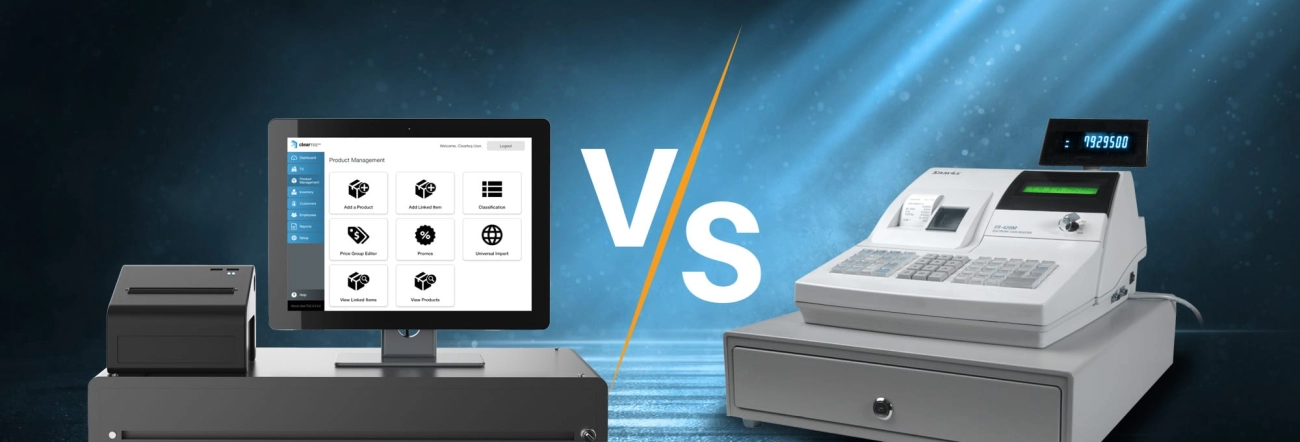
When deciding between a traditional cash register and a POS system, it’s important to weigh the real-world trade-offs based on your business needs, budget, and growth plans.
Cash Register Pros and Cons
Pros
- Low upfront cost: Typically between $100 and $500, making it affordable for small businesses just starting out.
- Simplicity: Very easy to use with no complicated software or training needed.
- No ongoing subscriptions: You own the hardware outright with no monthly fees.
Cons
- Prone to errors: Manual price entry and limited functionality increase the chance of mistakes during checkout.
- No growth tools: Lacks inventory tracking, sales reporting, and integrations needed for scaling your business.
- Basic for tax needs: Limited tax calculation features may complicate tax season reporting for US businesses.
POS System Pros and Cons
Pros
- Efficiency gains: Checkouts can be 20–30% faster thanks to barcode scanning and automated processes.
- Data insights: Access to detailed sales reports and customer behavior analytics can boost revenue by 15–25%.
- Better tax season support: Cloud-based reporting simplifies filing, a big plus for US small business owners.
- Multi-payment options: Accepts EMV cards, contactless payments, and integrates loyalty programs easily.
Cons
- Higher initial cost: A full system runs between $800 and $2,000 upfront, plus monthly software fees from $30 to $300.
- Learning curve: Requires some setup and staff training, especially for businesses new to digital tools.
Local Angle US Small Business Habits
In the US, many small retailers and hospitality businesses rely on simple cash registers for tax ease and familiarity. But as tax laws tighten and sales tracking becomes critical, POS systems offer time-saving tools for reporting and compliance. For shops handling multiple payment types and looking to grow, POS systems provide much-needed flexibility.
Quick Decision Quiz Which System Makes Sense
- If you sell fewer than 50 items a day and operate mainly in one location, a traditional cash register might do the job.
- If you sell more than 50 items daily, have multiple locations, or want better inventory and sales management, a POS system is the way to go.
Choosing the right setup means balancing upfront costs with long-term efficiency and growth potential. For many US small businesses, investing in a POS system pays off faster than expected.
Cost Breakdown Traditional Cash Register vs POS System in 2025
When deciding between a traditional cash register and a POS system, understanding the cost structure is key. Here’s a clear look at what you can expect in 2025:
Upfront Costs vs Ongoing Fees
- Traditional Cash Registers usually come with a one-time purchase price. You pay once for the hardware, and that’s it—no monthly software fees.
- POS Systems combine hardware and software, so you’ll pay for hardware upfront plus a monthly Software as a Service (SaaS) subscription. These fees usually range from $30 to $300 per month depending on features and users.
- Despite the ongoing cost, POS systems typically deliver a faster return on investment (ROI) by improving checkout efficiency and cutting down on errors.
Hidden Costs of Manual Tasks
One overlooked cost when using cash registers is lost time and productivity:
- In a small shop with about 5 employees, the time spent on manual price entry, inventory counts, and basic reporting can cost around $5,000 annually.
- This hidden expense adds up, costing more than what many consider upfront hardware savings.
- POS systems automate these tasks, freeing up staff to focus on customers and growth.
SDLPOS Spotlight on Affordable Bundles
If you’re worried about spotty gains or budgets, here’s some good news:
- SDLPOS offers affordable POS bundles starting at $499.
- These packages include hardware, software, and free data migration support, making it easier to switch from a traditional register.
- This makes upgrading accessible for small businesses aiming to grow without massive upfront costs.
Interactive Tool to Estimate Your Costs
Unsure what fits your business best? Use the SDLPOS interactive cost calculator to:
- Compare traditional register costs versus POS options.
- See how your business volume impacts the total price over time.
- Find the best plan based on your unique needs and budget.
Consider checking out the SDLPOS cash register systems for small business to explore options designed specifically for US retailers like you.
This breakdown helps clarify why many US small businesses are shifting to POS systems despite higher upfront and ongoing fees—they deliver better efficiency, more accurate sales tracking, and ultimately higher profits.
How to Choose Is a POS System Right for Your Retail or Hospitality Business
Choosing between a traditional cash register and a modern POS system depends a lot on your business size, growth plans, and daily operations. Here’s a quick way to see if a POS upgrade fits your needs, especially for US retailers and hospitality businesses.
Business Size Check
- Micro businesses with 1 or 2 cash registers, like a small kiosk or a neighborhood café, might still manage with a traditional register. However, if you’re handling more than 50 transactions a day, it’s a strong sign your business needs a POS system.
- For growing businesses or multi-location stores that want smooth inventory tracking, omnichannel sales, and real-time reporting, a POS system is nearly essential. It easily scales to handle multiple storefronts or mobile sales with cloud-based syncing.
Migration Tips for Switching to a POS System
Moving from a cash register to a POS might sound daunting, but it doesn’t have to be. Follow these simple steps for a smooth transition:
- Data Export – Transfer your sales records and inventory lists safely from old systems.
- Staff Training – Train your team on the new system with easy-to-understand tutorials, usually within one week.
- Setup Support – Use providers like SDLPOS that offer free migration help, making setup faster and stress-free.
- Test Runs – Run the system alongside your current setup for a few days to catch and fix issues early.
Case Study Success Story
Take the example of a local NYC café that switched to SDLPOS last year. They reported a 35% increase in sales within six months thanks to faster checkouts, accurate inventory management, and the ability to run loyalty programs. This shows how powerful the right POS solution can be for small to mid-sized retail and hospitality businesses in the US.
Bottom Line: If daily sales are growing, or you want more control over inventory, payments, and customer experience, a POS system is your best bet. SDLPOS offers affordable bundles that fit US small business budgets and come with key features like cloud-based analytics and multi-payment options to keep you competitive in 2025 and beyond.


