







Electronic Cash Register vs Mechanical Cash Register Key Features Compared

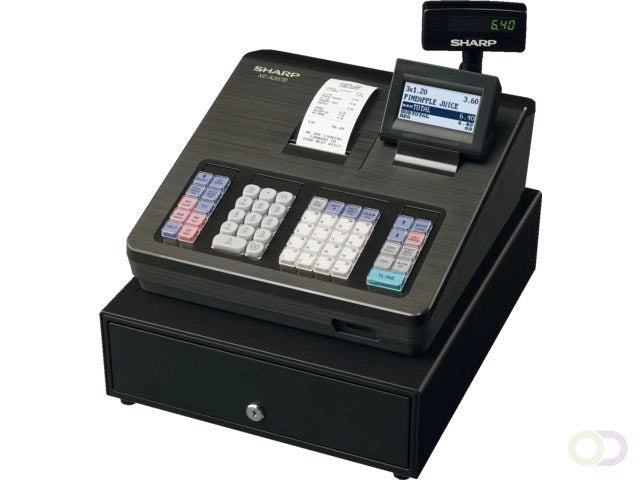
If you run a small shop or café, you’ve probably wondered: Electronic cash register vs mechanical cash register—which one actually works better in today’s fast-paced retail world? Maybe you’re still wrestling with that old mechanical till, frustrated by slow transactions and human errors that cost time and money. Or perhaps you’re considering an electronic model as a stepping stone—but is it really worth it?
In this post, we cut through the noise to compare these two classic systems head-to-head. You’ll get clear insights on their key differences, pros and cons, and practical advice to help you figure out if it’s time to upgrade—or better yet, leap ahead with a modern SDLPOS solution that transforms your checkout experience completely.
Ready to stop fumbling and start selling smarter? Let’s jump in.
Electronic Cash Register vs Mechanical Cash Register A Quick History From Mechanical Bells to Digital Beeps
The story of cash registers is a fascinating journey from simple mechanical devices to sophisticated electronic systems. Mechanical cash registers have their roots in the late 19th century when James Ritty, a saloon owner, invented the first cash register in 1879. His motivation was to combat employee theft and keep a reliable record of sales. The original mechanical cash till used a system of gears, levers, and bells that rung every time a sale was recorded. This innovative device revolutionized retail by offering tangible proof of transactions through its printed receipts and audible signals.
The basic mechanics consisted of manually operated keys or levers that added up sales amounts and stored cash securely inside the till. Due to their simplicity, mechanical cash registers dominated retail environments for decades. They were durable, required no electricity, and served both as a loss prevention tool and a basic sales monitor. For over half a century, these traditional cash tills shaped retail checkout operations and even influenced customer trust.
However, by the mid-20th century, limitations began to surface. Mechanical cash registers were slow, offered minimal reporting capabilities, and became increasingly impractical as businesses grew more complex. This paved the way for a significant shift in the 1970s with the rise of electronic cash registers (ECRs).
The transition marked a new era of retail technology. Electronic registers introduced keypads, digital displays, and automated transaction processes that drastically improved speed and accuracy. Unlike their mechanical predecessors, electronic tills supported multiple payment options, printed detailed receipts, and began integrating basic inventory tracking features. These advancements not only addressed the slow transaction speeds of manual registers but also helped reduce errors and shrink shrinkage through enhanced security features.
The mechanical limitations—such as manual totalization, lack of real-time data, and cumbersome maintenance—triggered the widespread adoption of electronic cash registers. For retailers, especially small businesses, this evolution meant better control over their sales process and the ability to scale operations efficiently.
For those curious about the origins and function of cash registers, what year was the cash register invented offers a deeper dive into this pivotal invention.
As we trace this evolution, it’s clear that both mechanical and electronic registers have shaped retail checkout methods in unique ways, setting the stage for modern POS systems that continue to transform how we do business today.
Electronic Cash Register vs Mechanical Cash Register Breakdown
When comparing electronic cash registers (ECR) vs mechanical cash registers, it’s clear these two systems serve different business needs, especially in the U.S. retail space where speed and accuracy are essential. Here’s a breakdown, feature by feature, to help you understand their impact on small businesses and scalability.
Transaction Speed and Accuracy
- Mechanical cash registers rely on manual entry and physical levers, which slows down checkout time. This can cause bottlenecks during busy hours, especially in stores with moderate to high sales volume.
- Electronic cash registers are faster thanks to keypad entry and digital displays, reducing human error and speeding up the checkout process—a big plus for local grocery stores, small retailers, and hospitality venues aiming to serve more customers efficiently.
Receipts and Reporting
- Mechanical tills print basic receipts, often lacking itemized details. No built-in reporting features mean business owners must manually track sales for bookkeeping.
- ECRs provide detailed receipts and offer basic to advanced reporting functions. Business owners can monitor daily sales, payment types, and even tax calculations, simplifying accounting and helping spot trends early on.
Payment Options
- Mechanical registers typically only handle cash transactions.
- Electronic cash registers support multiple payment options, including cash, credit/debit cards (with compatible terminals), and even digital wallets—matching the payment preferences of today’s customers.
Inventory Tracking
- Mechanical tills lack any form of inventory management.
- ECRs often come with basic inventory tracking, alerting owners when stock is low. For small businesses without a full POS system, this is a valuable tool to avoid stockouts and manage local supply more efficiently.
Security and Theft Prevention
- Mechanical cash registers offer limited security. Since transactions are manual, it’s easier for theft or errors to go unnoticed.
- Electronic registers have built-in security features, such as password protection and electronic audit trails, which discourage employee theft and improve accountability.
Maintenance and Durability
- Mechanical registers are simple machines with fewer electronics, so they require less frequent maintenance and work well without electricity—making them ideal for off-grid or temporary setups.
- Electronic registers require power and software updates, which can mean higher maintenance needs but also the benefit of ongoing improvements and support.
Implications for Small Business and Scalability
- For small, low-volume businesses or those in rural areas with limited connectivity, mechanical cash registers may still be a reasonable choice due to their low initial cost and independence from power sources.
- For growing businesses in urban or suburban U.S. markets, electronic registers provide scalability through faster checkouts, integrated payment systems, and sales analytics that help optimize operations and improve local customer service.
Local Usage Habits and Savings
- Many local businesses have moved to electronic cash registers to cut down on manual errors and time wasted per transaction—this translates into real savings on labor and lost sales.
- Mechanical cash registers remain popular in flea markets and small local shops where upfront cost and simplicity trump advanced features.
Table
| Feature | Mechanical Cash Register | Electronic Cash Register |
|---|---|---|
| Transaction Speed | Slow, manual operation | Fast, keypad entry |
| Accuracy | Prone to human error | High accuracy, error reduction |
| Receipts | Basic printouts | Detailed, itemized receipts |
| Reporting | None, manual tracking required | Built-in sales and tax reports |
| Payment Options | Cash only | Cash, cards, digital payments |
| Inventory Tracking | None | Basic inventory alerts |
| Security | Minimal theft prevention | User access control, audit trails |
| Maintenance | Low, no power needed | Requires power and regular updates |
By understanding these differences, U.S. retailers can better assess their current needs and how an electronic or mechanical cash register fits into their long-term plans.
Pros and Cons of Electronic Cash Register vs Mechanical Cash Register
When deciding between electronic cash registers (ECR) and mechanical cash registers, it’s important to look at real-world trade-offs. Both types have clear strengths and weaknesses, especially in everyday retail situations here in the U.S.
Mechanical Cash Register Advantages and Disadvantages
Advantages:
- Low Cost – Mechanical registers are generally cheaper upfront, making them appealing for very small or low-budget businesses.
- No Electricity Needed – Because they’re fully manual, they work perfectly in places without reliable power, like flea markets or rural shops.
- Simple to Use – No training needed—just punch in amounts and pull the lever.
Disadvantages:
- Slow Transactions – Manually entering every price and calculating totals can slow down checkout lines, especially during busy hours.
- Prone to Theft – Without digital tracking, it’s easier for cash to be mishandled or stolen.
- Limited Features – No receipt printing options, no inventory tracking, and no detailed sales reporting.
- No Error Reduction – All calculations done by hand increase chances for mistakes.
Electronic Cash Register Pros and Cons
Advantages:
- Faster Transactions – Keypads and digital displays speed up number entries and totals, reducing wait times.
- Improved Accuracy – Automated math reduces human error during sales.
- Basic Analytics and Reporting – You get daily sales reports, which help in managing finances and stock.
- Multiple Payment Options – Many ECRs accept cash, credit/debit cards, and even digital payments.
- Enhanced Security – Electronic registers can restrict access and log transactions, reducing theft risks.
Disadvantages:
- Higher Cost – Initial investment is higher than mechanical registers.
- Power Dependent – Requires electricity, so outages can stall operations unless there’s a backup plan.
- Training Needed – Staff have to learn how to operate digital screens and features, which can take time.
- Maintenance and Repairs – More parts can mean higher maintenance costs over time.
Quantifying the Losses and Benefits
- Small shops using mechanical registers might save on upfront costs but face losses from theft and slow service — which hurts customer experience.
- Electronic registers usually pay off with faster checkouts, fewer errors, and stock management, helping businesses scale and increase profits.
- In the U.S., where retail speed and payment options matter, many small to medium stores benefit from ECRs despite the higher cost.
If you prioritize low upfront cost and off-grid use, mechanical registers still have value. But for growing businesses, the efficiency, accuracy, and features of electronic cash registers make them the smarter choice in today’s retail environment.
When to Choose Electronic Cash Register vs Mechanical Cash Register Practical Scenarios for Modern Retail
Choosing between an electronic cash register vs mechanical cash register comes down to your business type, location, and budget. Each type shines in different settings and knowing when to use which can save money and boost efficiency.
Ideal Use Cases for Mechanical Cash Registers
Mechanical cash registers are surprisingly resilient and useful today, especially in:
Flea Markets and Outdoor Vendors
These setups often lack reliable electricity, so mechanical registers are great because they don’t need power to work. They are simple, durable, and easy to maintain on the go.
Off-Grid or Remote Locations
For small businesses in rural areas or temporary stands off the grid, mechanical tills keep sales flowing without worrying about power outages or battery life.
Budget-Conscious Local Shops
If your business prioritizes low upfront costs and minimal tech investment, mechanical models fit well. They have basic theft deterrence with locked drawers and need almost no training to operate.
However, keep in mind mechanical registers are relatively slow, prone to human error, and lack modern inventory or sales reporting.
When Electronic Cash Registers Make More Sense
For growing retailers and hospitality spots — like cafes, small boutiques, or convenience stores — electronic cash registers offer clear benefits:
Moderate to High Volume Sales
Faster transaction speed helps serve more customers during busy hours, improving overall throughput.
Basic Reporting and Inventory Tracking
Electronic tills provide sales summaries and sometimes track stock, which is essential for managing growing inventory and preparing for busy seasons.
Multiple Payment Options
Many electronic registers accept digital payments alongside cash, catering to modern shoppers who expect flexibility.
Improved Accuracy and Theft Prevention
Automated calculations reduce errors and built-in security features help protect against employee theft better than mechanical tills.
Decision Framework with Quiz Style Tips
Answer these quick questions to decide what suits your business best:
Do you operate in a place without reliable electricity?
Yes: Go with a mechanical cash register for simplicity and durability.
No: Consider electronic for efficiency.Is your business growing or do you expect more transactions soon?
Yes: Electronic cash registers provide speed and reporting tools.
No: Mechanical may be enough.Do you need to accept multiple payment methods?
Yes: Electronic registers support credit/debit and mobile pay options.
No: Mechanical might work.Are you managing inventory and sales data on a budget?
Yes: Electronic registers with basic analytics help track your business better.
No: Manual entry with mechanical registers may suffice.
Understanding Local Budget Conscious Behaviors
Many small businesses in the U.S., especially in rural or lower-income areas, lean toward mechanical cash registers because they are:
- Affordable upfront with no tech headaches
- Reliable without internet or power requirements
- Simple for new employees to pick up quickly
However, those moving towards scaling up often find that investing in an electronic till pays off long-term through faster checkout, better record keeping, and adaptability.
For detailed help on how to choose the right register for your business, you can explore resources on How to Choose a Cash Register for a Small Business.
Knowing when to switch or stick with mechanical vs electronic cash registers depends heavily on your current business size, location, and customer expectations. The goal is to strike the right balance between cost, efficiency, and technology to serve your customers smoothly while keeping overhead low.
Beyond the Basics Why Upgrade to SDLPOS POS Systems
Upgrading from traditional electronic cash registers (ECR) to SDLPOS POS systems brings significant benefits to retailers ready to move beyond basic checkout functions. While electronic cash registers improved transaction speed and accuracy, many still fall short in addressing growing business demands like inventory management, multi-payment options, and data analytics. SDLPOS solves these common electronic limitations by integrating modern features tailored for today’s competitive retail environment.
Modern Features That Outperform Traditional Electronic Cash Registers
Cloud Inventory Tracking
Unlike classic electronic tills that only record sales locally, SDLPOS connects your business to cloud-based inventory tracking. This means you can monitor stock levels in real time, receive restock alerts, and manage multiple locations without confusing manual counts or spreadsheets.
Multipayment Flexibility
SDLPOS supports all payment types including credit cards, mobile wallets, and digital payments—far beyond the limited payment options in traditional ECRs. This simplifies checkout for customers and reduces the chance of lost sales due to inconvenient or outdated payment methods.
Advanced Sales Analytics
Basic electronic registers offer limited reporting, but SDLPOS provides detailed sales data, customer insights, and performance trends. These analytics help business owners make informed decisions about inventory, promotions, and staffing, saving money and boosting profits.
Faster Checkouts and Theft Prevention
The system speeds up sales with intuitive touchscreen interfaces and barcode scanning, reducing lines and errors. Integrated security measures, like employee access controls and digital audit trails, greatly lower theft risks—an issue more common with older mechanical and electronic cash registers.
Real Results from Local Retailers
Take a small grocery store in Ohio that switched from a mechanical cash register to SDLPOS. They saw a 25% increase in checkout speed, allowing them to serve more customers during busy hours. Inventory mistakes dropped dramatically, freeing up staff to focus on customer service rather than stock counts. Additionally, the store started accepting Apple Pay and Google Wallet, attracting younger customers who prefer digital payments.
This real-world case shows how an SDLPOS upgrade not only improves daily operations but also drives sales growth. For local businesses mindful of budget and efficiency, moving beyond basic electronic cash registers to a full-featured POS system like SDLPOS is a smart step.
In short, SDLPOS offers:
- Cloud inventory management for accurate stock control
- Multiple payment options to capture all sales
- Robust sales analytics for smarter business decisions
- Faster checkouts and better security than mechanical or basic electronic cash registers
If you’re ready to leave behind the old limits of electronic cash registers and improve your retail checkout experience, SDLPOS is a modern solution designed for today’s small to mid-size U.S. businesses.


