







What Is a Cash Register Complete Guide Features and Benefits

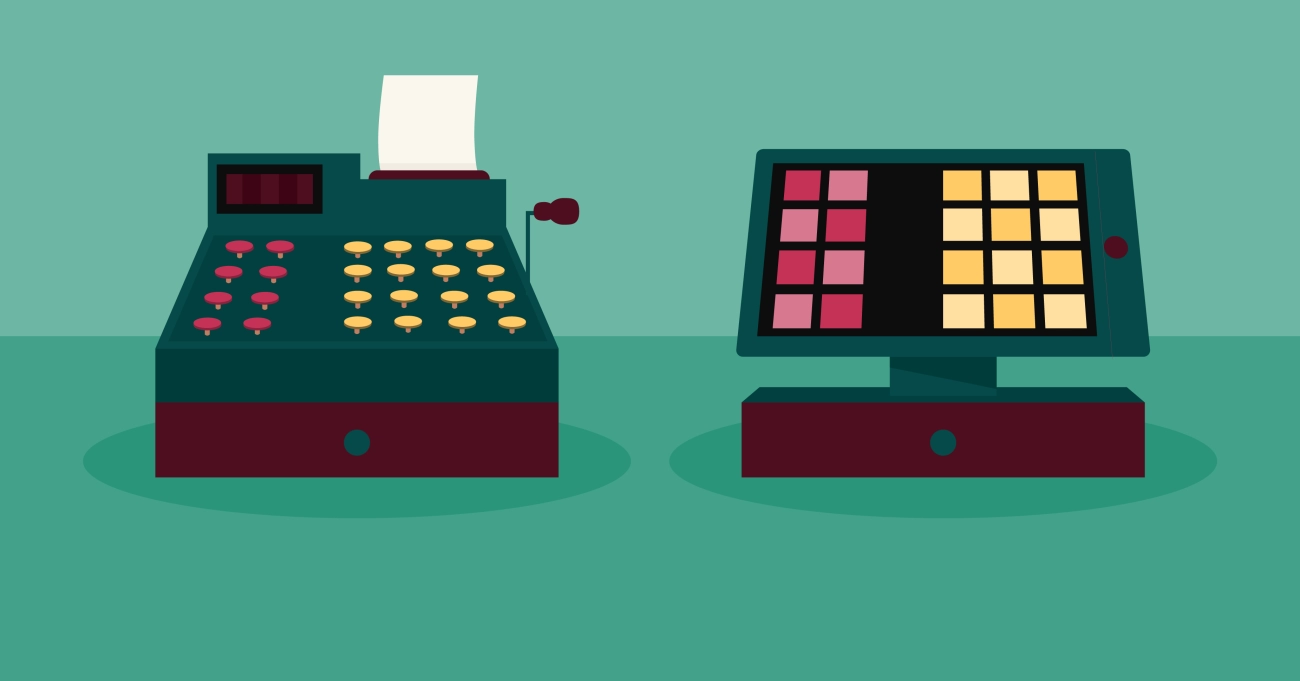
If you’ve ever wondered what a cash register is and why it’s still a cornerstone in retail, you’re in the right place. At its core, a cash register is the device that keeps your sales organized, calculates totals, prints receipts, and securely stores cash—all essential for smooth business operations. But today’s cash registers have come a long way, evolving from simple mechanical machines to high-tech systems that blend with modern point of sale solutions. Whether you’re starting a new shop or looking to upgrade, understanding the basics is the first step to running a smarter checkout. Let’s dive into what makes a cash register so essential—and why SDLPOS could be your next best retail partner.
The Definition and Core Purpose of a Cash Register What Exactly Is a Cash Register
A cash register is a fundamental device used at the checkout counter in retail businesses to record and process sales transactions. At its core, it serves as a transaction recording tool that helps businesses manage cash flow, calculate total sales, and provide customers with sales receipts.
Unlike everyday tools, a cash register is specifically designed to handle modern cash handling tasks efficiently. It includes features such as a cash drawer to securely store money, a sales receipt printer to provide proof of purchase, and sometimes basic inventory tracking capabilities to assist in stock management.
The primary purpose of a cash register is to streamline the payment process and keep accurate records for both the merchant and the customer. This helps prevent errors, supports accountability, and simplifies the reconciliation of daily sales. Whether mechanical or electronic, cash registers are vital to everyday retail operations, laying the foundation for more advanced point of sale systems widely used today.
By understanding what exactly a cash register is, business owners can better appreciate how this essential device supports smooth checkout experiences and helps maintain organized financial records. For businesses looking to upgrade or learn more about electronic cash register options, exploring solutions that combine sales and inventory data offers real advantages.
For an understanding of how cash registers have evolved to meet modern needs, visit The Evolution of Cash Register Technology.
How Does a Cash Register Differ from Everyday Tools
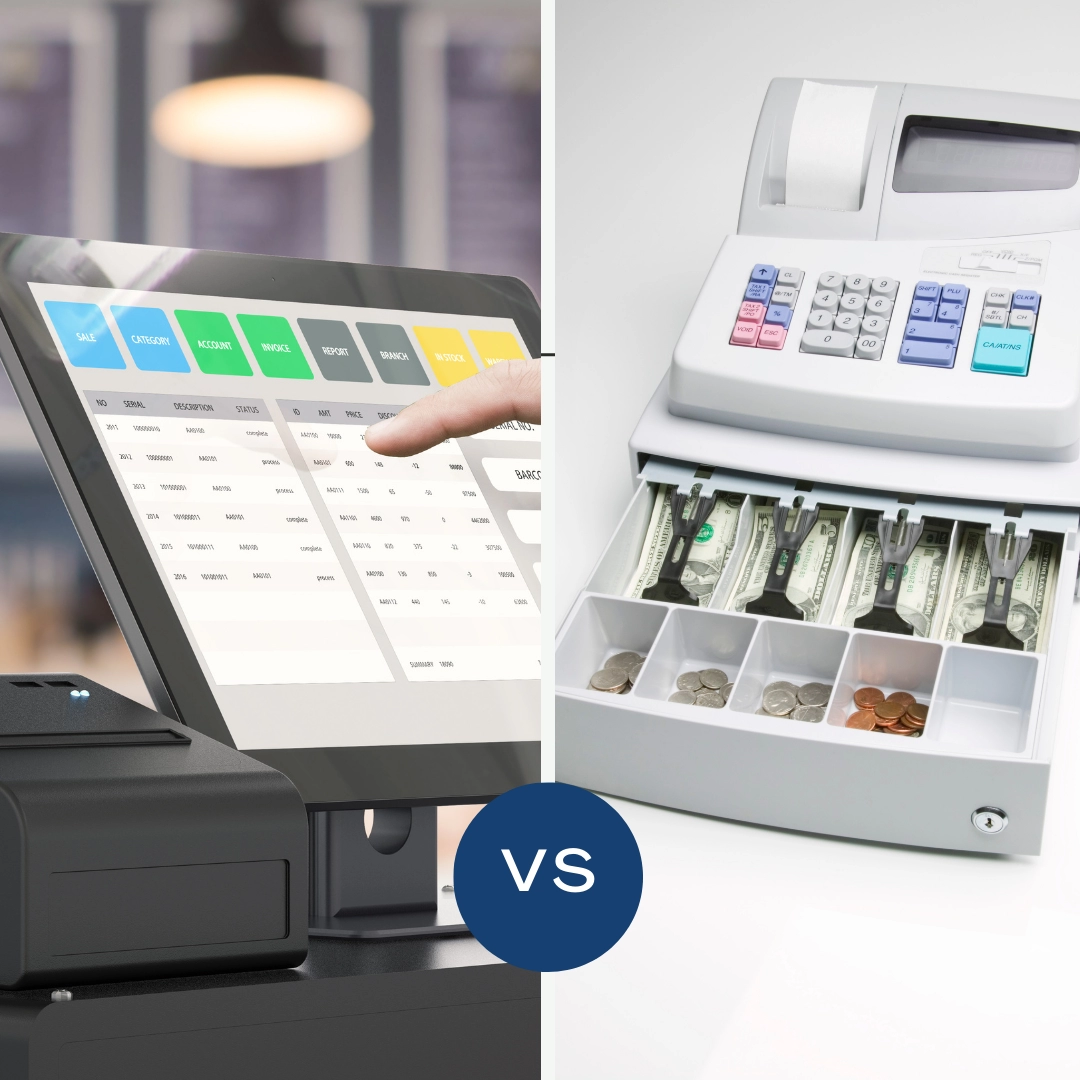
A cash register isn’t just another gadget—it’s a specialized tool built for handling money and sales efficiently at the checkout counter. Unlike everyday tools you might use at home or in the office, cash registers are designed to record transactions, manage a cash drawer, and print sales receipts with precision, all while helping merchants keep track of sales data.
Here’s how a cash register stands apart from regular tools:
Dedicated to Retail Transactions
Unlike a calculator or notebook, a cash register is built to handle multiple sales quickly, summing up prices and taxes automatically. It ensures every transaction is logged correctly, reducing mistakes.
Integrated Cash Management
Everyday tools don’t have cash drawers or tills. A cash register securely stores bills and coins, organizes change efficiently, and prevents theft with lockable compartments.
Sales Receipt Printing
A big difference is the ability to instantly print receipts. This transparency builds trust with customers, something a simple notebook or app can’t provide without extra equipment.
Inventory and Sales Data Tracking
Modern cash registers, especially electronic models, link sales information directly with inventory systems. This helps keep track of stock in real-time—a feature everyday devices lack.
User Interface Tailored for Speed and Accuracy
Cash registers come with a layout designed for fast input—be it mechanical keys or touchscreen interfaces. This workflow is optimized to handle rush hours in ways that general-purpose gadgets can’t match.
Simply put, a cash register is designed for modern cash handling in retail environments, making checkout smoother and more secure, unlike common everyday tools.
If you want to learn about the basics of using a cash register, check out our guide on Is Using Cash Register Hard to get a practical view.
A Brief History of Cash Registers and Their Evolution
The cash register, also known as a till machine or retail POS terminal, has come a long way since its invention. Understanding this evolution helps us appreciate how modern electronic cash registers and point of sale systems have transformed daily transactions.
Origins of the Cash Register
The first cash register was invented in the late 1800s by James Ritty, a saloon owner looking to stop employee theft and accurately record sales. This early mechanical machine featured a cash drawer and recorded transactions on paper, essentially the first step in modern transaction recording. It earned the nickname “the Ritty Model” and was purely mechanical, relying on manual inputs.
Mechanical to Electronic Transition
By the mid-1900s, cash registers evolved with advancements in technology. Mechanical models gave way to electronic cash registers, which introduced faster processing, built-in sales receipt printers, and better inventory tracking capabilities. These models helped retailers handle more transactions efficiently at the checkout counter.
The improved accuracy of electronic registers made them essential tools in retail, reducing errors and speeding up sales.
Modern Cash Registers and the Rise of POS Systems
Today, cash registers have largely integrated into broader point of sale systems that go beyond simple cash handling. Modern systems include inventory management, sales analytics, and customer relationship features. While traditional cash registers focus on cash and card transactions, POS terminals support multiple payment methods and provide detailed business insights.
Key Takeaway
From simple till machines to sophisticated retail POS terminals, cash registers have evolved to keep pace with the demands of modern commerce. This evolution reflects the push for speed, accuracy, and improved customer experience at every checkout counter.
Knowing this history helps local small businesses choose the right system — whether a straightforward cash register or a full POS solution — tailored for their unique needs.
How Cash Registers Work The Inner Workings of a Traditional Cash Register
Understanding how a traditional cash register operates gives great insight into its role at the checkout counter. At its core, a cash register helps businesses manage cash handling, record transactions, and provide customers with sales receipts—all key for smooth daily operations.
Basic Components of a Traditional Cash Register
A typical cash register includes several main parts working together:
- Cash drawer: This securely holds the money and opens only when a transaction is finalized.
- Keypad or mechanical keys: Used to enter prices and quantities of purchased items.
- Transaction recording system: Tracks each sale for auditing and reporting.
- Sales receipt printer: Prints out the customer’s receipt, showing purchase details.
- Display window: Shows the transaction total for both the cashier and customer.
How the Process Works
When you ring up a sale, you enter the price using the keys or buttons. The register calculates the total and tax if applicable. Once you press “total” or “cash,” the cash drawer pops open to store payment and give change if needed. The transaction is recorded internally, and the receipt printer spits out a proof of purchase.
Mechanical vs Electronic Actions
Traditional mechanical cash registers physically connect keys to gears and levers. Pressing buttons triggers a chain reaction that prints receipts and opens the cash drawer. While reliable, this method offers limited flexibility for complex pricing or inventory tracking.
Modern electronic cash registers use digital systems to record data and manage functions with software. They typically integrate with retail POS terminals, supporting smoother checkout experiences, better sales tracking, and inventory management.
Why Understanding the Inner Workings Matters
Knowing how a cash register functions helps you appreciate:
- The importance of accurate transaction recording for keeping business records straight.
- How built-in features like the cash drawer and receipt printer contribute to secure and efficient cash handling.
- The benefits of upgrading from purely mechanical to electronic systems for better reporting and inventory control.
Whether working with a mechanical till machine or an electronic cash register, the basics remain the same—helping local businesses process sales quickly and accurately right at the point of sale system.
Electronic vs Mechanical Cash Register Key Operational Differences
When choosing between an electronic cash register and a mechanical one, understanding how their keys operate is crucial for smooth transactions at your checkout counter or retail POS terminal.
Mechanical Cash Register Key Operation
Mechanical cash registers rely on physical keys connected directly to gears and levers inside the cash drawer. Here’s how they work:
- Manual pressing: Each key corresponds to a specific number or function. When you press a key, it mechanically moves internal parts to register the amount.
- Limited functionality: These keys typically handle basic inputs like price entry, tax, and total calculations.
- Less flexible: You can’t easily reprogram keys or update pricing — everything is fixed by the machine’s design.
- Durability: Mechanical keys are often rugged and don’t rely on electricity, which can be useful in areas with unreliable power.
Key takeaway: Mechanical keys offer straightforward operation but can slow down daily tasks, especially when handling complex sales or inventory tracking.
Electronic Cash Register Key Operation
Electronic cash registers use digital keypads or touchscreen buttons that interact with internal software. Their key operation includes:
- Programmable keys: You can assign keys to specific products, departments, or discounts, speeding up checkout.
- Multiple functions: Keys don’t just input numbers; they can trigger reports, print sales receipts, or update the inventory automatically in a retail POS system.
- Quick updates: Pricing changes, tax rates, or promotions can be updated easily without hardware changes.
- Integration features: Electronic keys work with sales receipt printers and other modern cash handling tools to streamline transactions.
Key takeaway: Electronic keypad operation greatly improves efficiency and data handling, which is ideal for businesses that need up-to-date inventory tracking and fast checkout.
of Key Differences
| Feature | Mechanical Cash Register | Electronic Cash Register |
|---|---|---|
| Key Function | Physical levers tied to pressing keys | Digital buttons linked to software functions |
| Programming | Fixed, hardcoded keys | Fully programmable for products, discounts, and reports |
| Speed | Slower due to manual operation | Faster, supports quick product entry and scanning |
| Features | Basic calculations | Advanced features like inventory tracking and receipt printing |
| Power Dependency | No power needed | Requires electricity and software |
For local small businesses in the US aiming to keep transactions smooth and integrate with modern retail management, electronic cash registers provide the operational flexibility and features needed to stay competitive. Mechanical options still have niche uses but generally don’t match the efficiency of electronic key operation in today’s fast-paced environments.
Types of Cash Registers Exploring Common Cash Register Types
When picking a cash register for your business, knowing the different types can help you choose the right fit. Each type has its strengths depending on what your local store needs—from simple cash handling to more advanced transaction recording.
Mechanical Cash Registers
Mechanical cash registers are the classic till machines many businesses used for decades. They rely on physical keys and gears to operate, with a cash drawer and a printed receipt. These are:
- Simple to use with basic functions
- Durable but limited in features
- No digital inventory tracking or integration options
Ideal for very small shops or businesses on a tight budget.
Electronic Cash Registers
The next step up, electronic cash registers, combine keypads with digital displays and often include a sales receipt printer. These machines can:
- Record transactions electronically
- Provide better accuracy over mechanical models
- Support basic inventory tracking on some models
- Connect with other tools like barcode scanners
They work well for small to medium-sized retail shops that want more than just a cash drawer but aren’t ready for a full Point of Sale system.
Hybrid Cash Registers
Hybrid models blend features from mechanical and electronic registers. They may have physical keys but also offer electronic transaction recording and printing options, acting as a bridge for businesses transitioning from old school to modern cash handling.
POS Terminal Based Cash Registers
Modern cash registers today often come as part of a retail POS terminal. These systems rely on touchscreen interfaces and connect to cloud inventory, payment processors, and advanced reporting tools.
Key benefits include:
- Seamless inventory tracking
- Faster checkout at the checkout counter
- Integration with multiple payment methods beyond just cash
- Real-time sales reporting
Perfect for local businesses aiming to streamline their entire sales process and customer experience.
Choosing the right type depends on your business size, budget, and plans for growth. For many local U.S. businesses, an electronic or POS terminal-based register offers the best mix of reliability, ease of use, and future-ready features.
Which Cash Register Type Suits Local Small Businesses
Choosing the right cash register is crucial for local small businesses aiming to streamline sales and provide smooth customer experiences. Not all tills or retail POS terminals are created equal, so understanding which type fits your daily needs can save time and money.
Mechanical Cash Registers for Simplicity and Reliability
For small businesses that focus on basic transactions, a mechanical cash register or till machine might still work well. These models are straightforward:
- Durable and easy to use with no reliance on software updates
- Provide clear transaction recording and cash drawer management
- Good for low-volume stores where simplicity beats advanced features
However, mechanical registers don’t track inventory or integrate with modern payment options, which many US customers have come to expect.
Electronic Cash Registers for Enhanced Functionality
Most local retailers benefit from electronic cash registers that combine traditional cash handling with useful tech features like:
- Sales receipt printers included for quick checkout and professional receipts
- Basic inventory tracking options for managing stock levels
- Compatibility with common payment methods—credit/debit cards, mobile pay
- User-friendly interfaces suitable for busy checkout counters
Electronic registers offer a good balance, especially for stores needing reliable point of sale systems without investing in advanced POS software.
Tailoring Your Register to Business Size and Industry
Small retail shops, cafes, or grocery stores typically do well with mid-range electronic cash registers. They get modern functions without the complexity of full POS systems. Check out options that specifically serve grocery or retail environments for tailored features (see use a cash register at a grocery store).
If your business expects growth, occasional high volume sales, or detailed data reporting, consider starting to explore hybrid solutions that merge cash registers with POS capabilities. This makes scaling easier without swapping hardware later.
Key Considerations for Local Small Businesses
- Ease of use: Avoid overly complex till machines that require lengthy staff training.
- Budget: Mechanical or low-end electronic registers keep upfront costs low and are ideal for tight budgets.
- Functionality: Match features like receipt printing, cash drawer size, and transaction recording to your daily checkout needs.
- Support and Maintenance: Local businesses benefit from choosing cash register suppliers offering reliable warranty and customer service to minimize downtime.
Ultimately, the best cash register for local small businesses strikes a balance between functionality, durability, and cost. Choosing a trusted provider like SDLPOS ensures you get tailored solutions designed for small business success. For more detailed options suited to various retail environments, explore cash registers for high-volume retail environments.
Cash Registers vs POS Systems The Shift from Cash Register to POS
The modern retail world is moving fast, and so are the tools we use at the checkout counter. Traditional cash registers have served businesses well for decades, handling cash drawer operations, printing sales receipts, and recording basic transactions. However, more local businesses in the U.S. are switching to Point of Sale (POS) systems for better efficiency and control.
Differences Between Cash Registers and POS Systems
Transaction Recording
Cash registers handle simple sales and keep basic records. On the other hand, POS systems track every sale in detail, include payment options like credit cards, and even update your inventory tracking automatically. That means less guesswork and fewer stock surprises.
Modern Cash Handling
Classic cash registers focus mainly on cash and check transactions, while POS terminals support multiple payment types including mobile payments and gift cards, making checkout quicker and smoother for customers.
Data and Reporting
Cash registers don’t provide much beyond daily totals. With POS, you get detailed sales reports, customer data, and employee performance insights — all accessible from your computer or smartphone.
Why the Shift Makes Sense for Local Businesses
Small local shops, restaurants, and service providers benefit greatly from switching to a retail POS terminal because it:
- Improves accuracy and speed at checkout
- Simplifies sales tax calculations
- Helps manage inventory in real-time
- Streamlines employee tracking and scheduling
Investing in a POS system goes beyond just ringing up sales; it offers tools to grow and optimize your business.
While cash registers remain useful for simple, cash-only setups, the shift toward POS systems reflects the growing demands of modern retail environments. If you’re managing a U.S.-based small business looking to simplify operations, improve accuracy, and gain valuable insights, embracing POS technology is the smart move.
Practical Tips for Daily Cash Register Operations
Running a cash register smoothly day-to-day is key to an efficient checkout process and happy customers. Whether you’re using a traditional till machine or an electronic cash register at your local business, following best practices keeps your transactions accurate and secure.
Start Your Day with a Cash Drawer Count
Count your cash drawer before opening to ensure the starting float is correct. This helps avoid confusion or shortages by the end of the day.
Keep Transaction Recording Accurate
- Enter all sales carefully to prevent discrepancies in your retail POS terminal or sales receipt printer.
- Use clear product codes or preset buttons for speedy checkout.
- Always double-check the amount tendered and the change given.
Maintain Cleanliness at Your Checkout Counter
A clean workspace helps prevent jams, especially in units with sales receipt printers or inventory tracking devices attached.
- Wipe down the register and cash drawer regularly.
- Keep receipts and paperwork organized for easy reference.
Use Inventory Tracking Features
When your cash register supports inventory tracking, update stock levels with each sale. This keeps your system current, assists in order planning, and reduces the risk of running out of popular items.
Follow Security Protocols
- Close the cash drawer immediately after each transaction.
- Limit access to trusted employees who know how to handle cash securely.
- Keep an eye out for counterfeit bills or unusual activity at the register.
Train Staff on Cash Register Use
Make sure all employees understand how to operate the cash register properly, including handling returns and voids, so mistakes don’t slow down your service or mess up your sales data.
Regularly Back Up Electronic Data
If you’re using an electronic cash register or a retail POS terminal, schedule regular data backups to avoid losing sales and inventory info.
Monitor Daily Reports
Review sales and transaction reports daily. It helps you spot errors early and understand your business flow better.
By sticking to these daily cash register tips, you’ll keep your checkout running efficiently and your cash handling accurate, all while providing a smooth customer experience.
For more guidance on choosing and using cash registers tailored to small businesses, check out this helpful resource on the best cash register for small business.
Maintenance Essentials for Longevity of Your Cash Register
To keep your cash register running smoothly and protect your investment, regular maintenance is key. Whether you use a traditional mechanical till machine or a modern electronic cash register, good care helps avoid unexpected breakdowns and keeps your checkout counter efficient.
Clean the Cash Drawer and Components Regularly
Dirt and debris can jam the cash drawer or cause keys to stick. Make a habit of:
- Wiping the drawer and keyboard with a soft, dry cloth daily
- Removing crumbs or dirt buildup that may interfere with the mechanism
- Using compressed air to clean out hard-to-reach spots without damaging electronics
Check and Replace the Sales Receipt Printer Supplies
Your sales receipt printer is critical for transaction recording and customer satisfaction. Keep an eye on:
- Printer paper levels, replacing rolls before they run out
- Printer heads, cleaning them gently to prevent smudged or faded receipts
- Regularly test printing to catch issues early
Perform Software Updates and Backup Data
For electronic cash registers and retail POS terminals, software updates fix bugs and add features. Protect your data by:
- Installing updates promptly when notified
- Backing up transaction and inventory tracking data regularly to avoid loss
- Monitoring system alerts that warn of errors or failures
Inspect Electrical Connections and Power Supply
Power disruptions can damage internal components. Ensure:
- Power cords are free of frays or damage
- Connections are secure and appropriately grounded
- A surge protector is used to shield the system from spikes
Schedule Professional Servicing Annually
Even with daily care, mechanical parts wear over time. Schedule a pro check-up to:
- Lubricate moving parts of mechanical cash registers
- Calibrate keys and displays
- Diagnose and fix underlying issues before they escalate
Benefits of Regular Maintenance
By following these best practices, you can expect:
- Longer lifespan of your cash register or retail POS system
- Reduced downtime and smoother daily operations at your checkout counter
- Better accuracy in sales and inventory tracking
Taking time to maintain your cash register isn’t an extra chore; it’s a smart move that safeguards your local business’s daily cash handling.
Why Choose SDLPOS for Your Cash Register Needs
When it comes to selecting the right cash register or retail POS terminal, SDLPOS stands out as a top choice for small and local businesses in the United States. Here’s why SDLPOS can elevate your retail game and streamline your daily operations.
Trusted Expertise in Cash Registers and POS Systems
SDLPOS offers a wide range of electronic cash registers and point of sale systems designed with the needs of local businesses in mind. Whether you run a small store, café, or boutique, their products focus on simplicity, reliability, and efficiency. You get:
- Easy-to-use till machines that speed up checkout without fuss
- Sales receipt printers built for clear, fast receipts to keep customers happy
- Integrated transaction recording and inventory tracking features that help you stay organized without extra work
Tailored Solutions for Small Business Owners
One of the big benefits with SDLPOS is how their systems fit local business patterns. You’re not paying for complicated features you don’t need. Instead, the focus is on:
- Streamlining everyday functions at your checkout counter
- Helping you manage modern cash handling smoothly alongside credit transactions
- Offering flexible setups whether you want a simple cash drawer or a full retail POS terminal
This means less time lost to technical issues and more time connecting with customers.
Dependable Support and Maintenance
Besides great products, SDLPOS provides solid customer support and tools to keep your system running long term. Regular maintenance tips, software updates, and quick help when things go sideways translate to less downtime and peace of mind.
Boost Efficiency and Control With SDLPOS
Choosing SDLPOS isn’t just about hardware — it’s about giving your business the tools to improve sales tracking, speed up service, and maintain accuracy. This leads to better inventory control and clearer financial insights, so you always know where your business stands.
In , if you want a reliable cash register supplier that understands the needs of local U.S. retailers, SDLPOS offers the right mix of technology, ease of use, and support. It’s a smart investment for any business ready to upgrade their checkout process and improve day-to-day operations.


