







POS Storage Cooling Guide Maximize SSD Lifespan with Fanless Design


Understanding Why POS Storage Overheats
Heat is the silent killer of data integrity in retail and hospitality environments. As manufacturers of industrial-grade hardware, we know that maintaining optimal operating temperatures is critical for system longevity. Before we can solve the problem effectively, we must understand exactly what causes a POS Storage Cooling Guide to become necessary in the first place.
Internal Heat Triggers
Modern POS systems are powerful computers packed into compact frames. When we utilize high-speed NVMe thermal management protocols or standard SATA SSDs for rapid data access, the drives themselves generate significant thermal energy.
- Data Friction: Constant read/write operations during peak business hours cause drive temperatures to spike.
- Ambient Rise: Heavy loads on the CPU (such as an Intel Core i5) raise the ambient temperature inside the chassis. If the internal heat isn’t managed, the storage drive has nowhere to dump its excess thermal energy.
- Thermal Throttling: When temperatures hit a critical limit, the system intentionally slows down to prevent physical damage, causing lag exactly when you need speed.
External Threats and the “Dead Air” Zone
The environment outside the terminal is often just as dangerous as the heat inside. We frequently see terminals squeezed into tight custom kiosks or placed flush against walls where retail environment airflow is non-existent. This creates a “Dead Air” zone where hot air recirculates around the unit rather than dissipating. In commercial kitchens, high ambient room temperatures combine with airborne grease to create extreme thermal stress on the hardware.
The Dust Cycle
This is the fatal flaw of legacy active cooling methods. Traditional systems that rely on fans might move air, but they also act as vacuums for particulate matter.
- Intake: Fans suck in dust, flour, lint, and grease along with the air.
- Insulation: This debris settles on the motherboard and storage modules, forming a thick, insulating layer.
- Failure: This layer prevents heat dissipation efficiency, effectively wearing a winter coat inside a sauna. The trapped heat bakes the storage drive, leading to premature hardware failure and potential data loss.
Active vs. Passive Cooling Technology
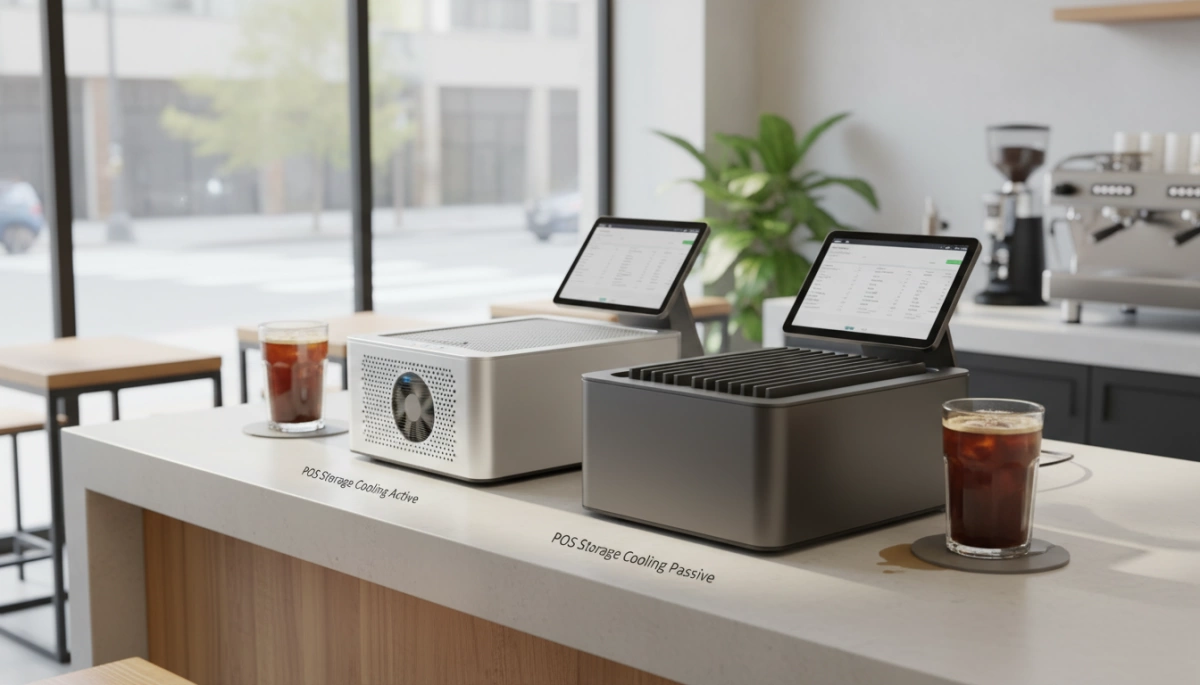
When protecting your data, how you manage heat defines the lifespan of your hardware. In the POS Storage Cooling Guide, the debate between active and passive methods usually comes down to reliability versus raw airflow.
The Problem with Active Cooling
For years, standard computers relied on active cooling—essentially, internal fans blowing air over hot components. While this works for gaming PCs, it is a liability in retail and hospitality.
- Mechanical Failure: Fans have moving parts. Eventually, bearings dry out and motors burn out. When the fan stops, heat dissipation efficiency plummets, leading to immediate overheating.
- Noise Pollution: In a quiet boutique or spa, the constant hum of a cooling fan is a distraction you don’t need.
- Maintenance Heavy: Fans actively pull in dust and grease. If you aren’t opening the case to clean it every few months, you are suffocating your storage drives.
The Science of Passive Cooling
We prefer passive cooling technology for commercial environments. This approach eliminates moving parts entirely. Instead of forcing air circulation, we rely on thermal conduction. Heat naturally moves from a hotter object to a cooler one. By using high-quality thermal pads, we bridge the gap between the SSD and the external case, allowing heat to flow away from critical data chips without a single fan spinning. A fanless POS terminal runs silent and removes the risk of mechanical breakdown.
The Aluminum Advantage
To maximize passive cooling, the material of the chassis is critical. Plastic traps heat; metal moves it. We utilize an aluminum alloy chassis manufactured through die-casting to act as a massive heat sink.
- Giant Heat Sink Design: The entire body of the terminal absorbs heat from the internal SSD and CPU.
- Natural Radiation: The aluminum surface radiates that heat into the surrounding air, keeping internal temps stable.
This engineering choice ensures that your high-performance POS terminal maintains safe operating temperatures even during peak business hours, protecting your drive longevity without the maintenance headaches of legacy fan systems.
Installation Tips for Storage Longevity
Even the most robust industrial hardware needs a proper environment to function correctly. We engineer our terminals with heavy-duty aluminum alloy chassis to act as giant heatsinks, but poor installation can negate that engineering. To ensure your POS Storage Cooling Guide is effective, you need to manage the physical space around the device to maximize heat dissipation efficiency.
Strategic Terminal Placement
The location of your hardware dictates its lifespan. We often see terminals shoved into tight cubbies or placed directly under sunlight, which spikes the SSD operating temperature.
- Avoid Direct Sunlight: UV rays and solar heat can rapidly overheat the chassis, overwhelming the passive cooling system. This is a critical consideration when positioning a cash register POS terminal for cafes, where machines often sit near windows or hot brewing equipment.
- Ensure Clearance: Leave at least 2-3 inches of open space around the unit. This gap allows for retail environment airflow, letting the heat radiating from the back panel dissipate naturally via convection.
Cable Management
Clutter is the enemy of cooling. While our fanless designs prevent internal dust buildup, external cable nests can trap heat against the body of the machine.
- Route Cables Cleanly: Bundle and tie cables away from the rear ventilation areas.
- Prevent Blockages: Ensure power bricks and excess cabling are not stuffed directly behind the unit, as this creates a “dead air” zone that insulates the hardware.
Peripheral Heat Management
A common mistake in compact setups is stacking hardware to save counter space.
- Do Not Stack: Never place thermal printers or other power supplies directly on top of or beneath the POS terminal.
- Thermal Separation: These peripherals generate their own heat, and stacking them creates a thermal loop that prevents the SSD cooling mechanisms from working, potentially leading to thermal throttling.
Engineering Cool Performance with SDLPOS
At SDLPOS, we tackle heat generation at the source before it ever threatens your data. We don’t rely on luck; we rely on precision engineering to keep our systems running cool without the noise and failure points of traditional fans. Our approach focuses on three core pillars to ensure data integrity protection and maximize hardware lifespan.
- Low TDP Processors: We utilize the Intel Elkhart Lake J6412 in our terminals. This processor is a powerhouse with a remarkably low CPU Thermal Design Power (TDP). By generating less waste heat right from the start, the ambient temperature inside the chassis remains stable. This naturally prevents thermal throttling on your storage drives, ensuring consistent read/write speeds even during your busiest shifts.
- Industrial-Grade Storage: Consumer drives often fail under the stress of 24/7 operation. We integrate industrial-grade hardware designed with a wider SSD operating temperature tolerance. Whether you are deploying cash registers for high-volume retail environments or outdoor kiosks, the storage modules we select are built to maintain performance when environmental temperatures rise.
- IP65 Sealing: Heat management becomes impossible if your components are coated in grime. Our designs feature IP65 dust protection on the front panels to block humidity and kitchen grease. This sealing preserves the internal cooling ecosystem, ensuring that the aluminum alloy chassis can effectively pull heat away from the drive without layers of dust acting as insulation.
Signs of POS Storage Overheating
Recognizing when your terminal is struggling with heat is the first step in preventing data loss and hardware failure. In a busy retail or hospitality environment, we often mistake heat-related issues for software bugs or network lag. However, the symptoms of a cooking SSD are distinct if you know what to look for.
Symptom Checklist: Lag and Throttling
The most common sign of storage distress is thermal throttling. Modern NVMe and SATA SSDs have built-in safety mechanisms that drastically lower read/write speeds when temperatures hit a critical threshold (usually around 70°C/158°F).
- Sudden Slowdowns: If your POS flies through transactions in the morning but starts lagging during the lunch rush, heat is likely the culprit.
- System Freezes: The screen might hang for a few seconds while the drive cools down.
- Random Reboots: To prevent permanent damage, the motherboard may trigger a shutdown. This automatic system downtime prevention saves the hardware but kills your service speed.
Understanding these behaviors is essential when evaluating factors to consider when choosing POS hardware, as the right thermal design prevents these bottlenecks.
Physical Checks: The Touch Test
How your POS terminal feels to the touch tells a story about its heat dissipation efficiency.
- Aluminum Alloy Chassis: On our fanless systems, a warm exterior is actually a good sign. It means the aluminum body is successfully pulling heat away from the internal storage and CPU, acting as a giant heatsink.
- Plastic Casings: If a plastic terminal feels hot on the outside, the internal components are likely baking. Plastic acts as an insulator, trapping heat near the drive and risking data integrity protection.
Auditory Cues in Legacy Systems
If you are still operating legacy terminals with active cooling, listen to the fans. A fan spinning at maximum RPM—sounding like a small jet engine—indicates the system is fighting a losing battle against internal temperatures. Since our designs are fanless and silent, we rely on performance monitoring rather than noise, eliminating the risk of mechanical fan failure causing a storage meltdown.
FAQ: Common POS Cooling Questions
What is the safe operating temperature range for POS SSDs?
For most commercial environments, the standard SSD operating temperature range sits between 0°C to 70°C (32°F to 158°F). However, keeping your drive well below that upper limit is critical. When an NVMe or SATA drive approaches 70°C, it triggers thermal throttling—a safety mechanism that intentionally slows down read/write speeds to lower the temperature. This results in sudden system lag during peak hours. For extreme environments like outdoor kiosks or hot kitchens, we utilize industrial-grade components designed to maintain data integrity protection even when ambient temperatures rise.
Does a fanless design really prevent overheating better than fans?
In the long run, yes. While a fan actively blows air, it introduces a major point of failure: moving parts. If a fan bearing fails or the vent gets blocked, the system cooks instantly. Our fanless POS terminal architecture relies on passive cooling technology. We use the heavy-duty aluminum alloy chassis as a massive heat sink to conduct heat away from the processor and storage continuously. This ensures consistent heat dissipation efficiency without the risk of mechanical failure, making it far more reliable for 24/7 retail operations.
How does dust impact POS storage performance over time?
Dust is the enemy of airflow. In legacy systems with fans, the intake sucks in retail dust, flour, or grease, which coats the internal motherboard and storage drive. This layer of grime acts like a winter coat, insulating the hardware and trapping heat inside. Over time, this “insulation effect” raises the baseline temperature of your storage, shortening its lifespan. By switching to a sealed, fanless design, you eliminate internal dust buildup, ensuring your hardware runs cool for years. For more insights on maintaining hardware longevity, check out our industry insights blog.


