







How to Fix a Slow Cash Register POS System Fast and Effectively

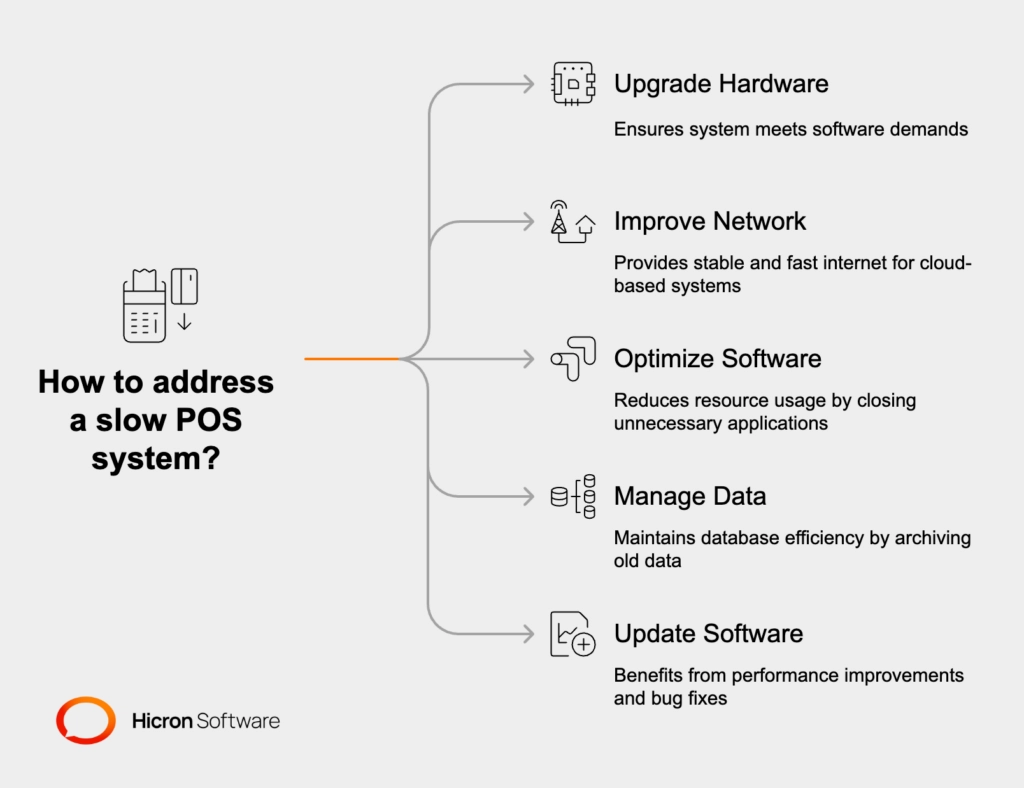
Is your cash register POS system slow, causing frustrating delays at checkout and longer lines? You’re not alone—and fixing it fast is crucial to keeping your customers happy and sales flowing. Whether you’re dealing with lagging transactions, frozen screens, or delayed printing, these common speed bumps can usually be cleared up without calling in expensive tech support. In this post, you’ll discover practical, easy-to-follow solutions to tackle POS system slowdowns head-on—and learn how investing in high-performance hardware like SDLPOS can prevent these issues from ever slowing you down again. Let’s get your checkout running smoothly right now!
Common Causes of a Slow Cash Register POS System
A slow cash register POS system can disrupt your retail flow, leading to longer customer wait times and lost sales. Understanding the root causes helps fix these issues efficiently:
- Outdated or underpowered hardware: Older processors and insufficient RAM struggle with today’s POS demands, causing lagging and delays.
- Accumulated junk files, cache, and temporary data: Over time, these clutter storage and slow down system responsiveness.
- Too many background programs or startup items: Extra apps running in the background consume valuable resources, impacting POS performance.
- Software issues: Using outdated POS software or missing important updates often results in glitches and incompatibility problems.
- Network connectivity problems: Slow internet speeds, Wi-Fi interference, or unstable connections particularly affect cloud-based POS systems, leading to delays and freezing.
- Overheating from dust buildup or poor ventilation: Heat slows down hardware performance and can cause the system to freeze or crash.
- High transaction volume during peak hours: Heavy system loads can overwhelm the POS, causing slowdowns exactly when speed matters most.
Recognizing these common causes is the first step to improving your POS system’s speed and reliability.
Quick Troubleshooting Steps to Speed Up Your POS System
If your cash register POS system is running slow, try these quick fixes to get things moving again:
Restart everything: Power off and restart your POS terminal, router, and any connected peripherals. This clears temporary glitches that often cause lagging or freezing.
Close unnecessary programs: Shut down non-essential apps running in the background and disable startup items that aren’t needed. This frees up system resources for smoother POS operation.
Clear cache and junk files: Use built-in cleanup tools to remove accumulated temporary data and cache that can clog your storage and slow down the system.
Optimize your network connection: Run internet speed tests, restart your router, and if possible, switch to a wired connection to avoid POS network problems and improve cloud-based system responsiveness.
Clean hardware regularly: Dust buildup in vents and fans can lead to POS overheating and slow performance. Carefully remove dust to maintain good ventilation and prevent hardware issues.
These quick troubleshooting steps can resolve most common POS performance issues and help you speed up your POS terminal without delay. For ongoing improvements, consider exploring best POS hardware options designed for busy retail environments, like those featured in POS hardware for businesses with high customer turnover.
Software Fixes for Better Performance
To fix a slow cash register POS system, start by updating your POS software and operating system. These updates often include bug fixes and performance improvements that can resolve many common POS performance issues.
Next, scan your system for malware or software conflicts using reliable antivirus tools. Malicious programs or software clashes can cause your cash register freezing or slow response times.
Optimizing your database also helps speed up the POS system. If your software supports it, regularly archive old transactions or clear out unnecessary data to keep things running smoothly.
Finally, limit multitasking on the POS terminal by avoiding non-POS apps during operation. Running too many programs at once can slow down the system and create transaction delays. These simple software fixes can significantly improve your POS system\’s speed and reliability.
For more tips on keeping your retail setup running efficiently, check out trusted options on POS hardware suppliers.
Hardware Upgrades and Maintenance Tips
If your cash register POS system is lagging, upgrading hardware can make a big difference. Start by increasing RAM or switching to SSD storage—these changes speed up data access and overall performance. Also, investing in a faster processor helps manage busy transaction times without freezing or delays.
Make sure all your peripherals like printers and scanners are compatible with your system and have the latest firmware or drivers installed. Outdated peripherals can cause bottlenecks that slow down your POS setup.
Stick to a regular maintenance routine: clean dust from vents and fans weekly and apply software updates monthly. This helps prevent overheating and keeps your system running smoothly.
If these upgrades and maintenance steps don’t fix persistent POS performance issues, it might be time for a full replacement. Signs your system is outdated include frequent crashes, continuous slowdowns despite fixes, and hardware that can’t support current software demands. For retailers looking to future-proof, exploring modern POS hardware solutions designed for small businesses is a smart move, as outlined in this guide to POS hardware solutions for small retailers.
Preventing Future Slowdowns in Your Cash Register POS
Avoiding POS system lagging means setting up your cash register POS with the right hardware and habits from the start. Here’s how to keep your system running fast and smooth:
Choose High-Performance Hardware
- Opt for robust processors and plenty of RAM designed for busy retail environments.
- Consider SDLPOS systems, which are built specifically to handle heavy transaction loads without slowing down.
- Upgrade to SSD storage for quicker data access and faster boot times.
Implement Best Practices
- Use a dedicated private network to reduce POS network problems and minimize interference.
- Perform regular backups to avoid data loss and improve recovery speed.
- Train your staff on efficient cash register use to prevent accidental slowdowns, like running unnecessary apps or excessive multitasking.
Monitor and Maintain Performance
- Use built-in diagnostics tools to watch for signs of POS performance issues early.
- Schedule routine system checks and maintenance to catch problems before they affect speed.
| Tip | Benefit |
|---|---|
| High-end SDLPOS hardware | Handles peak retail demand easily |
| Dedicated private network | Prevents Wi-Fi interference & lag |
| Regular backups | Safeguards data, speeds recovery |
| Staff training | Reduces operator errors |
| Diagnostics monitoring | Detects and fixes issues early |
By setting your system this way, you’ll reduce future cash register freezing, transaction delays, and retail POS slowdown. For more details on setting up an efficient cash register, see our guide on how to set up a cash register.


