







Receipt vs Label Printer Comparison Guide for Speed Durability and Cost

Verstehen der Grundlagen: Was sind Belegdrucker und Etikettendrucker?
Wenn Sie jemals an der Kasse in einem Geschäft bezahlt oder ein Versandpaket erhalten haben, haben Sie die Arbeit von Belegdruckern und Etikettendruckern gesehen. Aber was genau sind diese Geräte und worin unterscheiden sie sich?
Definition von Belegdruckern
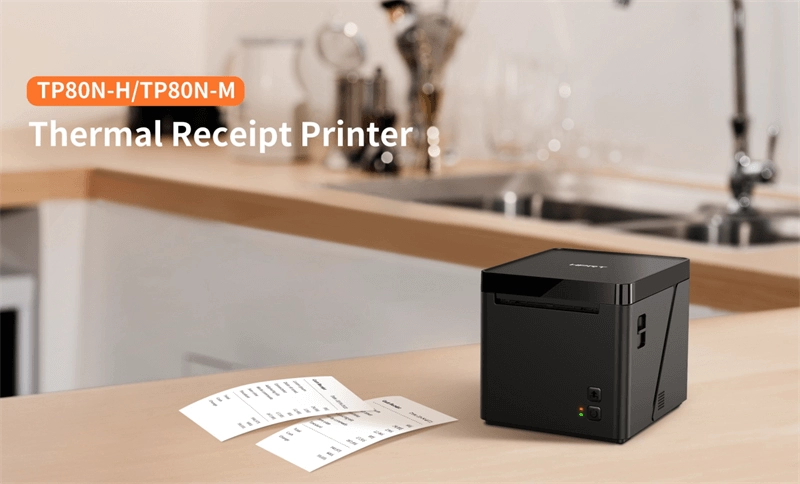
Belegdrucker sind spezialisierte Drucker, die Verkaufsbelege, Tickets oder Bestellbestätigungen schnell und klar drucken. Diese Geräte sind häufig an Einzelhandelskassen, in Restaurants und an jedem Point-of-Sale (POS) zu finden. Sie verwenden in der Regel thermische Belegdruckbänder, die scharfen Text und einfache Grafiken wie Logos oder QR-Codes produzieren. Ihr Hauptziel? Schnelles, zuverlässiges Drucken für kurzfristige Dokumente, die gehandhabt und oft entsorgt werden sollen.
Definition von Etikettendruckern
Etikettendrucker hingegen erstellen Klebeetiketten, die für Produktkennzeichnung, Versand, Inventar oder Compliance verwendet werden. Diese Geräte drucken auf verschiedenen Materialien wie Papier, Kunststoff oder synthetischen Folien und verwenden häufig entweder Direkt-Thermotransfer- oder Thermotransferdrucktechnologien. Etikettendrucker legen den Fokus auf Haltbarkeit – sie drucken Barcodes, Seriennummern oder Versandinformationen, die während des Umgangs, der Lagerung und des Transports bestehen bleiben sollen.
Schnelle visuelle Hilfe: Vergleich zwischen Belegdruckern und Etikettendruckern
| Funktion | Belegdrucker | Etikettendrucker |
|---|---|---|
| Hauptverwendung | Verkaufbelege drucken | Klebeetiketten drucken |
| Medientyp | Thermopapierrollen für Belege | Etikettenmaterial (Papier, synthetisch) |
| Erforderliche Haltbarkeit | Kurzfristig, wegwerfbar | Langfristig, widerstandsfähig gegen Abnutzung |
| Druckinhalt | Text, Logos, einfache Grafiken | Barcodes, Seriennummern, Produktinformationen |
| Gängige Einsatzbereiche | Einzelhandelsgeschäfte, Restaurants | Lagerhäuser, Versand, Gesundheitswesen |
Das Verständnis dieser grundlegenden Unterschiede hilft Ihnen dabei, herauszufinden, welcher Drucker Ihren Bedürfnissen entspricht und wo Sie investieren sollten – für Leistung, Haltbarkeit und Kosteneffizienz. Lassen Sie uns die Spezifikationen im nächsten Schritt genauer betrachten, um diese Drucker nebeneinander zu vergleichen.
Vergleich: Wichtige Spezifikationen und Leistung im Direktvergleich
Hier ist ein kurzer Vergleich der Belegdrucker vs. Etikettendrucker hinsichtlich der wichtigsten Spezifikationen und Leistungsmerkmale, die am meisten zählen:
| Funktion | Belegdrucker | Etikettendrucker |
|---|---|---|
| Drucktechnologie | Meistens Direktthermodruck | Direktthermografie oder Thermotransfer |
| Medientypen | Thermorollen (Belege) | Thermo- oder beschichtete Etikettenmaterialien |
| Verarbeitungsqualität | In der Regel leicht, für POS-Schalter konzipiert | Robuster, für den industriellen oder Versandgebrauch gebaut |
| Geschwindigkeit | Hohe Geschwindigkeit (bis zu 300 mm/s typisch) | Mittlere Geschwindigkeit, variiert je nach Etikettengröße |
| Haltbarkeit der Drucke | Kurzfristig, Belege verblassen mit der Zeit | Langlebige Barcode- und Versandetiketten |
| Konnektivität | USB, Ethernet, Bluetooth, Wi-Fi | USB, Ethernet, Wi-Fi, manchmal serielle Anschlüsse |
| Integration | Einfach mit POS-Systemen und Kassensystemen | Entwickelt für Bestandsverwaltung und Versandsoftware |
| Größe & Tragbarkeit | Kompakte, sogar tragbare kabellose Modelle | Größer für Desktop- oder Industrieanwendungen |
| Stromoptionen | Überwiegend mit Netzadapter betrieben, einige bieten batteriebetriebene Versionen | Überwiegend netzbetrieben, wenige mit tragbaren Optionen |
Was das für Sie bedeutet
- Kassendrucker in Geschwindigkeit und reibungsloser POS-Integration herausragend, perfekt für schnelle Kassenvorgänge.
- Etikettendrucker Fokus auf langlebigen, hochwertigen Druck für Barcodes und Versandetiketten, gebaut, um durch Handhabung und Scannen zu bestehen.
Wenn Sie eine vollständige Übersicht darüber wünschen, wie Sie Ihren Drucker auf die Bedürfnisse Ihres Unternehmens abstimmen, schauen Sie sich unseren Leitfaden an zu Einzelhandel POS vs. Restaurant POS Systeme, der sich mit Hardware-Kompatibilität und Integration beschäftigt.
Kostenaufstellung – Anfangsinvestition vs. langfristige Einsparungen
Beim Vergleich von Belegdruckern und Etikettendruckern ist die Anfangsinvestition kann je nach Marke, Funktionen und Drucktechnologie stark variieren. Typischerweise sind einfache Thermobelegdrucker in der Anschaffung günstiger, oft weniger als Etikettendrucker, insbesondere solche für den industriellen Einsatz. Etikettendrucker, insbesondere mit Direkt-Thermal- und Thermotransfer-Fähigkeiten, sind in der Regel teurer aufgrund ihrer vielseitigen Medienkompatibilität und Langlebigkeit.
Allerdings sind die laufenden Kosten ebenso wichtig. Belegdrucker verwenden Thermopapierrollen, die relativ kostengünstig sind, aber häufig ausgetauscht werden müssen. Etikettendrucker hingegen verwenden verschiedene Medien wie Vinyletiketten, Tags oder langlebige Barcode-Etikettenbögen, die teurer sein können, aber je nach Anwendung länger halten. Außerdem benötigen Thermotransfer-Etikettendrucker Farbbänder, die die laufenden Kosten erhöhen.
Wartungskosten unterscheiden sich ebenfalls. Belegdrucker haben in der Regel weniger bewegliche Teile und sind weniger verschleißanfällig, was zu niedrigeren Wartungsgebühren führt. Etikettendrucker, insbesondere industrielle Etikettenspender, benötigen aufgrund der Komplexität beim Umgang mit dickeren Medien und Bändern möglicherweise häufigere Wartungen.
Wenn man sich Gesamtkosten des Eigentums, anschaut, sollten Unternehmen den Anschaffungspreis gegen Verbrauchsmaterialien und Wartungskosten im Laufe der Zeit abwägen. Für Versandetiketten in hohem Volumen oder langlebigen Barcode-Druck kann eine Investition in einen robusten Etikettendrucker einen besseren Wert bieten. Umgekehrt könnten Einzelhandelsumgebungen, die auf schnellen Thermobelegdruck setzen, von einem kostengünstigen, wartungsarmen Belegdrucker profitieren.
Für eine vertiefte Betrachtung der Integration von Druckern in Ihr Kassensystem und der Balance zwischen Hardwareinvestitionen kann der POS-Hardware-Vergleich praktische Einblicke in langfristige Einsparungen und Effizienz bieten.
Anwendungen in der Praxis: Welcher Drucker passt zu Ihrer Branche?

Die Wahl zwischen einem Belegdrucker und einem Etikettendrucker hängt weitgehend von der Branche und den jeweiligen Aufgaben ab.
Einzelhandel und Kassenabrechnungen
Thermodrucker für Belege sind hier Standard, ideal für schnelles, zuverlässiges Drucken von Quittungen, Bestellscheinen und Transaktionsaufzeichnungen. Sie sind eng in POS-Systeme und Kassenzubehör integriert, was die Abwicklung an stark frequentierten Verkaufsstellen beschleunigt. Für Unternehmen, die aufrüsten oder stabilisieren möchten, lohnt es sich, die Optionen in POS für stark frequentierte Geschäfte zu prüfen, kann ein Wendepunkt sein.
Lagerhaltung und Logistik
zu prüfen. Etikettendrucker dominieren in Lagerumgebungen aufgrund ihrer Fähigkeit, langlebige Barcode-Etiketten, Versandetiketten und Inventarmarker zu drucken, die Handling und Umweltbedingungen standhalten. Industrielle Etikettenspender in Kombination mit robusten Etikettendruckern gewährleisten Genauigkeit und Langlebigkeit bei Versand- und Lageretiketten.
Gastgewerbe und Lebensmittelservice
Belegdrucker sind hier üblich, oft kabellose Thermodrucker, die Bestellzettel und Kundenquittungen drucken. Anpassungsoptionen ermöglichen Branding und Bestelldetails direkt auf dem Beleg. Etikettendrucker können auch für Lebensmittelverpackungen und Regaletiketten verwendet werden, um Gesundheits- und Sicherheitsstandards zu erfüllen.
Gesundheitswesen und Compliance
Etikettendrucker sind unerlässlich für langlebigen Barcode-Druck auf Patientenarmbändern, Medikamentenetiketten und Probenverfolgung, um strenge Compliance-Anforderungen zu erfüllen. Ihre Fähigkeit, eine Vielzahl von Medienarten zu verarbeiten, ist entscheidend für Genauigkeit und Sicherheit in klinischen Umgebungen.
Fallstudien-Teaser
Viele Unternehmen kombinieren beide Druckertypen, um ihre Bedürfnisse abzudecken. Zum Beispiel könnte ein Lebensmittelgeschäft an der Kasse Thermobelegdrucker verwenden und im Lager Barcode-Etikettendrucker für die Inventarisierung – eine Kombination, die die Betriebseffizienz maximiert.
Anpassungsnotiz
Beide Druckertypen bieten Anpassungsmöglichkeiten bei Etiketten- oder Beleggrößen, Druckqualität und Konnektivitätsoptionen, sodass Unternehmen Lösungen an ihre Arbeitsabläufe anpassen können.
If you’re unsure which to choose, consider your top priorities: speed and integration for retail checkouts, durability and barcode compatibility for logistics, or compliance-grade printing for healthcare. Our POS hardware experts can help evaluate your needs and recommend the right setup.
Vorteile, Nachteile und häufige Fallstricke, die vermieden werden sollten

Vorteile und Nachteile von Belegdruckern
Vorteile:
- Schnelle Druckgeschwindigkeiten für zügige Kassenlinien.
- Kompakte Größe passt leicht an POS-Theken.
- Verwendet erschwingliche Thermorollen, was die laufenden Kosten senkt.
- Ideal zum Drucken von Quittungen, Transaktionsaufzeichnungen und einfachen Barcodes.
- Nahtlose Integration in POS-Systeme, ideal für Einzelhandel und Gastronomie.
Nachteile:
- Druckt hauptsächlich auf Thermopapier, das mit der Zeit verblassen kann.
- Begrenzte Medienvielfalt – hauptsächlich schmale Quittungen.
- Nicht geeignet für langlebige oder schwere Kennzeichnungsanforderungen.
- Weniger effektiv, wenn detaillierte Etiketten mit Grafiken oder langlebigen Drucken benötigt werden.
Etikettendrucker Vorteile und Nachteile
Vorteile:
- Druckt auf verschiedenen Medien, einschließlich langlebiger, wetterfester Etiketten.
- Unterstützt Barcode-Etikettendruckfunktionen, ideal für Versand, Inventar und Compliance.
- Bietet direkte Thermo- und Thermotransferoptionen für flexible Haltbarkeit.
- Besser geeignet für Lagerhaltung, Gesundheitswesen und Logistik mit langlebigen Drucken.
- Kann verschiedene Größen und Arten von Etiketten verarbeiten, von kleinen Preisschildern bis zu großen Versandetiketten.
Nachteile:
- In der Regel sperriger und weniger tragbar im Vergleich zu Belegdruckern.
- Höhere Anfangskosten mit teureren Verbrauchsmaterialien wie Etikettenrollen oder Ribbons.
- Langsamere Geschwindigkeiten, abhängig von Druckqualität und Medienart.
- Erfordert mehr Einrichtung und Wartung im Vergleich zu einfachen Belegdruckern.
Häufige Fallstricke, die vermieden werden sollten
- Die falsche Medienart wählen: Einen Belegdrucker zu wählen, wenn langlebige Etiketten benötigt werden, führt zu verblassten oder unleserlichen Drucken.
- Verbindungserfordernisse ignorieren: Stellen Sie sicher, dass Ihr Drucker mit Ihrem POS-System oder Scanner kompatibel ist, um Integrationsprobleme zu vermeiden.
- Gesamtkosten übersehen: Konzentrieren Sie sich nicht nur auf den Anschaffungspreis—berücksichtigen Sie langfristige Verbrauchsmaterialien, Wartung und Ausfallzeiten.
- Druckgeschwindigkeit vergessen: In geschäftigen Umgebungen kann ein langsamer Drucker den Checkout oder Versand verzögern.
- Haltbarkeitsanforderungen vernachlässigen: Belegdrucker sind nicht für raue Umgebungen gemacht; Etikettendrucker bieten in der Regel robustere Bauweisen.
Diese Fehler zu vermeiden stellt sicher, dass Sie einen Drucker wählen, der zu Ihrem Betrieb passt, Ausfallzeiten reduziert und die Effizienz steigert. Für Tipps zur Verbesserung Ihrer POS-Ausstattung lesen Sie, wie Kassensysteme die Geschäftseffizienz verbessern.
Die richtige Wahl treffen: Schritt-für-Schritt-Entscheidungsrahmen
Die Entscheidung zwischen einem Belegdrucker und einem Etikettendrucker beginnt mit einer klaren Betrachtung Ihrer tatsächlichen Bedürfnisse. Hier ist ein einfacher Rahmen, um Ihnen bei der richtigen Wahl zu helfen:
1. Überprüfen Sie Ihre Druckanforderungen
- Auf welche Art des Druckens sind Sie am meisten angewiesen? Belege für Transaktionen oder Etiketten für Versand und Inventar?
- Berücksichtigen Sie das Volumen—wie viele Drucke pro Tag?
- Denken Sie an den Medientyp: Thermorollen für Belege oder langlebiges Etikettenmaterial für Barcodes und Versand.
2. Budget und Skalierbarkeit abwägen
- Schauen Sie nicht nur auf die Anfangskosten—berücksichtigen Sie laufende Verbrauchsmaterialien wie Thermopapier oder Etiketten sowie Wartungsbedarf.
- Wachstumsplanung. Wird Ihr Druckvolumen steigen? Skalieren die Drucker mit Ihrem Unternehmen?
3. Probieren Sie es aus, bevor Sie kaufen
- Wann immer möglich, führen Sie einen Testdruck auf der tatsächlichen Hardware durch. Überprüfen Sie Druckgeschwindigkeit, Klarheit und Benutzerfreundlichkeit.
- Bestätigen Sie die Kompatibilität mit Ihrem bestehenden POS-System oder Ihrer Lagerverwaltungssoftware, um Integrationsprobleme zu vermeiden.
4. Erkunden Sie Alternativen und Funktionen
- Einige POS-Hardware bietet kabellose Belegdrucker oder industrielle Etikettierer, die besser zu Ihrer Ausstattung passen könnten.
- Achten Sie auf Funktionen wie Barcode-Scanner-Kompatibilität oder Mehrzweckgeräte, wenn Sie Ihren Arbeitsplatz konsolidieren möchten.
5. Treffen Sie die Handlungsaufforderung
- Sobald Sie Ihre Optionen eingegrenzt haben, wenden Sie sich an Anbieter, die auf die POS-Hardware-Bedürfnisse Ihrer Branche spezialisiert sind.
- Für fachkundige Beratung und zuverlässige Produkte schauen Sie sich unsere Empfehlungen an beste POS-Hardwarelieferanten in Deutschland.
- Denken Sie daran, dass der richtige Drucker Ihnen Zeit und Geld spart. Investieren Sie klug.
Wenn Sie diese Schritte befolgen, wählen Sie selbstbewusst einen Drucker, der perfekt zu Ihrem Unternehmen passt—egal, ob für schnellen Belegdruck oder langlebige Etikettenherstellung.


