







Touch POS vs Keypad POS Comparison for Speed Durability and Cost

Grundlagen verstehen: Was sind Touch-POS- und Tastenfeld-POS-Systeme?
Bei der Auswahl eines Point-of-Sale (POS)-Systems ist es wichtig, den Unterschied zwischen Touch-POS und Tastenfeld-POS Systemen zu kennen. Beide helfen Unternehmen bei der Abwicklung von Verkäufen, funktionieren aber sehr unterschiedlich.
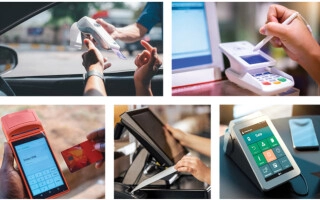
Touch-POS-Systeme verwenden elegante, bildschirmbasierte Oberflächen, die sich ähnlich anfühlen wie die Verwendung eines Smartphones oder Tablets. Sie tippen, wischen und wählen Symbole direkt auf einem Touchscreen aus. Diese Systeme sind intuitiv, visuell ansprechend und lassen sich einfach mit neuen Softwarefunktionen aktualisieren.
Auf der anderen Seite Tastenfeld-POS-Systeme verfügen über traditionelle physische Tasten und numerische Tastenfelder mit haptischem Feedback, das Sie bei jedem Drücken spüren können. Sie basieren auf mechanischen Tasten für die Zahleneingabe und Funktionsauswahl, wodurch sie vertraut und unkompliziert sind, insbesondere bei bargeldintensiven Transaktionen.
Ein kurzer Rückblick:
- Tastenfeld-POS-Systeme haben ihre Wurzeln in den 1980er Jahren, und entwickelten sich aus klassischen Registrierkassen, die an Verkaufstresen verwendet wurden.
- Touch-POS-Systeme entstanden um die 2010er Jahre, als die Touchscreen-Technologie erschwinglicher und weit verbreitet wurde und schnell an Popularität für ihre moderne Ausstrahlung und Flexibilität gewann.
Das Verständnis dieser Grundlagen wird Ihnen helfen zu entscheiden, welcher Stil besser zu Ihren Geschäftsanforderungen passt.
Direkter Vergleich: Aufschlüsselung der kritischen Faktoren
Hier ist, wie Touch-POS und Tastenfeld-POS in den wichtigsten Bereichen abschneiden:
| Faktor | Touch-POS | Tastenfeld-POS |
|---|---|---|
| Geschwindigkeit und Transaktionseffizienz | Schneller mit Symbolen und Gesten, ideal für schnelle Auswahlen und Multitasking | Schneller bei umfangreicher numerischer Eingabe wie Preisüberprüfungen oder Bargeldbeträgen |
| Haltbarkeit & Verarbeitungsqualität | Glasscreens können zerkratzen, sind aber leicht zu reinigen; weniger widerstandsfähig gegen Kratzer | Mechanische Tasten halten rauem Gebrauch stand und sind besser gegen Schmutz resistent |
| Kosten (Anschaffung & Laufend) | In der Regel höhere Anfangskosten, aber geringere Software-Update-Kosten; ROI-Rechner über 3 Jahre verwenden | Niedrigere Anfangskosten, aber potenzielle laufende Kosten für Tastenaustausch und Wartung |
| Lernkurve & Schulung | Intuitive Schnittstellen, die von jüngeren Mitarbeitern bevorzugt werden, kürzere Schulungszeit | Vertrautes Layout für erfahrene Mitarbeiter, minimale Anpassung erforderlich |
| Branchen & Anwendungsfälle | Ideal für kundenorientierte Bereiche wie Einzelhandel und Cafés | Besser geeignet für robuste Umgebungen und Back-of-House-Operationen |
| Wartung & Pflege | Leicht zu reinigen, unterstützt Cloud-Updates für schnelle Fehlerbehebungen | Erfordert physischen Tastenaustausch und gelegentliche Hardwarewartung |
| Fehlbedienung & Fehlerquellen | Mögliche Gestenfehler oder versehentliche Berührungen | Weniger Fehlberührungen durch taktiles Feedback, aber Risiko des Tastenklemms |
| Benutzererfahrung & Kundenwahrnehmung | Modern, elegant und ansprechend – verbessert das Markenimage | Praktisch und zuverlässig – schafft Vertrauen durch Vertrautheit |
Die richtige POS hängt vom Geschäftsablauf und dem Komfortlevel des Personals ab. Für eine kundenorientierte Einrichtung bietet ein Touchscreen-POS-System oft ein schnelleres, ansprechenderes Erlebnis. Während traditionelle Tastaturkassen in Haltbarkeit überzeugen und in anspruchsvollen Umgebungen gut funktionieren.
Wenn Sie eine detaillierte Analyse für Ihr Unternehmen wünschen, nutzen Sie unsere ROI-Tools und erkunden Sie Optionen, die auf Ihre Bedürfnisse zugeschnitten sind. Tipps zur Fehlerbehebung und Aufrüstung finden Sie auch auf unseren Zahlungsabwicklungslösungen für kleine Unternehmen.
Pro- und Kontra-Tabelle

Hier ist ein kurzer Vergleich der Touch POS- und Tastatur-POS-Systeme, der ihre wichtigsten Vor- und Nachteile hervorhebt, um Ihnen bei der Entscheidung zu helfen, was am besten zu Ihrem Unternehmen passt.
| Faktor | Touch-POS | Tastenfeld-POS |
|---|---|---|
| Geschwindigkeit | Schneller mit Symbolen und Gesten, ideal für schnellen Service | Schneller bei numerisch intensiven Aufgaben und einfacher Eingabe |
| Haltbarkeit | Glasscreens können zerbrechlich sein; erfordern sorgfältige Handhabung | Mechanische Tasten sind robust und widerstehen Schmutz gut |
| Kosten | Höhere Anfangskosten, aber geringere langfristige Updates | Niedrigerer Einstiegspreis; laufende Wartung kann sich summieren |
| Lernkurve | Benutzerfreundlich für jüngeres Personal; intuitive Oberfläche | Vertraut für erfahrene Mitarbeiter; minimaler Schulungsaufwand |
| Branchenpassung | Ideal für kundenorientierten Einzelhandel und Gastgewerbe | Am besten für robuste Umgebungen und Backoffice-Arbeiten |
| Wartung | Leicht zu reinigen; Fernupdates über die Cloud | Erfordert physische Schlüsselersatzteile und regelmäßige Reinigung |
| Mistouch-Risiko | Mögliche Gestenfehler; können Transaktionen verlangsamen | Taktisches Feedback reduziert Eingabefehler |
| Benutzererfahrung (UX) | Modernes, elegantes, ansprechendes Design | Funktional und zuverlässig, weniger auffällig |
Dies hilft Ihnen, die Abwägungen klar zu erkennen—wählen Sie Touch POS für elegante Schnittstellen und schnelle, ansprechende Kundenbetreuung oder Keypad POS für robuste, zuverlässige und unkomplizierte Abläufe.
Für eine vertiefte Entscheidungshilfe bei der Auswahl des richtigen POS-Systems für Ihre spezifischen Geschäftsanforderungen, schauen Sie sich unseren Leitfaden an Kassensysteme für Gastronomie- und Getränkeunternehmen.
Die richtige Wahl treffen: Faktoren, die Sie für Ihr Unternehmen berücksichtigen sollten

Die Entscheidung zwischen einem Touch POS und einem Keypad POS hängt von Ihren spezifischen Geschäftsanforderungen ab. Hier ist eine kurze Einschätzung zur Orientierung:
- Art der Transaktionen: Arbeiten Sie hauptsächlich mit schnellen, ikonengesteuerten Verkäufen oder mit zahlungsintensiven Eingaben? Touch POS eignet sich hervorragend für schnelle, visuelle Auswahlen, während Keypad POS oft bei präziser numerischer Eingabe glänzt.
- Mitarbeiterkomfort & Schulung: Sind Ihre Mitarbeiter technikaffin oder eher mit traditionellen Tasten vertraut? Touch POS-Systeme haben tendenziell eine geringere Lernkurve für jüngeres Personal, während Keypad-Setups besser für ein erfahrenes Team geeignet sein könnten.
- Umweltbeständigkeit: Benötigen Sie ein robustes Gerät für den Einsatz im Backoffice oder in industriellen Umgebungen? Keypad POS-Systeme halten in der Regel länger unter rauen Bedingungen, während Touch POS eine einfachere Reinigung und Cloud-Updates bietet.
- Budget und ROI: Berücksichtigen Sie die Anfangskosten und die langfristige Wartung. Touch POS mag teurer erscheinen, bietet aber möglicherweise eine bessere Kapitalrendite durch schnellere Transaktionen und Fernverwaltung.
Wenn Sie unsicher sind, können hybride POS-Terminals, die Touchscreen-Interfaces mit physischen Tasten kombinieren, das Beste aus beiden Welten bieten—Geschwindigkeit plus taktile Zuverlässigkeit.
Zukunftssicher zu sein bedeutet, bei der Planung Ihres POS an KI-gestützte Funktionen, erweiterte Analysen und mobile Synchronisationsmöglichkeiten zu denken, um Ihr Geschäft wettbewerbsfähig zu halten.
Nehmen Sie sich einen Moment Zeit, um Prüfen Sie Ihre aktuelle POS-Konfiguration. Maximieren Sie Geschwindigkeit und Effizienz? Erfüllen Ihre Geräte die Anforderungen Ihrer Branche? Diese Überprüfung ist Ihr erster Schritt zur Aufrüstung oder Optimierung Ihres Systems.
Für detailliertere Hilfe bei der Auswahl von Hardware, die auf saisonale Schwankungen oder Geschäftszyklen abgestimmt ist, lesen Sie unseren Leitfaden zu wie man POS-Hardware für saisonale Geschäfte auswählt.
Warum SDLPOS: Ihr Partner für POS-Hardware-Exzellenz
Wenn es um zuverlässige und langlebige POS-Hardware geht, ist SDLPOS ein vertrauenswürdiger Partner für Unternehmen in Deutschland. Unsere Lösungen sind robust gebaut, um den täglichen Einsatz in geschäftigen Einzelhandels- und Gastronomiebetrieben zu bewältigen, mit skalierbaren Optionen, die mit Ihrem Unternehmen wachsen. Ob Sie elegante Touchscreen-POS-Systeme oder robuste Tastaturkassen benötigen, SDLPOS bietet maßgeschneiderte Integrationen, die auf Ihren einzigartigen Arbeitsablauf und Ihr Budget abgestimmt sind – damit Sie den größtmöglichen Nutzen aus Ihrer Investition ziehen.
Unsere wettbewerbsfähigen Preise stellen sicher, dass Sie Qualität nicht zugunsten der Kosten opfern müssen, und viele zufriedene Kunden haben berichtet, wie SDLPOS-Hardware ihre Transaktionsgeschwindigkeit und das gesamte Kundenerlebnis verbessert hat. Bereit für ein Upgrade oder eine Optimierung Ihrer POS-Konfiguration? Kontaktieren Sie uns noch heute, um ein Angebot anzufordern und nahtlosen Support von einem Anbieter zu erhalten, der Ihre Bedürfnisse wirklich versteht.
Für weitere Einblicke in die Auswahl des richtigen Anbieters lesen Sie unseren detaillierten Leitfaden zur Auswahl des besten Kassenanbieters.


