







Diferencias y beneficios entre hardware y software POS explicados para negocios

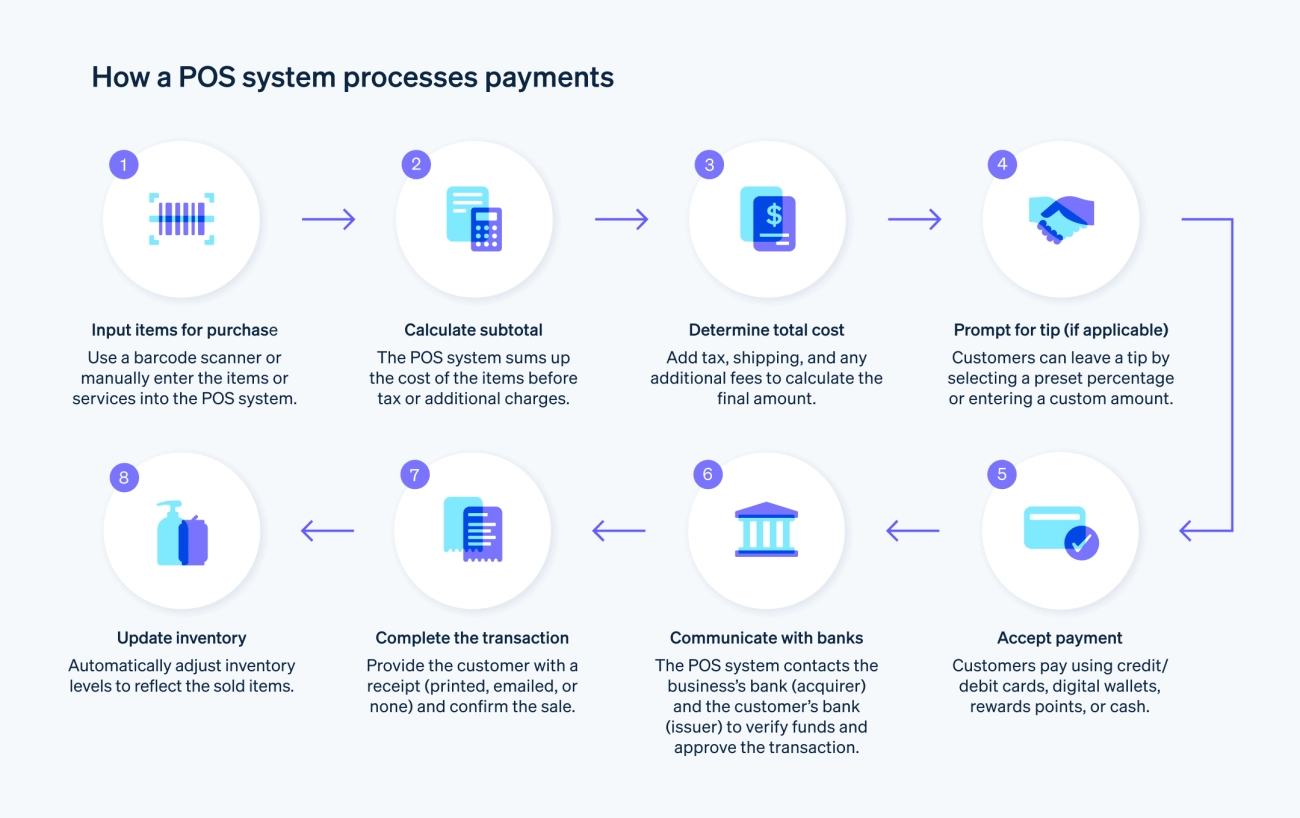
¿Estás intentando entender la verdadera diferencia entre hardware y software POS? Ya sea que dirijas una tienda minorista, un restaurante o un quiosco, saber cómo estas dos partes de un Sistema de Punto de Venta (POS) trabajan puede ahorrarte tiempo, dinero y dolores de cabeza en el futuro.
A simple vista, puede parecer sencillo: el hardware es lo físico que ves y tocas, y el software es el lado digital detrás de escena. Pero hay más—cómo interactúan, sus roles únicos y por qué elegir la combinación correcta importa para el éxito de tu negocio.
En esta publicación, obtendrás un desglose claro y directo de hardware vs software POS, descubrirás qué incluye cada uno y aprenderás cómo tomar decisiones inteligentes que se ajusten a tu presupuesto y planes de crecimiento. ¡Vamos a empezar y desbloquear el potencial completo de tu sistema POS!
Resumen de los sistemas POS
A Sistema de Punto de Venta (POS) es la columna vertebral de los negocios minoristas y de servicios modernos, diseñados para agilizar el proceso de ventas y mejorar la experiencia del cliente. En su núcleo, un sistema POS combina tanto componentes de hardware y software para gestionar las transacciones de ventas de manera eficiente y proporcionar valiosos insights comerciales.
Definición de un sistema POS
Un sistema POS es una solución tecnológica que permite a las empresas procesar ventas, aceptar pagos y rastrear transacciones en tiempo real. Más allá de registrar compras, maneja varias tareas que mejoran la eficiencia operativa — desde gestionar inventario hasta rastrear horas de empleados y generar informes detallados.
Componentes principales Hardware y Software
Hardware POS: Esto incluye dispositivos físicos como cajas registradoras, escáneres de código de barras, impresoras de tickets, lectores de tarjetas y terminales táctiles. Estos componentes permiten a los cajeros y al personal interactuar con el sistema, escanear productos y aceptar diversas formas de pago de manera segura.
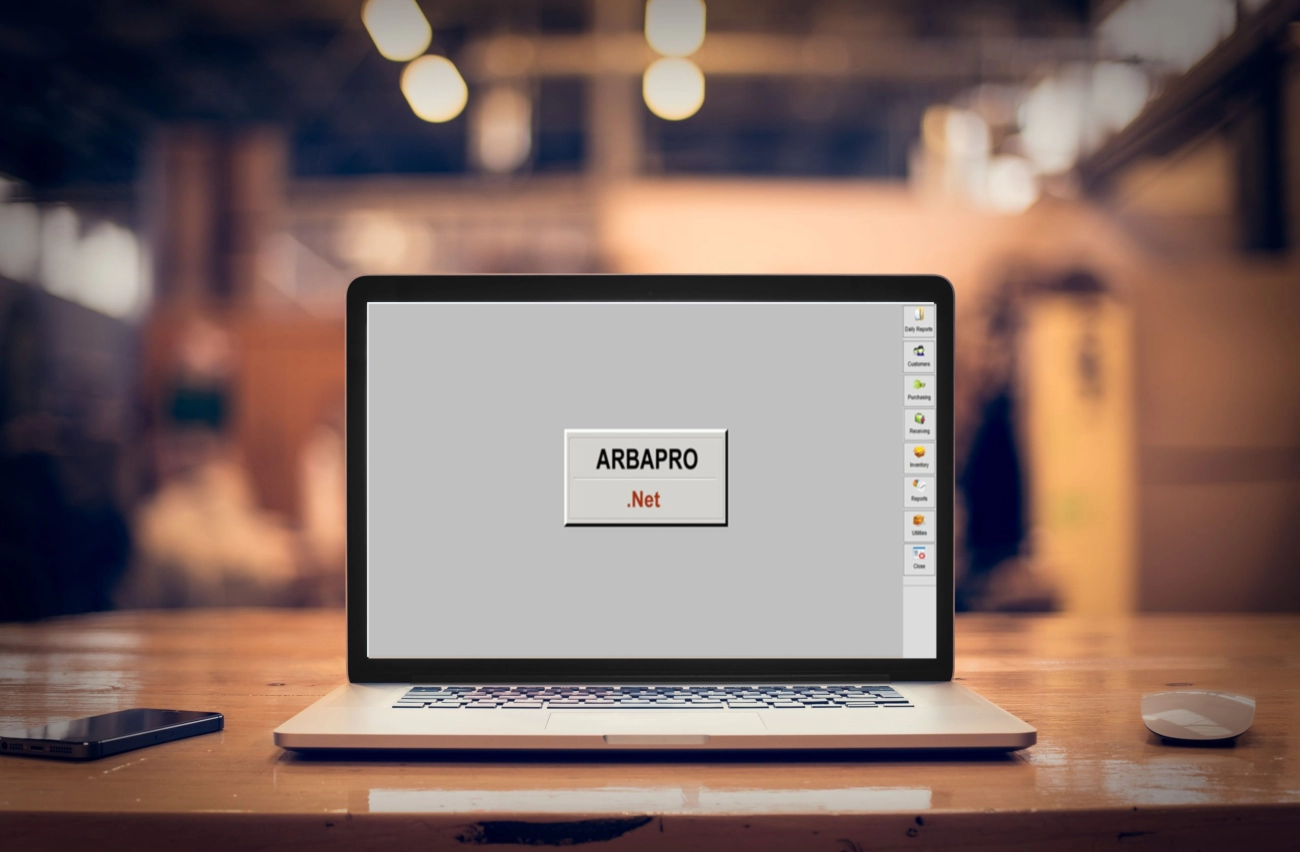
Software POS: El software impulsa las capacidades del sistema, incluyendo el seguimiento de ventas, gestión de inventario, gestión de relaciones con clientes (CRM) y procesamiento de pagos. Proporciona la interfaz, la gestión de datos y la automatización que impulsan las operaciones diarias de la tienda.
Cómo los sistemas POS agilizan las ventas y mejoran la experiencia del cliente
Las soluciones POS modernas integran hardware con software robusto para acelerar el proceso de pago, minimizar errores y mejorar la precisión. Esta conexión fluida ayuda a las empresas:
- Reducir los tiempos de espera en la caja, aumentando la satisfacción del cliente
- Mantener niveles precisos de inventario para evitar quiebres de stock o exceso de inventario
- Ofrecer opciones de pago flexibles incluyendo tarjetas con chip, pagos sin contacto y monederos móviles
- Acceder a datos de ventas en tiempo real para decisiones más inteligentes y marketing personalizado
- Mejorar la productividad de los empleados a través de funciones de seguimiento del tiempo y gestión de tareas
Al incorporar tanto funciones confiables componentes de hardware POS como soluciones avanzadas del software POS, las empresas crean una experiencia de compra fluida y profesional que genera confianza y lealtad en el cliente. Ya sea gestionando una pequeña boutique o un restaurante concurrido, un sistema POS bien adaptado sienta las bases para operaciones eficientes y escalables.
¿Qué es el hardware POS, ejemplos y papel en el procesamiento de transacciones?
hardware POS es el equipo físico que hace que un sistema de punto de venta funcione. Esta es la parte tangible que puedes tocar y ver, y es esencial para manejar transacciones y mantener tus ventas en marcha.
Componentes comunes del hardware POS
Aquí están los principales componentes de hardware POS que encontrarás en la mayoría de los sistemas:
- Cajas registradoras – La caja registradora clásica para guardar el dinero de forma segura durante las transacciones.
- Impresoras de recibos – Imprimir recibos rápidamente para los clientes, esencial como prueba de compra.
- Escáneres de código de barras – Acelera el proceso de pago escaneando los códigos de barras de los productos, reduciendo errores humanos.
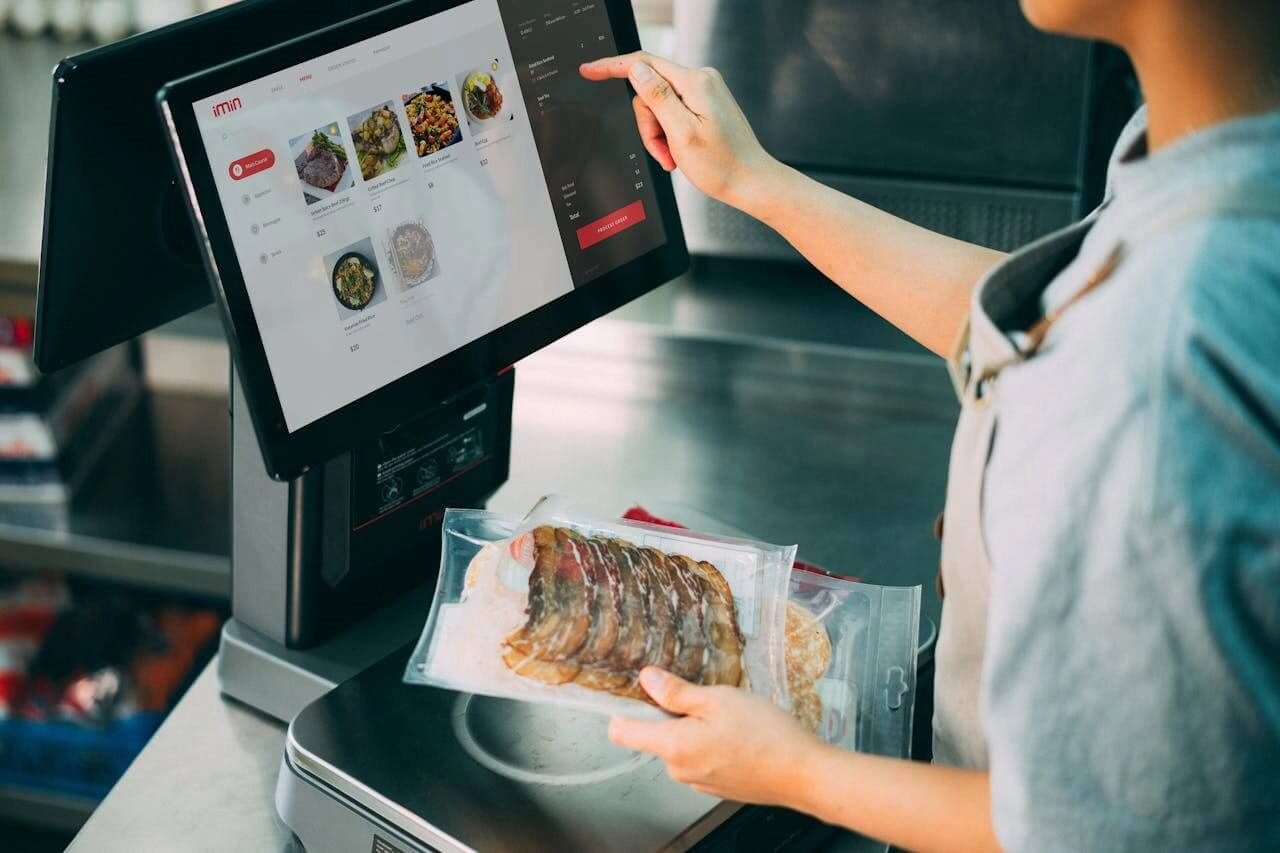
- Pantallas táctiles de terminales POS – La interfaz principal donde se procesan las ventas, a menudo utilizada con monitores táctiles para facilitar la entrada.
- Cajas registradoras – Compartimentos seguros que se abren solo cuando una venta está completa o autorizada.
- Lectores de tarjetas – Soporta tarjetas con chip, tarjetas con banda magnética y pagos sin contacto como Apple Pay o Google Wallet.
Estos dispositivos trabajan juntos para hacer que el proceso de pago sea rápido, preciso y fácil de usar.
Rol del hardware POS en el procesamiento de transacciones
El hardware POS desempeña un papel fundamental en procesamiento de transacciones sencillo por:
- Capturar información del producto mediante escáneres de código de barras.
- Aceptar diversos tipos de pago a través de lectores de tarjetas.
- Asegurar el efectivo en las cajas durante las ventas.
- Generar recibos impresos al instante.
- Proporcionar una interfaz fluida en los terminales POS para que los empleados completen las ventas.
Configuraciones típicas de hardware según el tipo de negocio
Los diferentes negocios necesitan diferentes configuraciones de hardware POS adaptadas a sus necesidades diarias:
- Tiendas minoristas: Escáneres de código de barras, cajas registradoras, impresoras de recibos, terminales táctiles para ventas rápidas.
- Restaurantes: Terminales POS con pantalla táctil para pedidos, impresoras integradas para tickets de cocina, lectores de tarjetas para pagos rápidos.
- Quioscos: Terminales compactos todo en uno con lectores de tarjetas integrados e impresoras de tickets diseñados para espacios limitados.
Elegir la combinación adecuada de hardware puede impactar directamente en la eficiencia de tu proceso de ventas y mejorar la satisfacción del cliente.
Para negocios con sede en España que buscan soluciones de hardware POS confiables y asequibles, es fundamental escoger dispositivos robustos que se ajusten a las necesidades de tu industria. SDLPOS ofrece una amplia gama de soluciones de hardware POS para retail incluyendo cajas registradoras duraderas y sistemas de pago integrados perfectos para pequeñas tiendas, franquicias y más.
¿Qué es el software POS y cuáles son sus características clave?
El software POS es el espina dorsal digital de cualquier sistema de punto de venta. A diferencia del hardware físico, el software POS se encarga del procesamiento y gestión de datos de las transacciones de tu negocio. En su núcleo, el software POS te permite rastrear ventas, gestionar inventario y generar informes detallados que te brindan una visión en tiempo real de cómo está funcionando tu negocio.
Funciones principales del software POS
Aquí tienes algunas características típicas que encontrarás en el software POS moderno:
- Seguimiento de ventas: Registra automáticamente cada venta, ayudándote a monitorear los ingresos y el rendimiento de los productos.
- Gestión de Inventario: Mantiene actualizados los niveles de stock, te alerta cuando los artículos están bajos y puede reordenar automáticamente en algunos casos.
- Informes: Genera informes que muestran tendencias de ventas, horas punta y movimiento de productos, ayudándote a tomar decisiones más inteligentes.
- Gestión de relaciones con clientes (CRM): Almacena datos de clientes, ayuda a rastrear programas de fidelidad y permite campañas de marketing dirigidas.
- Seguimiento del tiempo de los empleados: Monitorea las horas del personal y los turnos, simplificando la nómina y la planificación.
- Integración de procesamiento de pagos: Trabaja con pasarelas de pago para gestionar tarjetas de crédito, pagos móviles y otros métodos digitales de forma segura y eficiente.
Tipos de Software POS
- Software POS basado en la nube: Funciona a través de internet, ofreciéndote acceso desde cualquier lugar y en cualquier dispositivo. Es ideal para negocios con múltiples ubicaciones y ofrece actualizaciones y copias de seguridad fáciles.
- Software POS en las instalaciones: Instalado localmente en tu hardware; esta opción ofrece mayor control y puede adaptarse a negocios con necesidades específicas de seguridad o acceso limitado a internet.
Personalización y escalabilidad
Un buen software POS debe ser flexible y escalable para crecer con tu negocio. Ya sea que dirijas una pequeña boutique o una cadena con múltiples ubicaciones, busca un software que ofrezca:
- Paneles de control y flujos de trabajo personalizables
- Integración con otras herramientas empresariales como plataformas de contabilidad o comercio electrónico
- La capacidad de añadir nuevas funciones o módulos a medida que te expandes
Impacto en el análisis empresarial y la toma de decisiones
El software POS convierte los datos de ventas diarios en información útil para la toma de decisiones. Esto significa:
- Detectar productos más vendidos para optimizar el inventario
- Comprender los hábitos de compra de los clientes para mejorar el marketing
- Seguimiento del rendimiento de los empleados para mejoras operativas
- Tomar decisiones financieras informadas respaldadas por datos en tiempo real
Un sistema de software POS sólido no se trata solo de registrar ventas — se trata de ayudarte a gestionar tu negocio de manera más inteligente.
Para obtener más información sobre cómo integrar el software POS con hardware de calidad, considera consultar Integración de hardware SDLPOS para soluciones optimizadas.
Diferencias clave entre hardware y software POS
Al comparar hardware vs software POS, es importante entender cómo difieren en propósito, configuración y cuidado continuo. Ambos son esenciales pero cumplen roles distintos en un sistema de punto de venta.
Tangibilidad Física vs Intangible
- hardware POS se refiere a las partes físicas que puedes tocar—como cajas registradoras, escáneres de código de barras, pantallas táctiles, impresoras de tickets y lectores de tarjetas.
- software TPV es intangible; es el código y las aplicaciones que se ejecutan en estos dispositivos y que gestionan ventas, inventario, datos de clientes e informes.
Piensa en el hardware como el cuerpo y en el software como el cerebro de tu sistema POS.
Diferencias en instalación y mantenimiento
- Instalación de hardware generalmente implica configuración física: cableado, montaje de dispositivos y, a veces, soporte técnico en el lugar. El mantenimiento incluye limpiar piezas, reemplazar componentes dañados o actualizar dispositivos a medida que se desgastan.
- Instalación de software puede ser mucho más sencilla, especialmente con software POS basado en la nube. Las actualizaciones suelen ocurrir automáticamente a través de internet, mientras que el software en local puede requerir actualizaciones manuales o soporte de TI.
El mantenimiento del software se centra mucho en corrección de errores, parches de seguridad y mejoras de funciones, mientras que el cuidado del hardware gira en torno al desgaste físico.
Ciclos de actualización y consideraciones de coste
- Actualización de hardware tiende a ser más costoso y menos frecuente ya que implica comprar dispositivos físicos. Por ejemplo, cambiar a nuevos lectores de tarjetas o actualizar a terminales más rápidos implica costos iniciales.
- Las actualizaciones de software son generalmente continuas, especialmente con plataformas POS en la nube por suscripción. Pueden ser más asequibles y flexibles, con nuevas funciones añadidas regularmente sin necesidad de reemplazar hardware.
Al presupuestar, espera hardware como una inversión a largo plazo y software como un gasto continuo. Equilibrar ambos es clave para mantener la eficiencia sin gastar de más.
Dependencia e Integración
- Hardware depende de un software POS compatible para funcionar correctamente. Por ejemplo, un escáner de códigos de barras no sirve de nada sin un software que pueda procesar los datos escaneados.
- De manera similar, el software depende del hardware para recopilar entradas y completar transacciones. Sin lectores de tarjetas o cajones de efectivo, el software no puede procesar las ventas completamente.
Esta interdependencia significa que la compatibilidad es crucial. Elegir soluciones integradas o hardware y software bien integrados reduce errores y agiliza las operaciones.
Implicaciones de Seguridad para Hardware y Software
- hardware POS la seguridad implica medidas físicas como lectores de tarjetas seguros que previenen el skimming, cajones de efectivo con cerradura y dispositivos resistentes a manipulaciones.
- software TPV la seguridad se centra en la protección de datos, cifrado, cumplimiento PCI y prevención de amenazas cibernéticas como hacking o malware.
Tanto el hardware como el software deben estar asegurados para proteger la información de pago y los datos de los clientes. Una vulnerabilidad en uno puede comprometer todo el sistema POS.
Comprender estas diferencias clave te ayuda a tomar decisiones informadas al configurar o actualizar tu sistema POS. El equilibrio adecuado entre hardware POS soluciones duraderas y confiables software TPV junto con hardware y software flexibles y con muchas funciones.
servirá bien a tu negocio, ya sea que dirijas una tienda minorista, un restaurante o un quiosco.
Cómo trabajan juntos el hardware y el software POS para operaciones sin problemas, En cualquier sistema moderno de punto de venta, el hardware y el software POS deben trabajar en conjunto.
para crear una experiencia de compra fluida y eficiente. Cada uno desempeña un papel vital, y cuando están correctamente integrados, optimizan todo, desde escanear artículos hasta finalizar pagos sin contratiempos.
Integración para un flujo de trabajo fluido
- Escanea el código de barras del producto usando un escáner de códigos de barras (hardware). Esto envía la información del producto al software.
- El software de punto de venta identifica instantáneamente el artículo, recupera datos de precio e inventario, y actualiza el conteo de stock.
- El coste total se muestra en el terminal táctil, proporcionando a cajero y cliente una vista clara.
- El pago se procesa a través de lectores de tarjetas o dispositivos de pago sin contacto, con el software gestionando de forma segura los datos de la transacción.
- La impresora de tickets genera rápidamente un recibo, completando la venta.
Este flujo sin interrupciones depende de la compatibilidad entre los dispositivos hardware y el software de punto de venta. Una incompatibilidad puede causar errores en el escaneo, procesamiento lento o fallos en el pago, frustrando tanto a clientes como a empleados.
Por qué importan la compatibilidad y las soluciones integradas
Elegir hardware y software de punto de venta diseñados para trabajar juntos es crucial para la fiabilidad. Las soluciones integradas, como las que ofrece SDLPOS, simplifican la configuración y aseguran que todos los componentes se comuniquen perfectamente. Vienen preprobadas y optimizadas, lo que significa:
- Instalación más rápida y menos problemas técnicos
- Rendimiento consistente incluso durante períodos de ventas concurridos
- Mantenimiento más sencillo ya que un solo proveedor soporta todo el sistema
Estudio de caso: hardware SDLPOS con software recomendado
SDLPOS, un líder de hardware para cajas registradoras, emparejan sus robustos terminales POS y dispositivos con las mejores opciones de software adaptadas para diversos negocios en España—desde tiendas minoristas hasta food trucks. Esta combinación proporciona:
- Hardware duradero diseñado para un uso de alto volumen
- Software con funciones como seguimiento de inventario, informes de ventas y procesamiento de pagos integrado
- Opciones basadas en la nube que ofrecen flexibilidad y acceso remoto
- Soporte continuo para mantener su sistema funcionando sin problemas
Por ejemplo, una tienda minorista que utiliza hardware SDLPOS junto con su software POS basado en la nube recomendado disfruta de pagos más rápidos, gestión precisa del stock y conocimientos en tiempo real sobre ventas—todo esencial para mantenerse competitivo en el mercado actual.
En resumen, el hardware y el software POS deben elegirse como un conjunto, no piezas separadas. Su integración es la columna vertebral de un sistema de punto de venta confiable y eficiente que mantiene su negocio en marcha y a sus clientes satisfechos.
Elegir la configuración adecuada de hardware y software POS para su negocio
Elegir el hardware y software del POS la configuración se reduce a entender las necesidades de su negocio. Ya sea que dirija una pequeña tienda minorista, un restaurante concurrido o un quiosco en crecimiento, el sistema POS correcto puede marcar una gran diferencia en eficiencia y experiencia del cliente. Aquí están los factores clave a considerar antes de invertir:
Considere el tamaño y la industria de su negocio
- Pequeñas empresas generalmente priorizan hardware POS asequible y compacto con funciones básicas de software.
- Minoristas medianos a grandes o negocios con múltiples ubicaciones a menudo necesitan sistemas escalables con hardware más robusto y capacidades avanzadas de software.
- Restaurantes y servicios de comida requieren hardware específico como pantallas táctiles, pantallas en cocina y soluciones de pago integradas.
- Quioscos y vendedores móviles se benefician de hardware POS ligero y móvil combinado con software POS basado en la nube.
Comprender su industria le ayuda a seleccionar hardware como escáneres de código de barras, cajones de dinero o lectores de tarjetas que se ajusten a su flujo de trabajo.
El presupuesto y los planes de crecimiento son importantes
- Equilibrar coste vs durabilidad: No te limites a buscar el hardware más barato; un equipo POS duradero puede ahorrar dinero a largo plazo al reducir el tiempo de inactividad y las reparaciones.
- Planifica para el crecimiento futuro: Elige un software POS que permita personalización y escalabilidad. Las opciones en la nube suelen ofrecer flexibilidad sin costes iniciales elevados.
- Considere Opciones de leasing o financiación de hardware POS si la inversión inicial es una preocupación.
Funciones imprescindibles del software a buscar
Un buen software POS no solo se trata de procesar ventas; debe incluir:
- Gestión de inventario para mantener el stock bajo control
- Seguimiento de ventas e informes detallados para entender el rendimiento
- Gestión de relaciones con clientes (CRM) para fidelizar
- Seguimiento del tiempo de los empleados para gestionar horarios fácilmente
- Integración del procesamiento de pagos compatible con tu hardware
Encontrar software con estas funciones ayuda a optimizar operaciones y apoya decisiones inteligentes.
Por qué elegir SDLPOS para sus necesidades de hardware POS
Como un hardware POS en España, SDLPOS ofrece soluciones personalizadas que se adaptan a diferentes industrias y tamaños de negocio. Así es como SDLPOS apoya tu negocio:
- Paquetes de hardware POS personalizables que se ajustan a tus necesidades y presupuesto (ver personalización de hardware POS)
- Productos confiables diseñados para durabilidad y mínimo tiempo de inactividad
- Asesoramiento experto sobre cómo combinar hardware con software compatible para garantizar un funcionamiento fluidoconsulta las opciones de paquetes de hardware para TPV)
- Opciones de financiación y leasing para facilitar tu proceso de compra
- Servicios de soporte y mantenimiento continuosaprende más sobre el mantenimiento del hardware de TPV)
Con SDLPOS, obtienes más que solo equipo: obtienes una solución completa diseñada para ayudar a tu negocio a crecer con confianza y eficiencia.
Elegir el sistema correcto Configuración de TPV significa mirar más allá de las etiquetas de precio para encontrar hardware confiable y software potente que se adapte a las necesidades únicas de tu negocio. SDLPOS hace que ese proceso sea más fácil ofreciendo hardware de calidad y soporte experto adaptado a negocios en España.
Mantenimiento y soporte para hardware y software de TPV
Mantener su Sistema de TPV funcionando sin problemas significa prestar atención tanto al mantenimiento del hardware como del software. Cada uno tiene sus propias necesidades, por lo que conocer la diferencia ayuda a prevenir tiempos de inactividad y mantener tu negocio en marcha.
Servicio y ciclo de vida del hardware de TPV
El hardware de TPV como cajas registradoras, impresoras de tickets, escáneres de código de barras y lectores de tarjetas se desgasta físicamente con el tiempo. Aquí tienes qué tener en cuenta:
- Limpieza e inspección regular: El polvo y los derrames pueden dañar los componentes. Limpia las pantallas táctiles y los escáneres de forma rutinaria.
- Reparaciones de hardware: Partes como cajones de dinero o lectores de tarjetas pueden necesitar reparación o reemplazo si fallan.
- Consideraciones sobre el ciclo de vida: La mayoría del hardware de TPV dura entre 5 y 7 años, dependiendo del uso y la calidad. Planifica actualizaciones o reemplazos en consecuencia.
- Garantía y Soporte: Elija proveedores que ofrezcan buena cobertura de garantía y servicios de reparación rápidos, especialmente si opera múltiples ubicaciones minoristas o tiendas en franquicia.
- Hardware de respaldo: Mantenga dispositivos de repuesto a mano para evitar tiempos de inactividad durante las reparaciones, especialmente para cadenas minoristas o restaurantes concurridos.
Actualizaciones y soporte del software POS
El software POS es el cerebro de su sistema, y mantenerse actualizado es crucial para la seguridad, las funciones y el rendimiento:
- Actualizaciones regulares: Los proveedores de software lanzan frecuentemente actualizaciones para corregir vulnerabilidades de seguridad, mejorar integraciones y agregar nuevas funcionalidades.
- Ventajas basadas en la nube: Para el software POS en la nube, las actualizaciones son automáticas y no interrumpen su trabajo diario—ideal para negocios que buscan un mantenimiento fluido y sin complicaciones.
- Soporte técnico: Los proveedores de software confiables ofrecen soporte continuo vía chat, teléfono o correo electrónico para resolver rápidamente cualquier problema.
- Mantenimiento de personalización: Las empresas que utilizan software POS personalizado necesitan revisiones periódicas para garantizar que las funciones personalizadas sigan funcionando después de las actualizaciones.
- Copia de seguridad de datos: Las copias de seguridad rutinarias protegen las ventas, inventario y datos de clientes contra fallos inesperados del software.
Medidas preventivas para evitar tiempos de inactividad del sistema POS
El tiempo de inactividad es costoso. Aquí hay algunos pasos para mantener su hardware y software del sistema POS confiables:
- Programa de mantenimiento rutinario: Configure recordatorios automáticos para limpieza, revisiones del sistema y actualizaciones de software.
- Verificaciones de compatibilidad: Asegúrese de que las actualizaciones de hardware y software sigan siendo compatibles para evitar fallos.
- Capacitación de empleados: El personal bien capacitado puede detectar problemas temprano y manejar problemas menores sin demora.
- Utilice hardware SDLPOS y software recomendado: Elegir combinaciones probadas reduce riesgos y simplifica el soporte.
- Invierta en equipos de calidad: Hardware POS duradero diseñado para el tipo de negocio reduce fallos inesperados.
- Monitoree el rendimiento del sistema: Utilice análisis de software POS para detectar fallos o ralentizaciones antes de que afecten a los clientes.
Al comprender las diferentes necesidades de mantenimiento y soporte del hardware y software POS, puede minimizar interrupciones, prolongar la vida útil de su sistema y mantener su negocio funcionando eficientemente.
Tendencias futuras en hardware y software POS
El panorama de los sistemas de punto de venta evoluciona rápidamente, especialmente con POS móvil y software POS en la nube que se están convirtiendo en la norma. Cada vez más negocios abandonan configuraciones voluminosas y fijas por soluciones flexibles, sobre la marcha que mantienen las ventas en movimiento sin problemas en cualquier lugar, ya sea un quiosco emergente, un camión de comida o un piso de ventas concurrido.
Tendencias en POS móvil y software en la nube
- Dispositivos POS móviles permiten a los asociados de ventas registrar compras directamente desde tablets o smartphones, acelerando el proceso de pago y reduciendo las colas.
- Software POS basado en la nube ofrece seguimiento de ventas en tiempo real, actualizaciones de inventario e informes accesibles desde cualquier lugar, reduciendo los problemas de TI y mejorando la gestión remota.
- Las empresas valoran la asequibilidad y escalabilidad de soluciones en la nube, que se adaptan a medida que las empresas crecen o cambian sus operaciones.
- Protocolos de seguridad y cumplimiento en los sistemas POS en la nube mantienen seguros los datos sensibles de pago de los clientes, un factor cada vez más crítico.
Integración con tecnologías emergentes IoT y AI
- IoT (Internet de las Cosas) los dispositivos conectan el hardware POS, como escáneres de código de barras y lectores de tarjetas, para flujos de trabajo más suaves y automatizados.
- La IA mejora el análisis empresarial, los conocimientos sobre los clientes y los esfuerzos de marketing personalizados al analizar los datos del software POS de manera más inteligente y rápida.
- Funciones impulsadas por IA como gestión predictiva de inventario y precios dinámicos ayudan a reducir el desperdicio y a optimizar las ganancias.
- Terminales POS controlados por voz y opciones de pago sin contacto hacen que las transacciones sean más rápidas y sin contacto, perfectas para los clientes conscientes de la salud en la actualidad.
SDLPOS Liderando la innovación en hardware y software POS
- Como un de hardware para cajas registradoras, SDLPOS está invirtiendo en soluciones modernas de hardware POS que se integran fácilmente con el software en la nube líder.
- Ofrecen hardware duradero y escalable adaptado a industrias como el comercio minorista, la restauración y las tiendas con múltiples ubicaciones, asegurando que su configuración crezca con su negocio.
- SDLPOS se mantiene a la vanguardia al asociarse con desarrolladores de software para integración de sistemas POS integrados, ofreciendo a los clientes una experiencia lista para usar y sin complicaciones.
- Su enfoque en opciones de compra al por mayor asequibles y productos respaldados por garantía garantiza que las empresas en España, grandes o pequeñas, obtengan equipos confiables sin gastar de más.
Lo que debe saber
- El futuro de los sistemas POS se trata de movilidad, conectividad y conocimientos inteligentes.
- Elegir la combinación adecuada de hardware y software ahora significa que su negocio está preparado para la tecnología y las expectativas del cliente del mañana.
- Confíe en proveedores como SDLPOS que entienden el mercado español y pueden ofrecer soluciones integradas diseñadas para negocios locales.
Al alinearse con estas tendencias, está posicionando su negocio para vender de manera más inteligente, gestionar mejor y mantener a los clientes regresando.



Pensamientos sobre “POS Hardware vs Software Explained Differences Benefits for Business”