







Soluciones de hardware POS duraderas para negocios con ubicaciones remotas

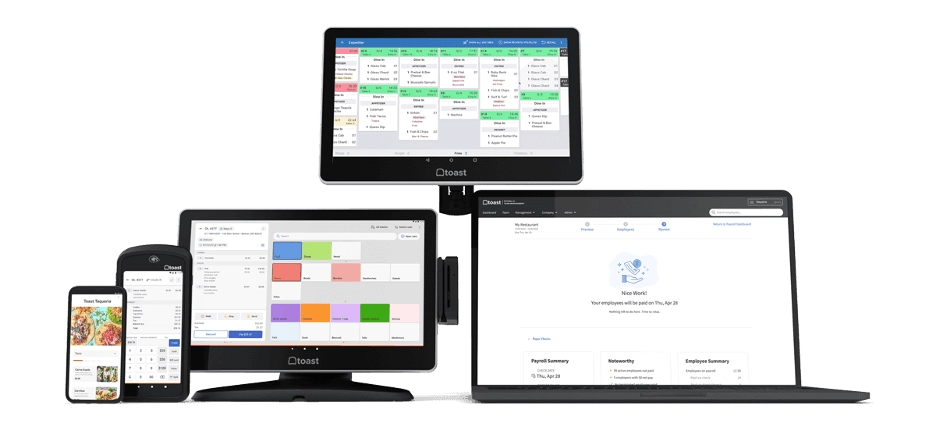
¿Estás buscando el el mejor hardware POS para negocios con ubicaciones remotas? Ya sea que gestiones tiendas rurales, puestos temporales u oficinas en el campo, encontrar equipos POS confiables que funcionen sin problemas a pesar de problemas de conectividad y desafíos ambientales es crucial. Tratar con múltiples sitios, a veces alejados, significa que tu hardware POS debe ser duradero, flexible y fácil de gestionar de forma remota.
En esta publicación, descubrirás exactamente qué características hacen que el hardware POS sea ideal para negocios remotos y cómo elegir soluciones que mantengan tus operaciones funcionando a la perfección, incluso cuando internet o la energía sean inestables. Además, te mostraremos cómo SDLPOS ofrece opciones de hardware personalizadas diseñadas para afrontar estos desafíos únicos de frente.
¡Si quieres sistemas POS que no te fallen y puedan escalar junto con tus ubicaciones remotas en crecimiento, sigue leyendo!
Las necesidades de los negocios en ubicaciones remotas para hardware POS
Gestionar un negocio en una ubicación remota viene con desafíos y demandas únicas, especialmente en lo que respecta al hardware de punto de venta (POS). Pero, ¿qué exactamente califica como una ubicación remota? Por lo general, estas incluyen:
- Tiendas rurales lejos de centros urbanos
- Oficinas en el campo que operan fuera de los principales centros
- Quioscos en parques, centros comerciales o áreas de tránsito
- Puestos temporales en eventos o mercados estacionales
Estas configuraciones a menudo enfrentan obstáculos que las tiendas tradicionales no. Entender estos desafíos es clave para elegir el Hardware POS para negocios con ubicaciones remotas.
Desafíos comunes en ubicaciones remotas
- Conexión a internet poco fiable: Las áreas remotas a menudo tienen redes Wi-Fi o celulares débiles o intermitentes, lo que dificulta el acceso constante en línea.
- Fluctuaciones de energía: Los cortes de energía o las subidas de tensión pueden interrumpir las ventas y dañar los equipos.
- Desgaste físico: Los quioscos al aire libre o los emplazamientos sobre el terreno exponen el hardware al polvo, la humedad, las caídas y las temperaturas extremas, lo que acelera el desgaste.
Por qué es importante un hardware de TPV duradero y adaptable
Los sistemas de TPV minoristas estándar no pueden seguir el ritmo en estos entornos. Las empresas en estos lugares necesitan hardware duradero y adaptable que pueda procesar transacciones de forma fiable a pesar de:
- Problemas de conectividad mediante el soporte de modos de transacción sin conexión
- Inestabilidad de la energía con opciones de alimentación de reserva o componentes de bajo consumo
- Manejo brusco a través de diseño robusto resistente a caídas y al clima
Elegir el equipo de TPV adecuado no se trata solo de tecnología, sino de garantizar la continuidad del negocio y experiencias fluidas para el cliente donde las configuraciones convencionales se quedan cortas. El hardware de TPV duradero adaptado para estas condiciones significa menos interrupciones y menos tiempo de inactividad costoso.
Para las empresas que gestionan múltiples ubicaciones remotas o que planean una expansión, las soluciones de TPV escalables y versátiles son fundamentales para mantener el control y la eficiencia en todos los sitios. Esto se vuelve aún más claro al analizar opciones como TPV basado en la nube para empresas con varias tiendas, diseñado para una gestión perfecta sin importar dónde estén sus tiendas.
Elegir las herramientas adecuadas ayuda a las tiendas remotas a prosperar a pesar de las adversidades, cerrando la brecha entre los desafíos de ubicación y el éxito operativo.
Para obtener más información sobre soluciones robustas y confiables, consulte nuestra guía sobre ordenar hardware de caja registradora con descuentos por volumen.
Características esenciales del hardware POS para ubicaciones remotas
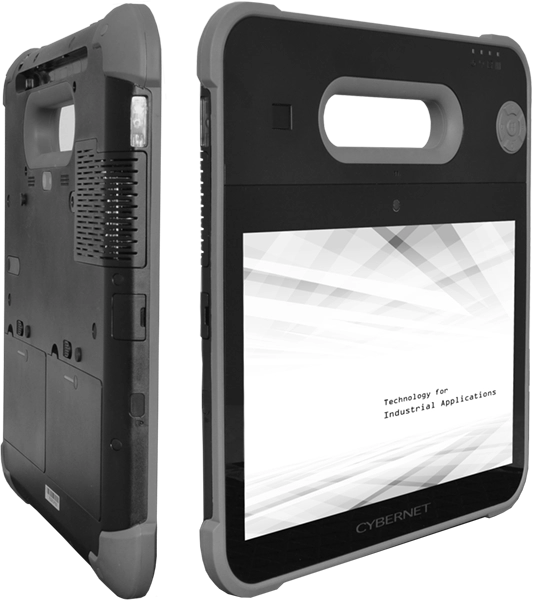
Al gestionar Hardware POS para negocios con ubicaciones remotas, es crucial centrarse en características que aseguren un funcionamiento fluido a pesar de entornos desafiantes. Aquí están los elementos clave que debe tener su sistema POS remoto.
Modo offline y almacenamiento de datos local
Capacidades confiables en modo offline son imprescindibles. Muchos lugares remotos enfrentan acceso intermitente o nulo a internet, por lo que su hardware POS debería:
- Almacenar datos de ventas y transacciones localmente.
- Sincronizar automáticamente con servidores en la nube cuando la conexión esté disponible.
- Prevenir pérdidas de ventas o corrupción de datos durante cortes.
Esto garantiza que sus tiendas remotas sigan operando sin interrupciones y mantengan registros precisos.
Conectividad inalámbrica flexible
Las ubicaciones remotas exigen opciones de conectividad inalámbrica versátiles adaptadas a diferentes infraestructuras:
- Wi-Fi para ubicaciones con redes locales estables.
- Soporte para redes celulares 4G y 5G para cubrir áreas sin internet cableado.
- Bluetooth para emparejamiento rápido y de corto alcance de dispositivos.
Tener múltiples opciones inalámbricas significa que puede desplegar terminales POS dondequiera que opere su negocio remoto sin perder eficiencia.
Respaldo de energía y eficiencia energética
La fiabilidad de la energía suele ser inestable en áreas remotas. Por lo tanto, su hardware POS debería incluir:
- Respaldo de batería o soluciones UPS para mantener los sistemas en funcionamiento durante cortes de energía.
- Componentes de bajo consumo energético que prolongan el tiempo de funcionamiento con batería.
- Accesorios opcionales como cargadores solares pueden mejorar significativamente el tiempo de actividad.
Esto previene tiempos de inactividad en el punto de venta debido a fluctuaciones de energía o apagones.
Diseño resistente y duradero
Las ubicaciones remotas pueden exponer el equipo POS a condiciones adversas como polvo, humedad, cambios de temperatura y impactos físicos. Elija hardware que sea:
- Resistente con carcasa reforzada para soportar caídas y golpes.
- Resistente al agua y al polvo para entornos exteriores o ambientes interiores difíciles.
- Construido para soportar un uso diario continuo sin desgaste rápido.
La durabilidad se traduce directamente en menos reparaciones y reemplazos.
Gestión y monitoreo remoto
Gestionar múltiples terminales POS remotos requiere herramientas para:
- Diagnósticos remotos y monitoreo del sistema para detectar problemas temprano.
- Actualizaciones de software y cambios de configuración enviados de forma remota.
- Alertas en tiempo real para minimizar el tiempo de inactividad.
Estas capacidades reducen la necesidad de visitas técnicas costosas en el sitio y mantienen el hardware funcionando sin problemas.
Integración sencilla con software de punto de venta basado en la nube
Finalmente, tu hardware de punto de venta remoto debería conectarse sin problemas con software POS basado en la nube, permitiendo:
- Informes de ventas centralizados en todas las ubicaciones remotas.
- Gestión de inventario sincronizada en tiempo real.
- Actualizaciones simplificadas y despliegue de funciones a través de la nube.
La integración en la nube aumenta la eficiencia y ofrece escalabilidad a medida que crece tu red de tiendas remotas.
Para obtener más información sobre cómo elegir el hardware adecuado, consulta esta guía sobre cómo elegir hardware de caja registradora. Además, mira las ofertas de SDLPOS en hardware POS en la nube diseñado específicamente para la fiabilidad y monitoreo remoto.
Tipos de hardware de punto de venta adecuados para negocios en ubicaciones remotas
Cuando gestionas tiendas u oficinas en lugares remotos, tener el hardware de punto de venta adecuado marca la diferencia. Aquí tienes un desglose de los mejores Hardware POS para negocios con ubicaciones remotas, diseñados para afrontar desafíos únicos como internet inestable y condiciones adversas.
Terminales POS Móviles
Tabletas y smartphones con lectores de tarjetas son una opción principal para negocios remotos. Son compactos, fáciles de transportar y perfectos para tiendas temporales, quioscos rurales u oficinas en campo. Dado que estos dispositivos suelen contar con capacidades de modo offline, puedes procesar ventas incluso cuando la conectividad se interrumpe, sincronizando más tarde cuando vuelves a estar en línea.
Sistemas POS todo en uno con pantalla táctil
Para instalaciones más permanentes como tiendas rurales u oficinas remotas, sistemas de punto de venta todo en uno con pantalla táctil ofrecen una solución completa para el checkout. Estos sistemas combinan la caja registradora, la pantalla táctil y el terminal de pago en un solo dispositivo elegante. Busca versiones con opciones de conectividad inalámbrica como Wi-Fi, 4G o incluso 5G para mantenerse conectado en áreas con internet inestable.
Escáneres de código de barras portátiles e impresoras de recibos
Estos accesorios añaden flexibilidad a su configuración de punto de venta. Portátiles lectores de código de barras acelera los pagos, mientras impresoras de recibos móviles le permiten proporcionar a los clientes prueba de compra en cualquier lugar. Con batería y compacto, son esenciales para quioscos y puntos de venta móviles.
Cajones de efectivo resistentes y periféricos
Los lugares remotos a menudo enfrentan ambientes adversos—polvo, humedad y riesgo de desgaste físico. Por eso, invertir en cajones de efectivo resistentes y periféricos es clave. Estas unidades están construidas para soportar caídas, derrames y cambios de temperatura, manteniendo el efectivo y objetos de valor seguros.
Accesorios opcionales para la fiabilidad eléctrica
Obtener datos de ventas precisos y continuos depende de la disponibilidad de energía. Para lugares remotos con frecuentes cortes o sin una fuente de energía confiable, cargadores solares y baterías externas se convierten en imprescindibles. Mantienen su hardware de punto de venta funcionando sin problemas, prolongando la vida de la batería sin importar dónde esté su negocio.
En resumen, combinando dispositivos móviles y resistentes de punto de venta adaptados para uso remoto, asegura que su negocio permanezca operativo y orientado al cliente, independientemente de los desafíos que presente su ubicación. Esta configuración soporta operaciones de venta confiables y flexibles para las diversas necesidades de las empresas remotas en España y en todos los países.
Soporte del proveedor y escalabilidad para sistemas de punto de venta en ubicaciones remotas
Al gestionar Hardware POS para negocios con ubicaciones remotas, contar con un soporte confiable del proveedor es fundamental. Los sitios remotos como tiendas rurales u oficinas en campo a menudo enfrentan problemas únicos—ya sea fallos de hardware, actualizaciones de software o problemas de conectividad—que requieren atención rápida.
Por qué importa un soporte al cliente confiable
- Solución rápida de problemas: En ubicaciones remotas, esperar días por soporte no es una opción. Su proveedor debe ofrecer ayuda rápida y confiable por teléfono, chat o acceso remoto.
- Mantenimiento de hardware: El equipo puede sufrir daños por fluctuaciones de energía y desgaste físico. Un proveedor que ofrece mantenimiento regular o servicios de reparación rápida mantiene su sistema POS funcionando sin problemas.
- Capacitación y recursos: El personal en puntos de venta remotos puede no ser expertos en tecnología. La capacitación de su proveedor de POS asegura que los equipos puedan operar el sistema de manera eficiente y resolver problemas menores por sí mismos.
Escalabilidad para las necesidades de POS en ubicaciones remotas en crecimiento
A medida que su negocio se expande y añade más tiendas o quioscos remotos, su hardware POS debe crecer con usted. La escalabilidad significa:
- Opciones de hardware modular: Comience con dispositivos esenciales y agregue periféricos—como escáneres de código de barras o impresoras de recibos—sin reemplazar todo el sistema.
- Integración Perfecta: Sus sistemas POS deben conectarse fácilmente a una plataforma central basada en la nube, para que gestionar múltiples ubicaciones sea sin complicaciones.
- Licencias flexibles: Los proveedores que ofrecen planes de software escalables le permiten ajustar según el número de terminales y usuarios sin sorpresas en los costos.
Políticas de garantía y reemplazo
- Garantía integral: Los entornos remotos pueden ser duros para el hardware. Una garantía sólida cubre defectos y daños accidentales, minimizando gastos inesperados.
- Servicios rápidos de reemplazo: Si un dispositivo falla, un reemplazo rápido garantiza un tiempo de inactividad mínimo, crucial para mantener operativas las tiendas remotas.
- Monitoreo Proactivo: Algunos proveedores ofrecen herramientas de monitoreo remoto que predicen problemas de hardware antes de que causen fallos, añadiendo una capa adicional de protección.
Elegir hardware POS de un proveedor que priorice un soporte sólido, escalabilidad y políticas de garantía claras es clave para operar un sistema POS fluido y confiable en todas tus ubicaciones remotas. Esto reduce el tiempo de inactividad, disminuye los costos de mantenimiento y apoya el crecimiento — exactamente lo que las empresas remotas necesitan para mantenerse competitivas.
Soluciones de Hardware POS SDLPOS para Ubicaciones Remotas
Cuando se trata de Hardware POS para negocios con ubicaciones remotas, SDLPOS ofrece una gama sólida diseñada para afrontar los desafíos únicos de tiendas rurales, comercios temporales y oficinas en campo. Sus productos se centran en durabilidad, conectividad y facilidad de uso, asegurando que tu negocio permanezca en funcionamiento sin importar dónde operes.
Hardware POS Duradero y Conectado
SDLPOS proporciona terminales POS robustos diseñado para resistir fluctuaciones de energía, desgaste físico y condiciones variables de red. Estos dispositivos cuentan con capacidades offline y almacenamiento de datos local, por lo que las ventas no se detienen incluso si la internet falla.
El hardware habilitado para la nube de SDLPOS permite monitoreo y gestión centralizados, facilitando la supervisión de múltiples ubicaciones remotas desde un solo lugar. Esta función soporta opciones de conectividad inalámbrica como Wi-Fi y 4G, ideal para configuraciones rurales o de difícil cableado.
Ejemplos Reales de Empresas Remotas
Muchos de los clientes de SDLPOS gestionan negocios en áreas donde Internet y energía confiables son escasos. Estos negocios dependen de equipos SDLPOS para procesar transacciones sin problemas, mantener la integridad de los datos y reducir el tiempo de inactividad. Los estudios de caso muestran mejoras en la velocidad de pago y el seguimiento del inventario, incluso en entornos remotos desafiantes.
Servicios de soporte y garantía confiables
SDLPOS entiende que los negocios remotos necesitan soporte rápido y confiable. Su equipo ofrece soporte al cliente adaptado para ubicaciones remotas, reparación rápida de hardware y cobertura de garantía sencilla. Esto asegura que su sistema POS esté siempre listo, minimizando interrupciones costosas en el negocio.
Por qué elegir SDLPOS para sistemas POS en ubicaciones remotas
- Dispositivos resistentes y duraderos construidos para durar en entornos difíciles
- Modo offline y almacenamiento local para ventas ininterrumpidas
- Opciones habilitadas para la nube para una gestión centralizada sencilla
- Conectividad inalámbrica para una implementación flexible
- Servicios de soporte y garantía sólidos enfocados en negocios remotos
Si su negocio opera en una ubicación remota, SDLPOS proporciona el hardware y los servicios en los que puede confiar todos los días.
Cómo elegir el hardware POS adecuado para su negocio remoto
Seleccionar el Hardware POS para ubicaciones remotas implica una revisión cuidadosa de las necesidades específicas de su negocio y su entorno. Aquí le mostramos cómo asegurarse de elegir un sistema que funcione bien, dure mucho y se adapte a su configuración.
Evalúa la ubicación y conectividad de tu negocio
- Entiende tu ubicación: ¿Tu sitio remoto es rural, una tienda temporal o una oficina en campo? Cada uno tiene condiciones únicas como clima, fiabilidad de la energía y restricciones de espacio.
- Verifica las opciones de internet: Los negocios remotos a menudo enfrentan internet poco fiable. Busca soluciones POS offline o hardware con opciones fuertes conectividad inalámbrica (4G, 5G, Wi-Fi, Bluetooth) que mantengan tu sistema en funcionamiento incluso si la conexión se cae.
- Considera la disponibilidad de energía: Si tu ubicación tiene fluctuaciones frecuentes de energía, prioriza dispositivos POS con respaldo de energía o componentes energéticamente eficientes que reduzcan el tiempo de inactividad.
Equilibra durabilidad y costo
- Busca terminales POS robustas diseñadas para soportar el desgaste físico, polvo y cambios de temperatura comunes en ubicaciones remotas.
- Evita escatimar en durabilidad—el hardware barato puede fallar rápidamente, costando más en reemplazos y ventas perdidas.
- Al mismo tiempo, evalúa las características operativas que realmente necesitas para no pagar por extras que no usarás.
Asegura una integración de software sin problemas
- Elige hardware que se integre fácilmente con tu ecosistema de software actual o planificado, especialmente si utilizas sistemas POS basados en la nube para gestionar múltiples tiendas remotas.
- La integración es importante para una sincronización de datos fluida, gestión de inventario y reportes centralizados sin trabajo manual adicional.
Busca asesoramiento experto y prueba productos
- No dudes en consultar a los proveedores o consultores de POS sobre el rendimiento de su hardware en entornos remotos. Las ideas del mundo real ayudan a evitar sorpresas.
- Siempre que sea posible, solicita pruebas o demostraciones del producto. La experiencia práctica muestra si el dispositivo realmente se ajusta a tu flujo de trabajo y entorno empresarial.
de Puntos Clave
- Evalúa los desafíos de ubicación y conectividad desde el principio
- Prioriza hardware POS duradero y resistente, adecuado para uso remoto
- Combina características con tus necesidades operativas y presupuesto
- Confirma una integración completa del software para una gestión fluida
- Confía en la orientación de expertos y prueba antes de comprar
Elegir el hardware POS adecuado adaptado a tu negocio remoto es una de las inversiones más inteligentes que puedes hacer. Mantendrá tu sistema de caja funcionando sin problemas, apoyará el crecimiento del negocio en diferentes ubicaciones y evitará dolores de cabeza en el futuro.


