







¿Cómo funcionan las cajas registradoras? Explicado para negocios con funciones POS


¿Tienes curiosidad por cómo funcionan las cajas registradoras ¿Y por qué son esenciales para tu negocio? Entender los entresijos de tecnología de caja registradora puede agilizar tus operaciones y aumentar la eficiencia.
Como propietario de un negocio, sé que elegir el caja registradora or sistema POS de Walmart es fundamental para transacciones fluidas y clientes satisfechos. En SDLPOS, hemos visto de primera mano cómo el hardware adecuado transforma las experiencias minoristas.
En esta guía, descubrirás la mecánica detrás de cajas registradoras tradicionales y electrónicas, el poder de lo moderno sistemas POS, y consejos para elegir la solución perfecta para tu negocio.
¡Comencemos!
Breve historia de las cajas registradoras y su evolución
Entender cómo funcionan las cajas registradoras comienza mirando sus orígenes y su desarrollo a lo largo del tiempo. Las cajas registradoras han avanzado mucho desde dispositivos mecánicos simples hasta las avanzadas de hoy en día sistemas POS.
Orígenes de las cajas registradoras
La primera caja registradora fue inventada a finales del siglo XIX por James Ritty, un propietario de un salón de juegos que quería prevenir el robo por parte de los empleados y llevar un mejor control de las ventas. Este dispositivo temprano era puramente mecánico. Registraba las transacciones mediante medios físicos — se pulsaban teclas para ingresar los importes, y la caja se abría después de cada venta. Estas cajas registradoras mecánicas tradicionales se hicieron rápidamente populares en los negocios minoristas por su capacidad de ofrecer transparencia y proteger el efectivo.
Evolución de las cajas registradoras mecánicas a electrónicas
Las cajas mecánicas permanecieron dominantes durante décadas, pero tenían limitaciones en velocidad y flexibilidad. A mediados del siglo XX, la aparición de las cajas registradoras electrónicas (ECRs) revolucionó las transacciones minoristas. Estos nuevos sistemas reemplazaron engranajes y palancas por componentes electrónicos, permitiendo:
- Programar más fácilmente precios y tasas de impuestos
- Integración con escáneres de código de barras y lectores de tarjetas
- Mejor seguimiento y almacenamiento de datos de ventas
Las cajas registradoras electrónicas hicieron que las operaciones diarias fueran más eficientes y sentaron las bases para futuras innovaciones.
El auge de los sistemas POS
Hoy en día, el crecimiento de los sistemas de punto de venta (POS) impulsados por software representa la última etapa en la tecnología de cajas registradoras. Los sistemas POS son más que simples cajas registradoras: combinan hardware y software para gestionar ventas, inventario, datos de clientes y procesamiento de pagos en una sola plataforma. Gracias a conectividad en la nube y análisis en tiempo real, los sistemas POS modernos ofrecen a las empresas herramientas poderosas para aumentar la precisión y mejorar la experiencia del cliente.
In , las cajas registradoras evolucionaron de máquinas mecánicas simples a sistemas POS complejos e integrados. Esta evolución refleja el cambio en el mundo del comercio minorista hacia la eficiencia, precisión y gestión digital—necesidades fundamentales de las empresas actuales en toda España.
Cómo funcionan las cajas registradoras mecánicas tradicionales
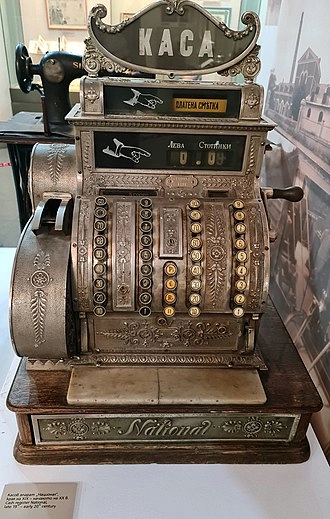
Las cajas registradoras mecánicas fueron la columna vertebral de las transacciones minoristas y de servicios mucho antes de que la tecnología digital tomara el control. Comprender cómo funcionan proporciona una visión del desarrollo de la tecnología actual de cajas registradoras.
Componentes básicos de las cajas registradoras mecánicas
Una caja registradora mecánica tradicional incluye varias partes clave:
- Teclas o botones: Cada uno representa un precio o categoría de artículo para ingresar el monto de la venta.
- Cajón de efectivo: Donde se almacenan de forma segura el efectivo y las monedas durante las transacciones.
- Impresora de recibos: Generalmente produce un registro físico en papel de las transacciones (en modelos posteriores).
- Ventana de visualización: Muestra el monto total de la venta al cajero y al cliente.
Proceso paso a paso de la transacción de venta
- Precio de entrada o artículo: El cajero presiona las teclas correspondientes al precio o producto.
- Calcular total: Engranajes mecánicos dentro de la caja registradora suman los precios de los artículos a medida que se presionan las teclas.
- Total de la caja registradora: Una vez que se ingresa la venta, tirar de una palanca o presionar una tecla de total bloquea la cantidad.
- Abrir caja registradora: La caja registradora desbloquea la caja para la recolección de pagos.
- Imprimir recibo: Los modelos mecánicos tempranos pueden incluir impresión de recibos; los modelos posteriores añaden opciones de impresión más detalladas.
- Registrar la venta: El mecanismo interno registra la transacción y actualiza los totales mostrados en la caja registradora.
Cómo las cajas registradoras mecánicas calculan el costo total y registran las ventas
Las cajas mecánicas dependen de engranajes entrelazados complejos y palancas para calcular los totales. Cada pulsación de tecla activa un movimiento de engranaje que suma ese valor al contador total. Cuando se finaliza la venta:
- La máquina mecánicamente bloquea la cifra total de la venta.
- It incrementa el total de ventas diarias de la caja, actualizando el total acumulado de la máquina.
- Algunos modelos incluyen un contador de transacciones, llevando un registro del número de ventas.
- El efectivo se almacena físicamente hasta que se cierra la caja y comienza la siguiente venta.
Este sistema no almacena información detallada de los artículos como las cajas registradoras electrónicas modernas, pero es confiable para registrar los totales diarios de ventas y gestionar el flujo de efectivo.
Las cajas registradoras mecánicas son máquinas simples construidas para la durabilidad y un registro de ventas directo. Aunque carecen de funciones digitales, sentaron las bases para la tecnología moderna de cajas registradoras, especialmente en la gestión segura del efectivo y el cálculo preciso de las ventas diarias.
La funcionalidad de las cajas registradoras electrónicas
Las cajas registradoras electrónicas (ECRs) son un gran avance respecto a los modelos mecánicos tradicionales. A diferencia de las cajas mecánicas, las versiones electrónicas dependen de software para gestionar las transacciones, haciéndolas más rápidas y flexibles para el entorno minorista actual.
Características en comparación con las cajas registradoras mecánicas
- Pantalla digital y botones táctiles reemplazan las teclas físicas, permitiendo una entrada y navegación más fáciles.
- Cálculos automatizados como impuestos, descuentos y cambio reducen errores humanos.
- Capacidad para almacenan múltiples códigos de precios y artículos, lo que hace que las transacciones sean más fluidas y el seguimiento del inventario más preciso.
- Algunos modelos incluyen recibos personalizables con logotipos, promociones o políticas de devolución, mejorando la comunicación con el cliente.
Integración con escáneres de código de barras, lectores de tarjetas y impresoras
Una ventaja importante es la capacidad de conectar con otros dispositivos:
- Los escáneres de código de barras aceleran el proceso de pago al leer automáticamente los precios de los artículos, eliminando errores de entrada manual.
- Los lectores de tarjetas permiten un procesamiento de pagos seguro y rápido para tarjetas de crédito, débito y monederos móviles, adaptándose a los hábitos modernos de los consumidores.
- Las impresoras de recibos producen recibos claros y rápidos y también pueden imprimir informes de ventas o resúmenes de turno para facilitar la contabilidad.
Cómo el software gestiona los datos de ventas y el inventario
Las cajas registradoras electrónicas utilizan sistemas de software integrados para:
- Rastrear las ventas en tiempo real, proporcionando a los propietarios de negocios información detallada sobre los ingresos diarios.
- Actualizar automáticamente el inventario a medida que se venden los artículos, reduciendo el riesgo de agotamientos o excesos de stock.
- Generar informes sobre tendencias de ventas, productos más vendidos y rendimiento de los empleados.
- Esta gestión de datos ayuda a tomar mejores decisiones, ahorrando tiempo y dinero a las empresas.
Para las empresas en España, estas funciones ayudan a cumplir con las expectativas de los clientes de un servicio rápido y confiable, manteniendo las operaciones eficientes. Las cajas registradoras electrónicas cierran la brecha entre la simple gestión de efectivo y los sistemas de punto de venta completos, convirtiéndolas en una opción práctica para muchos minoristas pequeños y medianos.
Los sistemas POS modernos y sus ventajas
Las sistemas POS van mucho más allá de simplemente registrar ventas. Estos sistemas de caja registradora impulsados por software conéctese directamente a la nube, permitiendo a los propietarios de negocios gestionar sus operaciones en cualquier lugar y en cualquier momento. Esta conectividad en la nube significa que sus datos de ventas, inventario y información de clientes siempre están respaldados y accesibles desde cualquier dispositivo.
Gestión de Inventario e Informes de Ventas
Una de las mayores ventajas de las modernas sistemas POS is gestión de inventario en tiempo real. Al escanear artículos y procesar ventas, el sistema actualiza automáticamente los niveles de stock. Esto ayuda a prevenir ventas excesivas y facilita la reposición. Además, detalles informes y análisis de ventas sin problemas le brindan ideas claras sobre qué se está vendiendo, cuándo y a quién — información clave para aumentar la rentabilidad.
Múltiples Opciones de Procesamiento de Pagos
Los sistemas POS modernos manejan una variedad de pagos—efectivo, tarjetas de crédito/débito y pagos móviles como Apple Pay o Google Pay. Esta flexibilidad le permite atender a más clientes de manera fluida sin necesidad de equipo adicional. Muchos sistemas también soportan pagos sin contacto y tarjetas con chip, mejorando la seguridad y la rapidez en el pago.
Mayor Precisión y Eficiencia
Al integrar funciones como escáneres de código de barras y cálculos automáticos de precios, el software de caja moderna reduce errores humanos y acelera los tiempos de pago. Esto aumento de precisión ayuda a prevenir pérdidas por errores y mejora la experiencia del cliente.
Por qué esto es importante para su negocio
Usar un sistema POS moderno significa obtener una herramienta de negocio completa, no solo una caja registradora. Ya sea que dirija una tienda minorista, un restaurante o un negocio de servicios, estos sistemas optimizan tareas diarias y proporcionan datos accionables para hacer crecer su negocio con confianza. Para negocios locales en toda España, invertir en la configuración adecuada de POS puede marcar una diferencia real en la gestión efectiva de sus ventas y operaciones de caja.
Usos prácticos de las cajas registradoras en diferentes tipos de negocios
Las cajas registradoras no son universales. Diferentes negocios necesitan tecnología de caja registradora adaptada a sus operaciones diarias. Ya sea que dirija una tienda minorista, un restaurante o brinde servicios, entender cómo se adaptan las cajas registradoras puede ayudarle a elegir el sistema adecuado para mantener las operaciones sin problemas.
Tiendas minoristas
En el comercio minorista, cajas registradoras son la columna vertebral de cada transacción de venta. Manejan todo, desde escanear códigos de barras hasta gestionar descuentos y devoluciones. Las cajas registradoras minoristas a menudo se integran con sistemas de inventario para rastrear niveles de stock en tiempo real. Esto ayuda a evitar ventas excesivas y facilita la reposición. Funciones como búsqueda de artículos y anulación de precios son esenciales en entornos minoristas para atender rápidamente las necesidades del cliente.
Restaurantes y servicios de comida
Los restaurantes necesitan un sistema de caja registradora que pueda gestionar pedidos complejos—el ritmo rápido requiere velocidad y precisión. Cajas registradoras electrónicas y sistemas POS diseñadas para restaurantes, soportan gestión de mesas, división de cuentas y propinas. También se conectan con impresoras de cocina o muestran los pedidos al personal de cocina, agilizando el procesamiento de pedidos. Estas cajas se adaptan ofreciendo funciones específicas del menú y múltiples opciones de pago, incluyendo efectivo, tarjeta y pagos móviles.
Negocios de servicios
Para proveedores de servicios como salones de belleza, talleres de reparación o consultorías, las cajas registradoras ayudan en la reserva de citas, facturación y seguimiento de pagos. Una caja registradora en negocios de servicios a menudo se integra con software de citas y gestiona diferentes tasas de impuestos o cargos por servicios. Esto ayuda a las empresas a mantener registros de transacciones profesionales y a mejorar la experiencia del cliente.
Cómo se adaptan las cajas registradoras a las necesidades del negocio
- Teclas y menús personalizables para acceso rápido a artículos o servicios comunes
- Integración con plataformas de pago para soportar diversos tipos de pago (efectivo, tarjetas, pago móvil)
- Seguimiento de inventario enlazado directamente con los datos de ventas
- Funciones de reporte que ofrecen información sobre tendencias de ventas y rendimiento de empleados
- Soporte para funciones específicas del negocio como programas de fidelidad o tarjetas de regalo
Si buscas ver cómo funcionan las cajas registradoras en entornos específicos o necesitas ayuda para elegir el sistema adecuado, visita Cajas registradoras para pequeñas empresas. Es importante adaptar la configuración de tu caja registradora a lo que mejor se ajuste a tu tipo de negocio para aumentar la eficiencia y la satisfacción del cliente.
Cómo elegir la caja registradora adecuada para tu negocio
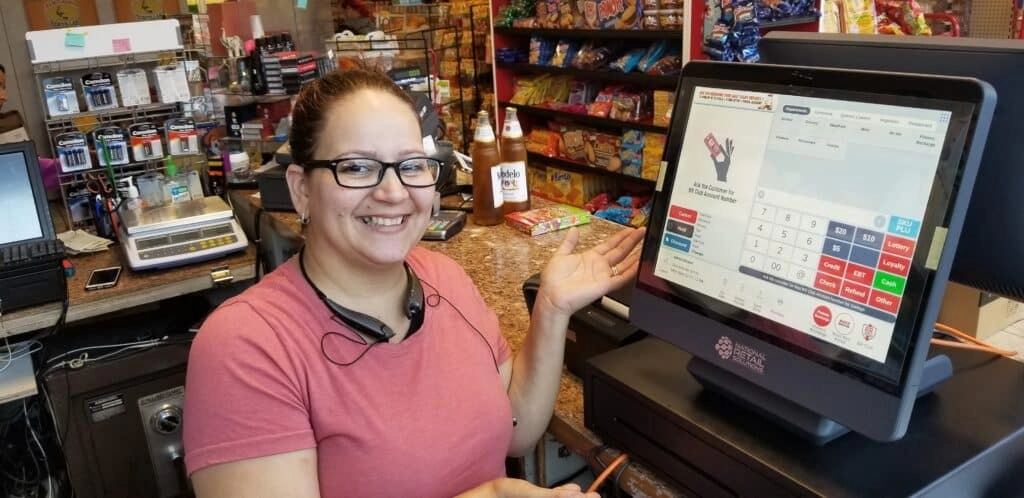
Seleccionar el caja registradora or sistema POS de Walmart es crucial para gestionar las ventas de manera fluida y mantener tu negocio organizado. Aquí te mostramos cómo encontrar la que se adapte a tus necesidades.
Considere el tamaño de su negocio y el volumen de transacciones
- Tamaño del Negocio: ¿Tu tienda es una pequeña boutique, un restaurante concurrido o una cadena minorista en crecimiento? Los negocios más pequeños pueden necesitar solo una caja registradora electrónica sencilla, mientras que las operaciones más grandes se benefician de sistemas POS completos.
- Volumen de transacciones: Un alto volumen de transacciones significa que necesitas equipos diseñados para manejar la velocidad y la fiabilidad. Si procesas muchas ventas diarias, busca cajas registradoras con procesamiento rápido y durabilidad sólida.
Comprender los Tipos de Pago que Necesitas Aceptar
- Efectivo y Tarjeta: La mayoría de los sistemas soportan efectivo y tarjetas de crédito/débito por defecto.
- Pagos móviles: Los clientes cada vez prefieren más Apple Pay, Google Pay u otras opciones sin contacto. Asegúrate de que tu sistema soporte estas opciones para facilitar los pagos.
- Tarjetas de Regalo y Programas de Fidelidad: Si tu negocio utiliza estos, elige un software con soporte integrado.
Características a Buscar en Cajeros y Sistemas POS
- Gestión de Inventario: Lleva un control automático de los niveles de stock.
- Informes de ventas y análisis: Ayuda a entender el comportamiento del cliente y las tendencias de ventas.
- Capacidades de integración: Funciona bien con escáneres de código de barras, impresoras de recibos y terminales de pago.
- Interfaz fácil de usar: Rápido de aprender y fácil de operar durante las horas punta.
- Características de Seguridad: Protege tus datos de ventas y la información de los clientes.
- Personalización: Se adapta a las necesidades específicas de tu negocio, como mesas en restaurantes o citas de servicio.
Cómo SDLPOS Puede Ayudarte a Elegir el Mejor Equipo
En SDLPOS, entendemos lo importante que es contar con el hardware adecuado para cajeros y sistemas POS.
- Consultas personalizadas basadas en el tamaño de tu negocio y métodos de pago.
- Una amplia gama de cajeros y sistemas POS modernos diseñados para diversas industrias.
- Asesoramiento sobre funciones que mejoran la precisión en ventas, reducen los tiempos de espera y simplifican la gestión de inventario.
Cuando estés listo para seleccionar tu nuevo sistema, SDLPOS está aquí para ofrecerte la tecnología más avanzada adaptada a las necesidades de tu negocio.
Para obtener consejos más detallados sobre el uso y la selección de cajeros, consulta Cómo Usar un Cajero y explora nuestras opciones completas de hardware en Cajero para Negocios.
Consejos de mantenimiento y resolución de problemas para cajeros
Mantener su caja registradora en buen estado es clave para operaciones de venta fluidas. Ya sea que utilice un caja registradora mecánica o un caja registradora electrónica, el mantenimiento regular ayuda a evitar tiempos de inactividad y reparaciones costosas. Aquí hay una guía sencilla para mantener su sistema en funcionamiento y cuándo solicitar ayuda profesional de SDLPOS.
Mantenimiento regular para cajas registradoras mecánicas y electrónicas
Limpie regularmente el cajón y las teclas
El polvo y los residuos pueden atascar las partes mecánicas o hacer que las teclas se queden pegadas. Use un paño suave y un limpiador suave. Evite productos químicos agresivos que puedan dañar la superficie o los componentes internos.
Verifique los rollos de papel y las cabezas de impresión
Para cajas con impresoras de recibos, asegúrese de reemplazar los rollos de papel antes de que se agoten. Limpie ocasionalmente las cabezas de la impresora para prevenir manchas o impresiones desvaídas.
Actualice el software de las cajas registradoras electrónicas y sistemas POS
Mantenga su software actualizado para beneficiarse de correcciones de errores, parches de seguridad y nuevas funciones que ayudan en el seguimiento de inventario y ventas.
Inspeccionar cables y conexiones
Los cables sueltos o dañados pueden causar interrupciones. Verifique los cables de alimentación, conexiones USB y dispositivos periféricos como escáneres de código de barras y lectores de tarjetas regularmente.
Pruebe las funciones clave y las pantallas
Asegúrese de que todos los botones registren correctamente y que las pantallas muestren información correcta. Aborde rápidamente cualquier tecla que no responda o comportamiento extraño en la pantalla.
Problemas comunes con la caja registradora y soluciones rápidas
La caja registradora no se abre
Intente una liberación manual (consulte el manual de su modelo). Para cajas electrónicas, asegúrese de que la conexión al cajón sea segura y que el software active la señal de apertura.
El recibo no se imprime o se imprime débilmente
Reemplace el rollo de papel y limpie la cabeza de la impresora. Además, verifique si hay atascos de papel dentro del mecanismo de la impresora.
Las teclas se quedan pegadas o no registran
Limpie la zona del teclado y elimine polvo o residuos pegajosos. Para cajas mecánicas, lubrique las partes móviles con precaución—solo use productos recomendados por el fabricante.
Fallos en el software o congelamientos
Reinicie el dispositivo. Si el problema persiste, verifique si hay actualizaciones de software o archivos de datos corruptos. Hacer copias de seguridad regularmente puede prevenir pérdidas durante problemas.
Cuándo buscar apoyo profesional de SDLPOS
Fallo de hardware o problemas mecánicos complejos
Si tu caja registradora tiene teclas rotas, problemas en la caja o fallos en la impresora que la solución básica no puede arreglar, es momento de buscar ayuda experta.
Problemas de software y red que van más allá de las soluciones básicas
Problemas como bloqueos persistentes del sistema, errores en los datos de ventas o fallos de integración con escáneres de código de barras y lectores de tarjetas requieren diagnóstico profesional.
Actualizaciones y optimización del sistema
SDLPOS puede ayudarte a actualizar tu hardware o migrar a un sistema POS moderno, asegurando operaciones sin interrupciones y mejor gestión de datos.
Revisiones profesionales de rutina
Programar mantenimiento experto puede prolongar la vida útil de tu caja registradora y detectar posibles problemas antes de que interrumpan el negocio.
Mantener tu caja registradora bien cuidada minimiza el tiempo de inactividad y asegura que tu proceso de ventas sea fluido. La limpieza regular, las actualizaciones oportunas y la resolución rápida de problemas marcan una gran diferencia. Y recuerda, SDLPOS está aquí con un servicio confiable y soporte experto cuando más lo necesitas.
Tendencias futuras en la tecnología de cajas registradoras
POS móvil y mayor flexibilidad
El futuro de tecnología de caja registradora se trata de movilidad y flexibilidad. Los sistemas POS móviles están convirtiéndose en esenciales para negocios que necesitan procesar ventas en cualquier lugar, ya sea un camión de comida, una tienda temporal o un piso de ventas concurrido. Estos sistemas funcionan en smartphones o tablets, conectándose de forma inalámbrica a impresoras y procesadores de pago, haciendo que el proceso de pago sea rápido y sencillo.
- Beneficios del POS móvil:
- Ventas en cualquier lugar y en cualquier momento
- Costes iniciales más bajos en comparación con terminales fijos
- Fácil de actualizar y ampliar con aplicaciones
Integración de IA para operaciones comerciales más inteligentes
La inteligencia artificial (IA) está entrando en el mundo de las cajas registradoras y sistemas POS. La IA puede analizar patrones de ventas, predecir necesidades de inventario y sugerir estrategias de precios. Esto ayuda a las empresas a adelantarse mejorando la gestión de stock y ofreciendo promociones personalizadas.
- La IA en las cajas registradoras ayuda con:
- Seguimiento automatizado de inventario
- Experiencias personalizadas para el cliente
- Detección de fraudes y previsión de ventas
Seguridad mejorada en los pagos
Con el auge de los pagos digitales, seguridad en pagos es más crítico que nunca. Las futuras cajas registradoras incorporarán cifrado avanzado, autenticación biométrica y cumplimiento con los estándares de pago más recientes como EMV y PCI DSS. Esto significa transacciones más seguras tanto para las empresas como para los clientes.
- Características clave de seguridad:
- Manejo cifrado de datos de tarjetas
- Tokenización para pagos móviles
- Copias de seguridad en la nube seguras para datos de ventas
El papel de las cajas registradoras en un entorno minorista digital
Incluso a medida que el comercio minorista se desplaza hacia el comercio electrónico y las ventas omnicanal, las cajas registradoras siguen siendo cruciales. Las cajas registradoras modernas y los sistemas POS actúan como centros neurálgicos que conectan las ventas en tienda, los pedidos en línea y la gestión de inventario. Esta integración proporciona experiencias sin fisuras para los clientes y datos más claros para los propietarios de negocios.
- Cómo encajan las cajas registradoras modernas:
- Sincronizar ventas en línea y fuera de línea
- Actualizaciones de inventario en tiempo real
- Informes detallados de ventas y análisis
El futuro apunta a que las cajas registradoras evolucionen hacia sistemas inteligentes y conectados que hacen mucho más que simplemente registrar ventas. Para las empresas en España que buscan mantenerse competitivas, adoptar POS móvil, integración de IA y mayor seguridad será clave. Mantenerse al día con estas tendencias garantiza operaciones más fluidas y una mejor confianza del cliente en un panorama minorista cada vez más digital.


