







Cómo Elegir el Hardware de Caja Registradora para el Éxito de Tu Negocio

Elegir el el hardware de caja registradora adecuado puede cambiar el juego para tu negocio. Ya sea que dirijas una tienda minorista concurrida o un restaurante de ritmo rápido, contar con equipos confiables y eficientes no es solo algo deseable, sino imprescindible. Pero con tantas opciones disponibles, ¿cómo eliges la configuración perfecta que se adapte a tus necesidades y presupuesto?
En esta guía, descubrirás cómo elegir hardware de caja registradora que coincide con el tamaño de tu negocio, la velocidad de las transacciones y el espacio. Desde cajones de dinero hasta escáneres de código de barras, desglosaremos los componentes esenciales y lo que más importa al tomar tu decisión. Además, obtendrás conocimientos expertos sobre compatibilidad con el software POS y cómo preparar tu compra para el futuro.
Si estás listo para aumentar la productividad, simplificar el proceso de pago y ofrecer una experiencia más fluida a los clientes, estás en el lugar correcto. Vamos a profundizar en todo lo que necesitas saber antes de comprar tu próximo sistema de hardware de caja registradora.
Componentes del Hardware de Caja Registradora Partes Esenciales Explicadas
Cuando eliges hardware de caja registradora para tu negocio, entender el componente esencial es el primer paso. Estas piezas trabajan juntas de manera perfecta dentro de un sistema POS de Walmart para garantizar transacciones rápidas y sin problemas que mantengan a tus clientes satisfechos y tus operaciones eficientes.
Partes Esenciales del Hardware para Cajas Registradoras
Cajón de efectivo
La columna vertebral de tu caja registradora, el cajón de dinero almacena el dinero de forma segura. Busca cajones de dinero duraderos con opciones de cerradura y mecanismos de apertura suaves que se integren con tu POS para acceso automático durante las transacciones.
Impresora de Recibos
Un elemento imprescindible para proporcionar recibos a los clientes y registros de transacciones. Las opciones van desde impresoras térmicas para una impresión rápida y silenciosa hasta impresoras de impacto para recibos de múltiples copias. Asegúrate de que la compatibilidad de la impresora de recibos con tu software POS sea adecuada para evitar fallos.
Escáner de Código de Barras
Acelera el proceso de pago escaneando los códigos de producto, algo fundamental para minoristas y supermercados. Elige un escáner que soporte los tipos de código de barras habituales y ofrezca alta precisión en el escaneo, además de un diseño ergonómico para la comodidad del empleado.
Monitor táctil
Las cajas registradoras modernas suelen utilizar pantallas táctiles para una navegación rápida y reducir el uso del teclado. A monitor táctil sensible mejora la facilidad de uso, acelerando las transacciones y reduciendo el tiempo de formación.
Teclado
Aunque las pantallas táctiles son populares, muchas configuraciones incluyen un teclado físico para entrada manual, especialmente útil en restaurantes o negocios de servicios donde se necesitan escribir pedidos personalizados.
Periféricos opcionales que mejoran la eficiencia
Dependiendo de las necesidades de su negocio, agregar estos periféricos puede agilizar las operaciones y mejorar la experiencia del cliente:
Pantalla para clientes
Muestra los detalles de la transacción a los clientes en tiempo real, generando confianza y reduciendo errores.
Balanza
Esencial para negocios de alimentación y supermercados, las balanzas integradas pesan automáticamente los productos y envían los datos al TPV.
Terminales de pago
Lectores de tarjetas integrados o independientes que aceptan pagos con tarjeta de crédito, débito y móvil, todos con seguridad encriptada para mantener las transacciones seguras.
Cómo trabajan juntos los componentes de hardware en un sistema de TPV
Cada pieza de hardware se comunica a través del software de su sistema de TPV para crear una experiencia de pago unificada:
- Escanear un código de barras hace que el sistema muestre la información y el precio del artículo.
- La pantalla táctil o el teclado introducen pedidos personalizados o descuentos.
- La caja registradora se abre automáticamente cuando se procesa un pago en efectivo.
- La impresora de tickets imprime la transacción al instante.
- Los terminales de pago procesan de forma segura pagos con tarjeta o sin contacto, mientras que el TPV actualiza el inventario en tiempo real.
Una integración fluida entre los componentes es clave para transacciones rápidas, un seguimiento preciso del inventario y reportes de ventas fiables. Al seleccionar hardware, es importante considerar cómo cada elemento se ajusta al flujo único de su negocio para evitar problemas de compatibilidad en el futuro.
Para más información sobre los conceptos básicos de la caja registradora, consulta nuestra guía sobre sistemas de caja registradora y POS.
Evaluación de las necesidades de tu negocio para el hardware de caja registradora

Antes de elegir hardware de caja registradora, es fundamental entender las necesidades específicas de tu negocio. Este paso te ayuda a encontrar la configuración adecuada que se ajuste a tu operación sin gastar de más o perder funciones clave.
Considera el tamaño y el tipo de tu negocio
- Negocios minoristas generalmente necesitan hardware que acelere el escaneo y el proceso de pago, como escáneres de código de barras rápidos y impresoras de recibos.
- Restaurantes requieren hardware diseñado para una entrada rápida de pedidos, a menudo con monitores táctiles y impresoras de cocina.
- Negocios basados en servicios podrían priorizar interfaces simples y fáciles de usar y pantallas para clientes para agilizar la facturación.
Saber qué tipo de negocio gestionas te ayudará a elegir componentes como cajones de dinero, teclados y hardware POS periféricos.
Analiza el volumen y la velocidad de las transacciones
- Estima tu volumen típico de transacciones. Las tiendas de alto volumen necesitan hardware robusto y duradero que pueda soportar un uso continuo con un mínimo de tiempo de inactividad.
- Si la velocidad es esencial, busca impresoras y escáneres rápidos que reduzcan los tiempos de espera.
- Para volúmenes menores, un sistema más básico puede ser suficiente, ahorrándote dinero.
Limitaciones de espacio y configuración
- Evalúa el espacio en el mostrador y decide si tu configuración es fija o móvil.
- Los mostradores pequeños o concurridos necesitan hardware compacto como cajones de efectivo delgados o monitores táctiles más pequeños.
- Los negocios móviles, como tiendas temporales o camiones de comida, se benefician de opciones inalámbricas o alimentadas por batería.
Integración con Software de Inventario y Contabilidad
- Tu hardware debería facilitar la integración con sistemas de gestión de inventario y contabilidad que uses o planees usar.
- Busca hardware que soporte plataformas populares software TPV para mantener tus datos de ventas sincronizados en tiempo real.
- La integración reduce el trabajo manual y ayuda a mantener registros precisos.
Al definir claramente tu tipo de negocio, necesidades de transacción, limitaciones de espacio y requisitos de integración de software, podrás elegir hardware de caja registradora que funcione sin problemas y apoye tus operaciones únicas.
Compatibilidad con Software POS para Hardware de Caja Registradora
Coincidir tu hardware de caja registradora con el software TPV correcto.
es crucial para asegurar que todo funcione sin problemas y sin contratiempos. Si tu hardware y software no trabajan bien juntos, podrías enfrentar errores frecuentes, transacciones más lentas o funciones faltantes que perjudican tu negocio.
- Por qué importa la compatibilidad entre hardware y software POS Operaciones eficientes.
- El hardware incompatible puede provocar pérdida de datos o un seguimiento inexacto del inventario.
- Una mala integración significa tiempo adicional dedicado a solucionar problemas en lugar de atender a los clientes.
En SDLPOS, entendemos lo importante que es esta compatibilidad. Por eso nuestro hardware está probado y verificado para funcionar perfectamente con muchos sistemas POS populares en el mercado, incluyendo:
- Square
- Shopify POS
- Lightspeed
- Tostadora
- Clover
Esto garantiza que obtienes el mejor hardware de caja registradora para pequeñas empresas de uso, compatible con el software que prefieras.
Hardware SDLPOS y Sistemas POS Populares
Aquí tienes por qué el hardware de SDLPOS destaca:
- Conecta y usa funcionalidad con las principales plataformas POS, reduciendo los dolores de cabeza en la configuración.
- Impresoras de tickets que soportan rollos de papel estándar y funcionan con múltiples controladores de software.
- Escáneres de códigos de barras que se autoconfiguran para su sistema POS de comercio minorista o restauración.
- Cajas registradoras que se comunican de manera fluida para transacciones rápidas y seguras.
Esta compatibilidad ayuda a que su proceso de pago sea rápido y fiable, lo cual es esencial para entornos minoristas o de restauración concurridos.
Asegure la compatibilidad futura de su hardware de caja registradora
Al elegir hardware, piense a largo plazo:
- Busca hardware que soporte actualizaciones de software y nuevas funciones.
- Considere sistemas con capacidades ampliables como periféricos adicionales o integración en la nube.
- Asegúrese de que su equipo funcione con los sistemas operativos y versiones de POS más recientes.
SDLPOS ofrece hardware equipado con funciones preparadas para el futuro, para que no tenga que reemplazar su configuración con frecuencia. Esto protege su inversión y mantiene su negocio en funcionamiento sin interrupciones.
Al centrarse en la compatibilidad de software, evitará frustraciones costosas y disfrutará de un sistema de caja registradora fluido adaptado a las necesidades de su negocio. Permita que SDLPOS le guíe hacia hardware que encaje perfectamente con su software POS elegido, ahora y en el futuro.
Factores clave a considerar al elegir hardware para caja registradora
Al seleccionar el el mejor hardware de caja registradora para pequeñas empresas, debe centrarse en varias áreas importantes para garantizar que su configuración funcione sin problemas y tenga una larga duración.
Durabilidad y calidad de construcción para entornos concurridos
Su hardware necesita soportar el desgaste diario sin fallar. Si gestiona un tienda minorista, restaurante o negocio basado en servicios, espere un uso constante en su caja registradora, pantalla táctil y impresora de tickets. Busque materiales robustos y marcas de confianza que ofrezcan hardware diseñado para entornos de alto tráfico. Esto reduce el tiempo de inactividad y los costos de reemplazo.
Facilidad de uso y formación de empleados
Elija hardware que sea simple e intuitivo. Su equipo debería aprender a usarlo rápidamente sin necesidad de una formación prolongada. Un monitor táctil con una interfaz fácil de usar, un escáner de códigos de barras sensible y una caja registradora sencilla son esenciales. Esto ayuda a acelerar el proceso de pago y reducir errores, ahorrándole tiempo y mejorando la experiencia del cliente.
Opciones de conectividad para una configuración flexible
La forma en que su hardware se conecta puede afectar desde la colocación hasta el mantenimiento. Considere qué funciona mejor para su negocio:
- USB para conexiones confiables por cable
- Bluetooth or Wi-Fi para flexibilidad inalámbrica y una configuración más limpia
- Ethernet para una comunicación de red rápida y estable, especialmente en lugares concurridos
Asegúrese de que su hardware sea compatible con la conectividad que soporta su software de punto de venta. Esto garantiza una interacción fluida entre los dispositivos.
Características de seguridad para proteger su negocio
La seguridad es importante. Busque hardware de caja registradora con incorporado terminales de pago encriptados y cajas fuertes para efectivo que se cierran herméticamente. Esto protege datos sensibles de pago y controla el acceso al efectivo, reduciendo el riesgo de robo y fraude. Asegurarse de que su hardware cumple con los estándares de seguridad es una decisión inteligente para su tranquilidad.
Consideraciones presupuestarias y análisis de costo versus valor
Es tentador optar por modelos más económicos, pero piense en el valor a largo plazo. A veces pagar más por adelantado significa obtener hardware duradero, fácil de usar, con mejores funciones y soporte. Considera:
- La frecuencia con la que se usará su hardware
- El costo de posibles reparaciones o reemplazos
- Garantía y servicios postventa ofrecidos
Equilibre su presupuesto con la necesidad de equipos confiables y eficientes que ayuden a que su negocio crezca.
Al prestar atención a estos factores — durabilidad, usabilidad, conectividad, seguridad y presupuesto — elegirá hardware de caja registradora que se adapte a su negocio hoy y crezca con él mañana.
Los principales modelos de hardware de caja registradora y recomendaciones de SDLPOS
Cuando se trata de elegir el el mejor hardware de caja registradora para pequeñas empresas o cadenas minoristas más grandes, SDLPOS le ofrece una gama de modelos confiables y populares. Nuestra selección se centra en la durabilidad, facilidad de uso y una integración perfecta con su software POS, asegurando operaciones diarias sin problemas, ya sea que dirija un restaurante concurrido, una tienda minorista o un negocio de servicios.
Sistemas de caja registradora más vendidos en SDLPOS
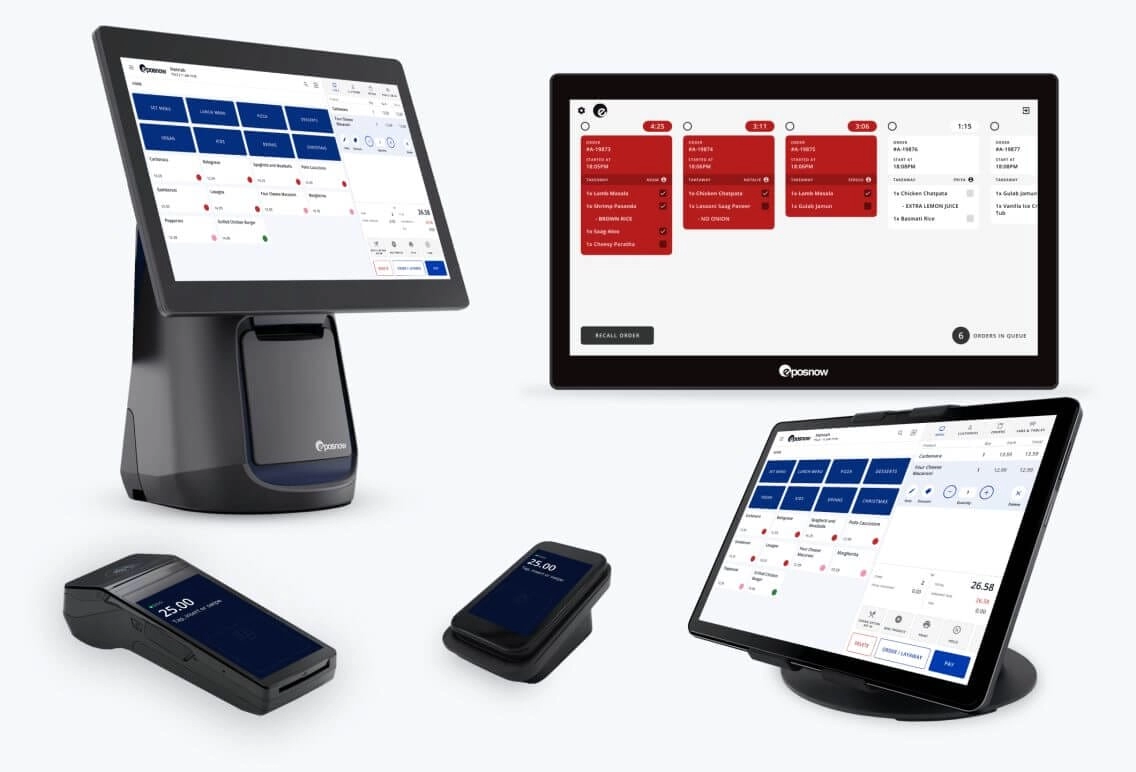
- Terminales POS compactos con pantalla táctil: Perfecto para restaurantes y pequeñas tiendas minoristas, estos cuentan con pantallas táctiles integradas, impresoras de recibos rápidas y escáneres de código de barras integrados. Están diseñados para ahorrar espacio en el mostrador y acelerar las transacciones.
- Cajones de efectivo duraderos: Disponibles en varios tamaños y tipos de cerradura, nuestros cajones de efectivo se adaptan a diferentes necesidades de seguridad. Desde cajones de metal de alta resistencia para tiendas de alto volumen hasta modelos compactos para configuraciones móviles, tenemos opciones para ajustarse a su espacio.
- Pantallas para clientes y paquetes de periféricos: SDLPOS ofrece paquetes que incluyen pantallas para clientes, escáneres de código de barras y terminales de pago. Estos kits están diseñados para agilizar el proceso de pago y mejorar la experiencia del cliente.
- Hardware POS móvil: Para negocios que necesitan movilidad, como camiones de comida o tiendas temporales, ofrecemos escáneres ligeros e impresoras de recibos inalámbricas que se emparejan fácilmente vía Bluetooth o Wi-Fi.
Paquetes de hardware personalizados para cada tipo de negocio
Entendemos que diferentes industrias tienen necesidades de hardware únicas. Por eso, SDLPOS ofrece paquetes de hardware POS personalizados para:
- Tiendas minoristas que necesitan escaneo rápido de códigos de barras e integración de inventario
- Restaurantes que requieren impresoras de cocina, entrada de pedidos táctil y cajones de efectivo seguros
- Negocios de servicios que buscan configuraciones compactas con fácil compatibilidad de software
Nuestros paquetes están probados para funcionar sin problemas juntos y con los principales software POS, ahorrándole tiempo y esfuerzo en la configuración.
Garantía y soporte postventa
Comprar en SDLPOS significa más que solo hardware. Respaldamos nuestros productos con:
- Garantías integrales que cubren defectos de fabricación y fallos del hardware
- Servicio postventa confiable incluyendo resolución de problemas, piezas de repuesto y asistencia para actualizaciones de software
- Opciones de soporte en el sitio disponibles en muchas regiones de España para ayudar a que su sistema funcione rápidamente y mantenerlo funcionando sin problemas
Elegir SDLPOS significa invertir en hardware que dura y soporte en el que puede confiar—clave para cualquier negocio que opere con márgenes y horarios ajustados.
Al centrarse en proveedores de hardware POS de alta calidad como SDLPOS que ofrecen soluciones personalizadas y un fuerte cuidado al cliente, está preparando su negocio para operaciones eficientes, seguras y escalables. Ya sea que necesite sistemas de caja registradora asequibles con garantía o soluciones avanzadas de pago integradas, SDLPOS tiene modelos y paquetes para satisfacer sus necesidades.
Consideraciones locales para compradores que eligen hardware de caja registradora
Al elegir hardware de caja registradora para su negocio en España, es importante tener en cuenta las especificidades locales que pueden marcar una gran diferencia en cómo funciona su configuración sin problemas.
Disponibilidad y opciones de envío cerca de usted
- Consulte a proveedores locales: Obtener hardware de proveedores cercanos como SDLPOS puede acelerar la entrega y hacer que devoluciones o cambios sean sin complicaciones.
- La velocidad de envío importa: Busque vendedores que ofrezcan envíos rápidos y confiables para que su tienda no quede esperando durante los momentos de mayor actividad.
- Pedidos en volumen y ofertas al por mayor: Si posee varias ubicaciones o es revendedor, los distribuidores locales suelen ofrecer precios por volumen y una reposición más sencilla.
Servicios de soporte en el sitio y de instalación
- Instalación profesional: Trabajar con un proveedor local significa acceso a técnicos que pueden instalar su sistema en el lugar, asegurando que todo funcione correctamente.
- Capacitación y resolución de problemas: Los equipos locales pueden ofrecer capacitación a empleados y resolución rápida de problemas, reduciendo el tiempo de inactividad y acelerando la adopción.
- Soporte postventa: Tener soporte cercano significa tiempos de respuesta más rápidos para reparaciones, actualizaciones o actualizaciones de software, cruciales para entornos minoristas o de restauración ocupados.
Cumplimiento con las regulaciones locales de impuestos y recibos
- Cumplir con los requisitos fiscales estatales: Los estados varían en las reglas de impuestos sobre ventas, por lo que su sistema de caja registradora debe soportar cálculos precisos de impuestos y reportes para su ubicación específica.
- Normas de recibos y facturas: Cumplir con las leyes locales sobre el formato y la información de los recibos (como requisitos para códigos de barras o políticas de devolución) evita multas y quejas de los clientes.
- Integración con la contabilidad local: Asegúrese de que su hardware funcione sin problemas con software que gestione la contabilidad y las declaraciones fiscales en España.
Al elegir hardware de caja registradora que se adapte a estas necesidades locales—disponibilidad, soporte y cumplimiento normativo—protege las operaciones de su negocio y mantiene satisfechos a sus clientes. El soporte local de proveedores confiables como SDLPOS puede marcar la diferencia en mantener una funcionalidad de POS fluida y sin preocupaciones.
Historias de éxito de clientes con hardware de caja registradora SDLPOS
En SDLPOS, nos enorgullece ayudar a negocios en toda España a mejorar sus operaciones diarias con hardware de caja registradora confiable. Aquí hay algunos ejemplos reales de cómo nuestras soluciones han marcado la diferencia.
Tiendas minoristas optimizan el proceso de pago y inventario
Un minorista regional de ropa cambió a paquetes de hardware SDLPOS, incluyendo escáneres de códigos de barras y monitores táctiles. Reportaron:
- Tiempos de pago más rápidos, reduciendo las colas durante las horas punta
- Seguimiento preciso del inventario integrado con su software de punto de venta
- Menos tiempo de inactividad gracias a hardware duradero y de alta calidad diseñado para entornos minoristas concurridos
Su personal encontró el sistema fácil de aprender, ahorrando horas en capacitación de empleados.
Restaurantes Mejoran la Precisión y Velocidad de los Pedidos
Un restaurante local concurrido adoptó impresoras de recibos SDLPOS y monitores táctiles personalizados para sus necesidades de servicio. El resultado fue:
- Mayor precisión en los pedidos con configuración intuitiva en pantalla táctil
- Preparación de alimentos más rápida gracias a pedidos digitales instantáneos
- Mejora de la experiencia del cliente mediante terminales de pago integrados que manejan pedidos rápidos con solo tocar y pagar de forma segura
También elogiaron el sólido soporte en el sitio ofrecido, minimizando interrupciones durante los picos de servicio.
Las Pequeñas Empresas Se Benefician de Soluciones Flexibles
Una pequeña boutique que reemplazó un cajón de efectivo obsoleto encontró que el hardware SDLPOS era una opción perfecta:
- Cajones de efectivo compactos y que ahorran espacio para espacios limitados en el mostrador
- Compatible con su software POS existente para una integración fluida
- Precios asequibles con una impresionante garantía y soporte postventa
Esto les ayudó a modernizar su punto de venta sin gastar una fortuna.
Cómo SDLPOS Hardware impulsa la eficiencia operativa
En todos los ejemplos, los factores clave que destacan los clientes incluyen:
- Compatibilidad sin fisuras con software POS popular
- Hardware robusto diseñado para transacciones de alto volumen
- Opciones personalizadas según la escala y el tipo de negocio, desde minoristas hasta restaurantes
- Excelente soporte al cliente y resolución rápida de cualquier problema
If you’re looking to boost your business efficiency, SDLPOS cash register hardware offers proven solutions adaptado para negocios en España, respaldado por historias de éxito reales de clientes.
Cómo comprar hardware de caja registradora en SDLPOS
Comprar tu hardware de caja registradora en SDLPOS es sencillo, ya sea que estés equipando un pequeño negocio o actualizando una cadena minorista. Aquí tienes una guía paso a paso sencilla para comenzar con las soluciones de hardware POS adecuadas.
Paso 1 Elige tu hardware
Evalúa las necesidades de tu negocio basándote en los componentes que ofrecemos: cajones de dinero, impresoras de tickets, escáneres de código de barras, monitores táctiles y terminales de pago. SDLPOS proporciona paquetes de hardware adaptados a diversas industrias como comercio minorista, restaurantes y negocios de servicios. Elige los mejores sistemas de caja registradora y dispositivos periféricos que se ajusten a tus operaciones diarias.
Paso 2 Contacta con SDLPOS para una consulta
Nuestro equipo de expertos está listo para ayudarte a encontrar el el mejor hardware de caja registradora para pequeñas empresas o configuraciones de gran tamaño para minoristas. Comunícate a través de:
- Teléfono: Habla directamente con un especialista en productos.
- Correo electrónico: Envía tus preguntas para obtener información escrita detallada.
- Chat en línea: Obtén soporte inmediato durante el horario laboral.
Esta consulta personalizada asegura que selecciones hardware POS compatible que funcione perfectamente con tu software existente o planificado.
Paso 3 Programar una demostración
¿No estás seguro de qué modelos se adaptan a tu negocio? SDLPOS ofrece opciones de demostración para que puedas probar hardware como escáneres de código de barras o monitores táctiles antes de comprar. Este enfoque práctico te ayuda a confirmar la facilidad de uso, durabilidad y capacidades de integración, reduciendo las conjeturas y mejorando tu confianza en la compra.
Paso 4 Realiza tu pedido
Una vez que hayas seleccionado tu hardware, realiza el pedido en línea o por teléfono. SDLPOS soporta:
- Opciones de compra al por mayor para mayoristas y negocios con múltiples ubicaciones.
- Paquetes de hardware personalizados para nichos específicos como supermercados o negocios de alimentación y bebidas.
- Sistemas de caja registradora asequibles con precios claros y soporte de garantía.
Paso 5 Organiza la entrega e instalación
SDLPOS ofrece opciones flexibles opciones de envío en toda España, con entregas rápidas y seguras. Para clientes que necesitan ayuda adicional, se ofrecen servicios de soporte en el lugar y de instalación de hardware para garantizar que tu sistema POS funcione sin problemas.
Soporte Postventa del Paso 6
Benefíciese de servicios de garantía, soporte técnico y actualizaciones regulares de software para mantener su hardware de caja registradora optimizado. SDLPOS se compromete a su satisfacción a largo plazo y eficiencia operativa.
Contacta con SDLPOS hoy y permítanos ayudarle a elegir el mejor hardware POS adaptado a las necesidades de su negocio. Ya sea que necesite cajas registradoras duraderas para restaurantes o sistemas de pago integrados para tiendas minoristas, SDLPOS tiene lo que necesita.



Pensamientos sobre “How to Choose Cash Register Hardware for Your Business Success”