







Mejor impresora de etiquetas POS 2025, de alta velocidad, inalámbrica y duradera

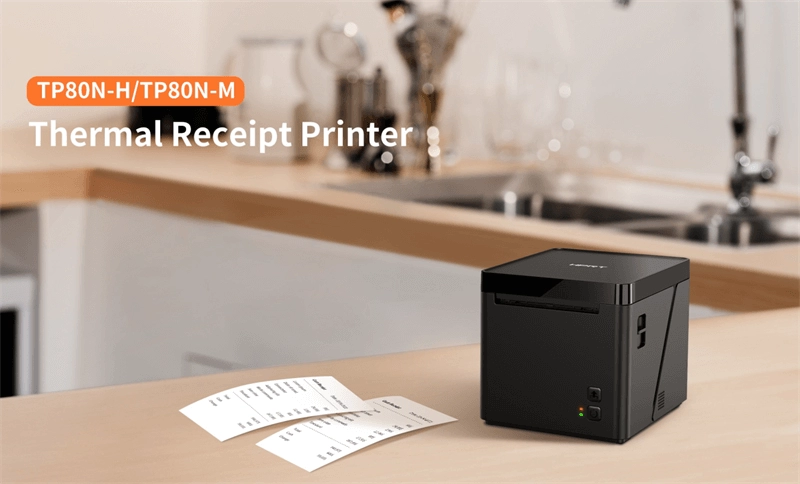
¿Estás buscando el terminal de punto de venta inalámbrico perfecto Impresora de etiquetas POS ¿para optimizar las operaciones de tu negocio? Elegir el impresora de etiquetas para punto de venta puede transformar la forma en que gestionas inventario, envíos o etiquetado minorista. Como propietario de un negocio, entiendo la necesidad de soluciones confiables, rápidas y rentables que se integren perfectamente con tu sistema POS de Walmart. En esta guía, descubrirás las principales características, beneficios y consejos internos para seleccionar la mejor impresora de etiquetas SDLPOS para tus necesidades en 2025. Desde impresión de códigos de barras to etiquetas RFID, tenemos cubierto con consejos prácticos basados en experiencias del mundo real. ¡Vamos a sumergirnos y potenciar la eficiencia de tu negocio!
Beneficios clave de usar una impresora de etiquetas POS para tu negocio
Invertir en una Impresora de etiquetas POS ofrece ventajas claras que van más allá de la simple impresión de etiquetas. Ya sea que dirijas una tienda minorista, un restaurante o un negocio de comercio electrónico, estos beneficios mejoran las operaciones diarias y las interacciones con los clientes.
Mayor eficiencia en las operaciones
Una impresora de etiquetas para punto de venta ayuda a agilizar el proceso de etiquetado produciendo etiquetas de manera rápida y precisa. Esto reduce los tiempos de espera durante el pago y la gestión de inventario. Características como impresión de etiquetas térmicas permiten impresiones rápidas y de alta calidad sin necesidad de tinta, acelerando los flujos de trabajo.
- Pago más rápido con etiquetas de código de barras escaneadas al instante
- Más fácil seguimiento de inventario a través de etiquetas consistentes y claras
- Reabastecimiento simplificado con etiquetas impresas duraderas
Ahorro de costos significativo
Utilizar una impresora de etiquetas confiable para escritorio o móvil reduce costos de varias maneras:
- Reduciendo el desperdicio de etiquetas mediante impresión bajo demanda
- Bajando los gastos de mantenimiento en comparación con las impresoras tradicionales
- Disminuyendo las pérdidas relacionadas con errores gracias a etiquetas precisas y escaneables
Además, elegir impresoras de etiquetas sin liner disminuye el desperdicio de material, contribuyendo aún más a los ahorros generales.
Personalización para Adaptarse a Tu Marca y Necesidades
La impresión de etiquetas en sistemas POS permite a las empresas personalizar etiquetas con logotipos, promociones y información específica adaptada a productos o servicios. Esta flexibilidad es esencial para:
- Diferenciar tu marca en los estantes
- Comunicar detalles importantes como precio, fecha de caducidad o instrucciones
- Ofrecer promociones dirigidas o mensajes estacionales a los clientes
Las etiquetas personalizadas mejoran la apariencia y profesionalismo de tus productos.
Mejora la experiencia del cliente
Etiquetas claras y bien impresas crean una mejor experiencia de compra al proporcionar a los clientes detalles precisos del producto y códigos de barras fáciles de escanear. Esto aumenta la confianza del cliente y acelera el proceso de compra. Las ventajas adicionales incluyen:
- Reducción de errores en la caja que conducen a transacciones más fluidas
- Mejora de la transparencia sobre la información del producto
- Devoluciones y cambios más fáciles con un mejor seguimiento
En general, una impresora de etiquetas POS apoya una interacción fluida entre tu negocio y los clientes.
Para más detalles sobre soluciones confiables de impresión de etiquetas, consulta nuestras opciones térmicas para impresoras POS y descubre cómo mejoran tu entorno minorista.
Principales características a buscar en una impresora de etiquetas POS
Elegir el sistema correcto Impresora de etiquetas POS significa saber qué funciones realmente importan para tu negocio. Aquí tienes un desglose de las principales cosas a tener en cuenta, ya sea que estés usando una impresora de etiquetas térmicas, un de escritorio or impresora de etiquetas móvil para tu configuración minorista o de hostelería.
Calidad y velocidad de impresión
- Impresiones nítidas y claras son esenciales para que los códigos de barras y las etiquetas de precio se escaneen sin problemas. Busca impresoras que ofrezcan una alta resolución de impresión.
- La velocidad importa, especialmente durante las horas punta. Una impresora rápida ayuda a mantener tu caja en movimiento y evita retrasos.
- Considera impresoras con tecnología de impresión térmica, que ofrece etiquetas nítidas sin necesidad de tinta o tóner—ahorrándote tiempo y dinero.
Opciones de conectividad
- Tu impresora debe conectarse fácilmente a tu sistema POS de Walmart. Las opciones incluyen USB, Ethernet, o Wi-Fi, dependiendo de tu configuración.
- La conectividad inalámbrica añade flexibilidad, perfecta para negocios móviles o temporales.
- Algunos modelos soportan Bluetooth, permitiendo la impresión desde dispositivos móviles en movimiento.
Versatilidad de Etiquetas
- Verifica si la impresora soporta diferentes tipos de etiquetas: etiquetas con código de barras, etiquetas RFID, etiquetas sin liner, o tamaños personalizados.
- Las empresas con necesidades variadas de etiquetado—como etiquetas de inventario, etiquetas de precios o etiquetas de envío—se beneficiarán de una impresora que maneje múltiples formatos.
- La capacidad de imprimir en diferentes materiales, como papel o etiquetas sintéticas, aumenta la versatilidad.
Durabilidad y Mantenimiento
- Una impresora confiable debe soportar el uso diario en un entorno de comercio minorista o hostelería ocupado.
- Busca modelos con una construcción robusta y componentes fáciles de limpiar.
- El mantenimiento debe ser sencillo. Características como la carga fácil de etiquetas, reemplazos simples de cinta o rollos, y cabezales de impresión accesibles reducen el tiempo de inactividad.
Compatibilidad de software
- Asegúrate de que la impresora funcione perfectamente con tu software de impresión de etiquetas or sistemas de gestión de inventario.
- La compatibilidad con plataformas populares hace que la configuración y el uso diario sean sin complicaciones.
- Algunas impresoras de etiquetas para TPV vienen con software fácil de usar que te permite diseñar e imprimir etiquetas personalizadas rápidamente.
Al centrarte en estas características, puedes encontrar una impresora de etiquetas para punto de venta que se adapte a tus operaciones diarias, te ahorre tiempo y mejore el servicio al cliente.
Cómo elegir la impresora de etiquetas para TPV adecuada para tu negocio
Seleccionar el mejor Impresora de etiquetas POS para tu negocio significa pensar más allá del simple precio. Aquí te mostramos cómo tomar una decisión informada que se ajuste a tus necesidades y presupuesto específicos.
Evalúe las necesidades de su negocio
Comienza por entender qué tipo de etiquetas imprimes a diario. ¿Principalmente imprimes etiquetas de código de barras para comercio minorista ¿o etiquetas de envío para comercio electrónico? Considera el volumen—¿necesitas una impresora de etiquetas de escritorio para uso moderado o una impresora de etiquetas móvil para impresión en movimiento? Además, piensa en el tamaño y materiales de las etiquetas, como si requieres impresoras de etiquetas térmicas para impresión rápida y sin tinta.
Conoce tus límites presupuestarios
Las impresoras de etiquetas para puntos de venta varían mucho en precio. No compres solo la opción más barata; en su lugar, busca valor sobre costo. Invertir un poco más puede significar mayor fiabilidad y menos dolores de cabeza. Ten en cuenta consumibles como rollos de etiquetas y cintas, que aumentan los costes continuos. Elige una impresora que equilibre el gasto inicial con los ahorros a largo plazo.
Considera las especificidades de la industria
Las diferentes industrias tienen demandas distintas. Por ejemplo:
- El comercio minorista suele necesitar impresión rápida y clara de códigos de barras para la gestión de inventario.
- La hostelería puede requerir tamaños de etiquetas flexibles para menús o pedidos.
- La logística necesita impresión duradera y de alta velocidad para etiquetas de envío.
Asegúrate de que la impresora de etiquetas de tu sistema POS pueda manejar las necesidades específicas de tu sector, incluyendo compatibilidad con software de impresión de etiquetas lo que ya utilizas o planeas adoptar.
Revisa opiniones y comentarios de clientes
Las experiencias reales de los usuarios son importantes. Busca opiniones que se centren en la fiabilidad, facilidad de uso y soporte de marcas como SDLPOS. Esto puede ayudarte a evitar marcas propensas a fallos frecuentes o a un mal servicio de mantenimiento. Las opiniones verificadas también destacan problemas prácticos como la calidad de impresión o fallos en el software que puedas enfrentar.
Al evaluar cuidadosamente estos puntos—tu volumen de etiquetado, presupuesto, necesidades de la industria y conocimientos del cliente—harás la elección de la impresora de etiquetas POS que se adapte perfectamente a tu negocio.
Por qué elegir las impresoras de etiquetas POS SDLPOS
Cuando se trata de elegir un Impresora de etiquetas POS, la fiabilidad y versatilidad son las principales prioridades. SDLPOS ofrece ambas con hardware construido para durar y una gama que se adapta a diversas necesidades minoristas y empresariales en toda España.
Hardware confiable y garantía líder en la industria
Las impresoras SDLPOS son conocidas por su sólida calidad de construcción. Ya sea que necesites una impresora de etiquetas de escritorio para tu mostrador minorista o una impresora de etiquetas móvil para operaciones en movimiento, el hardware SDLPOS resiste el desgaste diario. Cada unidad viene con una garantía líder en la industria que brinda tranquilidad, minimizando el tiempo de inactividad y los costos de reparación. Esto ayuda a las empresas a evitar interrupciones en sus procesos de impresión de etiquetas en el sistema POS .
Opciones de impresión versátiles para diferentes necesidades empresariales
SDLPOS ofrece una variedad de impresoras que incluyen:
- Impresoras de etiquetas térmicas para impresión nítida de códigos de barras y recibos sin tinta
- Impresoras de etiquetas sin revestimiento que reducen residuos y ahorran dinero
- Impresión de etiquetas RFID dispositivos compatibles para un seguimiento avanzado del inventario
- Opciones adaptadas para impresora de códigos de barras para comercio minorista entornos, gestión de inventario y logística.
Esta versatilidad significa que puedes encontrar la opción adecuada ya sea que dirijas una tienda concurrida, un restaurante o un almacén de comercio electrónico.
Modelos específicos SDLPOS para cada sector
SDLPOS entiende que las industrias pueden tener necesidades únicas. Sus modelos incluyen:
- Impresoras compactas para pequeñas empresas
- Impresoras de alta velocidad para minoristas de alto volumen
- Impresoras móviles para personal de reparto y hostelería
Esto facilita la integración con tus sistemas existentes y escalar a medida que crece tu negocio.
Características ecológicas que reducen impacto y costos
Destaca eligiendo SDLPOS con características ecológicas. Muchas de sus impresoras soportan operaciones energéticamente eficientes y utilizan materiales de etiquetas sostenibles. Ser ecológico no solo reduce la huella de carbono de tu negocio, sino que también puede ahorrar en facturas de energía. Esto se alinea bien con las crecientes expectativas de los clientes sobre prácticas empresariales responsables.
Elegir SDLPOS significa que obtienes hardware confiable, soporte integral, opciones de impresión flexibles, y una huella más ecológica. Es una inversión sólida para cualquier negocio en España enfocado en la eficiencia y la experiencia del cliente con sus necesidades de impresión de etiquetas POS.
Cómo configurar y usar su impresora de etiquetas POS SDLPOS
Configurar su Impresora de etiquetas POS SDLPOS es sencilla y está diseñada para poner en marcha rápidamente la impresión de etiquetas en su punto de venta. Aquí tiene una guía paso a paso sobre cómo desempaquetar, conectar, imprimir su primera etiqueta, optimizar la configuración de impresión y solucionar problemas comunes.
Desempaquetando su impresora de etiquetas POS SDLPOS
Cuando reciba su impresora de etiquetas SDLPOS, revise el paquete en busca de estos elementos esenciales:
- El impresora de etiquetas térmica o de escritorio unidad
- Adaptador de corriente y cables
- Opciones de conectividad USB, Ethernet o Bluetooth (según su modelo)
- Rollo de etiquetas de inicio o medios de muestra
- Guía de inicio rápido e información de garantía
Asegúrese de que todo esté en perfectas condiciones antes de comenzar.
Conectando a su sistema POS
Las impresoras de etiquetas SDLPOS soportan varias opciones de conectividad para una configuración flexible:
- conexión USB para una conexión sencilla y plug-and-play con la mayoría de los sistemas POS minoristas
- conexión Ethernet para entornos en red, útil para tiendas más grandes
- Bluetooth o WiFi para integración inalámbrica, especialmente útil con configuraciones de POS móvil
Combina tu tipo de conexión con el sistema POS que estás usando. Para compatibilidad detallada con terminales POS populares y software de impresión de etiquetas, consulta recursos de SDLPOS como sus impresoras térmicas POS.
Imprimir tu primera etiqueta
Una vez conectado:
- Carga el Rollo de etiquetas o medio de etiquetas sin liner en la impresora como se muestra en la guía.
- Instala los controladores necesarios o el software de diseño de etiquetas recomendado por SDLPOS.
- Envía una impresión de prueba desde tu software POS o interfaz de la impresora. Esto confirma que la impresora es reconocida y funciona.
- Verifica que la salida de la etiqueta sea clara y nítida, con códigos de barras y texto legibles.
Optimización de configuraciones de impresión
Para obtener la mejor calidad y velocidad de impresión:
- Ajusta la densidad de impresión y velocidad a través de la configuración de la impresora o del software de etiquetas, equilibrando claridad con uso eficiente.
- Selecciona el tamaño y tipo de etiqueta correctos en tu sistema POS para que coincidan con tu medio de etiqueta.
- Utiliza medios compatibles con SDLPOS etiquetas de rollos or papel térmico para resultados consistentes (ver más opciones aquí).
Calibre regularmente el sensor para asegurar que las etiquetas se alimenten correctamente, especialmente con diferentes tipos de etiquetas como RFID o etiquetas sin revestimiento.
Solución de Problemas Comunes
Si tiene problemas:
- Etiquetas que no se alimentan correctamente: Verifique la dirección de carga del medio y limpie el camino de alimentación.
- Problemas de calidad de impresión: Limpie la cabeza de impresión suavemente con materiales recomendados; reemplace las etiquetas viejas.
- Errores de conectividad: Verifique los cables, configuraciones de WiFi o instalaciones del controlador.
- El software no detecta la impresora: Reinicie su sistema, verifique los controladores o pruebe con otra puerto USB/red.
SDLPOS ofrece soporte y guías de resolución de problemas para ayudar a resolver los problemas rápidamente.
Siguiendo estos pasos, hará que su impresora de etiquetas POS SDLPOS funcione de manera fluida y confiable, ayudando a agilizar la impresión de etiquetas en su sistema POS con mínimo esfuerzo.
Comparando las impresoras de etiquetas POS SDLPOS con otras marcas líderes
Al buscar un Impresora de etiquetas POS, precio, características y fiabilidad son lo más importante. SDLPOS destaca en el mercado saturado, especialmente en comparación con otras opciones populares para impresoras de etiquetas térmicas y impresoras de código de barras para comercio minorista.
Comparación de precios
- SDLPOS ofrece precios competitivos sin recortar en la calidad de construcción o el rendimiento de impresión.
- Muchas marcas reconocidas cobran una prima por las mismas funciones básicas que ofrece SDLPOS.
- Para pequeñas y medianas empresas en España, SDLPOS logra un excelente equilibrio entre costo inicial y valor a largo plazo.
Funciones y Versatilidad
- Las impresoras SDLPOS soportan una amplia gama de tipos de etiquetas incluyendo etiquetas sin respaldo, RFID, y modelos de escritorio o móviles.
- Las opciones de conectividad son sólidas — USB, Ethernet y configuraciones inalámbricas se adaptan a la mayoría procesos de impresión de etiquetas en el sistema POS de necesidades.
- La compatibilidad de software es amplia, funcionando sin problemas con los programas software de impresión de etiquetas más utilizados en comercio minorista, hostelería y logística.
- Algunos competidores no alcanzan la versatilidad de etiquetas o requieren medios propietarios costosos, pero SDLPOS mantiene abiertas las opciones.
Fiabilidad y durabilidad
- El hardware de SDLPOS está diseñado para un rendimiento constante en entornos minoristas concurridos, ofreciendo alta fiabilidad y menos problemas de mantenimiento.
- Muchas empresas en España reportan una mayor duración de los dispositivos y menos tiempo de inactividad en comparación con otras marcas.
- Las piezas de la impresora son fáciles de limpiar y reemplazar, minimizando las interrupciones.
Tabla comparativa de funciones
| Característica | el hardware y las soluciones de SDLPOS | Marca A | Marca B |
|---|---|---|---|
| Precio | Asequible | Más alto | Moderado |
| Velocidad de Impresión | Hasta 6 IPs | Hasta 5 IPs | Hasta 7 IPs |
| Conectividad | USB, Ethernet, Wi-Fi | USB, Bluetooth | USB, Ethernet |
| Tipos de etiquetas compatibles | Térmico, RFID, Sin revestimiento | Solo térmico | Térmico, RFID |
| Compatibilidad de software | Amplio | Limitado | Moderado |
| Garantía | Liderazgo en la industria con 2 años | 1 año | 1-2 años |
| Durabilidad | Alto | Moderado | Moderado |
Propuesta de valor SDLPOS
- Confiable, asequible y diseñado para empresas en España que necesitan soluciones de impresión eficientes.
- SDLPOS combina versatilidad, soporte de software sólido y hardware robusto—haciendo que destaque para quienes usan impresoras de etiquetas de inventario or impresoras de código de barras para comercio minorista.
- La garantía líder en la industria y un excelente soporte al cliente garantizan tranquilidad.
- Si buscas un impresora de etiquetas para punto de venta que no te ralentice ni te saque de presupuesto, SDLPOS debería estar en la cima de tu lista.
Aplicaciones en el mundo real de las impresoras de etiquetas POS en el comercio minorista, la hostelería, el comercio electrónico y la logística
Las impresoras de etiquetas POS se han convertido en herramientas esenciales en múltiples industrias en España, ayudando a las empresas a optimizar las operaciones, reducir los errores y mejorar la satisfacción del cliente. Ya sea que esté administrando una tienda minorista concurrida, dirigiendo un restaurante o gestionando envíos de comercio electrónico, una impresora de etiquetas de punto de venta confiable juega un papel clave.
Minorista
En el comercio minorista, impresoras de código de barras para comercio minorista su uso está generalizado. Estas impresoras generan etiquetas de precios, etiquetas de inventario y etiquetas de estantes de forma rápida y precisa. Con la impresión de etiquetas del sistema POS adecuado, las tiendas pueden:
- Acelerar el pago con códigos de barras claros
- Realizar un mejor seguimiento del inventario para evitar el desabastecimiento o el exceso de existencias
- Personalizar fácilmente las etiquetas con promociones o descuentos
- Crear Etiquetas RFID para una mejor gestión del stock
Hostelería
Para restaurantes y cafeterías, las impresoras de etiquetas POS ayudan con la gestión de pedidos y la comunicación en la cocina. Las etiquetas impresas bajo demanda pueden incluir números de mesa, instrucciones especiales o ingredientes. Esto mejora la precisión de los pedidos y acelera el servicio. Usando impresoras de etiquetas térmicas aquí significa que las etiquetas pueden soportar el calor y la humedad, manteniendo los pedidos claros y legibles.
Comercio electrónico y logística
Los vendedores en línea y los almacenes confían en gran medida en las impresoras de etiquetas para gestionar el envío y el inventario. Impresoras de etiquetas de escritorio y impresoras de etiquetas móviles se utilizan para imprimir etiquetas de envío, albaranes y etiquetas de devolución en el momento. Esto garantiza que los paquetes estén correctamente etiquetados y rastreados a lo largo de la cadena de suministro.
- Reduce el error humano con impresora de etiquetas de inventario soluciones
- Limita los costosos errores y retrasos en el envío
- Admite opciones de impresora de etiquetas sin revestimiento para envíos respetuosos con el medio ambiente
Estudio de caso sobre la reducción de errores de etiquetado
Una empresa de comercio electrónico de tamaño medio en España cambió a una impresora de etiquetas térmicas SDLPOS integrada con su software de impresión de etiquetas del sistema POS. Antes del cambio, tenían una tasa de error 5% con paquetes mal etiquetados que provocaban devoluciones y clientes insatisfechos.
Después de adoptar la nueva impresora de etiquetas POS:
- Los errores de etiquetado disminuyeron en un 80% en los primeros 3 meses
- La precisión en el envío mejoró, reduciendo a la mitad las quejas de los clientes
- El personal ahorró tiempo con una impresión de etiquetas más rápida y clara
- La gestión de inventario se volvió más precisa y confiable
Este ejemplo muestra cómo invertir en la impresora de etiquetas POS adecuada puede transformar la forma en que operan las empresas, reduciendo errores costosos y mejorando la experiencia del cliente.
invertir en un sistema de impresora de etiquetas POS de calidad adaptado a las necesidades de su industria no solo aumenta la eficiencia, sino que también impacta directamente en la satisfacción del cliente y en sus resultados. Ya sea en comercio minorista, hostelería o logística, estas impresoras han demostrado ser herramientas invaluables para operaciones fluidas y sin errores.
Consejos para maximizar el rendimiento de su impresora de etiquetas POS
Para aprovechar al máximo su impresora de etiquetas POS, ya sea una impresora de etiquetas térmicas, impresora de etiquetas de escritorio, o impresora de etiquetas móvil, significa mantenerse al día con el mantenimiento y usar los materiales adecuados. Aquí hay algunos consejos prácticos para mantener su impresora de etiquetas para punto de venta funcionando de manera fluida y eficiente.
El mantenimiento regular mantiene su impresora confiable
- Limpiar regularmente las cabezas de impresión y los rodillos para prevenir manchas y errores de impresión. La acumulación de polvo y residuos puede causar atascos o etiquetas desvaídas.
- Verificar actualizaciones de firmware para su impresora de etiquetas. Esto asegura que tenga las últimas correcciones y mejoras de rendimiento.
- Inspeccionar cables y conexiones con frecuencia, especialmente si utiliza conectividad USB o Bluetooth. Las conexiones sueltas pueden interrumpir los trabajos de impresión en su procesos de impresión de etiquetas en el sistema POS configuración.
- Reemplace las piezas desgastadas con anticipación como rodillos de plancha o cortadores para evitar tiempos de inactividad durante las horas punta.
Utilice medios de etiquetado de alta calidad para obtener los mejores resultados
- Elija las etiquetas adecuadas para su impresora, ya sean etiquetas adhesivas estándar, etiquetas sin respaldo o etiquetas RFID. El papel de baja calidad puede causar atascos o mala calidad de impresión.
- Evite la exposición de las etiquetas a la humedad o temperaturas extremas antes de imprimir, especialmente si utiliza impresoras de códigos de barras para comercio minorista o impresoras de etiquetas de inventario.
- Adquiera rollos de etiquetas de proveedores confiables que cumplan con las especificaciones de su impresora para garantizar una calidad de impresión constante.
Aproveche los servicios en la nube y el software de impresión de etiquetas
- Integre software de impresión de etiquetas basado en la nube con su sistema POS para optimizar su flujo de trabajo y reducir errores manuales.
- El uso de servicios en la nube le permite actualizar las plantillas de etiquetas al instante, incluso desde ubicaciones remotas.
- Algunos modelos SDLPOS soportan gestión remota de impresoras, permitiéndole monitorear el estado de la impresora y la cola de impresión sin estar en el lugar.
- Esta flexibilidad es especialmente útil para negocios en comercio minorista, hostelería o comercio electrónico que requieren cambios rápidos en precios o información de productos.
Al combinar mantenimiento regular, usando papel de etiqueta de alta calidad, y aprovechando software moderno de impresión de etiquetas y soluciones en la nube, puedes mejorar significativamente el tiempo de actividad de tu impresora de etiquetas POS y la calidad general de la producción. Esto mantiene tu negocio funcionando más suavemente y a tus clientes más satisfechos.


