







Guía de tamaños, tipos y opciones libres de BPA para rollos de papel para impresoras POS

¿Estás luchando por encontrar el perfecto rollos de papel para impresoras POS para tu negocio? Elegir la adecuada papel para recibos puede optimizar sus operaciones y mantener a sus clientes satisfechos. Como propietario de un negocio, sé lo importante que es contar con productos confiables y de alta calidad rollos de papel térmico que funcionen perfectamente con su sistema POS. En SDLPOS, le ofrecemos asesoramiento experto y suministros de primera calidad basados en años de experiencia en la industria. En esta guía, descubrirá todo lo que necesita saber sobre suministros para sistemas POS, desde tamaños y tipos hasta opciones ecológicas como papel para recibos sin BPA. Vamos a profundizar y encontrar los mejores tamaños de rollos de impresora para sus necesidades!
¿Qué son los rollos de papel para impresoras POS?
Los rollos de papel para impresoras POS son papel especializado diseñado específicamente para su uso en sistemas de punto de venta (POS), como cajas registradoras, impresoras de recibos y otros dispositivos de impresión minorista. Estos rollos contienen el papel utilizado para imprimir recibos, registros de transacciones o tickets de pedido de manera rápida y eficiente en los puntos de pago. Elegir el rollo de papel adecuado es crucial para garantizar un funcionamiento fluido y impresiones claras y duraderas.
Tipos comunes de rollos de papel para impresoras POS
Rollos de papel térmico
El tipo más utilizado, el papel térmico está recubierto con una capa sensible al calor. Cuando pasa por una impresora térmica, el recubrimiento químico reacciona al calor, produciendo imágenes y textos nítidos sin necesidad de tinta o cintas. Esto hace que rollos de papel térmico sea rentable y fácil de mantener para restaurantes, comercios y otros negocios de alto volumen.
Rollos de papel bond
El papel bond, también conocido como papel para recibos tradicional, requiere una cinta o cartucho de tinta. Ofrece una calidad de impresión nítida, pero implica un mantenimiento mayor en comparación con el papel térmico. Se usa comúnmente cuando se requiere durabilidad o características específicas de impresión.
Rollos de papel sin carboncillo
Utilizados para recibos o formularios de varias partes, rollos de papel sin carboncillo elimina la necesidad de hojas de carbono entre copias. Es ideal para facturas o copias de clientes donde se requieren recibos duplicados de forma instantánea.
Importancia de la compatibilidad
Compatibilidad de la impresora es esencial al seleccionar rollos de papel para impresoras POS. Cada impresora soporta tipos de papel, tamaños y diámetros de núcleo específicos. Usar papel incompatible puede provocar mala calidad de impresión, atascos o daños en la impresora. Verifique siempre:
- Soportado ancho del rollo y longitud
- tamaño del núcleo (generalmente de 0,5 a 1 pulgada de diámetro)
- Tipo de papel compatible (termal, bond o sin carbono)
Al coincidir los rollos de papel exactamente con su sistema POS, evita tiempos de inactividad y garantiza una impresión de recibos consistente y fiable.
Elegir el rollo de papel adecuado para la impresora POS significa entender las necesidades de su sistema y seleccionar un papel que ofrezca calidad, durabilidad y ajuste perfecto en cada uso.
Especificaciones clave para entender los rollos de papel para impresoras POS
Al elegir rollos de papel para impresoras POS, conocer las especificaciones clave puede ahorrarle tiempo y dinero mientras evita problemas en la impresora. Esto es lo que más importa:
Tamaños y dimensiones
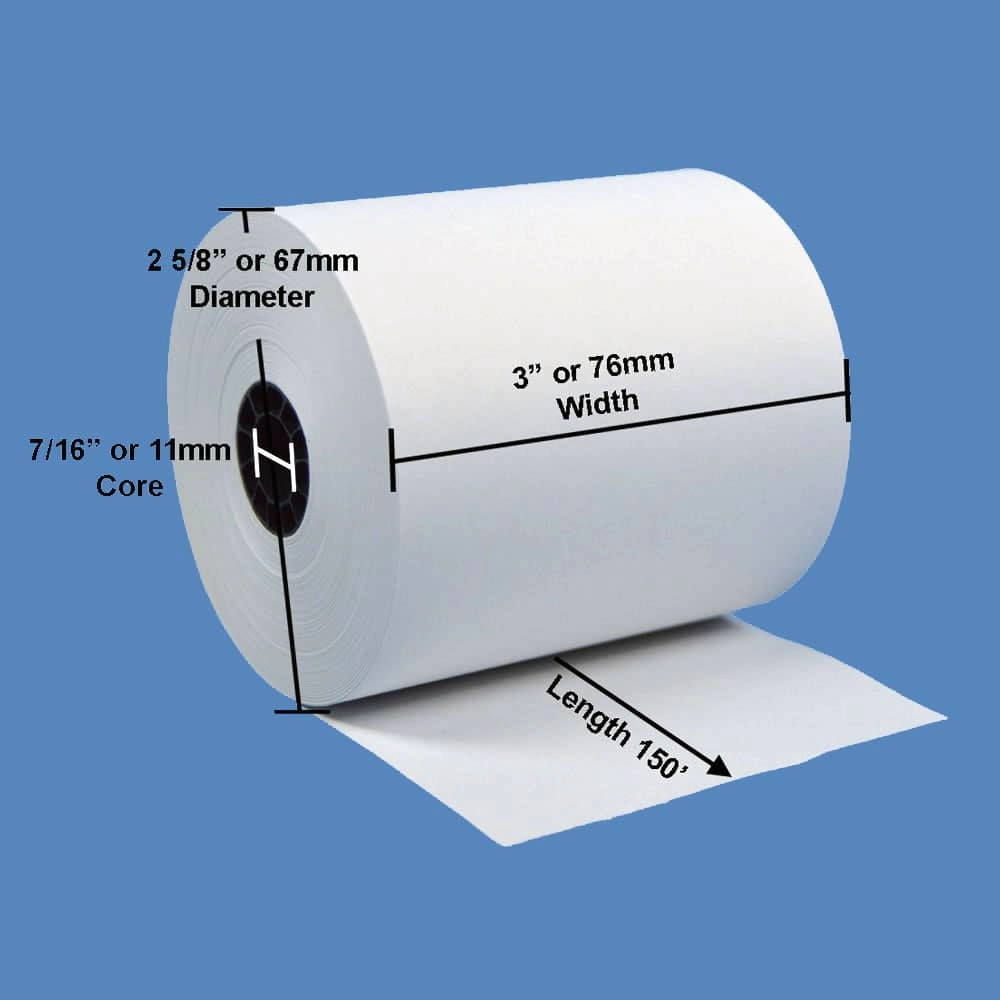
- Anchos: Los anchos más comunes son 2 1/4 pulgadas (57mm) y 3 1/8 pulgadas (80mm). El manual de su impresora POS o la información del modelo especificarán qué se ajusta mejor.
- Longitudes: Las longitudes de los rollos varían desde 50 pies hasta 230 pies o más. Rollos más largos significan menos cambios de rollo, pero vigile el grosor del papel para mantener la calidad de impresión.
- Tamaño y diámetro del núcleo: Los tamaños de núcleo generalmente oscilan entre 0,5 pulgadas y 1 pulgada de diámetro interior. El diámetro total del rollo afecta la cantidad de papel que la impresora puede contener. Asegúrese de verificar la compatibilidad del tamaño del núcleo y el diámetro máximo del rollo de su impresora.
Tipos de papel y diferencias
- Rollos de papel térmico: Los más populares para sistemas POS debido a impresión rápida basada en calor sin tinta. Estos rollos deben ser compatibles con térmico.
- Rollos de papel bond: Requieren cintas de tinta. Menos comunes, pero aún utilizados en algunos sistemas POS.
- Rollos de papel sin carboncillo: Se usan cuando se necesitan recibos duplicados sin usar tinta. Ideales para industrias que requieren recibos de varias partes.
- Considere papel para recibos sin BPA opciones para recibos más seguros y no tóxicos, preferidas por muchas empresas en España.
Consideraciones ambientales
- Busca opciones de papel ecológico como rollos térmicos reciclados o papeles libres de BPA.
- Los recubrimientos químicos reducidos o los papeles certificados por FSC ayudan a disminuir el impacto ambiental.
- Algunos proveedores ofrecen opciones diseñadas para minimizar el desgaste de la impresora, prolongando la vida útil de tu impresora y reduciendo residuos.
Comprender estas especificaciones garantiza que los rollos de papel para tu impresora POS encajen perfectamente, impriman con claridad y cumplan con los objetivos ambientales de tu negocio. Esto ayuda a evitar tiempos de inactividad y recursos desperdiciados.
Elegir los rollos de papel para impresora POS adecuados para tus necesidades
Cuando se trata de comprar rollos de papel para impresoras POS, elegir los adecuados puede ahorrarte tiempo, reducir costos y mantener tus operaciones en marcha. Aquí tienes qué considerar:
Verifica primero la compatibilidad de la impresora
No todo el papel para impresoras de tickets encaja en todas las máquinas. Rollos de papel térmico, papel bond, o opciones sin cera cada uno funciona con tipos específicos de impresoras. Siempre verifica tus impresora térmica POS especificaciones del modelo para coincidir con el tamaños de rollos de impresora (ancho, diámetro, tamaño del núcleo) y el tipo de papel. Usar el papel incorrecto puede causar atascos, mala calidad de impresión o incluso dañar la impresora.
Comprende las necesidades de tu industria
Los diferentes negocios requieren diferentes tipos de papel para recibos:
- Minorista las tiendas suelen necesitar rollos más largos para recibos detallados, a menudo usando rollos de papel térmico que son libres de BPA para un manejo seguro por parte del cliente.
- Restaurantes pueden preferir rollos térmicos de impresión rápida o papel sin cera para tickets de pedido.
- Industrias de la salud o servicios pueden necesitar rollos de papel sin carboncillo para registros duplicados sin usar hojas de cera.
Asegúrate de que la elección de tu papel coincida con el volumen de transacciones típico de tu negocio y los requisitos de impresión.
Consideraciones de volumen y presupuesto
Si tu negocio maneja muchas transacciones diarias, comprar al por mayor puede reducir significativamente los costos. Busca rollos de papel de alta calidad y duraderos que resistan la decoloración y las manchas con el tiempo. Aunque comprar al por mayor es rentable, no comprometas la calidad para ahorrar unos euros, ya que el papel de mala calidad genera gastos en reemplazos frecuentes.
Opciones de impresión personalizada
Obtener rollos de papel con tu logo o mensajes promocionales impresos en los recibos puede fortalecer tu marca. Muchos proveedores, incluidos proveedores de sistemas POS confiables, ofrecen recibos impresos personalizados en papel térmico o de bobina. Asegúrate de que tu impresora POS soporte este tipo de impresión, especialmente si quieres mantener la marca clara sin complicaciones adicionales.
Aspectos clave
- Ajusta el tipo y tamaño de papel a tu impresora POS para un funcionamiento impecable.
- Elige el papel según la industria de tu negocio y el estilo de transacción.
- Considera comprar al por mayor para obtener mejores precios, pero enfócate en la calidad.
- Explora la impresión personalizada para mejorar la experiencia del cliente y la imagen de marca.
Elegir los rollos de papel ideales para tu impresora POS garantiza que tu sistema de punto de venta sea eficiente, confiable y profesional.
Por qué comprar rollos de papel para impresora POS en SDLPOS
Cuando se trata de rollos de papel para impresoras POS para tu negocio, elegir el proveedor adecuado es importante. En SDLPOS, entendemos la importancia de un papel de recibo confiable y de alta calidad que mantenga tu sistema POS de Walmart funcionando sin problemas.
Calidad en la que puedes confiar
Ofrecemos rollos de papel térmico duraderos y papel de recibo de bobina diseñado para funcionar perfectamente con tus impresoras de tickets y cajas registradoras. Nuestro papel es libre de BPA, lo que significa que es seguro para tus clientes y personal, mientras proporciona una impresión nítida y clara en cada uso.
Amplia gama de tamaños y tipos
No importa tu configuración—ya sea que necesites opciones estándar papel para recibos, rollos de papel sin carboncillo, o impresiones personalizadas, tenemos una amplia selección de tamaños de rollos de impresora. Esto asegura que obtengas el ajuste exacto para tu compatibilidad con impresoras POS, para evitar atascos de papel costosos o recibos ilegibles.
Envío rápido y gratuito en toda España
Sabemos que el tiempo es dinero. Por eso, SDLPOS ofrece envío rápido y gratuito en todos los pedidos dentro de España. Ya seas un pequeño minorista o un restaurante concurrido, puedes contar con una entrega rápida para mantener tu negocio en marcha sin interrupciones.
Atención al cliente excepcional
Nuestro equipo está aquí para ayudarte con asesoramiento experto asesoramiento sobre la mejor papel para tu industria y volumen de compra. Además, asistimos con pedidos al por mayor y solicitudes de impresión personalizada, haciendo que tu compra sea sencilla y adaptada a tu negocio.
Elegir SDLPOS significa elegir suministros confiables para sistemas POS respaldados por un servicio que te ayuda a mantener el enfoque en lo que importa—gestionar tu negocio.
Consejos para optimizar el uso de tus rollos de papel para impresoras POS
Usar rollos de papel para impresoras POS eficientemente no solo ahorra dinero sino que también mantiene su proceso de compra fluido y sin complicaciones. Aquí hay algunos consejos prácticos para ayudarle a aprovechar al máximo su papel de recibo y los rollos de papel térmico.
Almacene los rollos correctamente
- Mantenga los rollos en un lugar fresco y seco lejos de la luz solar directa y del calor para evitar que el papel se enrolle o decolore.
- Tienda rollos de papel térmico en su embalaje original hasta su uso para proteger el recubrimiento sensible al calor.
- Evite la exposición a la humedad para asegurarse de papel de recibo de bobina y rollos de papel sin carboncillo que no se dañen.
Configure pedidos automáticos
- Utilice los datos de su caja registradora o sistema POS para rastrear el consumo de sus rollos de papel.
- Configure disparadores de reorden automático con su proveedor para evitar quedarse sin papel en momentos de mucho movimiento.
- Las funciones de reorden automático ayudan a mantener un stock constante sin comprar en exceso, ahorrando espacio de almacenamiento y costos.
Revise la compatibilidad de la impresora regularmente
- Revise las especificaciones de su impresora POS antes de comprar nuevos rollos de papel.
- Asegúrese de que el tamaño del rollo de papel, el tipo (térmico o de papel bond) y el diámetro del núcleo coincidan con el modelo de su impresora de recibos.
- El uso de papel incompatible puede causar atascos, mala calidad de impresión o daños en las impresoras.
Considere opciones ecológicas
- Busca papel para recibos sin BPA y rollos de papel térmico reciclado para reducir tu impacto ambiental.
- Muchas opciones ecológicas ofrecen la misma calidad y durabilidad que el papel convencional.
- Cambiar a un papel más ecológico no solo apoya la sostenibilidad, sino que también puede mejorar la reputación de tu negocio entre los clientes con conciencia ecológica.
By following these tips, you’ll improve your suministros para sistemas POS gestión, aumentar la eficiencia y mantener tu papel para caja registradora funcionando de la mejor manera.
Errores comunes que se deben evitar al comprar rollos de papel para impresoras POS
Al comprar rollos de papel para impresoras POS, evitar errores comunes puede ahorrarte tiempo, dinero y molestias. Estos son los errores clave que debes tener en cuenta:
Usar tamaños y tipos de papel incorrectos
Uno de los errores más frecuentes es comprar papel para recibos que no coinciden con las especificaciones de tu impresora. Usar rollos que son demasiado anchos, demasiado estrechos o con el tamaño de núcleo incorrecto puede causar atascos, una impresión deficiente o dañar tu suministros para sistemas POS. Además, diferentes impresoras requieren tipos de papel específicos, como rollos de papel térmico para impresoras térmicas o rollos de papel sin carboncillo para impresoras de impacto, así que asegúrate de que tu papel coincida con la tecnología de tu impresora para obtener los mejores resultados.
Ignorar la compatibilidad de la impresora
No todo el papel funciona con todas las impresora térmica POS o impresoras de impacto. Pasar esto por alto puede provocar el desperdicio de rollos y tiempo de inactividad. Consulta los requisitos del modelo de tu impresora antes de realizar el pedido y considera consultar con proveedores de confianza como SDLPOS para obtener orientación. Esto ayuda a garantizar que tu papel para caja registradora funcione sin problemas y sin problemas de compatibilidad.
Pasar por alto el impacto ambiental
En el mercado actual, papel para recibos sin BPA y las opciones ecológicas y respetuosas con el medio ambiente importan más que nunca. Ignorar esto podría dañar la huella ambiental de tu negocio y posiblemente la imagen de tu marca. Optar por opciones reciclables o menos tóxicas ayuda a reducir residuos y se alinea con las crecientes expectativas de los clientes en sostenibilidad.
Perderse descuentos y ahorros por volumen
Comprar sin buscar ofertas o considerar compras en volumen puede costarte más. Muchos proveedores ofrecen descuentos en pedidos al por mayor o compras recurrentes, ahorrándote dinero con el tiempo. No ignores las oportunidades de obtener mejores precios, especialmente si dependes en gran medida de suministros para sistemas POS diariamente.
No considerar la fiabilidad del rollo de papel
Elegir papel de baja calidad o inconsistente puede provocar impresiones desvaídas o atascos en el rollo, interrumpiendo las transacciones y frustrando a los clientes. Prioriza siempre rollos de papel de alta calidad y duraderos de proveedores confiables para minimizar interrupciones y mantener tu negocio funcionando sin problemas.
Al evitar estos errores comunes, garantizarás que tu rollos de papel para impresoras POS funcione perfectamente con tu hardware de punto de venta de grado comercial configuración, manteniendo tu proceso de pago rápido y sin complicaciones. Para asesoramiento experto sobre cómo elegir los rollos adecuados, visita nuestro impresora de recibos comercial or impresora térmica POS páginas.
Pensamientos finales Optimiza tus operaciones con los rollos de papel para impresoras POS SDLPOS
Cuando se trata de realizar transacciones fluidas y eficientes, contar con el rollos de papel para impresoras POS es esencial. Elegir papel de recibo de alta calidad y compatible no solo garantiza impresiones claras, sino que también reduce el tiempo de inactividad y la frustración en tu caja.
En SDLPOS, entendemos lo importante que son los suministros confiables para tu negocio. Desde rollos de papel térmico y papel de recibo de bobina hasta tamaños personalizados y opciones sin BPA, ofrecemos una amplia gama de suministros para sistemas POS diseñados para adaptarse a tu hardware y volumen específicos.
¿Por qué elegir SDLPOS para tus rollos de papel para impresoras POS?
- Papel duradero de alta calidad que funciona perfectamente con tus sistemas de caja registradora y terminal POS.
- Envío rápido y gratuito para ayudarte a mantener tu negocio en movimiento sin retrasos.
- A amplia selección de tamaños de rollos de impresora y tipos, incluyendo opciones sin carbono y térmicas.
- Atención al cliente excepcional listos para ayudarte con recomendaciones de impresión personalizada y pedidos al por mayor.
Para mantener tus operaciones funcionando sin problemas y ahorrar dinero, contacta con SDLPOS hoy. Nuestro equipo puede guiarte en las mejores opciones para la compatibilidad de tu impresora, escala de negocio y presupuesto, ayudándote a evitar errores comunes como pedir el tamaño o tipo de papel incorrecto.
Haz la elección inteligente para tu negocio minorista o de restauración. Contacta con SDLPOS para asesoramiento experto sobre rollos de papel para impresoras POS y realiza tu pedido al por mayor ahora. Optimiza tu proceso de pago y mantiene tu hardware POS funcionando al máximo con suministros confiables de SDLPOS.


