







How to Run a Cash Register Step by Step Guide for Beginners

Cómo manejar una caja registradora: Una guía paso a paso para principiantes
¿Eres nuevo en operar una caja registradora o buscas capacitar a tu equipo para transacciones más fluidas? Dominar la caja registradora es esencial para mantener tu negocio minorista o de hostelería funcionando de manera eficiente. Ya seas dueño de un pequeño negocio o cajero primerizo, esta guía de el hardware y las soluciones de SDLPOS te acompañará en todo lo que necesitas saber para manejar una caja registradora como un profesional. Desde la configuración hasta la resolución de problemas, te ofrecemos consejos prácticos basados en experiencias reales. Vamos a ello y haz que tu de operación de la caja registradora sea perfecta!
Tipos y componentes de tu caja registradora
Si eres nuevo en de operación de la caja registradora, entender los diferentes tipos y las partes clave es un excelente punto de partida. Ya sea que dirijas una pequeña tienda o un lugar de venta minorista concurrido, conocer tu equipo ahorra tiempo y frustración.
Tipos de Cajas Registradoras
Cajas registradoras manuales
Estos son modelos básicos, mecánicos. Introduces los precios a mano y utilizan cajones de dinero simples y rollos de recibos. Son adecuados para configuraciones de baja tecnología, pero limitados en funciones.
Cajas registradoras electrónicas
Estas son más comunes hoy en día. Combinan teclas de precios con pantallas digitales y potencia informática básica, permitiendo un pago más rápido y un seguimiento sencillo de ventas.
Sistemas de Punto de Venta (POS)
Estas son las más avanzadas y populares para el comercio minorista moderno. Incluyen integración de software y hardware para inventario, informes de ventas y opciones de pago como tarjetas y pago móvil.
Componentes básicos de tu caja registradora
Independientemente del tipo, tu caja registradora tendrá algunas o todas estas partes principales:
- Cajón de efectivo para sujetar billetes y monedas de forma segura
- Teclado o pantalla táctil para introducir precios o escanear artículos
- Impresora de recibos para dar a los clientes prueba de compra
- Pantalla mostrar precios e información de la transacción
Estos componentes trabajan juntos para mantener su proceso de pago fluido y preciso.
Familiarizándose con las funciones del hardware SDLPOS
Si está utilizando hardware SDLPOS, cuenta con equipos confiables enfocados en el mercado español diseñados para un uso fácil y duradero. Esto es lo que distingue a SDLPOS:
- Construcción de calidad que soporta el uso diario en el comercio minorista
- Pantallas táctiles intuitivas para transacciones más rápidas
- Opciones flexibles de procesamiento de pagos incluyendo efectivo, tarjeta de crédito, débito y pagos móviles
- Impresoras de recibos integradas con sistemas de carga rápida de papel
- Cajas registradoras seguras con compartimentos ajustables para diferentes billetes y monedas
Familiarizarse con estas funciones desde el principio hace que las conceptos básicos de la caja registradora para principiantes sean mucho más fáciles, ayudándole a realizar transacciones sin contratiempos.
Comprender el tipo y las partes de su caja registradora desde el principio es un paso clave para dominar el proceso de pago en el comercio minorista. A continuación, veremos cómo preparar su caja para su uso, desde encenderla hasta configurarla según las necesidades específicas de su negocio.
Preparar la caja registradora para su uso

Antes de comenzar a registrar ventas, es esencial prepara correctamente tu caja registradora. Este paso establece la base para operaciones diarias fluidas y precisión en la gestión de transacciones. Aquí tienes cómo preparar tu caja registradora minorista:
Encender y Inicializar el Sistema
- Enciende la caja registradora o sistema POS usando el botón de encendido, generalmente ubicado en la parte frontal o lateral de la unidad.
- Espera a que el sistema se inicialice completamente. Este proceso carga los componentes de software y hardware, preparando la caja para procesar transacciones.
- Algunas cajas registradoras electrónicas o sistemas POS pueden requerir que inicies sesión con un ID de usuario o PIN para garantizar un acceso seguro antes de usar.
Configurar la Fecha, Hora y Tasas de Impuestos
- Accede al menú de configuración o ajustes en tu caja registradora para establecer la fecha y hora actuales. La configuración precisa de fecha/hora es crucial para los sellos de tiempo en los recibos y los informes de fin de día.
- Luego, ingresa las tasas de impuestos correctas según tu localidad. Dado que el impuesto sobre ventas varía según la comunidad autónoma y, a veces, por municipio o provincia, asegúrate de que estas tasas reflejen la ubicación de tu tienda.
- Muchos sistemas de TPV modernos te permiten almacenar múltiples tipos de impuestos si tu negocio opera en diferentes áreas, simplificando el cumplimiento fiscal.
Carga correcta de efectivo y monedas en el cajón
- Abre la caja registradora y coloca el fondo de caja inicial—esta es una cantidad fija de efectivo que usarás para dar cambio durante todo el día.
- Organiza los billetes y monedas en las ranuras designadas para un fácil acceso. Normalmente, los billetes tienen compartimentos más grandes y las monedas encajan perfectamente en secciones más pequeñas.
- Mantén el fondo de caja equilibrado y organizado para acelerar las transacciones y evitar errores de efectivo.
- Verifica siempre la cantidad de efectivo al inicio de tu turno para garantizar la precisión en los procedimientos de manejo del cajón de efectivo.
Preparar correctamente tu caja registradora siguiendo estos pasos no solo garantiza un pago eficiente, sino que también ayuda a mantener una gestión de efectivo limpia y organizada. Para obtener una descripción completa sobre el funcionamiento de una caja registradora y su configuración, consulta nuestra guía sobre cómo usar un sistema de TPV.
Proceso de transacción básico para el funcionamiento de la caja registradora
Al operar una caja registradora, es esencial saber cómo manejar las transacciones diarias sin problemas. Aquí tienes una guía sencilla para gestionar las ventas en una caja registradora, que abarca desde el registro de artículos hasta la emisión de recibos.
Registro de artículos: escaneo de códigos de barras frente a la entrada manual de precios
Hay dos formas comunes de ingresar artículos en tu caja registradora:
- Escaneo de códigos de barras: Este es el método más rápido y preciso. Utiliza el escáner para leer el código de barras del artículo, y el precio aparece automáticamente en la caja registradora. La mayoría de los sistemas POS modernos facilitan esto y lo hacen sin errores.
- Entrada manual de precio: Cuando un artículo no tiene código de barras o el escáner no funciona, puedes introducir manualmente el precio del artículo o el código del producto. Asegúrate de verificar estos datos para evitar errores durante el pago.
Ambos métodos son habilidades fundamentales para operar una caja registradora minorista. Utilizar el escaneo de códigos de barras cuando sea posible acelera el proceso de pago y reduce errores.
Aplicación de descuentos, anulaciones y sobreescrituras de precios
Cada negocio necesita aplicar descuentos o corregir errores ocasionalmente. Esto es lo que debes saber:
- Descuentos: Puedes aplicar descuentos porcentuales o de cantidad fija a un artículo o a toda la venta. Esto es útil para promociones y recompensas de fidelidad.
- Anulaciones: Si se escaneó un artículo incorrecto, la función de anulación cancela esa entrada sin afectar el resto de la transacción.
- Sobrescrituras de precios: En algunos casos, puede ser necesario cambiar manualmente el precio de un artículo, como durante una igualación de precios o una oferta especial. Usa esto con cuidado y de acuerdo con la política de la tienda.
Estas funciones mantienen tus transacciones precisas y flexibles, lo cual es especialmente importante durante las horas punta de venta.
Manejo de múltiples métodos de pago
Los clientes pagan de diferentes maneras, por lo que tu caja registradora debe gestionar diversos tipos de pago de manera fluida:
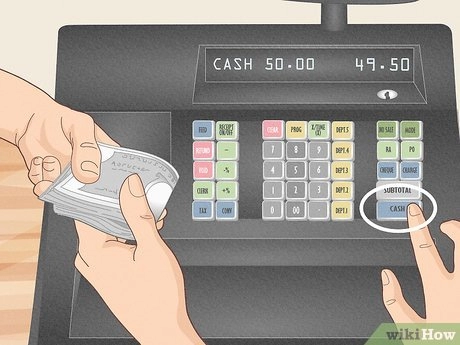
- Efectivo: Asegúrate de ingresar correctamente la cantidad en efectivo entregada y proporcionar el cambio exacto. Mantén tu caja organizada para un acceso rápido.
- Tarjetas de crédito y débito: La mayoría de las cajas registradoras electrónicas o sistemas POS integran lectores de tarjetas. Siempre confirma el importe antes de procesar la transacción.
- Pagos móviles: Servicios como Apple Pay, Google Pay y otros métodos sin contacto son cada vez más comunes. Verifica que tu hardware soporte estos métodos para un pago más rápido.
Sentirse cómodo con todos los tipos de pago ayuda a reducir los tiempos de espera y mejora la experiencia del cliente.
Impresión y emisión de recibos
Después del pago, siempre imprime y emite un recibo:
- Los recibos confirman la venta para tus registros y la prueba de compra del cliente.
- La mayoría de las cajas registradoras y sistemas POS tienen impresoras de recibos integradas que imprimen automáticamente después de completar el pago.
- En algunos casos, puedes enviar recibos por correo electrónico o mensaje de texto si tu sistema soporta opciones digitales.
Siempre pregunta al cliente si desea un recibo — es una forma sencilla de ofrecer un mejor servicio.
Para profundizar en cómo usar una caja registradora de manera efectiva, consulta esta guía de operación de caja registradora. Si quieres aprender más sobre el hardware, incluyendo procedimientos para manejar cajones electrónicos, visita cajón de dinero SDLPOS.
Funciones comunes de la caja registradora explicadas
Entendiendo el funciones comunes de tu caja registradora son clave para operaciones diarias fluidas. Ya sea que uses un sistema manual, electrónico o SDLPOS, estas funciones mantienen tu flujo de trabajo eficiente y preciso.
Abrir el cajón sin una venta
A veces necesitas abrir el cajón sin registrar una venta — por ejemplo, para hacer depósitos en efectivo o gestionar tu float de caja. En la mayoría de las cajas registradoras y sistemas POS como SDLPOS:
- Utiliza el “No Sale” or “Abrir Cajón” botón.
- Esto abre el cajón sin crear una transacción.
- Es esencial para mantener un seguimiento de las entradas de efectivo separadas de las ventas.
Verifique siempre que estas aperturas se registren para evitar discrepancias en el efectivo.
Realización de Reembolsos y Devoluciones
Manejar reembolsos y devoluciones correctamente es fundamental para el servicio al cliente y la precisión del inventario. En su caja registradora:
- Accede al modo reembolso o devolución a través del menú de su caja o teclas de acceso rápido.
- Escanee o ingrese el código de barras o código del artículo devuelto.
- El sistema le solicitará el método de reembolso (generalmente efectivo, tarjeta o crédito de la tienda).
- Asegúrese de emitir un recibo que muestre la cantidad devuelta tanto para usted como para su cliente.
Si utiliza hardware SDLPOS, generar recibos de reembolso claros y rastrear estas transacciones ayuda en el balanceo de fin de día y en las auditorías.
Proceso de Conteo y Liquidación de Efectivo al Final del Día
Cerrar su caja registradora cada día es importante para una contabilidad precisa y gestionar el flujo de efectivo.
- Comience por contar todo el efectivo y monedas en el cajón.
- Combina esto con el informe de caja del registro o ventas. .
- Sigue las instrucciones de tu sistema SDLPOS para liquidar la caja, lo cual generalmente implica ingresar la cantidad de efectivo de cierre y confirmar las ventas totales del día.
- Almacena el efectivo excedente de forma segura durante la liquidación para evitar riesgos.
Este paso asegura que los saldos de efectivo coincidan con tus registros de ventas y resalta cualquier discrepancia temprano.
Generación de informes de ventas en sistemas SDLPOS
Los informes de ventas son herramientas poderosas para gestionar tu negocio.
- Con SDLPOS, genera informes de ventas diarios, semanales o mensuales directamente desde el caja o el software conectado.
- Estos informes incluyen ventas totales, métodos de pago, reembolsos y detalles a nivel de artículo.
- Utiliza los informes para analizar los horarios de mayor venta, productos populares y tendencias de pago.
- Revisarlos regularmente te ayuda a gestionar inventarios, mejorar la eficiencia del personal y planificar promociones.
Al dominar estas funciones comunes de la caja registradora, mantienes tu proceso de cobro en el comercio minorista fluido y profesional, aprovechando al máximo las capacidades de tu sistema SDLPOS.
Solución de problemas comunes de la caja registradora
Al gestionar una caja registradora, especialmente sistemas electrónicos o POS, ciertos problemas pueden ralentizar tu proceso de cobro. Saber cómo solucionar estos problemas comunes garantiza operaciones más suaves y clientes satisfechos.
Qué hacer si la caja no se abre
Si su la caja registradora no se abre cuando se espera, aquí tienes una lista rápida para resolver el problema:
- Verifica la conexión: Asegúrese de que la caja registradora esté correctamente enchufada a la caja o terminal POS. Un cable suelto puede bloquear la señal.
- Liberación manual: La mayoría de las cajas registradoras tienen una palanca de liberación manual en la parte inferior. Úsela para abrir la caja sin energía.
- Error de software o sistema: A veces, la caja no envía la señal para abrir la caja debido a un fallo en el software. Intente reiniciar su sistema.
- Configuraciones de anulación: Confirme que no haya configuraciones en su software POS que impidan abrir la caja durante ciertas transacciones.
- Problemas de energía: Si la caja o el terminal no están completamente alimentados, la caja no se abrirá electrónicamente.
Solución de atascos y errores de impresión en la impresora
Las impresoras de tickets son una parte vital de su configuración de caja registradora, pero pueden sufrir atascos o fallar al imprimir correctamente. Aquí le mostramos cómo manejar estos casos:
- Eliminar atascos con cuidado: Siempre apague la impresora antes de intentar eliminar atascos de papel. Retire cualquier papel atascado con suavidad para evitar dañar la impresora.
- Utilice el papel adecuado: Utilice solo papel térmico para tickets especificado para su caja para evitar atascos frecuentes.
- Verifique la instalación del papel: Asegúrese de que los rollos de papel estén correctamente cargados y que el recorrido del papel esté alineado.
- Luces de error en la impresora: Busque códigos de parpadeo o luces de error en la impresora. Su manual de usuario o soporte técnico puede explicar estos códigos.
- Reinicie la impresora: A veces, un ciclo de encendido y apagado rápido soluciona fallos menores de impresión.
Manejo de bloqueos del sistema y mensajes de error
Los bloqueos del sistema o los mensajes de error en su caja registradora o sistema POS pueden detener su proceso de venta. Aquí le mostramos cómo manejarlos de manera eficiente:
- Reiniciar el sistema: La primera y más rápida solución es reiniciar su caja o terminal POS.
- Buscar actualizaciones: El software o firmware desactualizado puede causar fallos; asegúrese de mantener su sistema actualizado.
- Referencia de mensajes de error: Anote cualquier mensaje de error exactamente como aparece. Utilice recursos en línea o soporte técnico para identificar y solucionar el problema.
- Limitar la multitarea: Ejecutar demasiadas aplicaciones o procesos a la vez puede ralentizar el sistema. Cierre programas innecesarios.
- Contactar soporte: Si los errores persisten, comuníquese con el soporte técnico de SDLPOS para obtener asistencia experta.
Al tener estos consejos de resolución de problemas a mano, puede minimizar el tiempo de inactividad y mantener su caja en funcionamiento sin problemas. Eficiente de operación de la caja registradora y rápida resolución de problemas van de la mano para una gestión exitosa de las ventas diarias.
Consejos para una operación eficiente de la caja registradora
Operar una caja registradora sin problemas se trata de organización, capacitación y uso inteligente de su sistema. Aquí le mostramos cómo mantener su proceso de cobro rápido y sin errores aprovechando al máximo su sistema POS.
Mantenga su caja organizada y limpia
Una caja desordenada o sucia ralentiza el servicio y conduce a errores. Para mantener la eficiencia:
- Organiza los artículos relacionados cerca: Mantén el papel del recibo, bolígrafos y bolsas al alcance de la mano.
- Limpia regularmente el teclado y la pantalla: Evita teclas pegajosas o pantallas manchadas que confunden a los operadores.
- Asegúrate de que la caja registradora esté ordenada: Coloca los billetes y monedas en los compartimentos adecuados para una gestión rápida del efectivo y una contabilidad más sencilla.
Capacita al personal para minimizar errores y acelerar el servicio
La comodidad y familiaridad de tu equipo con la caja registradora impactan en la rapidez y precisión. Enfócate en:
- Capacitación paso a paso: Recorre el proceso básico de transacción incluyendo escaneo, entrada manual y manejo de pagos.
- Practica tareas comunes: Como aplicar descuentos, anulaciones y devoluciones para prevenir errores durante las horas punta.
- Fomenta hacer preguntas: Un operador confiado reduce la confusión y el tiempo de espera del cliente.
Utiliza los informes de la caja registradora para mejorar el inventario y el análisis de ventas
Una función a menudo pasada por alto de las cajas registradoras electrónicas y sistemas POS es la capacidad de generar informes detallados de ventas. Estos informes pueden:
- Rastrear qué artículos se venden mejor: Ayudando a gestionar tu stock y planificar la reposición.
- Monitorear tendencias de ventas: Detectar momentos de mayor afluencia o períodos lentos para optimizar la programación del personal.
- Identifica errores y pérdidas: Detecta discrepancias temprano para reducir el encogimiento y mejorar la responsabilidad del efectivo.
Al mantenerte organizado, enfocarte en la formación y aprovechar las funciones de informes de tu caja registradora, gestionarás una caja más eficiente y rentable en el comercio minorista. Una gestión eficiente del cajón de efectivo y conocer a fondo el proceso de caja crea una experiencia fluida tanto para el personal como para los clientes.
Por qué elegir SDLPOS para el hardware de tu caja registradora
Cuando se trata de operar una caja registradora de manera fluida y confiable, el hardware que eliges juega un papel fundamental. Por eso, muchos minoristas en España confían el hardware y las soluciones de SDLPOS para sus necesidades de caja registradora. Aquí tienes por qué SDLPOS destaca si deseas actualizar o configurar un nuevo sistema de caja registradora electrónica o un sistema POS.
Calidad y fiabilidad en las que puedes confiar
Los productos de SDLPOS están fabricados con materiales duraderos y probados para un rendimiento a largo plazo. Sus cajones de efectivo, impresoras de tickets, teclados y pantallas están diseñados para soportar un uso intensivo diario en entornos minoristas concurridos. Esto significa menos averías y menos tiempo de inactividad, para que puedas seguir atendiendo a los clientes sin interrupciones.
- Cajones de efectivo robustos con apertura suave y cierre confiable.
- Impresoras de tickets rápidas y claras que reducen atascos de papel.
- Teclados sensibles y pantallas intuitivas que facilitan el cobro de ventas.
Esta fiabilidad minimiza los problemas comunes de las cajas registradoras y ayuda a mantener un proceso de pago fluido.
Soporte que te mantiene en movimiento
Comprar hardware es solo el comienzo. SDLPOS ofrece un soporte al cliente sólido para ayudarte a configurar tu sistema, solucionar problemas o responder preguntas sobre el funcionamiento de tu caja o sistema POS. Para las empresas en España, un soporte local rápido y útil es crucial cuando algo sale mal durante las horas punta.
Cómo el hardware adecuado simplifica el uso de tu caja registradora
Elegir SDLPOS significa que obtienes hardware que funciona de manera integrada y sin problemas. Esto hace de operación de la caja registradora fácil de usar para el personal de la tienda, reduciendo el tiempo de capacitación y los errores.
- Componentes compatibles que se sincronizan sin fallos.
- Instalación sencilla para poner en marcha tu sistema rápidamente.
- Dispositivos amigables con el software que funcionan con las plataformas POS más populares.
El hardware adecuado agiliza cada paso, desde registrar los artículos y aplicar descuentos hasta gestionar los procedimientos de la caja y imprimir recibos.
Información de contacto y compra
¿Listo para mejorar tu experiencia en la caja con hardware confiable? SDLPOS ofrece opciones de compra directa a través de su sitio web y distribuidores autorizados en España. Contacta con el servicio de atención al cliente de SDLPOS para:
- Obtener una cotización personalizada según el tamaño y las necesidades de tu negocio.
- Conocer los paquetes de productos para configuraciones completas del sistema.
- Programar demostraciones o solicitar folletos de productos.
Visita la web de SDLPOS o llama a su línea de soporte para comenzar tu camino con hardware que se adapta perfectamente a tus necesidades de operación de caja registradora.
Elegir el hardware de caja registradora de SDLPOS significa invertir en calidad, facilidad de uso y el soporte necesario para mantener tus operaciones minoristas en marcha sin problemas cada día.


