







How Does a Point of Sale System Function Complete Guide for Retail

What Is a POS System and How It Transforms Transactions
A point of sale (POS) system is the essential technology that powers modern retail and hospitality businesses by facilitating the POS transaction process. At its core, a POS system is where customers pay for products or services, but today it’s far more than just a digital cash register. It acts as a comprehensive digital hub that connects sales, inventory, payment processing, and customer management in one streamlined platform.
Evolution From Cash Registers to All-in-One Digital Hubs
The journey from traditional cash registers to today’s sophisticated POS systems highlights the rapid innovation in retail technology. Early cash registers were limited to simple cash counting and receipts. Modern POS systems, however, integrate:
- Cloud-based POS software for real-time data access and security
- Retail inventory tracking with barcode scanner functionality that instantly updates stock
- Payment processing integration supporting credit cards, mobile wallets, and contactless payments
- Customer loyalty management tools that enhance personalized shopping experiences
This evolution means businesses no longer just record sales; they gain insights, automate tasks, and improve customer engagement effortlessly.
Core Purpose Streamlining Transactions and Operations
At its heart, a POS system’s primary goal is to streamline transactions and daily operations. By automating checkout, tracking inventory, and syncing sales data seamlessly, it:
- Reduces manual errors and checkout times
- Ensures accurate inventory levels to avoid stockouts or overstocking
- Simplifies sales reporting for better decision-making
- Enhances the overall customer experience with quick and flexible payment options
For businesses aiming to stay competitive, adopting a modern POS system like SDLPOS means empowering staff, delighting customers, and running operations with precision and ease.
Ready to explore how POS systems function step-by-step? Let’s dive into the key components that make this possible.
Key Components of a POS System Hardware and Software Breakdown
A POS system isn’t just one thing; it’s a combo of hardware and software working together to keep your business running smoothly. Understanding these parts can help you pick the right setup and get the most out of your investment.
Essential Hardware for POS System Functionality
The hardware side includes all the physical devices that handle the POS transaction process and retail operations, such as:
Barcode Scanners
These devices quickly capture product data by scanning barcodes. This speeds checkout and improves accuracy in retail inventory tracking.
Receipt Printers
Even with digital receipts becoming common, many customers still prefer a paper slip. Printers keep things professional at checkout.
Cash Drawers
Securely store cash and coins while syncing with the system to register each transaction.
POS Terminals or Tablets
The main point of interaction, either a touchscreen terminal or mobile POS hardware, where sales associates ring up products and process payments.
Payment Processing Devices
These connect with credit cards, mobile wallets, and other cashless options, streamlining payment processing integration.
The Software Backbone Driving Your Business
Behind the scenes, your POS software is where all the magic happens. The software controls the data flow and makes sure your hardware performs well. Key features usually include:
Sales Analytics Dashboard
Offers real-time sales data and reports that help you track performance and optimize inventory with precision.
Inventory Management Module
Keeps product levels updated automatically when sales occur, helping avoid stockouts or overstock situations.
Customer Loyalty Management
Tracks repeat buyers and reward points, supporting your marketing efforts to boost customer retention.
Cloud-Based POS Software
Allows access to your system from anywhere, offers automatic updates, and ensures your business data is securely backed up.
By combining this hardware and software effectively, your POS system turns into a powerful tool that goes well beyond just ringing up sales—it becomes an essential part of your daily operations and growth strategy.
How a POS System Functions Step-by-Step Transaction Flow
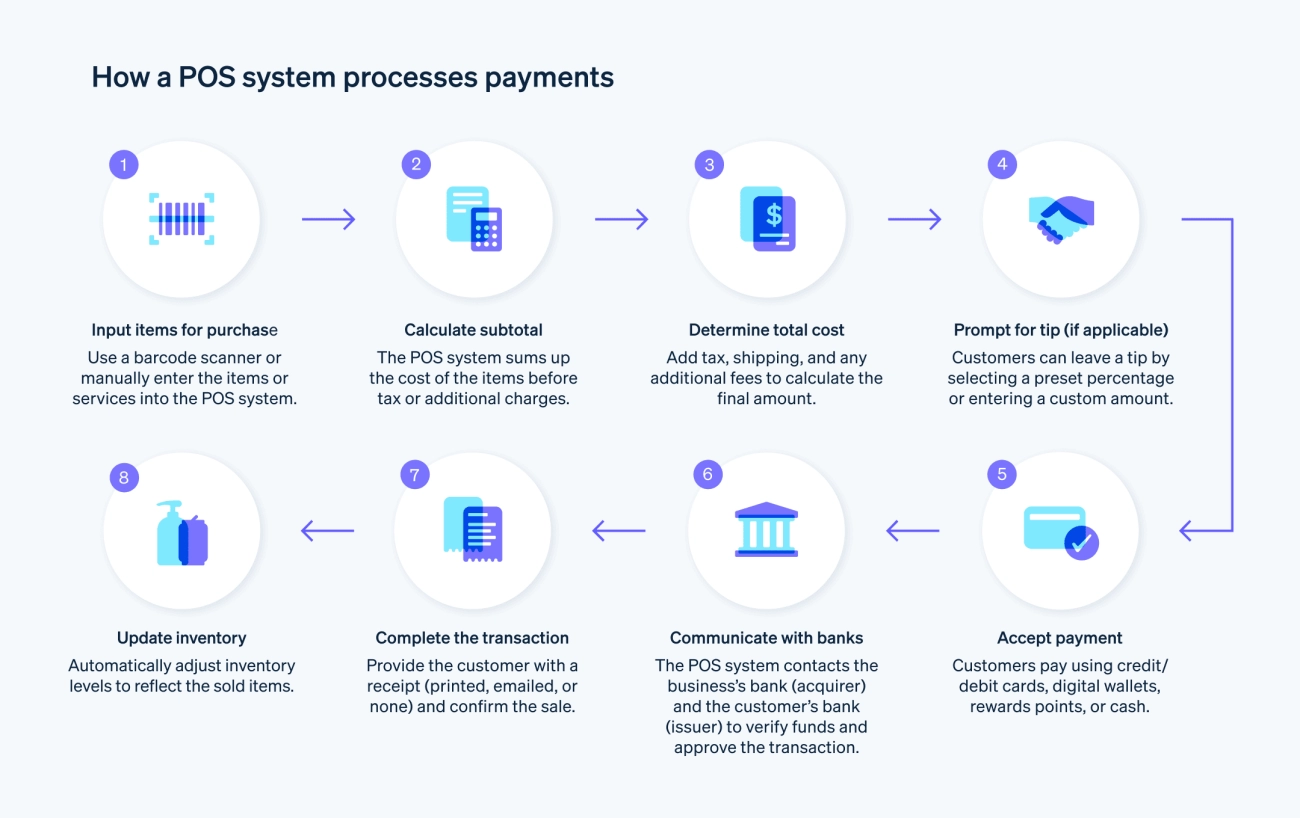
Understanding the POS transaction process helps you see how these systems keep your business running smoothly from start to finish. Here’s a clear breakdown of each step and the role of retail inventory tracking, payment processing integration, and real-time automation.
Step 1 Product Selection and Data Capture
The first step begins when the customer chooses their items. As you scan products using a barcode scanner, the POS system instantly pulls up the product information—price, description, and available stock. This data capture is crucial for accurate retail inventory tracking, making sure your system knows what’s selling and what needs restocking.
If you’re using cloud-based POS software, all this info updates in real time across your entire system, giving you clear visibility of sales trends and inventory levels no matter where you are.
Step 2 Payment Processing
Once products are selected, the system moves to payment processing integration. Whether customers pay by card, mobile wallet, or cash, the POS system securely handles the transaction. It communicates with payment gateways to process credit or debit cards instantly, reducing wait times and errors.
Many systems support mobile POS hardware, allowing sales anywhere in the store or even off-site. This flexibility improves customer experience. Plus, because payments sync back to your software, you get accurate sales records without manual input.
Step 3 Transaction Completion and Backend Updates
After payment approval, the POS system completes the sale by printing receipts or sending digital copies. Behind the scenes, your inventory adjusts automatically—even updating quantities for each item sold. This real-time automation eliminates the need for manual stock counts and cuts down errors.
Your sales data also feeds into your sales analytics dashboard, providing insights into best sellers, peak hours, and customer preferences. This backend update is essential for keeping your business responsive and informed.
Beyond Checkout Real-Time Automation
A modern POS doesn’t stop at checkout. It helps you manage loyalty programs, track employee performance, and even syncs data with your accounting software. This ongoing automation saves you time and keeps operations tight:
- Automatic inventory alerts when stock runs low
- Customer loyalty management to reward repeat buyers
- Real-time sales reports accessible from any device
This seamless flow from product selection to backend updates keeps your store efficient and customer-friendly while supporting smarter business decisions.
Advanced POS System Functions and What Makes Them Indispensable
Modern POS systems have evolved far beyond just handling the checkout process. They now play a critical role in helping businesses manage operations efficiently while improving customer experience. Here’s a closer look at the advanced functions that make POS systems indispensable for retailers and service providers in the U.S. market.
Inventory Management and Sales Analytics
One of the strongest features of a POS system is real-time retail inventory tracking. Instead of manually counting stock, the system automatically updates inventory levels every time a product is scanned and sold. This helps you:
- Avoid stockouts and overstock situations
- Track product performance and seasonal trends
- Make smarter purchasing decisions based on actual sales data
Most advanced POS solutions come with a sales analytics dashboard that presents this data visually. You get insights on top-selling items, peak sales times, and profit margins. These analytics help shape marketing strategies and operational improvements without guesswork.
Customer Relationship Tools
A big part of why POS systems are crucial is their role in customer loyalty management. They allow businesses to:
- Store customer data and purchase history securely
- Offer personalized promotions and discounts
- Simplify loyalty programs with points or rewards linked directly to transactions
These CRM features help build repeat customers and deepen engagement, which is vital in competitive U.S. retail and hospitality markets.
Omnichannel and Mobile Capabilities
Today’s shoppers expect flexibility. POS systems support omnichannel retail systems, connecting online sales with in-store operations seamlessly. This means:
- Real-time synchronization of inventory across eCommerce and physical locations
- Unified customer profiles and order history, whether bought online or in-store
Additionally, mobile POS hardware lets sales associates process payments anywhere in the store or on the go, speeding up the checkout process and improving customer satisfaction. Features like barcode scanner functionality and mobile payment processing integration further streamline operations.
Why These Advanced Features Matter
By integrating inventory management, analytics, customer tools, and omnichannel capabilities into one platform, a POS system becomes a digital hub that simplifies your daily operations and drives business growth. For businesses looking to take advantage of these benefits without hassle, solutions like SDLPOS offer easy setup and robust tools tailored for U.S. retailers.
Learn more about how these advanced features work in practice with point of sale system features and check out how integration issues are handled in our troubleshooting common POS system issues guide.
Benefits of Implementing a POS System in Your Business
Using a POS system can truly transform how your business runs day to day. It’s more than just a tool to ring up sales—it’s a powerful solution that improves efficiency, accuracy, and customer experience.
Streamlined Transactions and Faster Checkout
A modern POS system speeds up the POS transaction process by quickly scanning barcodes and processing payments through integrated methods. This means your customers spend less time waiting, and cashiers can manage high traffic with ease.
Accurate Retail Inventory Tracking
With built-in retail inventory tracking, your POS software updates inventory levels in real time with every sale. This limits mistakes like overselling or running out of stock, helping you avoid lost sales and keep customers happy.
Better Sales Analytics for Smarter Decisions
The sales analytics dashboard built into most cloud-based POS software provides you with detailed insights on daily sales, product performance, and peak shopping times. This data lets you adjust your marketing and inventory right when your business needs it most.
Enhanced Customer Loyalty Management
POS systems support customer loyalty management by storing buying habits and preferences. You can launch promotions, reward repeat customers, and deliver personalized service, which builds stronger customer relationships and boosts repeat business.
Flexible Omnichannel and Mobile Capabilities
A good POS system often supports omnichannel retail systems—meaning it works smoothly across your online store, physical shop, and mobile sales points. This flexibility lets you sell wherever your customers are and manage all sales through one platform.
Simplified Payment Processing Integration
Integrating multiple payment options, from credit cards to mobile wallets, is standard with POS systems. This flexibility ensures you don’t miss sales due to limited payment choices and supports fast, secure checkouts.
Reduced Human Error and Increased Security
Automation helps reduce manual entry mistakes in transactions and inventory updates. Plus, with secure cloud-based systems, your business data is better protected against loss or theft.
Time and Cost Savings
By automating back-office tasks, inventory restocking alerts, and sales reporting, POS systems free up your time and cut down on staffing demands. This efficiency translates to real cost savings in daily operations.
Implementing a POS system is a smart move for U.S. businesses aiming to modernize operations, scale efficiently, and offer a seamless shopping experience. It’s an investment that pays off by boosting sales, improving management, and keeping customers coming back.
Common Challenges in POS Systems and How SDLPOS Solves Them
When you’re setting up a point of sale system, challenges like setup hurdles and integration issues can slow down your business. It’s normal to worry about whether the investment in POS hardware and software will bring enough value to your operation. Here’s a closer look at these common problems and how SDLPOS offers practical solutions tailored to U.S. retailers.
Setup Hurdles and Integration Issues
Getting your POS system up and running can feel overwhelming, especially with complex software settings or compatibility problems between hardware like barcode scanners and payment processors. Many businesses face delays because:
- Hardware doesn’t communicate properly with existing retail inventory tracking systems.
- Cloud-based POS software requires stable internet and technical know-how.
- Integrating payment processing smoothly to accept cards, mobile pay, and other methods isn’t plug-and-play.
How SDLPOS tackles this:
- Comprehensive setup guidance: SDLPOS provides clear installation steps and personalized support, helping you avoid guesswork during setup.
- Seamless integration: Their POS systems are designed for easy compatibility with popular payment processors and retail systems, making the POS transaction process smoother.
- Local tech support: SDLPOS offers U.S.-based customer service that understands the challenges of local businesses, ensuring quick problem resolution.
Cost vs Value
Many business owners hesitate to invest in a point of sale system because of upfront costs, fearing it won’t justify the expense in the long run. However, balancing cost with value is crucial.
Key considerations:
- Some POS solutions come with hidden fees or require costly upgrades for features like customer loyalty management or sales analytics dashboards.
- Cheaper hardware may save money initially but result in downtime and poor transactional accuracy.
Why SDLPOS makes sense:
- Affordable pricing with robust features: SDLPOS offers competitively priced POS systems that cover essential functions without skimping on quality.
- Long-term savings: With reliable hardware and cloud-based software updates, you avoid frequent replacements or expensive service calls.
- Enhanced efficiency: Streamlined payment processing integration and automated retail inventory tracking reduce manual work, helping you save money on labor.
By choosing SDLPOS, you get a trustworthy partner that understands the needs of American retailers. Their systems reduce setup headaches, minimize integration issues, and deliver solid value — helping you focus on growing your business.
Choosing the Right POS System Tips for Retail Success
Picking the right POS system is crucial for smooth operations and growth in your retail business. With so many options out there, it can feel overwhelming, but focusing on key factors will guide you to the best choice.
Understand Your Business Needs
Start by getting clear on what your store really needs:
- Transaction volume: Do you handle a high number of daily sales? This affects hardware and software speed.
- Inventory complexity: If you manage lots of SKUs, you’ll want robust retail inventory tracking and easy barcode scanner functionality.
- Sales channels: Planning to sell online and in-store? Look for omnichannel retail systems or cloud-based POS software that handle all channels seamlessly.
- Customer engagement: Features like customer loyalty management and sales analytics dashboard add value by helping you keep customers coming back.
Prioritize User-Friendly Hardware and Software
Your staff will use the POS system daily, so ease of use is key. Consider mobile POS hardware options if your sales floor needs flexibility, or touchscreen setups for quick checkouts. The software should:
- Integrate smoothly with your current payment processing tools.
- Offer intuitive dashboards for sales data and inventory insights.
- Enable quick product lookup and transaction processing.
Check Setup and Integration Support
A complex setup can slow launch and frustrate teams. Choose a POS provider with a solid POS system setup guide and responsive support. Compatibility with existing cash register systems or barcode scanners ensures a smooth transition without losing valuable sales data. If you want to learn more about this, check out how POS systems work for businesses.
Consider Cost Versus Value
It’s smart to weigh upfront costs against long-term benefits. Don’t just pick the cheapest option—look at:
- Included features and scalability.
- Ongoing subscription fees for cloud services.
- Hardware warranties and update policies.
For deeper insights into this, see cost of POS systems for retail.
Look for Advanced Features That Grow With You
Advanced tools like inventory alerts, sales analytics, and customer management modules often pay for themselves by improving efficiency and sales. Also, consider:
- Integration with accounting systems.
- Mobile POS capabilities for sales on the go.
- Support for multiple payment methods.
Final Tips
- Test before buy: Request demos or trial periods.
- Read user reviews: Get feedback from businesses similar to yours.
- Plan for training: Ensure your team can quickly adapt to the new system.
Choosing the right POS system involves balancing your business needs with convenience and cost. By focusing on these key areas, you’ll find a solution that not only streamlines your POS transaction process but also supports smarter retail inventory tracking and customer engagement.


