







Las mejores impresoras térmicas POS 2025 modelos rápidos, confiables y compatibles


¿Estás buscando el terminal de punto de venta inalámbrico perfecto impresora POS térmica solución de pago impresora térmica POS puede transformar su proceso de pago, ahorrando tiempo y aumentando la eficiencia. Como propietario de un negocio, entiendo las molestias de las impresoras de recibos lentas e poco confiables, y estoy aquí para ayudarle a encontrar una solución que funcione.
En esta guía, descubrirá todo lo que necesita saber sobre impresoras de recibos térmicos, desde su rendimiento ultrarrápido hasta su integración perfecta con sistemas POS. Ya sea que dirija una tienda minorista, un restaurante o un centro logístico, desglosaremos las funciones y beneficios imprescindibles para satisfacer sus necesidades. Además, he incluido consejos internos basados en experiencias del mundo real para asegurar que realice una inversión inteligente.
¿Listo para mejorar sus transacciones con una impresora de recibos de alta velocidad? ¡Vamos a ello!
Por qué elegir una impresora POS térmica para su negocio
Si administra una tienda minorista, un restaurante o una operación logística, sabe lo importante que es una impresión de recibos rápida y confiable en el punto de venta. Las impresoras POS térmicas se han convertido en la opción preferida para muchas empresas porque ofrecen velocidad, fiabilidad y bajo mantenimiento, haciendo que las transacciones diarias sean fluidas y sin complicaciones.
Qué es una impresora POS térmica
Una impresora POS térmica es un dispositivo que imprime recibos, etiquetas o tickets usando papel sensible al calor. A diferencia de las impresoras tradicionales, no requiere tinta ni tóner. En su lugar, utiliza un cabezal de impresión térmica para crear impresiones nítidas y claras de manera rápida y silenciosa, ideal para entornos donde la velocidad y la claridad son importantes.
Por qué las impresoras POS térmicas son populares
Las impresoras de recibos térmicas han ganado un uso generalizado en minorista, hostelería y logística debido a varias ventajas clave:
- Velocidades de impresión rápidas reducen los tiempos de espera de los clientes y aceleran el proceso de pago.
- Operación silenciosa mantiene bajos los niveles de ruido en tiendas y restaurantes concurridos.
- Bajo mantenimiento significa que no hay reemplazos desordenados de tinta o tóner y menos interrupciones en el servicio.
- Calidad de impresión confiable para códigos de barras, recibos y etiquetas garantiza un escaneo y registro sin problemas.
Las empresas que buscan soluciones de impresión de recibos duraderas, eficientes y modernas, a menudo recurren a la tecnología térmica para optimizar sus operaciones.
Confía en SDLPOS para impresoras térmicas POS de calidad
Cuando se trata de elegir la impresora térmica POS adecuada, el hardware y las soluciones de SDLPOS destaca como un proveedor confiable de dispositivos de alta calidad. Nuestra gama de impresoras térmicas avanzadas ofrece velocidad impresionante, opciones robustas de conectividad y componentes duraderos diseñados para los entornos empresariales de ritmo rápido de hoy en día. Ya dirijas una pequeña tienda minorista o un restaurante concurrido, SDLPOS tiene la impresora térmica POS adecuada para tus necesidades.
¿Listo para actualizar tu sistema de punto de venta con una impresora de recibos térmica confiable? Explora las impresoras térmicas POS de SDLPOS para una experiencia de impresión sin problemas que mantiene tu negocio en movimiento.
Cómo funcionan las impresoras térmicas POS
Cuando se trata de impresoras térmicas POS, entender la tecnología que las respalda te ayuda a tomar la decisión correcta para tu negocio. Hay dos tipos principales de impresión térmica: térmica directa y transferencia térmica.
Impresión térmica directa vs transferencia térmica
Impresión térmica directa utiliza una cabeza de impresión térmica que aplica calor directamente a papel especial sensible al calor. Esto crea la imagen sin necesidad de tinta, cintas o tóner, lo que lo hace simple y rentable. Por otro lado, impresión por transferencia térmica utiliza calor para derretir la tinta de una cinta sobre la etiqueta o papel. Este método se usa a menudo para impresiones de mayor duración en etiquetas o etiquetas de envío, pero implica más suministros.
Componentes clave de las impresoras POS térmicas
- Cabeza de impresión térmica: La parte principal que genera calor.
- Papel sensible al calor: Reacciona al calor para producir texto o imágenes.
Por esto, impresoras de recibos térmicos no necesitan tinta ni tóner, reduciendo significativamente los costos de mantenimiento y operación.
Beneficios de las impresoras POS térmicas
- Velocidades de impresión rápidas: Perfecto para entornos minoristas y de hostelería concurridos donde los recibos de cafetería o los tickets de caja rápida son imprescindibles.
- Operación silenciosa: Sin mecanismo de impacto ruidoso, lo que las hace ideales para áreas de atención al cliente o entornos de hostelería tranquilos.
- Calidad de impresión nítida: Recibos claros y nítidos y impresiones de códigos de barras que facilitan la lectura y una presentación profesional.
SDLPOS ofrece una gama de impresoras térmicas avanzadas diseñadas específicamente para un rendimiento de alta velocidad, asegurando que su negocio siga el ritmo de las transacciones diarias. Ya sea que necesite una impresora POS para comercio minorista o una Impresora POS Bluetooth para pagos móviles, su gama ofrece hardware confiable que soporta impresiones suaves y sin interrupciones en todo momento.
Características clave a buscar en una impresora térmica POS
Al elegir un impresora POS térmica para su negocio, varias características pueden marcar una gran diferencia en las operaciones diarias. Aquí le indicamos en qué enfocarse:
Velocidad de impresión para entornos de alto volumen
La impresión rápida es esencial en tiendas minoristas o restaurantes concurridos. Busque impresoras que ofrezcan 200 a 300 mm por segundo de velocidad de impresión para manejar largas filas sin ralentizar el proceso de pago. Las impresoras de recibos de alta velocidad mejoran el flujo de clientes y reducen significativamente los tiempos de espera.
Opciones de conectividad flexibles
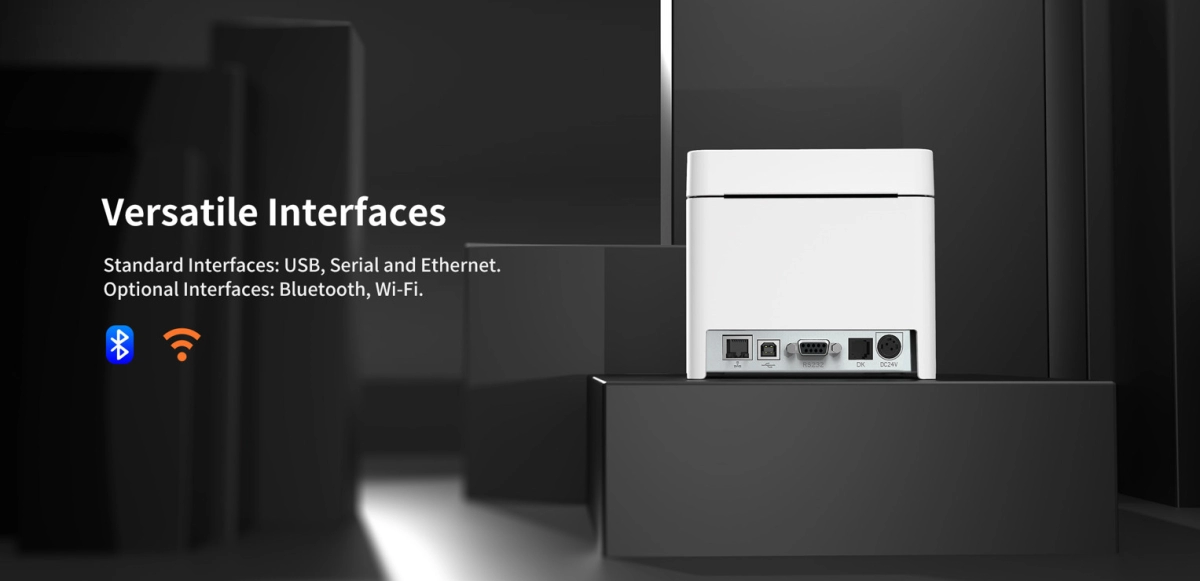
Su impresora de recibos térmica debe integrarse fácilmente en su configuración existente. Verifique la disponibilidad de múltiples tipos de conexión como USB, Ethernet, Bluetooth y Wi-Fi. Estas opciones le brindan flexibilidad para emparejar la impresora con ordenadores de escritorio, tablets o dispositivos POS móviles según sus necesidades.
Compatibilidad con sistemas POS populares
Asegúrese de que la impresora funcione sin problemas con su software POS. Muchas empresas en España utilizan sistemas como Square, Shopify o Clover, por lo que elegir una impresora térmica compatible con estas plataformas evita problemas de integración. Los modelos SDLPOS soportan múltiples plataformas, facilitando la configuración.
Durabilidad y bajo mantenimiento
Las impresoras térmicas deben soportar un uso intensivo sin reparaciones frecuentes. Opte por impresoras con cabezales de impresión duraderos, generalmente calificados en torno a 100 a 150 kilómetros de papel impreso. Esto minimiza el tiempo de inactividad y reduce los costos de mantenimiento, una ventaja clave sobre las impresoras de impacto que requieren cintas de tinta.
Tamaño y Diseño para Tu Espacio
Considera el tamaño y espacio de tu mostrador. Las impresoras térmicas POS compactas se adaptan a mostradores pequeños sin desorden, mientras que los modelos portátiles están diseñados para ventas y eventos en movimiento. SDLPOS ofrece diseños elegantes y que ahorran espacio que se integran bien tanto en configuraciones fijas como móviles.
Por qué SDLPOS destaca
Las impresoras térmicas SDLPOS vienen con controladores multiplataforma para una compatibilidad amplia y hardware robusto diseñado para velocidad y fiabilidad. Sus modelos combinan alta velocidad de impresión, conectividad diversa y construcción duradera — perfectos para pequeñas empresas en España que buscan una impresión de recibos eficiente y sin complicaciones.
Al enfocarte en estas características, encontrarás una impresora POS térmica que aumenta la productividad, se ajusta a tu sistema y mantiene tu negocio funcionando sin problemas.
Beneficios de las Impresoras POS Térmicas para Diferentes Industrias
Las impresoras POS térmicas son una opción inteligente en varias industrias gracias a su velocidad, fiabilidad y calidad. Así aportan valor a los principales sectores empresariales en España:
Beneficios para el Comercio Minorista
En el comercio minorista, la velocidad y la claridad son cruciales. Las impresoras de recibos térmicos ayudan aceleran los pagos a mantener en movimiento a los clientes. Las impresiones son nítidas y claras, produciendo recibos nítidos y etiquetas de código de barras que se escanean fácilmente. Esto reduce errores y mejora la experiencia de compra en general. Las impresoras térmicas SDLPOS vienen con impresión de alta velocidad y una excelente compatibilidad con papel, lo que los hace perfectos para mostradores de venta ocupados.
Beneficios para la Hostelería
Los restaurantes y cafeterías necesitan impresoras que puedan manejar el ritmo rápido de pedidos y demandas de cocina. SDLPOS ofrece modelos aptos para cocina con funciones como cubiertas resistentes a salpicaduras que protegen los tickets de pedido de derrames y grasa. La operación silenciosa y rápida significa que los pedidos se procesan sin interrupciones por ruido, manteniendo en marcha su área de atención y cocina sin problemas.
Beneficios para la Logística
Para logística y envíos, la durabilidad y la calidad de las etiquetas son importantes. Las impresoras térmicas de SDLPOS producen etiquetas claras y duraderas adecuadas para el seguimiento de inventario y envíos. Su papel térmico soporta manejo y escaneo sin desvanecerse, lo cual es fundamental para gestionar paquetes de manera eficiente. Estas impresoras son lo suficientemente robustas para entornos de almacén y se integran bien con sistemas de gestión de inventario.
Personalización para las necesidades de la industria
Lo que distingue a SDLPOS es su capacidad para personalizar impresoras térmicas POS para las necesidades específicas de cada sector. Ya sea que necesite modelos compactos para pequeños mostradores de venta, impresoras POS Bluetooth móviles para ventas en movimiento o diseños resistentes para entornos logísticos difíciles, SDLPOS tiene opciones diseñadas para coincidir. Sus impresoras soportan múltiples opciones de conectividad como USB, Ethernet y Wi-Fi, asegurando una integración perfecta con su hardware y software de sistema de punto de venta existentes como Square o Shopify.
In , elegir las impresoras térmicas POS de SDLPOS significa obtener soluciones enfocadas en la industria que mejoran la eficiencia, mejoran la experiencia del cliente y ofrecen un rendimiento confiable adaptado a negocios de venta minorista, hostelería y logística en el mercado de España y países de habla hispana.
Impresoras térmicas vs Impacto: ¿Cuál es la adecuada para usted?
Elegir entre un impresora POS térmica y un impresora POS de impacto depende de las necesidades de su negocio, entorno y cómo utiliza el hardware de su sistema de punto de venta. Aquí tiene un desglose sencillo para ayudarle a decidir.
Velocidad y Ruido
Impresoras térmicas son mucho más rápidos, imprimiendo alrededor 20 líneas por segundo, en comparación con las impresoras de impacto que gestionan aproximadamente 3 líneas por segundo. Esta velocidad hace que las impresoras térmicas sean perfectas para entornos concurridos y orientados al cliente, como tiendas minoristas o restaurantes de comida rápida donde la velocidad de pago es importante.
Además, las impresoras térmicas funcionan de manera silenciosa. Las impresoras de impacto, por otro lado, utilizan un mecanismo de golpe físico que es notablemente ruidoso—menos ideal en ambientes donde la calma es importante.
Costo y Durabilidad
Las impresoras de impacto suelen tener un costo inicial menor y utilizan cintas de tinta que pueden ser más baratas en algunos casos, pero las impresoras térmicas no requieren tinta ni cintas, reduciendo costos continuos y desorden.
En cuanto a durabilidad, las impresoras de impacto son robustas y manejan bien formularios de múltiples copias, convirtiéndolas en una opción preferida en algunas cocinas o almacenes. Mientras tanto, las impresoras térmicas como los modelos avanzados de SDLPOS cuentan con cabezales de impresión duraderos con vidas útiles de 100 a 150 km de papel, requiriendo un mantenimiento mínimo.
Cuándo elegir cada impresora
Elija impresoras térmicas POS para:
- Cajas rápidas en tiendas minoristas
- Impresión clara y nítida de recibos y códigos de barras
- Entornos tranquilos y orientados al cliente
Elija impresoras de impacto para:
-entornos como cocinas donde el calor y la grasa son comunes- Impresión de recibos o formularios multipartitos
Por qué las impresoras térmicas SDLPOS son ideales para negocios modernos
Si gestionas una tienda o restaurante moderno y concurrido, impresoras POS térmicas SDLPOS combinan velocidad, fiabilidad y bajo mantenimiento. Soportan múltiples opciones de conectividad y funcionan perfectamente con sistemas POS populares como Square y Shopify. Esto las hace perfectas para negocios que buscan mantener las transacciones fluidas y eficientes.
En : Para la mayoría de las pequeñas empresas en España que buscan un servicio rápido y una operación elegante, las impresoras POS térmicas de SDLPOS ofrecen una ventaja clara sobre las impresoras de impacto, excepto en casos específicos como entornos de cocina difíciles.
Cómo elegir la mejor impresora POS térmica para tus necesidades
Elegir el sistema correcto impresora POS térmica significa entender los requisitos únicos de tu negocio. Aquí tienes un enfoque sencillo para ayudarte a tomar la mejor decisión.
Evalúe las necesidades de su negocio
- Volumen de transacciones: Si gestionas un volumen alto de transacciones diarias, busca una impresora de recibos de alta velocidad que pueda mantenerse al día sin ralentizar las líneas de caja.
- Entorno: Considera dónde se usará la impresora—mostradores minoristas, restaurantes concurridos o configuraciones móviles. Por ejemplo, una impresora de recibos para restaurante podría necesitar funciones resistentes a salpicaduras, mientras que una impresora POS Bluetooth móvil funciona mejor para tiendas temporales.
- Presupuesto: Encuentra un equilibrio entre el coste inicial y los ahorros a largo plazo. Invertir un poco más al principio suele compensar con impresoras de mayor duración y menos mantenimiento.
Verifica la compatibilidad con los sistemas existentes
- Asegúrate de que tu impresora de recibos térmica funcione perfectamente con tu hardware del sistema POS.
- Verifica el soporte con software POS popular como Square, Shopify o Clover.
- Busca impresoras que utilicen comandos estándar como comandos de impresora ESC/POS para simplificar la integración.
Considera los costos a largo plazo
- Las impresoras térmicas utilizan impresión térmica directa, lo que significa sin tinta ni cintas—solo papel térmico. Esto suele reducir los costos continuos en comparación con las impresoras de impacto que requieren cintas de tinta.
- Ten en cuenta el precio y la disponibilidad de compatibilidad con papel térmico para evitar sorpresas más adelante.
Aprovecha el soporte experto de SDLPOS
- SDLPOS ofrece orientación experta para ayudarte a seleccionar el modelo adecuado según tus necesidades.
- Su soporte técnico garantiza una configuración e integración con los sistemas existentes de manera sencilla y sin complicaciones.
- Con SDLPOS, tienes acceso a impresoras confiables y duraderas que se adaptan a soluciones POS para pequeñas empresas? el mercado de España.
Al evaluar cuidadosamente estos puntos, encontrarás la impresora térmica POS que encaje perfectamente en tu negocio—ofreciendo una impresión rápida y confiable sin gastar de más.
Por qué elegir las impresoras térmicas POS de SDLPOS para tu negocio
Cuando se trata de impresoras térmicas POS, SDLPOS destaca como un socio de confianza para empresas en toda España. Aquí te explicamos por qué elegir SDLPOS puede marcar la diferencia en tu configuración de punto de venta:
Hardware confiable construido para durar
Las impresoras SDLPOS están diseñadas con durabilidad en mente. Sus cabezas de impresión térmica ofrecen una larga vida útil, a menudo de entre 100 a 150 kilómetros de impresión sin perder calidad. Esto significa menos tiempo de inactividad y menos reemplazos, lo cual es crucial para tiendas minoristas ocupadas, restaurantes y operaciones logísticas.
Compatibilidad multiplataforma para una integración sin problemas
Uno de los mayores desafíos al elegir una impresora de recibos térmica es asegurarse de que funcione sin problemas con su sistema POS. SDLPOS soporta todas las plataformas principales, incluyendo software popular como Square, Shopify y Clover. Ya sea que necesite una conexión USB, Ethernet, Bluetooth o Wi-Fi, las impresoras SDLPOS ofrecen opciones flexibles para adaptarse fácilmente a su configuración existente.
Funciones avanzadas para negocios modernos
Tome, por ejemplo, el SDLPOS TP80K. Está diseñado pensando en las necesidades del negocio, con un diseño luminoso y elegante que destaca en su mostrador y tecnología inteligente de reducción de errores para minimizar atascos o impresiones incorrectas en los recibos. Estos pequeños pero importantes detalles mantienen sus operaciones funcionando sin contratiempos.
Asequibilidad y garantía que apoyan a las pequeñas empresas
SDLPOS entiende las limitaciones presupuestarias que enfrentan muchas empresas locales. Sus impresoras POS térmicas equilibran rendimiento y costo de manera efectiva, ofreciendo funciones robustas sin gastar una fortuna. Además, muchos modelos vienen con garantías sólidas y soporte al cliente local, simplificando reparaciones o reemplazos cuando sea necesario.
Disponibilidad local y soporte experto
Comprar en SDLPOS significa que no solo obtiene hardware, sino también la tranquilidad que brinda soporte técnico receptivo con sede en España. Esta presencia local asegura que pueda resolver rápidamente cualquier problema y acceder a consejos de mantenimiento adaptados a su modelo, lo cual es fundamental para mantener su sistema POS confiable todos los días.
In , SDLPOS impresoras POS térmicas combinan durabilidad, compatibilidad, funciones avanzadas y asequibilidad con un sólido soporte local, convirtiéndolas en una excelente opción para empresas en España que buscan mejorar la velocidad, fiabilidad y experiencia del cliente en el momento del pago.
Consejos para mantener su impresora POS térmica en óptimas condiciones y garantizar un rendimiento confiable
Mantener su impresora POS térmica mantenerla en perfectas condiciones le ahorra tiempo de inactividad y costos adicionales. Siga estos consejos simples pero efectivos, especialmente si confía en su impresora a diario para recibos, etiquetas de envío o tickets de pedido.
Almacene el papel térmico correctamente para prevenir que se decolore
- Mantenga el papel térmico alejado del calor y la luz solar. La exposición puede hacer que los recibos impresos se decoloren rápidamente.
- Almacene los rollos en un lugar fresco y seco con una temperatura estable.
- Utilice papel térmico compatible recomendado por su proveedor de impresoras, como las marcas sugeridas por SDLPOS, para garantizar la calidad de impresión y la durabilidad del papel.
Limpie las cabezas de impresión regularmente para obtener impresiones nítidas
- Limpie la cabeza de impresión térmica cada 1 a 2 semanas, o después de un uso intensivo. La acumulación de polvo y residuos conduce a impresiones desvanecidas o incompletas.
- Utilice alcohol isopropílico y un paño sin pelusas o bolígrafos de limpieza recomendados para obtener mejores resultados.
- Evite usar productos químicos agresivos o materiales abrasivos que puedan dañar las partes sensibles.
Monitoree y reemplace los consumibles a tiempo
- Reemplace los rollos de papel térmico antes de que se agoten para evitar atascos o interrupciones en el servicio.
- Si su impresora utiliza otros consumibles, como tarjetas de limpieza para modelos especializados, siga las instrucciones del fabricante.
Aproveche las guías de mantenimiento y soporte de SDLPOS
- SDLPOS ofrece guías de mantenimiento detalladas adaptadas a sus impresoras térmicas de alta velocidad, ayudándole a realizar el mantenimiento rutinario con confianza.
- Su equipo de soporte al cliente está listo para asistir con la resolución de problemas, asegurando que reciba asesoramiento experto para prolongar la vida útil de su impresora.
- El mantenimiento regular no solo previene fallos, sino que también mantiene una operación silenciosa y una impresión nítida de códigos de barras, cruciales para entornos de comercio minorista o hostelería de ritmo rápido.
Siguiendo estos pasos, mantendrás tu impresora de recibos térmica funcionamiento sin problemas, evitando interrupciones inesperadas y reparaciones costosas. Un cuidado adecuado significa que el hardware de tu sistema POS se mantiene confiable, apoyando tu negocio todos los días.



Pensamientos sobre “Top Thermal POS Printers 2025 Fast Reliable and Compatible Models”