







Cómo solucionar problemas comunes de la caja registradora paso a paso


¿Estás enfrentando problemas con tu caja registradora justo cuando más lo necesitas? Ya seas dueño de un pequeño negocio, gerente minorista o cajero de primera línea, saber cómo solucionar problemas comunes de la caja registradora puede ahorrarte tiempo y dinero valiosos. Una caja registradora confiable no es solo un equipo, es el corazón de tu proceso de ventas.
En esta guía, obtendrás soluciones prácticas, paso a paso, para abordar problemas frecuentes como fallos de energía, errores en la pantalla, atascos en la impresora y errores de software. Desglosaremos las soluciones para que puedas diagnosticar y resolver rápidamente los problemas sin llamar a reparaciones costosas. Además, aprenderás cuándo es momento de contactar a profesionales y cómo mantener tu caja registradora funcionando sin problemas.
Si quieres minimizar el tiempo de inactividad y aumentar tu confianza con tu hardware POS, esta guía de SDLPOS es exactamente lo que necesitas. ¡Vamos a empezar!
Componentes básicos y funciones de tu caja registradora
Entender tu caja registradora es el primer paso para una solución efectiva de problemas. Una caja registradora es más que una simple máquina para gestionar transacciones de ventas; es una pieza vital de tu hardware del sistema POS que garantiza operaciones comerciales fluidas. Conocer sus componentes básicos y funciones te ayudará a identificar problemas potenciales más rápidamente y aplicar las soluciones correctas.
Componentes clave de una caja registradora
Unidad de alimentación eléctrica
La fuente de alimentación es el corazón de tu caja registradora, proporcionando electricidad a todos los componentes internos. Los problemas aquí suelen causar fallos de energía o apagados inesperados.
Pantalla
Esto muestra detalles de las transacciones, precios y mensajes del sistema. Una pantalla que funciona mal puede interrumpir las ventas y crear confusión en los clientes.
Interfaz de teclado o pantalla táctil
Se utiliza para ingresar precios, seleccionar productos y operar funciones. Las fallas aquí pueden ralentizar las transacciones y causar errores en la entrada.
Impresora de Recibos
Esencial para imprimir recibos de clientes y registros de transacciones. Los problemas comunes incluyen atascos de papel y impresiones desvanecidas.
Cajón de efectivo
Almacena de forma segura efectivo y monedas y generalmente se abre automáticamente durante las transacciones. Los problemas mecánicos o errores de software pueden impedir que la bandeja se abra.
Procesador y memoria internos
Este es el “cerebro” donde se procesan los cálculos y se almacenan los datos de ventas. Los fallos de software o fallos de hardware en esta sección pueden causar errores operativos.
Funciones básicas de una caja registradora
Su caja registradora está diseñada para:
- Procesar transacciones de ventas de manera rápida y precisa
- Calcular totales, impuestos y cambio automáticamente
- Imprimir recibos para clientes de manera eficiente
- Gestionar el efectivo de forma segura con acceso controlado a la caja
- Almacenar datos de ventas para informes y propósitos contables
Muchas cajas registradoras modernas funcionan como parte de un sistema integrado sistema POS de Walmart, combinando hardware y software para gestionar inventario, datos de clientes e informes de manera fluida. Esto aumenta la complejidad, pero también mejora la funcionalidad.
Al dominar los componentes básicos y cómo interactúan, puedes abordar la resolución de problemas con una comprensión más clara. Por ejemplo, si tu pantalla de la caja registradora no funciona, sabrás si debes revisar el fuente de alimentación, los cables o la propia pantalla.
Para una introducción detallada sobre cómo trabajar con cajas registradoras de manera efectiva, consulta nuestra guía sobre cómo manejar una caja registradora en una tienda de comestibles.
Conocer tu equipo en profundidad te prepara para diagnosticar y resolver errores comunes de la caja registradora con confianza, manteniendo tu negocio en marcha sin problemas.
Problemas comunes de la caja registradora y consejos rápidos de diagnóstico
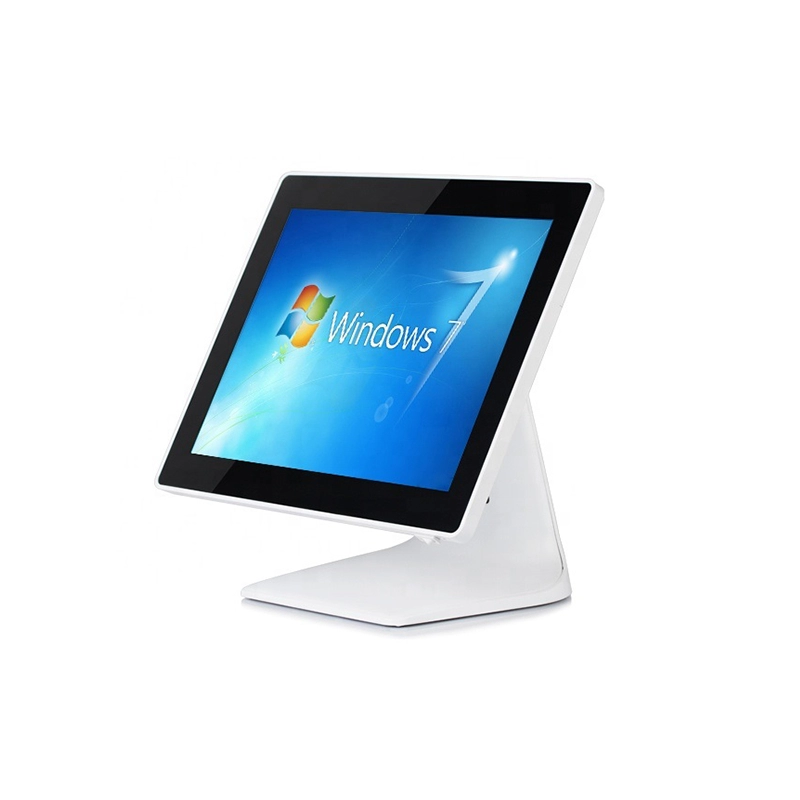
Cuando se trata de solución de problemas de caja registradora, la mayoría de los usuarios enfrentan una serie de problemas recurrentes. Conocer estos problemas comunes y formas rápidas de diagnosticarlos puede ahorrarte tiempo y mantener tu negocio en funcionamiento sin problemas. Aquí tienes un desglose de errores típicos de la caja registradora y cómo identificarlos rápidamente.
Problemas de energía
Si su la caja registradora no enciende o sigue apagándose inesperadamente, generalmente es un problema de energía. Primero, verifica si el cable de alimentación está bien conectado tanto a la caja registradora como a la toma de corriente. Busca cables dañados o conexiones sueltas. También, confirma si la toma de corriente funciona probando con otro dispositivo. A veces, un fusible fundido o un disparo en el disyuntor puede causar esto también. Un reinicio rápido de la regleta o del disyuntor podría solucionar el problema.
Pantalla No Funciona
Una pantalla en blanco o parpadeante de la caja registradora es otro dolor de cabeza común. Diagnóstico esto asegurándose de que los cables y conectores de la pantalla estén firmemente conectados. Si tu modelo tiene una pantalla separada, busca cables sueltos o desgastados. A veces, ajustar el brillo o reiniciar la caja registradora puede devolverle la vida. Si ves códigos de error, anótalos; pueden ayudar a identificar fallos específicos de hardware o software.
Problemas con la Impresora de Tickets
Los problemas con la impresora de tickets son frecuentes en tiendas concurridas. Si notas que no hay impresión o la calidad de impresión es pobre, comienza revisando el rollo de papel: ¿está cargado correctamente y hay suficiente papel? Busca atascos de papel y límpialos cuidadosamente sin rasgar el rollo. Además, confirma que la configuración de la impresora en el software de la caja registradora esté correcta. Las cabezas de impresión sucias o niveles bajos de tinta (para impresoras de tinta) también pueden causar problemas.
La Caja Registradora No Se Abre
Cuando la la caja registradora no se abre, puede ralentizar mucho tu proceso de cobro. Esto podría ser un problema de hardware o de conexión. Asegúrate de que la caja esté correctamente conectada a la registradora y que no haya obstrucciones físicas. Prueba los mecanismos de liberación manual si están disponibles. Si el software de la caja controla la apertura, confirma tus configuraciones y verifica si activa correctamente el comando de apertura.
Fallas en el Teclado o Pantalla Táctil
Las teclas que no responden o las pantallas táctiles pueden ser frustrantes. Para los teclados, revisa si hay teclas atascadas o sucias, y límpialas suavemente si es necesario. Para las pantallas táctiles, un reinicio simple puede solucionar problemas de calibración. Confirma que no haya daños físicos y, si es posible, prueba con dispositivos de entrada externos para aislar el problema.
Errores de Software
Por último, los problemas de software como bloqueos, mensajes de error o errores en transacciones suelen indicar software desactualizado o corrupto. Ejecutar una actualización de software para cajas registradoras puede corregir errores y mejorar el rendimiento. A veces, un reinicio completo o reiniciar la máquina resuelve fallos menores, pero respalda tus datos primero si es posible.
Consejos Rápidos de Diagnóstico
- Siempre comienza con la energía y las conexiones.
- Anota cualquier código de error o ruidos inusuales.
- Prueba los componentes básicos de hardware (impresora, pantalla, caja) uno por uno.
- Reinicie el sistema antes de abordar reparaciones complejas.
- Mantenga una lista de verificación de problemas y soluciones para referencia futura.
Comprender estos errores comunes en la caja registradora y saber cómo evaluarlos rápidamente le prepara para solucionar problemas con rapidez o decidir cuándo es necesario ayuda profesional.
Pasos detallados para solucionar problemas Problemas de energía en la caja registradora Soluciones a problemas de energía
Los problemas de energía son uno de los problemas de hardware más comunes que puede enfrentar en una caja registradora. Cuando su caja registradora no enciende o se apaga constantemente, puede detener sus ventas y frustrar tanto a usted como a sus clientes. Aquí hay una guía sencilla para diagnosticar y solucionar estos problemas de energía.
Verifique la fuente de alimentación y las conexiones
- Verifique la toma de corriente: Conecte otro dispositivo (como un cargador de teléfono) en la misma toma para asegurarse de que funciona.
- Inspeccione los cables de alimentación: Busque daños visibles, deshilachados o enchufes sueltos. Los cables dañados pueden causar energía intermitente.
- Asegure las conexiones firmes: Tanto el cable de alimentación como la entrada de energía de la caja registradora deben estar conectados de manera segura.
Reinicie la caja registradora
- Apague la unidad: Si su caja registradora tiene un interruptor de encendido, apáguelo.
- Desconecte de la toma de corriente: Desconecte completamente la caja registradora.
- Espere 30 segundos: Esto permite que se drene cualquier energía residual.
- Vuelva a enchufarla y enciéndala: Este simple reinicio suele solucionar fallos menores de software que afectan la alimentación.
Verificar la batería interna (si aplica)
- Algunas cajas registradoras tienen un batería de respaldo interna para mantener la configuración. Si los problemas de energía persisten incluso cuando está conectado:
- Consulte su manual para verificar si la batería interna necesita ser reemplazada.
- Una batería de respaldo agotada puede no impedir la energía, pero puede causar comportamientos erráticos.
Inspeccionar fusible o disyuntor
- Muchas cajas registradoras contienen un fusible o disyuntor en su interior:
- Localice el fusible (generalmente cerca de la entrada de corriente).
- Si está fundido, reemplácelo por uno con la misma calificación.
- Si su unidad dispara los disyuntores con frecuencia, podría indicar problemas eléctricos que requieren ayuda profesional.
Evitar sobretensiones y cortes de energía
- Utilice un protector contra sobretensiones para proteger su caja registradora de picos de voltaje inesperados.
- Si su zona tiene una energía poco fiable, considere un sistema de alimentación ininterrumpida (SAI) para un funcionamiento fluido.
Cuando los problemas de energía persisten
- Si ninguna de estas soluciones ayuda, el problema podría ser una falla interna del hardware.
- Contacto soporte profesional o el fabricante de su caja registradora para opciones de reparación o reemplazo.
Siguiendo estos pasos, puede cubrir la mayoría de las soluciones rápidas relacionadas con la energía para la caja registradora, minimizando el tiempo de inactividad durante sus horas más ocupadas.
Pasos detallados para la resolución de problemas de fallos en la pantalla de la caja registradora
A pantalla de la caja registradora que no funciona puede ralentizar su proceso de ventas y confundir tanto al personal como a los clientes. Aquí hay una guía sencilla para diagnosticar y solucionar problemas comunes de la pantalla para que pueda volver a trabajar rápidamente.
Verifique las conexiones y cables de alimentación
- Verifique la fuente de alimentación: Asegúrese de que la pantalla esté bien conectada. A veces, un cable de alimentación suelto o un tomacorriente defectuoso puede hacer que la pantalla parpadee o permanezca en blanco.
- Inspeccione los cables de conexión: Si su pantalla se conecta por separado del cuerpo principal de la caja registradora (a través de VGA, HDMI o USB), revise los cables en busca de daños o conexiones sueltas.
- Pruebe con un tomacorriente diferente: A veces, una regleta o un tomacorriente pueden ser el problema, así que pruebe la pantalla con una fuente de alimentación diferente.
Reinicie y restablezca la pantalla
- Reinicia la caja registradora: Un simple reinicio suele solucionar pequeños fallos que afectan la pantalla.
- Restablezca la configuración de la pantalla: Consulte su manual de usuario para saber cómo restablecer la configuración de la pantalla. Esto puede resolver problemas como imágenes distorsionadas o niveles de brillo incorrectos.
- Utilice la opción de restablecimiento de fábrica si está disponible, pero solo después de hacer una copia de seguridad de los datos importantes.
Inspeccionar daños físicos y problemas en la pantalla
- Buscar grietas o daños visibles en la pantalla.
- Si la pantalla está tenue o tiene píxeles muertos, podría necesitar reparación profesional o reemplazo.
- Limpiar la pantalla suavemente con un paño suave—a veces la suciedad y las manchas afectan la sensibilidad táctil o la visibilidad.
Probar problemas relacionados con el software en la pantalla
- Actualizar el software de la caja registradora: El software desactualizado puede causar errores en la pantalla.
- Verifica la configuración del software para problemas de configuración de la pantalla.
- Si los fallos en la pantalla ocurren al ejecutar funciones específicas, podría ser un error de software que requiere una actualización o parche.
Evaluar factores del entorno externo
- Las luces brillantes o el deslumbramiento a veces dificultan la visualización de la pantalla—ajuste su configuración si es necesario.
- Asegurarse de que la pantalla no se sobrecaliente ni esté cerca de fuentes de calor; el exceso de calor puede causar mal funcionamiento.
Cuando los problemas de la pantalla persisten
Si después de estos pasos su pantalla de la caja registradora aún no funciona, it’s likely a hardware defect or system-level problem beyond basic troubleshooting. Time to call professional support or the manufacturer’s service center to prevent prolonged downtime.
Siguiendo estos consejos, diagnosticará rápidamente la mayoría de los problemas de hardware del sistema POS relacionados con la pantalla y mantendrá sus ventas funcionando sin problemas.
Pasos detallados para solucionar problemas de problemas en la impresora de recibos
Los problemas con la impresora de recibos están entre los problemas más comunes en las cajas registradoras que pueden interrumpir las ventas y causar retrasos a los clientes. Para solucionar los problemas de la impresora de recibos, es necesario identificar la causa exacta. Aquí tienes una guía clara de resolución de problemas que cubre los sospechosos habituales y cómo resolverlos rápidamente.
La impresora de recibos no imprime o imprime recibos en blanco
Verificar la instalación del rollo de papel
Asegúrate de que el rollo de papel esté instalado correctamente, con el papel alimentándose desde la parte inferior, no desde la superior. Una carga incorrecta suele provocar recibos en blanco.
Inspeccionar el tipo de papel
Utiliza papel térmico compatible recomendado por el fabricante. Papel de baja calidad o incorrecto puede hacer que la impresora imprima débilmente o no imprima en absoluto.
Limpiar la cabeza de impresión
Con el tiempo, la suciedad y los residuos se acumulan en la cabeza de impresión. Usa un bolígrafo de limpieza o alcohol isopropílico con un paño suave para limpiarla suavemente.
Verificar las conexiones de la impresora
Asegúrate de que la impresora esté correctamente conectada a la caja registradora o sistema POS. Los cables sueltos o los puertos USB/serie defectuosos son causas frecuentes.
Atasco de papel o problemas en la alimentación del recibo
Retirar cuidadosamente el papel atascado
Abre la tapa de la impresora y retira suavemente cualquier papel atascado o atascado. Evita rasgarlo para prevenir residuos dentro del mecanismo.
Verificar el recorrido del papel en busca de obstrucciones
Limpia cualquier trozo de papel rasgado o residuos en el recorrido del papel. A veces, enlaces antiguos o recibos bloquean una alimentación suave.
Verificar el grosor y tamaño del papel
Utiliza el calibrador de papel o las directrices del fabricante para confirmar que el grosor y el ancho del papel sean correctos. Un tamaño incorrecto puede causar atascos.
Mala calidad de impresión y manchas
Ajustar la configuración de la impresora
Accede al menú de configuración de la impresora para ajustar la oscuridad de la impresión o la velocidad. Aumentar la oscuridad puede mejorar la impresión desvaída.
Reemplazar la cabeza de impresión desgastada
Después de un uso intensivo, la cabeza de impresión puede desgastarse. Si la limpieza no ayuda, consulte el manual para los pasos de reemplazo o servicio profesional.
Evitar calor o humedad excesivos
Mantenga la impresora en un lugar fresco y seco. El calor o la humedad excesivos pueden degradar el papel térmico y la calidad de impresión.
Errores y alertas de la impresora de recibos
Reiniciar la impresora
Muchas cajas registradoras permiten reiniciar la impresora a través de opciones del menú o reiniciando el dispositivo. Esto puede borrar errores temporales del software que afectan a la impresora.
Verificar el sensor del rollo de papel
Asegúrese de que el sensor del rollo de papel no esté bloqueado o sucio. Los problemas con el sensor suelen causar alertas falsas de “sin papel”.
Actualizar el firmware o software de la impresora
El software desactualizado puede causar conflictos de comunicación entre la caja registradora y la impresora. Realice actualizaciones de software para mantener la compatibilidad.
Para obtener información más detallada sobre hardware de caja registradora y cómo funcionan componentes como la impresora de recibos, consulte Los conceptos básicos del hardware de caja registradora para comercio minorista. Esta guía le ayuda a entender mejor su sistema y a solucionar problemas de manera más efectiva.
Siguiendo estos pasos, debería poder solucionar rápidamente los problemas de la impresora de caja registradora, minimizando el tiempo de inactividad y manteniendo su caja en funcionamiento sin problemas.
Pasos detallados para solucionar problemas de la caja registradora
Los problemas con la caja registradora son un obstáculo común al gestionar un comercio minorista, especialmente en entornos concurridos. Saber cómo solucionar problemas de la caja registradora rápidamente puede ahorrarle frustrantes retrasos en la caja. Aquí hay un desglose de problemas típicos de la caja registradora y cómo solucionarlos.
La Caja Registradora No Se Abre
Si su la caja registradora no se abre, prueba estos pasos:
- Verifica la conexión: Asegúrate de que el cable de la caja registradora esté bien conectado tanto a la caja como a la caja registradora.
- Liberación manual: La mayoría de las cajas registradoras tienen una palanca o llave de liberación manual. Úsala para abrir la caja manualmente y verificar si hay atascos o monedas atascadas.
- Energía y señal: If your register is off or the POS system hardware has power issues, the cash drawer won’t release. Confirm the register is on and functioning.
- Comandos de software: Asegúrate de que ningún fallo de software esté bloqueando la caja. Intenta cerrar las transacciones correctamente o reiniciar la caja registradora.
La caja se abre aleatoriamente o no se bloquea
Las aperturas inesperadas pueden ser señal de cableado defectuoso o fallos de software. Prueba esto:
- Inspecciona el cableado: Busca cables dañados o conexiones sueltas entre la caja y la caja registradora.
- Actualizar software: A veces el problema está en el software que envía señales incorrectas. Verifica si hay alguna actualización de software para cajas registradoras.
- Reinicia el sistema: Realiza un reinicio simple de la caja registradora siguiendo las instrucciones de tu modelo para eliminar errores menores de software.
La caja se atasca o se queda pegada
Si la caja es difícil de abrir o cerrar físicamente:
- Elimina obstrucciones: Quita billetes, monedas u objetos extraños que bloqueen el deslizamiento de la caja.
- Lubrica las vías: Utilice una pequeña cantidad de spray de silicona o lubricante similar en el mecanismo deslizante.
- Verifique la alineación: Asegúrese de que el cajón esté correctamente alineado con el registro y asentado correctamente.
El cajón no es reconocido por el registro
Si su caja registradora no puede detectar el cajón:
- Confirme la compatibilidad: Algunos cajones requieren modelos específicos o versiones de firmware.
- Pruebe con otra caja registradora: Si está disponible, conecte el cajón a una caja registradora diferente para ver si es un problema de hardware.
- Reemplace los cables: Los cables defectuosos pueden impedir la comunicación entre el cajón y la caja registradora.
Consejos para el éxito en la resolución de problemas del cajón de efectivo
- Siempre apague su caja registradora antes de desconectar o examinar el hardware.
- Mantenga su cajón de efectivo limpio y libre de residuos para evitar atascos.
- Regularmente Verifique las conexiones del cajón de efectivo y la configuración del software para detectar problemas temprano.
Conocer estos pasos puede ahorrarle tiempo valioso, especialmente durante las horas punta de negocio. Cuando los problemas persistentes continúan, podría ser momento de llamar a soporte profesional o considerar un reemplazo para mantener operaciones de pago sin problemas.
Pasos detallados para la resolución de problemas de fallos en el teclado y la pantalla táctil
Cuando su teclado o pantalla táctil de la caja registradora no responde, puede ralentizar todo su día. Aquí le mostramos cómo solucionar problemas comunes y volver a trabajar rápidamente.
Verifique daños físicos o suciedad
- Inspeccione el teclado o la pantalla táctil en busca de suciedad, polvo o derrames. Estos pueden bloquear las pulsaciones de teclas o los sensores táctiles.
- Limpie suavemente con un paño suave, sin pelusas, ligeramente humedecido con agua o un limpiador suave. Evite productos químicos agresivos.
- Verifique si hay grietas visibles o teclas atascadas que puedan necesitar reparación.
Reinicie su caja registradora
- A veces, la solución más sencilla es reiniciar su caja registradora.
- Apáguela, espere 30 segundos y vuelva a encenderla. Esto puede eliminar problemas menores fallos de software que afectan el teclado o la pantalla táctil.
Verifique la configuración del teclado o la pantalla táctil
- Acceda al menú de configuración de su caja registradora.
- Asegúrese de que el teclado o la pantalla táctil estén habilitados y correctamente configurados.
- Algunas cajas permiten ajustar la sensibilidad táctil—intente aumentarla si las pulsaciones no se registran.
Pruebe el hardware del teclado o la pantalla táctil
- Utilice diagnósticos integrados si su caja registradora los tiene.
- Intente conectar un teclado externo si es compatible, o cambiar a un ratón para navegar y aislar el problema.
- Si su pantalla táctil soporta gestos, pruebe esas funciones para ver si la pantalla responde en absoluto.
Actualice el software para solucionar fallos en el teclado y la pantalla táctil
- Los fallos en el software suelen causar teclas o pantalla no respondientes.
- Verifique que actualización de software para cajas registradoras. Mantener el software de su sistema POS actualizado puede solucionar errores y mejorar la compatibilidad del hardware.
Verifique los cables y puertos de conexión
- Si su teclado o pantalla táctil son desmontables, asegúrese de que todos los cables estén conectados de forma segura.
- Los cables sueltos o dañados son una causa común de problemas de hardware.
- Busque pines doblados o cables desgastados y reemplácelos si es necesario.
Cuando ninguno de estos pasos funciona
- Si el teclado o la pantalla táctil de su caja registradora siguen sin responder o son inconsistentes incluso después de probar estos pasos, probablemente sea un defecto de hardware.
- Considere reparación profesional o reemplazo para restaurar la funcionalidad completa de su sistema POS.
Siguiendo estos pasos sencillos, podrá solucionar de manera eficiente los fallos más comunes en teclados y pantallas táctiles, minimizando el tiempo de inactividad en su negocio.
Pasos detallados para solucionar fallos de software en cajas registradoras
Los fallos en el software pueden interrumpir el rendimiento de su caja registradora, causando errores, congelamientos o respuestas lentas. Estos errores comunes en las cajas registradoras suelen deberse a software desactualizado, archivos corruptos o conflictos con nuevas actualizaciones. Aquí le mostramos cómo solucionar y corregir problemas relacionados con el software de manera efectiva.
Identifique problemas de software
- Síntomas a vigilar: bloqueo del sistema, apagados inesperados, mensajes de error, operación lenta o fallo en el procesamiento de ventas.
- Verificar cambios recientes: ¿El problema comenzó después de una actualización de software o una instalación nueva? Esto puede ayudar a identificar la causa.
Pasos para solucionar fallos de software
Reinicie su caja registradora
- A veces, un simple reinicio soluciona fallos menores.
- Apague completamente, espere 10 segundos y vuelva a encender.
Actualizar el software
- Verifique las últimas actualizaciones de software específicas para su modelo de caja registradora.
- El software actualizado suele incluir correcciones de errores y mayor estabilidad.
- Siga las instrucciones del fabricante o visite su sitio web para herramientas de actualización.
Borrar caché y archivos temporales
- La acumulación de caché puede ralentizar el rendimiento o causar errores.
- Si su sistema lo permite, borre la caché o restablezca los archivos temporales para actualizar el entorno del software.
Ejecutar diagnósticos o herramientas de resolución de problemas integradas
- Muchas cajas registradoras tienen un modo de diagnóstico para la salud del software.
- Ejecute las herramientas disponibles para detectar y reparar archivos corruptos o conflictos.
Restablecer a configuración de fábrica (con precaución)
- Si los problemas persisten, considere un restablecimiento de fábrica para revertir todas las configuraciones del software.
- Haga una copia de seguridad de los datos importantes primero, ya que esto borrará la configuración personalizada y el historial de transacciones.
Verificar conflictos de software
- Si utiliza sistemas POS integrados o aplicaciones de terceros, asegúrese de la compatibilidad.
- Desactivar o desinstalar las adiciones recientes para probar si causan el fallo.
Cuando persisten los problemas de software
Si los fallos del software continúan después de estos pasos, podría ser un problema más profundo del sistema o relacionado con el hardware, causando fallos en el software. En ese caso, contacte con soporte profesional o con su proveedor de caja registradora para obtener más ayuda.
Prevención de problemas de software
- Verifique e instale regularmente las actualizaciones de software.
- Evite apagados abruptos; siempre utilice los procedimientos adecuados para apagar el equipo.
- Limite la instalación de aplicaciones de terceros no verificadas en el sistema de la caja registradora.
Siguiendo estos pasos de resolución de problemas, reducirá el tiempo de inactividad causado por fallos de software y mantendrá su caja registradora funcionando sin problemas para las operaciones diarias.
Cuándo llamar a soporte profesional para solucionar problemas de caja registradora
Saber cuándo llamar a soporte profesional puede ahorrar tiempo y prevenir problemas mayores con su caja registradora. Aunque muchos problemas comunes pueden resolverse con verificaciones simples y soluciones rápidas, algunas situaciones requieren ayuda de expertos.
Señales de que necesita ayuda profesional
- Problemas persistentes de energía: Si los problemas de energía de su caja registradora continúan después de verificar cables, tomas de corriente y fuentes de alimentación, es necesaria una diagnosis profesional.
- Fallos en la pantalla que no se borran: Cuando la pantalla permanece en blanco o muestra mensajes de error después de reinicios, es momento de llamar al soporte técnico.
- Problemas con la impresora de tickets que se repiten: Atascos de papel regulares o problemas de calidad de impresión que no mejoran al solucionar lo básico, a menudo necesitan la intervención de un técnico.
- La caja registradora no se abre mecánicamente: Si la caja permanece atascada después de asegurarse de que no hay bloqueos mecánicos y de realizar reinicios, los profesionales pueden solucionar el problema de forma segura.
- Fallas en el teclado o pantalla táctil que afectan las transacciones: Dispositivos de entrada que no responden o funcionan de manera errática, especialmente después de actualizaciones de software o reinicios, requieren intervención experta.
- Errores de software que no se resuelven con actualizaciones: Si el software de tu caja registradora se congela, cierra o muestra códigos de error después de múltiples reinicios o actualizaciones, lo mejor es contactar con soporte.
Por qué es importante llamar a profesionales
- Prevenir daños: Las reparaciones caseras a veces pueden empeorar los problemas internos.
- Ahorrar tiempo: Los profesionales pueden localizar los problemas rápidamente y cuentan con herramientas especializadas.
- Evitar pérdida de datos: Cash registers handle sensitive sales data, so it’s important to preserve accurate records.
- Garantizar cumplimiento: Técnicos certificados mantienen tu sistema en cumplimiento con los estándares y protocolos de seguridad actuales.
Cómo prepararse antes de llamar al soporte
- Documentar el problema: Anote los mensajes de error, síntomas y cuándo comenzó el problema.
- Anote cualquier cambio reciente: Actualizaciones de software, hardware nuevo o eventos inusuales pueden ayudar a diagnosticar.
- Pruebe reinicios básicos: Reinicie su sistema o restablezca la caja registradora siguiendo las instrucciones del fabricante.
- Verificar conexiones: Asegúrese de que todos los cables y fuentes de alimentación estén seguros.
Llamar a soporte profesional suele ser la forma más rápida de solucionar problemas complejos de la caja registradora y mantener su negocio en funcionamiento sin interrupciones. Saber cuándo escalar puede prevenir tiempos de inactividad costosos y proteger sus ingresos.
Consejos de mantenimiento preventivo para un rendimiento duradero de la caja registradora
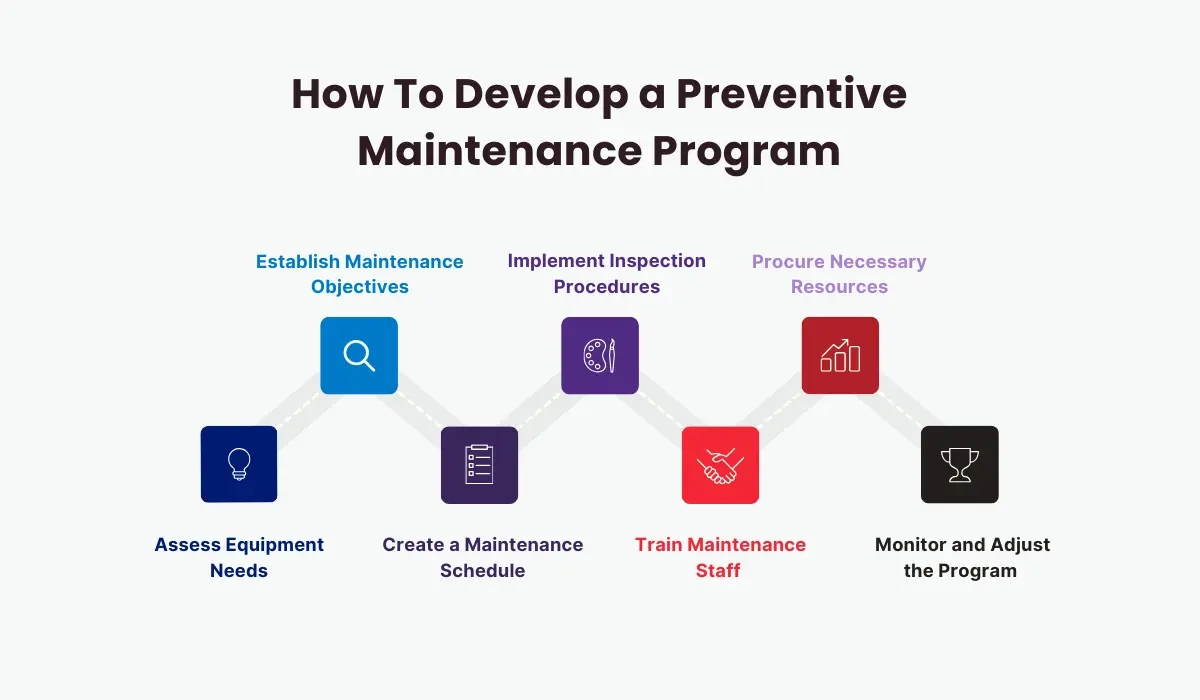
Mantener su caja registradora funcionando sin problemas significa que un poco de mantenimiento regular ayuda mucho. Para evitar problemas comunes y prolongar la vida útil del hardware de su sistema POS, siga estos consejos prácticos:
Manténgalo limpio y libre de polvo
El polvo y la suciedad pueden causar problemas de hardware como pantalla de la caja registradora que no funciona o atascos en la impresora.
- Limpie regularmente el exterior con un paño suave
- Utilice aire comprimido para limpiar las áreas del teclado y de la impresora de recibos
- Evite comer o beber cerca de la caja registradora
Revise las conexiones de energía con frecuencia
Los problemas de energía son una causa principal de apagados inesperados.
- Asegúrese de que el cable de alimentación esté bien conectado
- Utilice un protector contra sobretensiones para prevenir daños por picos de energía
- Inspeccione periódicamente los cables de alimentación en busca de desgaste o deshilachado
Reemplazar correctamente el papel de la impresora de tickets
Usar el tipo incorrecto o cargar mal el papel puede causar atascos en la impresora y impresiones desvaídas.
- Siempre utilice papel de recibo recomendado por el fabricante
- Cargue el papel correctamente con la orientación adecuada
- Mantenga rollos de repuesto a mano para no quedarse sin papel en el momento justo
Mantenga lubricado el mecanismo del cajón de efectivo
Un cajón de efectivo pegajoso puede interrumpir el proceso de cobro y causar errores.
- Limpie ocasionalmente las pistas deslizantes
- Utilice un lubricante ligero recomendado para cajones de efectivo para mantenerlo funcionando suavemente
Actualice el software regularmente
Los errores en el software ralentizan las operaciones y causan errores.
- Verifique si hay actualizaciones de software de su proveedor de caja registradora
- Realice las actualizaciones durante las horas de menor actividad para no interrumpir el negocio
- Haga una copia de seguridad de sus datos antes de realizar actualizaciones
Realice reinicios rutinarios del sistema
A veces, un simple reinicio soluciona varios problemas como pantallas congeladas o teclados que no responden.
- Apague y encienda su caja registradora regularmente (apague, espere 10 segundos, encienda)
- Siga las instrucciones de reinicio del fabricante si están disponibles
Capacite al personal sobre el uso correcto
Prevenir errores causados por los usuarios comienza con buenos hábitos.
- Enseña cómo cargar papel y efectivo correctamente
- Muestra cómo informar de los problemas a tiempo antes de que se conviertan en problemas mayores
Siguiendo estos pasos de mantenimiento preventivo, reduces la posibilidad de errores comunes en la caja registradora y aprovechas al máximo tu inversión. Un cuidado regular mantendrá tu dispositivo fiable y listo cuando más lo necesites.
Preguntas frecuentes sobre la guía de solución de problemas de la caja registradora
Aquí tienes respuestas a algunos de los problemas más comunes de la caja registradora a los que se enfrentan los clientes, junto con soluciones rápidas para que tu sistema funcione sin problemas.
¿Por qué no se enciende mi caja registradora?
- Comprueba la fuente de alimentación: Asegúrate de que la caja registradora esté enchufada correctamente y de que el enchufe funcione.
- Inspecciona los cables de alimentación: Busca cables dañados o conexiones sueltas.
- Reinicia el sistema: Intenta desenchufarlo durante 30 segundos y luego vuelve a enchufarlo.
- Si esto no funciona, podría ser un problema de hardware que necesite ayuda profesional.
¿Qué hago si el cajón de efectivo no se abre?
- Confirma si es electrónico o manual: Algunos cajones se abren solo durante las transacciones.
- Verificar atascos: Retire cualquier objeto atascado que bloquee la bandeja.
- Utilice la llave de anulación: Muchas cajas registradoras vienen con una llave manual para abrir la bandeja.
- Si el problema persiste, pruebe la conexión entre la bandeja y la caja registradora.
¿Cómo puedo arreglar que la pantalla de la caja registradora no funcione?
- Ajustar brillo y contraste: A veces, la configuración de la pantalla cambia accidentalmente.
- Reiniciar la caja registradora: El ciclo de encendido puede restablecer errores en la pantalla.
- Inspeccionar el cable de la pantalla: Los cables internos sueltos pueden causar pantallas negras o parpadeantes.
- Para problemas persistentes, puede ser necesario reemplazar la pantalla o repararla profesionalmente.
¿Cómo puedo solucionar problemas de atascos de papel en la impresora de tickets?
- Apague la caja registradora antes de despejar atascos para evitar daños.
- Abra la tapa de la impresora: Retire cuidadosamente cualquier papel atascado.
- Utilice el tipo y tamaño de papel adecuados: El papel incorrecto puede causar atascos.
- Limpie regularmente la cabeza de impresión: La acumulación de polvo afecta el rendimiento.
- Siempre vuelva a cargar el papel correctamente y cierre la tapa firmemente.
¿Qué hacer si el teclado o la pantalla táctil de la caja registradora no responde?
- Limpie la superficie: La suciedad o los derrames pueden bloquear la entrada.
- Reiniciar la caja registradora: Los fallos en el software suelen resolverse después de reiniciar.
- Verifique la calibración: La pantalla táctil puede necesitar recalibración a través de la configuración.
- Si las teclas o botones fallan físicamente, considere piezas de repuesto.
Cómo manejar fallos en el software de la caja registradora
- Actualice su software regularmente: Los errores suelen corregirse en las actualizaciones.
- Reinicie para eliminar errores temporales: Apague y encienda antes de intentar algo complicado.
- Haga una copia de seguridad de sus datos antes de realizar reparaciones importantes: Evite la pérdida de datos durante reinicios o reinstalaciones.
- Si los problemas de software persisten, contacte a su proveedor para soporte o reinstale el software.
Tener respuestas rápidas a estos errores comunes en la caja registradora ayuda a minimizar el tiempo de inactividad y mantiene su negocio funcionando sin problemas. Cuando no pueda solucionarlo usted mismo, no dude en contactar con soporte profesional para problemas de hardware o necesidades de software de su sistema POS.


