







Receipt vs Label Printer Comparison Guide for Speed Durability and Cost

Comprendiendo lo Básico: ¿Qué son las Impresoras de Tickets y las Impresoras de Etiquetas?
Si alguna vez has realizado una compra en una tienda o has recibido un paquete de envío, has visto el trabajo de las impresoras de tickets y las impresoras de etiquetas. Pero, ¿qué son exactamente estos dispositivos y en qué se diferencian?
Definición de Impresoras de Tickets
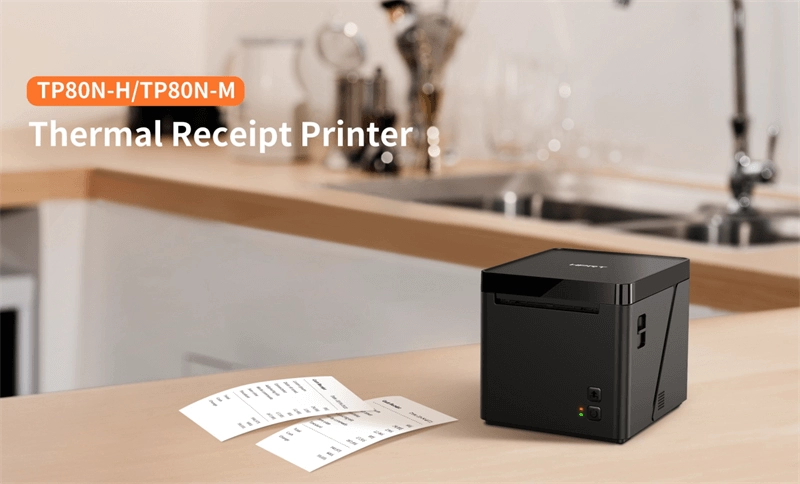
Las impresoras de tickets son impresoras especializadas diseñadas para imprimir recibos de venta, billetes o confirmaciones de pedidos de manera rápida y clara. Estos dispositivos se encuentran comúnmente en cajas de tiendas, restaurantes y cualquier entorno de punto de venta (POS). Normalmente utilizan rollos de papel térmico para recibos, produciendo texto nítido y gráficos sencillos como logotipos o códigos QR. ¿Su objetivo principal? Impresión rápida y fiable de documentos de corta duración destinados a ser manipulados y, a menudo, descartados.
Definición de Impresoras de Etiquetas
Las impresoras de etiquetas, por otro lado, crean etiquetas adhesivas utilizadas para la identificación de productos, envíos, inventario o cumplimiento. Estos dispositivos imprimen en diversos materiales como papel, plástico o películas sintéticas y suelen emplear tecnologías de impresión térmica directa o transferencia térmica. Las impresoras de etiquetas se centran en la durabilidad: imprimen códigos de barras, números de serie o información de envío diseñada para durar durante el manejo, almacenamiento y tránsito.
Ayuda Visual Rápida: Comparación entre Impresoras de Tickets y Etiquetas
| Característica | Impresora de Recibos | Impresora de etiquetas |
|---|---|---|
| Uso principal | Impresión de recibos de venta | Impresión de etiquetas adhesivas |
| Tipo de Medio | Rollos de papel térmico para tickets | Material de etiqueta (papel, sintético) |
| Durabilidad Necesaria | De corta duración, desechable | De larga duración, resistente al desgaste |
| Contenido de la Impresión | Texto, logotipos, gráficos sencillos | Códigos de barras, números de serie, información del producto |
| Configuraciones Comunes | Tiendas minoristas, restaurantes | Almacenes, envíos, atención sanitaria |
Comprender estas diferencias fundamentales te ayudará a determinar qué impresora se adapta a tus necesidades y dónde invertir, ya sea por rendimiento, durabilidad o rentabilidad. Vamos a profundizar en las especificaciones para ver estas impresoras lado a lado.
Comparación cara a cara: Especificaciones clave y rendimiento
Aquí tienes una vista rápida lado a lado de las impresoras de recibos vs. impresoras de etiquetas en las especificaciones clave y puntos de rendimiento que más importan:
| Característica | Impresoras de recibos | Impresoras de Etiquetas |
|---|---|---|
| Tecnología de impresión | Mayormente impresión térmica directa | Impresión térmica directa o transferencia térmica |
| Tipos de medios | Rollos de papel térmico (recibos) | Materiales de etiquetas térmicas o recubiertas |
| Calidad de construcción | Generalmente ligeras, diseñadas para mostradores de punto de venta | Más robustas, diseñadas para uso industrial o de envío |
| Velocidad | Alta velocidad (hasta 300mm/s típicamente) | Velocidad moderada, varía según el tamaño de la etiqueta |
| Durabilidad de las impresiones | A corto plazo, los recibos se desvanecen con el tiempo | Etiquetas de código de barras y de envío duraderas |
| Conectividad | USB, Ethernet, Bluetooth, Wi-Fi | USB, Ethernet, Wi-Fi, a veces puertos seriales |
| Integración | Fácil integración con sistemas POS y cajas registradoras | Diseñado para software de gestión de inventario y envío |
| Tamaño y portabilidad | Modelos inalámbricos compactos, incluso portátiles | Más voluminosos para uso de escritorio o industrial |
| Opciones de alimentación | Mayormente alimentados por adaptadores de corriente, algunos ofrecen versiones con batería | Principalmente alimentados por corriente, pocos con opciones portátiles |
Qué significa esto para ti
- Impresoras de tickets sobresalen en velocidad e integración fluida con POS, lo que los hace perfectos para pagos rápidos.
- Impresoras de etiquetas enfócate en una salida duradera y de alta calidad para códigos de barras y etiquetas de envío, construidos para resistir el manejo y escaneo.
Si deseas un desglose completo de cómo adaptar tu impresora a las necesidades de tu negocio, consulta nuestra guía sobre sistemas POS minoristas vs. sistemas POS para restaurantes, que profundiza en la compatibilidad de hardware e integración.
Desglose de costos – Inversión inicial vs. ahorros a largo plazo
Al comparar impresoras de recibos y de etiquetas, la inversión inicial puede variar mucho dependiendo de la marca, características y tecnología de impresión. Por lo general, las impresoras térmicas básicas de recibos son más asequibles inicialmente, a menudo costando menos que las impresoras de etiquetas, especialmente las diseñadas para uso industrial. Las impresoras de etiquetas, particularmente las que tienen capacidades de transferencia térmica y térmica directa, suelen tener un precio más alto debido a su compatibilidad con medios versátiles y durabilidad.
Sin embargo, los costes continuos son igual de importantes. Las impresoras de recibos utilizan rollos de papel térmico, que son relativamente económicos pero necesitan ser reemplazados con frecuencia. Las impresoras de etiquetas, por otro lado, usan diversos medios como etiquetas de vinilo, etiquetas o hojas de etiquetas de código de barras duraderas, que pueden ser más caras pero durar más dependiendo de la aplicación. Además, las impresoras de transferencia térmica requieren cintas de tinta que aumentan los gastos continuos.
Los costes de mantenimiento también difieren. Las impresoras de recibos generalmente tienen menos piezas móviles y sufren menos desgaste, lo que reduce las tarifas de servicio. Las impresoras de etiquetas, especialmente las aplicadoras industriales, pueden necesitar un mantenimiento más frecuente debido a la complejidad de manejar medios más gruesos y cintas.
Mirando costes totales de propiedad, las empresas deben comparar el precio inicial con los suministros y el mantenimiento a lo largo del tiempo. Para etiquetas de envío de alto volumen o impresión duradera de códigos de barras, invertir en una impresora de etiquetas robusta podría ofrecer mejor valor. Por el contrario, los entornos minoristas enfocados en la impresión rápida de recibos térmicos podrían beneficiarse de una impresora de recibos de menor coste y bajo mantenimiento.
Para una exploración más profunda sobre la integración de impresoras con su sistema de punto de venta y el equilibrio de inversiones en hardware, explorar la comparativa de hardware POS puede ofrecer ideas prácticas sobre ahorros y eficiencia a largo plazo.
Aplicaciones en el mundo real: ¿Qué impresora se adapta a su industria?

Elegir entre una impresora de recibos y una impresora de etiquetas depende en gran medida de la industria y las tareas específicas.
Minoristas y cajas registradoras
Las impresoras de recibos térmicos son un elemento básico aquí, perfectas para una impresión rápida y fiable de recibos, tickets de pedido y registros de transacciones. Están estrechamente integradas con los sistemas POS y accesorios de caja registradora, ayudando a acelerar las cajas en tiendas concurridas. Para empresas que buscan actualizar o estabilizar, explorar opciones en POS para tiendas de alto tráfico puede cambiar las reglas del juego.
Almacenamiento y Logística
Las impresoras de etiquetas dominan en entornos de almacenamiento debido a su capacidad para imprimir etiquetas de código de barras duraderas, etiquetas de envío y marcadores de inventario que resisten el manejo y las condiciones ambientales. Los aplicadores de etiquetas industriales combinados con la durabilidad de las impresoras de etiquetas robustas garantizan precisión y longevidad en las etiquetas de envío y almacenamiento.
Hostelería y servicios de alimentación
Las impresoras de recibos son comunes aquí, a menudo impresoras térmicas inalámbricas que manejan tickets de pedido y recibos de clientes. Las opciones de personalización permiten incluir la marca y los detalles del pedido directamente en el ticket. Las impresoras de etiquetas también pueden usarse para el envasado de alimentos y etiquetado en estanterías para cumplir con las normas de salud y seguridad.
Sanidad y cumplimiento
Las impresoras de etiquetas son esenciales para la impresión duradera de códigos de barras en pulseras de pacientes, etiquetas de medicamentos y seguimiento de muestras, ayudando a mantener estrictos requisitos de cumplimiento. Su capacidad para manejar una variedad de tipos de medios es crucial para la precisión y seguridad en entornos clínicos.
Avance del estudio de caso
Muchas empresas combinan ambos tipos de impresoras para cubrir sus necesidades. Por ejemplo, una tienda de comestibles podría usar impresoras de recibos térmicos en la caja y fabricantes de etiquetas de código de barras en la trastienda para inventario, una combinación que maximiza la eficiencia operativa.
Nota de personalización
Ambos tipos de impresoras ofrecen personalización en tamaños de etiquetas o recibos, calidad de impresión y opciones de conectividad, permitiendo a las empresas adaptar las soluciones a sus flujos de trabajo.
If you’re unsure which to choose, consider your top priorities: speed and integration for retail checkouts, durability and barcode compatibility for logistics, or compliance-grade printing for healthcare. Our POS hardware experts can help evaluate your needs and recommend the right setup.
Ventajas, desventajas y errores comunes a evitar

Pros y Contras de las Impresoras de Recibos
Ventajas:
- Velocidades de impresión rápidas diseñadas para líneas de caja rápidas.
- Tamaño compacto que encaja fácilmente en los mostradores de punto de venta.
- Utiliza rollos de papel térmico asequibles, reduciendo los costos continuos.
- Ideal para imprimir recibos, registros de transacciones y códigos de barras simples.
- Integración perfecta con sistemas de punto de venta, lo que la hace ideal para comercio minorista y hostelería.
Desventajas:
- Imprime principalmente en papel térmico, que puede desvanecerse con el tiempo.
- Versatilidad limitada en medios—principalmente solo recibos de ancho estrecho.
- No apta para necesidades de etiquetado duradero o de alta resistencia.
- Menos efectiva si necesitas etiquetas detalladas con gráficos o impresiones duraderas.
Pros y Contras de las Impresoras de Etiquetas
Ventajas:
- Imprime en una variedad de medios, incluyendo etiquetas duraderas y resistentes a la intemperie.
- Soporta funciones de creador de etiquetas con código de barras, ideales para envíos, inventario y cumplimiento normativo.
- Ofrece opciones de transferencia térmica directa y térmica para una durabilidad flexible.
- Más adecuada para almacenamiento, atención sanitaria y logística con impresiones duraderas.
- Puede manejar diferentes tamaños y tipos de etiquetas, desde pequeñas etiquetas de precio hasta grandes etiquetas de envío.
Desventajas:
- Generalmente más voluminosas y menos portátiles en comparación con las impresoras de recibos.
- Costo inicial más alto con consumibles más caros, como rollos de etiquetas o cintas.
- Velocidades más lentas dependiendo de la calidad de impresión y el tipo de medio.
- Requiere más configuración y mantenimiento en comparación con las impresoras de recibos simples.
Errores comunes a evitar
- Elegir el tipo de medio incorrecto: Seleccionar una impresora de tickets cuando se necesitan etiquetas duraderas resulta en impresiones desvaídas o ilegibles.
- Ignorar las necesidades de conectividad: Asegúrate de que tu impresora sea compatible con tu sistema POS o escáner para evitar problemas de integración.
- Pasar por alto el costo total: No te enfoques solo en el precio inicial—considera los suministros a largo plazo, el mantenimiento y el tiempo de inactividad.
- Olvidar la velocidad de la impresora: En entornos concurridos, una impresora lenta puede crear cuellos de botella en el proceso de pago o envío.
- Descuidar los requisitos de durabilidad: Las impresoras de tickets no están diseñadas para entornos adversos; las impresoras de etiquetas suelen ofrecer construcciones más resistentes.
Evitar estos errores garantiza que elijas una impresora que se adapte a tu operación, reduciendo el tiempo de inactividad y mejorando la eficiencia. Para consejos sobre cómo mejorar la configuración de tu sistema POS, consulta cómo las cajas registradoras mejoran la eficiencia empresarial.
Elegir la opción correcta: marco de decisión paso a paso
Elegir entre una impresora de tickets y una impresora de etiquetas comienza con una revisión clara de lo que realmente necesitas. Aquí tienes un marco simple para ayudarte a tomar la decisión correcta:
1. Evalúa tus necesidades de impresión
- ¿Qué tipo de impresión utilizas más? ¿Tickets para transacciones o etiquetas para envíos e inventario?
- Considera el volumen—¿cuántas impresiones al día?
- Piensa en el tipo de medio: rollos de papel térmico para tickets o material de etiquetas duraderas para códigos de barras y envíos.
2. Equilibra presupuesto y escalabilidad
- No te limites solo al costo inicial—considera los suministros continuos como papel térmico o etiquetas y las necesidades de mantenimiento.
- Planifica para el crecimiento. ¿Aumentará tu volumen de impresión? ¿La impresora escala con tu negocio?
3. Prueba de conducción antes de comprar
- Siempre que sea posible, realiza una prueba de impresión en el hardware real. Verifica la velocidad de impresión, la claridad y la facilidad de uso.
- Confirma la compatibilidad con tu sistema POS existente o software de almacén para evitar problemas de integración.
4. Explora alternativas y funciones
- Algunos hardware POS ofrecen impresoras de recibos inalámbricas o aplicadores de etiquetas industriales que podrían adaptarse mejor a tu configuración.
- Busca funciones como compatibilidad con escáneres de códigos de barras o dispositivos multifunción si deseas consolidar tu espacio de trabajo.
5. Toma la decisión y actúa
- Una vez que reduzcas tus opciones, contacta a proveedores que se especialicen en las necesidades de hardware POS de tu industria.
- Para orientación experta y productos confiables, consulta nuestras recomendaciones los mejores proveedores de hardware POS en Europa.
- Recuerda, la impresora adecuada te ahorra tiempo y dinero, así que invierte con sabiduría.
Siguiendo estos pasos, elegirás con confianza una impresora que se adapte perfectamente a tu negocio, ya sea para imprimir recibos rápidamente o para fabricar etiquetas de código de barras duraderas.


