







Componentes clave de un sistema POS moderno para una gestión minorista eficiente

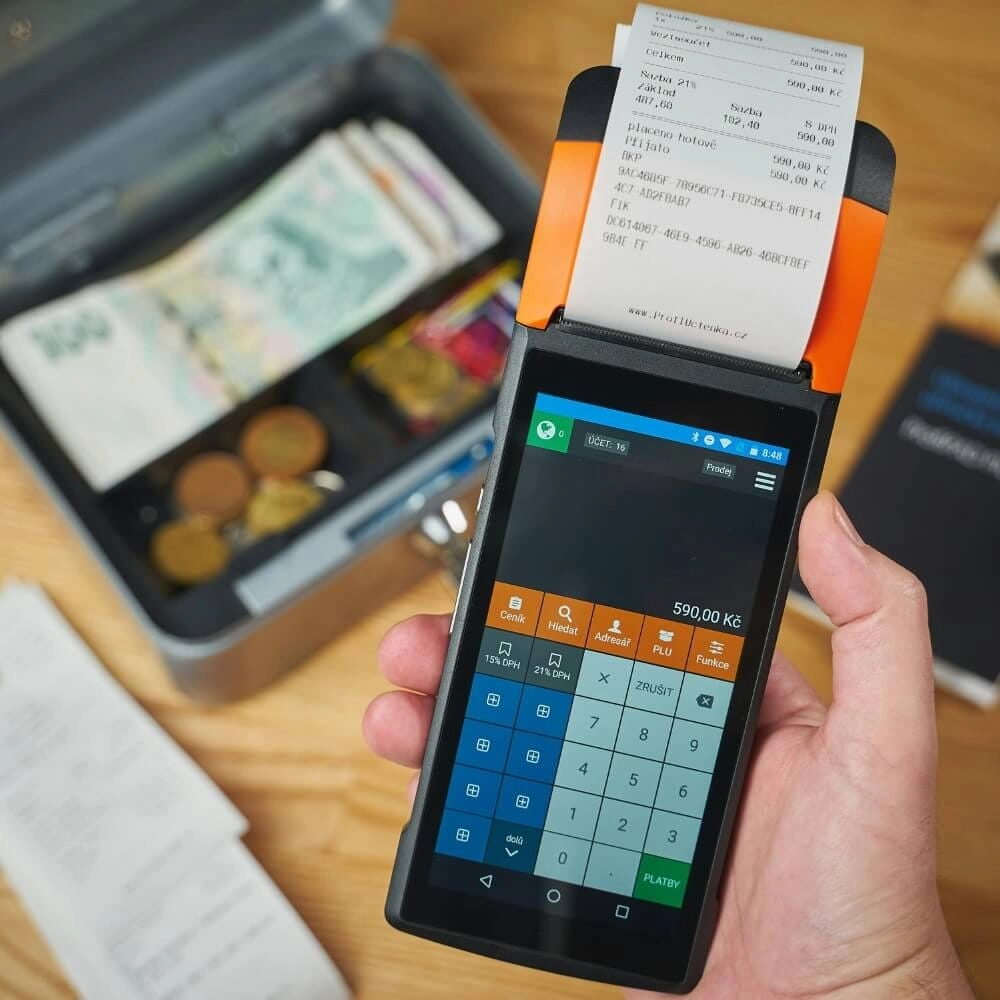
El hardware esencial para puntos de venta: componentes imprescindibles para operaciones sin interrupciones

Un sistema POS moderno comienza con componentes de hardware confiables que mantienen su negocio en funcionamiento sin problemas. Ya sea en comercio minorista, servicios de comida o cualquier otro entorno de ritmo acelerado, estas herramientas físicas forman la columna vertebral de sus operaciones diarias.
Terminal POS y Pantalla Táctil: El centro de mando de su negocio
El Terminal POS es el corazón de su configuración. La mayoría de los sistemas ahora cuentan con un pantalla táctil sensible que actúa como el centro de mando intuitivo. Este hardware permite una selección rápida de artículos, procesamiento de pedidos y acceso a funciones esenciales, minimizando el tiempo de capacitación y acelerando el servicio al cliente.
- Las pantallas duraderas y fáciles de limpiar son importantes en entornos concurridos.
- Los terminales POS móviles añaden flexibilidad, permitiendo que el personal ayude a los clientes en cualquier parte del establecimiento.
- Las pantallas táctiles con soporte multi-touch mejoran la precisión y eficiencia.
Escáneres de códigos de barras y lectores de pagos aceleran las cajas
De mano o fijos lectores de código de barras son vitales para un seguimiento de inventario rápido y sin errores, y para un pago rápido. Combinados con lectores de pago avanzados, reducen los tiempos de espera y mejoran la satisfacción del cliente al aceptar diversos métodos de pago.
- Soporte para pagos sin contacto y la tecnología NFC es ahora esencial.
- Los lectores de tarjetas con chip EMV protegen contra fraudes y cumplen con los protocolos de seguridad.
- Los escáneres que se integran perfectamente con su software POS mantienen los datos sincronizados en tiempo real.
Cajones de efectivo, impresoras de recibos y pantallas para clientes completan la configuración esencial
Mientras crecen los pagos digitales, cajones de dinero siguen siendo necesarios para muchas transacciones. Trabajan en conjunto con impresoras de tickets para proporcionar prueba de compra de manera rápida. Además, pantallas de atención al cliente mejoran la transparencia y la confianza mostrando los detalles del pedido durante el proceso de pago.
- Las impresoras de recibos varían desde modelos térmicos hasta de impacto según sus necesidades.
- Las pantallas para clientes mejoran la claridad y reducen las disputas.
- Las cajas registradoras con cerraduras resistentes garantizan la seguridad.
Juntos, estos componentes clave de hardware crean una experiencia de pago fluida y contribuyen a un seguimiento efectivo del inventario y precisión en las ventas. Invertir en hardware de calidad es fundamental para la fiabilidad a largo plazo y la satisfacción del cliente en cualquier sistema POS moderno.
El motor de software que impulsa los sistemas POS modernos

A modern POS system’s true strength lies in its software engine—the digital features that drive your business forward. The right software doesn’t just process sales; it delivers inteligencia empresarial en tiempo real que le ayuda a gestionar inventario, pagos, informes y relaciones con los clientes de manera eficiente.
Gestión de inventario con seguimiento en tiempo real
Una de las funciones más críticas es gestión de inventario. Un POS moderno realiza un seguimiento de los niveles de stock en tiempo real, ayudándole a evitar agotamientos costosos o exceso de inventario. Esto significa que siempre sabe qué productos se venden rápidamente y cuándo reordenar, manteniendo sus estantes bien surtidos y a sus clientes satisfechos. Muchos sistemas también se integran con proveedores, automatizando su proceso de reposición. Para más detalles sobre el seguimiento de inventario, consulte nuestro artículo sobre sistemas de caja registradora con gestión de inventario integrada.
Procesamiento de pagos y seguridad
Su software POS necesita gestionar múltiples opciones de pago, desde tarjetas tradicionales hasta pagos sin contacto y móviles, para satisfacer las expectativas de los clientes. Debe soportar protocolos de procesamiento de pagos seguros que protejan datos sensibles y combatan el fraude. Características como cifrado de extremo a extremo, soporte para chip EMV y tokenización son estándar en los sistemas modernos, reduciendo sus riesgos y generando confianza.
Informes y Análisis para Decisiones más Inteligentes
Una gran ventaja del software POS moderno es su capacidad de informes y análisis. Los paneles proporcionan información sobre tendencias de ventas, horas punta, rendimiento de empleados y popularidad de productos. Estos datos te ayudan a tomar decisiones más inteligentes sobre precios, promociones e inventario. Los paneles de análisis minorista convierten datos en bruto en información útil, ofreciéndote una visión clara de la salud del negocio sin conjeturas.
Gestión de Relaciones con Clientes y Herramientas de Fidelización
Construir negocios recurrentes es más fácil cuando tu software POS incluye funciones de CRM y programas de fidelización. Puedes almacenar perfiles de clientes, rastrear el historial de compras y enviar ofertas o promociones personalizadas según los hábitos de compra. Las herramientas de fidelización recompensan a los clientes habituales y aumentan la participación, impactando directamente en tus resultados al fomentar visitas frecuentes.
Al combinar estas funciones digitales, tu software POS actúa como un motor de negocio potente—optimizando operaciones, mejorando la seguridad y proporcionándote las herramientas para crecer. Para las empresas que buscan modernizarse, estas capacidades son esenciales para mantenerse competitivas y responder a las necesidades de los clientes.
Integraciones Avanzadas para Sistemas POS Modernos
Acceso en la Nube y Soporte Omnicanal
A sistema POS en la nube es un cambio radical para las empresas en toda España. Con acceso en la nube, puedes gestionar tu tienda desde cualquier lugar—ya sea en casa, en una ubicación satélite o en movimiento. Esta configuración permite actualizaciones en tiempo real de ventas, inventario y datos de clientes sin estar atado a una terminal física.
soporte omnicanal es otra función imprescindible. Conecta tus ventas en tienda con tu tienda online de manera fluida, para que los clientes tengan una experiencia coherente ya sea que compren en persona, en línea o a través de una aplicación móvil. Esta integración ayuda a evitar confusiones en el inventario y mantiene precisos los datos de ventas en todas las plataformas.
Escalabilidad y Personalización para Empresas en Crecimiento
Al elegir un sistema POS, piensa en cómo crecerá con tu negocio. La escalabilidad de las soluciones POS modernas significa que puedes comenzar con poco y añadir funciones o terminales a medida que tus necesidades crecen.
Buenos sistemas POS ofrecen opciones personalizables para adaptar flujos de trabajo, agregar aplicaciones o integrarse con servicios de terceros como contabilidad o herramientas de marketing. Esta flexibilidad es crucial para minoristas y pequeñas empresas que desean mantenerse competitivos y eficientes a medida que escalan.
Beneficios Clave de las Integraciones Avanzadas
- Gestión de datos unificada a través de los canales de venta
- Acceso remoto para monitorear tu negocio en cualquier momento
- Experiencias de cliente fluidas con funciones sincronizadas de inventario y CRM
- Expansión más sencilla sin necesidad de una revisión completa del sistema
Invertir en un TPV con integraciones avanzadas sólidas te ayuda a ver el panorama completo—combinando ventas, stock y conocimientos de clientes para gestionar tu negocio de manera más inteligente y rápida.
Consejos para elegir la implementación adecuada de un TPV y errores comunes
Seleccionar el sistema POS de Walmart para tu negocio en el mercado español es fundamental. Con varias opciones disponibles—desde software POS basado en la nube hasta configuraciones tradicionales de hardware—tomar la decisión equivocada puede conducir a recursos desperdiciados, personal frustrado y clientes insatisfechos. Aquí tienes algunos consejos esenciales y errores comunes a tener en cuenta durante la implementación.
Consejos para una implementación exitosa de un TPV
Entiende las necesidades de tu negocio
Comienza evaluando lo que tu tienda realmente necesita. ¿Necesitas funciones fuertes seguimiento de inventario en el TPV para evitar quiebres de stock? ¿O es integración de pagos sin contacto una prioridad para procesos de pago más rápidos y seguros? Identificar funciones, como herramientas CRM para programas de fidelización o una panel de análisis minorista para decisiones más inteligentes, te guiará en la elección del sistema adecuado.
Prioriza hardware y software fáciles de usar
Tu equipo interactuará con el sistema a diario, por lo que la facilidad de uso en la Esenciales del hardware POS (como terminales táctiles o lectores de código de barras) y la interfaz del software son clave. Busca diseños intuitivos que reduzcan el tiempo de capacitación y mejoren la eficiencia.
Asegura protocolos de seguridad sólidos
Tu TPV debe seguir los últimos protocolos de seguridad de TPV para protegerse contra fraudes y brechas de datos. Esto incluye procesamiento de pagos encriptados y cumplimiento con estándares de la industria como PCI DSS—algo que los minoristas en España no pueden permitirse pasar por alto.
Opta por escalabilidad y personalización
Elige un sistema que crezca con tu negocio. Ya sea que dirijas una tienda pequeña o te expandas a múltiples ubicaciones, tu TPV omnicanal para comercio minorista debería ofrecer flexibilidad, incluyendo agregar nuevas funciones o integrarse con otras herramientas en el futuro.
Prueba antes de la implementación completa
Una implementación por fases o piloto ayuda a detectar errores temprano. Prueba tu terminal de TPV móvil o sistema en la nube en una ubicación primero para recopilar comentarios y solucionar problemas.
Errores comunes a evitar
Ignorar las capacidades de integración
No verificar si tu TPV se conecta sin problemas con software de contabilidad, plataformas de comercio electrónico o sistemas CRM crea cuellos de botella en el flujo de trabajo. La integración importa, especialmente para negocios que desean una solución todo en uno.
Pagando de más por funciones innecesarias
Algunos proveedores ofrecen paquetes de TPV costosos llenos de funciones que no usarás. Concéntrate en lo que se ajusta a tus necesidades actuales para evitar gastar de más en configuraciones complejas que no aportan valor real.
Descuidar el soporte y la capacitación continua
Elegir un sistema sin un servicio de atención al cliente confiable o recursos adecuados de capacitación conduce a tiempos de inactividad y errores. Asegúrate de que tu proveedor ofrezca soporte accesible adaptado a las expectativas de los clientes en España.
Subestimar los requisitos de red e Internet
Para software POS basado en la nube, una conexión a Internet estable es crucial. La mala conectividad puede interrumpir las ventas y frustrar a los clientes. Planifica tu infraestructura en consecuencia.
Al mantener estos puntos en el centro de atención, abrirás camino para una implementación fluida del sistema POS que apoye los objetivos de tu negocio, mejore la eficiencia operativa y ofrezca una experiencia de pago sin problemas para tus clientes.


