







Conceptos básicos de hardware POS para principiantes Guía de equipo esencial de POS

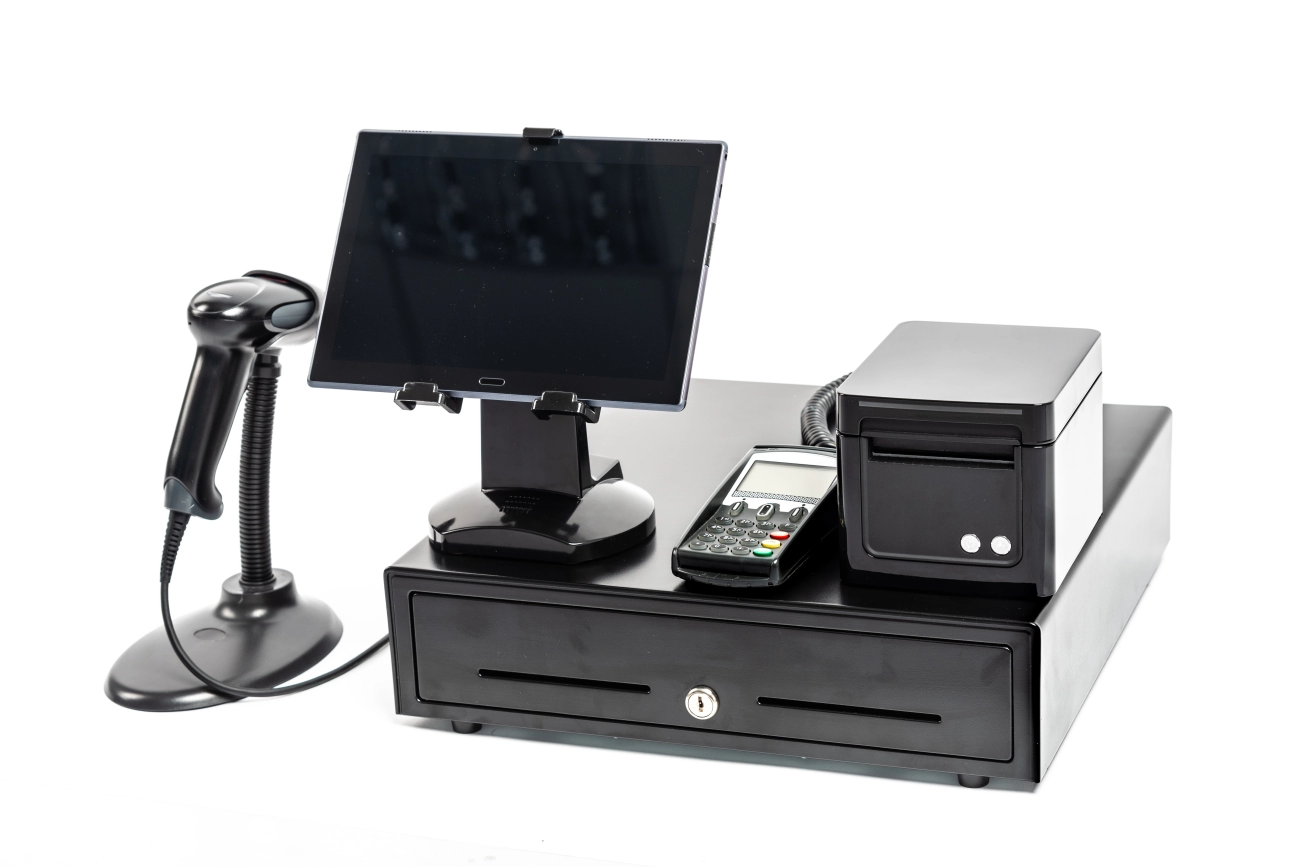
¿Eres nuevo en el mundo de hardware POS y te preguntas por dónde empezar? Elegir el equipo adecuado puede parecer abrumador, especialmente con tantas opciones disponibles. Pero no te preocupes — entender bien conceptos básicos de hardware POS para principiantes es más fácil de lo que piensas. Ya seas dueño de un pequeño negocio, cajero o gerente minorista, comprender los componentes clave y cómo trabajan juntos te preparará para transacciones fluidas y eficientes.
En esta guía, aprenderás qué exactamente hardware POS es, los dispositivos esenciales que componen un sistema y qué considerar al elegir la configuración adecuada para tu negocio. Además, obtendrás consejos prácticos sobre el mantenimiento de tu equipo y por qué trabajar con un proveedor local de confianza como SDLPOS puede marcar la diferencia.
¿Listo para comenzar? Vamos a sumergirnos en todo lo que necesitas saber sobre conceptos básicos de hardware POS — hecho simple, práctico y adaptado especialmente para principiantes como tú.
¿Qué es Conceptos básicos de hardware POS para principiantes
Al adentrarse en conceptos básicos de hardware POS para principiantes, it’s important to start with a clear definition. hardware POS se refiere a los dispositivos físicos utilizados en un sistema de punto de venta para completar transacciones comerciales. Estos dispositivos trabajan juntos para apoyar procesos de venta, gestión de inventario, interacción con el cliente y aceptación de pagos en entornos minoristas o de hostelería.
o cualquier negocio que utilice procesos de pago digitales. Gestiona la entrada y salida necesarias para completar pagos, rastrear inventario e imprimir recibos. A diferencia del software, que funciona en tu ordenador o terminal y gestiona datos y lógica empresarial, el hardware POS es el equipo tangible que interactúa directamente con los clientes y el personal de ventas.
Para entender completamente los sistemas POS, necesitas distinguir entre hardware POS y software POS.
- hardware POS incluye equipos tangibles como cajas registradoras, escáneres de código de barras, impresoras de recibos y terminales de pago.
- software TPV es el programa digital que se ejecuta en el hardware, gestionando operaciones como el seguimiento de ventas, actualizaciones de inventario y procesamiento de transacciones.
Piensa en el hardware como el cuerpo y en el software como el cerebro de tu sistema POS—ambos son esenciales pero cumplen roles diferentes.
Rol del hardware POS en las transacciones comerciales
En las transacciones comerciales diarias, el hardware POS desempeña un papel fundamental por:
- Capturando rápidamente los detalles del artículo a través de escáneres de código de barras.
- Registrando ventas con precisión a través de cajas registradoras o terminales.
- Procesando pagos de forma segura a través de lectores de tarjetas.
- Comunicándose con los clientes a través de pantallas y recibos impresos.
Esta capa de interacción física garantiza que las transacciones sean fluidas, rápidas y confiables, generando confianza en el cliente y eficiencia operativa.
Para una introducción sobre cómo se integra el hardware con el software, consulta esta guía útil sobre Integración de hardware de TPV.
Comprender estos conceptos básicos sienta las bases para seleccionar el hardware POS adecuado adaptado a las necesidades de tu negocio.
Componentes principales del hardware POS para principiantes

Entendiendo el componentes del hardware del punto de venta son cruciales si quieres que las transacciones de tu negocio funcionen sin problemas. Cada parte desempeña un papel clave en el proceso de venta, por lo que es vital saber qué hacen y cómo trabajan juntas.
Terminal de caja registradora
Este es el dispositivo central donde se gestionan las transacciones. El terminal de caja registradora procesa las ventas, calcula los totales y se comunica con otros hardware. A menudo ejecuta el software POS, pero es en sí el centro físico. Ya tengas una caja registradora tradicional o un terminal POS moderno, aquí es donde comienza y termina la venta.
Impresora de Recibos
El impresora de recibos produce la prueba física de compra que los clientes esperan. Imprime detalles de la transacción como artículos comprados, precios y método de pago. La impresión rápida y fiable de recibos mejora la satisfacción del cliente y ayuda en la gestión de registros, lo cual es especialmente importante para devoluciones o auditorías.
Escáner de Código de Barras
El escáner de código de barras es un elemento básico en entornos minoristas. Lee rápidamente los códigos de barras de los productos, acelerando el proceso de pago y reduciendo errores. La lectura elimina la entrada manual, ahorrando tiempo valioso y mejorando la precisión durante las ventas.
Lector de tarjetas del terminal de pago
Este hardware acepta las tarjetas de pago de los clientes, ya sea una tarjeta de crédito, débito o monedero móvil. El lector de tarjetas del terminal de pago procesa los pagos de forma segura, soportando transacciones con chip EMV, banda magnética y NFC sin contacto, asegurando el cumplimiento de las normas de seguridad.
Pantalla para clientes
A pantalla para el cliente muestra los detalles de la transacción en tiempo real, para que los compradores vean los artículos que están comprando y el monto total. Esta transparencia genera confianza y minimiza disputas en la caja, siendo una ayuda tanto para el personal como para los clientes.
Cajón de efectivo
El caja registradora almacena de forma segura el efectivo de las transacciones. Se conecta a la caja registradora y solo se abre cuando se realiza una venta o se produce una anulación por parte del gerente. Tener un cajón resistente y fiable ayuda a mantener el efectivo organizado y a prevenir robos.
Monitor táctil del teclado POS
teclados POS or con monitores táctiles confiables y receptivos proporcionan la interfaz que el personal utiliza para introducir datos y navegar por el sistema POS. Los pantallas táctiles han reemplazado en gran medida a otros periféricos porque son intuitivos, rápidos y reducen la necesidad de dispositivos adicionales. Permiten buscar artículos rápidamente, ajustar precios y acceder a informes de ventas.
Cómo trabajan juntos cada componente
En una venta típica, el escáner de código de barras lee los artículos, enviando datos al terminal de caja registradora o sistema POS. El sistema calcula los totales y aplica descuentos o impuestos. El lector de tarjetas del terminal de pago completa el proceso de pago mientras que el caja registradora se abre para gestionar efectivo. Finalmente, el impresora de recibos genera un recibo de regalo o compra, y el pantalla para el cliente mantiene informado al comprador en todo momento. Esta integración fluida de hardware y software mantiene las transacciones eficientes y precisas.
Al conocer estos componentes básicos, estarás mejor preparado para elegir el hardware POS adecuado para tu negocio. Ya sea que comiences o actualices, cada pieza desempeña un papel vital en ofrecer una experiencia de pago fluida.
Cómo funciona el hardware POS: una visión general paso a paso
Comprender cómo componentes de hardware POS trabajan juntos durante una venta puede ayudar a los principiantes a tener una idea más clara del proceso. Aquí tienes un desglose sencillo de una transacción de venta típica usando hardware POS, de principio a fin, además de una rápida visión de cómo se integran hardware y software.
Paso 1 Escaneo de artículos
El proceso generalmente comienza con el escáner de código de barras. Cuando se escanea un artículo, el escáner lee el código de barras y envía la información del producto al terminal POS. Esto muestra instantáneamente el precio, la descripción y el estado del inventario desde el software POS conectado.
Paso 2 Mostrar y Confirmar
Una vez que los artículos son escaneados, el pantalla para el cliente shows the list of products and totals, so customers can easily verify what they’re buying. On the staff side, the monitor táctil POS o teclado permite al cajero revisar la venta y hacer ajustes si es necesario.
Paso 3 Procesar Pago
Cuando se confirma la compra, el siguiente paso implica el lector de tarjetas del terminal de pago. Los clientes deslizan, insertan o acercan sus tarjetas de crédito/débito o utilizan opciones de pago móvil aquí. Este terminal se comunica de forma segura con el procesador de pagos, autorizando o rechazando la transacción.
Paso 4 Imprimir Recibos
Después de la aprobación, el impresora de recibos kicks in and prints the customer’s receipt, detailing the purchase, payment method, and any return policies. This step also helps keep records for the business.
Paso 5 Manejo de Efectivo
Para pagos en efectivo, el caja registradora se abre automáticamente una vez que se acepta el pago. Almacena el efectivo de forma segura y ayuda al cajero a devolver el cambio correcto.
Conceptos básicos de integración de hardware y software
Detrás de escena, el hardware POS trabaja en conjunto con software TPV. El hardware envía datos (como artículos escaneados e información de pago) al software, que procesa las transacciones, actualiza el inventario y registra las ventas. Esta integración garantiza precisión y agiliza el proceso de pago.
Por qué importa la integración
- Seguimiento de inventario en tiempo real previene problemas de stock.
- Informes de ventas ayuda a los dueños de negocios a tomar decisiones informadas.
- Procesamiento de pagos fluido reduce los tiempos de espera.
En resumen, cada pieza de hardware POS desempeña un papel crucial, pero es la conexión perfecta con el software lo que hace que todo el sistema funcione sin problemas para las empresas, especialmente en entornos minoristas o restaurantes concurridos.
Factores a considerar al elegir hardware POS para principiantes
Seleccionar el hardware POS es un paso crítico para cualquier negocio, especialmente si estás comenzando o actualizando tu sistema actual. Aquí están los factores clave a tener en cuenta para garantizar que tu compra apoye tus operaciones sin problemas.
Tipo y tamaño del negocio
Cada negocio tiene necesidades únicas. Una pequeña tienda minorista, un café concurrido o un supermercado grande requieren diferentes componentes del hardware del punto de venta:
- Pequeñas empresas y startups generalmente se benefician de terminales POS compactas y todo en uno o sistemas basados en tabletas que ahorran espacio y reducen el desorden.
- Empresas medianas a grandes a menudo necesitan hardware más robusto con impresoras más rápidas, escáneres de código de barras avanzados y múltiples terminales de pago.
- Necesidades específicas de la industria también son importantes. Por ejemplo, los restaurantes pueden necesitar pantallas táctiles con software especializado, mientras que las tiendas minoristas se centran más en escáneres de código de barras e impresoras de recibos.
Comprender el tamaño y el sector de tu negocio te ayuda a elegir hardware que no sea excesivo, pero que apoye las operaciones diarias sin contratiempos.
Compatibilidad con el Software POS
El hardware y el software deben trabajar en conjunto. Elegir hardware POS que sea totalmente compatible con tu software POS evita frustraciones y costos adicionales en el futuro. Algunos hardware solo funciona con ciertas marcas o versiones de software, por lo que:
- Verifica si tu proveedor de software recomienda modelos específicos de hardware.
- Busca integración de hardware y software POS existente características.
- Asegura la capacidad de soportar actualizaciones de software y posibles mejoras.
La compatibilidad es imprescindible para agilizar tus transacciones de venta y gestión de inventario.
Durabilidad y fiabilidad
En cualquier entorno empresarial concurrido, durabilidad asuntos. Quieres hardware POS que dure y funcione de manera consistente con el tiempo. Enfócate en:
- Materiales de alta calidad para componentes de hardware como cajones de efectivo y escáneres.
- Dispositivos calificados para ciclos de uso intensivo, especialmente impresoras o lectores de tarjetas.
- Resistencia a derrames o daños accidentales si tu negocio implica alimentos o bebidas.
Hardware confiable que minimiza el tiempo de inactividad y reparaciones costosas, permitiendo que tu personal trabaje con confianza durante las horas punta.
Facilidad de uso para el personal
La comodidad de tu equipo es importante para transacciones fluidas. El hardware debe ser fácil de usar y fácil de entender. Considera:
- Interfaces simples y directas en pantallas táctiles o teclados.
- Tiempos de respuesta rápidos en escáneres de códigos de barras y terminales de pago.
- Mínimo entrenamiento requerido para reducir errores de los empleados.
El personal que puede usar fácilmente el equipo POS conduce a pagos más rápidos y mejor atención al cliente.
Soporte local y fiabilidad del proveedor
Comprar a un proveedor local confiable con soporte sólido beneficia a tu negocio a largo plazo. Busca:
- Acceso rápido a soporte técnico o piezas de repuesto.
- Garantía confiable y acuerdos de servicio.
- Opiniones positivas de negocios locales en el mercado de España.
Contar con soporte local hace que la resolución de problemas sea más sencilla y mantiene tu sistema en funcionamiento.
Consideraciones presupuestarias
Por último, sé realista con tu presupuesto. Aunque no quieres gastar de más en funciones innecesarias, invertir en hardware POS de calidad a menudo ahorra dinero a largo plazo al reducir averías y mejorar la eficiencia.
- Compara precios entre tipos tradicionales de hardware de caja registradora y terminales POS modernos.
- Considera opciones de financiación o paquetes combinados para obtener mejor valor.
- Presupuesta para futuras actualizaciones o necesidades adicionales de hardware.
Equilibrar coste con calidad asegura que obtienes el mejor equipo POS para tu pequeña empresa.
Para una guía más detallada para principiantes sobre hardware POS y cómo escoger el sistema adecuado, consulta nuestro Conceptos básicos de hardware POS para pequeños minoristas y el guía completa de sistemas de caja registradora. Estos recursos te ayudan a tomar decisiones informadas adaptadas a las necesidades de tu negocio.
Tipos comunes de sistemas de hardware POS disponibles

Cuando se trata de hardware POS, existen varios tipos de sistemas diseñados para adaptarse a diferentes necesidades empresariales. Entender estas opciones puede ayudarte a escoger la configuración adecuada para tu tienda o restaurante.
Cajas registradoras tradicionales vs terminales POS modernas
Las cajas registradoras tradicionales hacen mucho tiempo que son la columna vertebral del proceso de pago en el comercio minorista. Manejan transacciones básicas, almacenan efectivo de forma segura y imprimen recibos. Son simples pero limitados en funciones.
Por otro lado, terminales POS modernas van mucho más allá del manejo de efectivo. Se integran con software para gestionar inventario, datos de ventas, información de clientes e incluso horarios de empleados. Estos terminales suelen contar con pantallas táctiles, escáneres de código de barras más rápidos y sistemas de pago integrados, aumentando la eficiencia y precisión en el proceso de pago.
Necesidades de hardware para sistemas POS móviles y tabletas
Sistemas POS móviles (mPOS) y configuraciones de POS en tableta están creciendo rápidamente, especialmente con pequeños minoristas y camiones de comida, gracias a su portabilidad y flexibilidad. Utilizan hardware como:
- Escáneres de código de barras compactos
- Lectores de tarjetas de pago con Bluetooth o Wi-Fi
- Impresoras de recibos portátiles
- Tabletas o smartphones ligeros y duraderos
Esta configuración te permite procesar pagos en cualquier parte de la tienda o en movimiento, ampliando tu alcance y reduciendo los tiempos de espera.
Hardware TPV especializado para industrias específicas
Diferentes industrias a veces necesitan opciones de hardware a medida que se ajusten a su flujo de trabajo específico:
- Restaurantes: Hardware como sistemas de visualización de cocina, terminales de pedidos con pantalla táctil y dispositivos integrados de pago en la mesa.
- Minorista: Escáneres de códigos de barras avanzados, verificadores de precios y pantallas orientadas al cliente.
- Hostelería: Terminales TPV vinculados con sistemas de reservas, lectores de tarjetas llave y opciones de pago móvil.
Elegir hardware TPV especializado garantiza operaciones fluidas y un mejor servicio al cliente en su entorno empresarial específico.
Para obtener más información sobre cómo elegir la configuración de TPV adecuada, puede consultar nuestra guía sobre cómo elegir hardware de caja registradora o explore soluciones adaptadas a pequeños minoristas en Soluciones de hardware SDLPOS para pequeños minoristas.
Consejos de mantenimiento para hardware TPV

Mantener su hardware POS en óptimas condiciones es clave para operaciones comerciales fluidas. El mantenimiento regular ayuda a evitar el tiempo de inactividad, ahorra costos y garantiza que su sistema funcione de manera confiable.
Limpieza y cuidado regulares
- Limpie las pantallas y los teclados diariamente con un paño suave que no suelte pelusa para eliminar el polvo, las huellas dactilares y los derrames.
- Usar aire comprimido para eliminar los residuos de los escáneres de códigos de barras, los teclados y las impresoras de recibos.
- Mantenga el cajón de efectivo libre de polvo y residuos para evitar que se pegue o se atasque.
- Evite los productos químicos agresivos; utilice soluciones de limpieza suaves diseñadas para la electrónica.
- Programe limpiezas profundas mensuales para verificar si hay acumulación de suciedad en todos los puertos y conexiones.
Solución de problemas comunes de hardware POS
- Si un barcode scanner isn’t reading, revise si hay suciedad en la lente y asegúrese de que el escáner esté correctamente conectado.
- Atascos en las impresoras de tickets? Limpie los restos de papel y utilice papel térmico de buena calidad.
- Cuando la fallo en el lector de tarjetas del terminal de pago, reinicie el dispositivo y verifique las conexiones de red.
- Si el la pantalla del cliente se queda en blanco, verifique doblemente las conexiones de cables y la fuente de alimentación.
- Actualice regularmente el firmware cuando sea aplicable para solucionar errores y mejorar la compatibilidad del hardware.
Cuándo reemplazar las piezas del hardware del TPV
- La calidad de impresión de la impresora de tickets disminuye: líneas o impresiones desvaídas son una señal de que es hora de cambiar la cabeza de impresión o toda la impresora.
- Preste atención si un lector de tarjetas falla repetidamente después de reinicios—el reemplazo suele ser más rápido y económico que las reparaciones.
- Pantallas táctiles que pierden sensibilidad o muestran puntos muertos suelen indicar que es momento de actualizar.
- Si el El cierre o los resortes del cajón de efectivo se desgastan, reemplazar las piezas temprano puede evitar problemas mayores.
- Considere reemplazar el hardware cuando los costos de reparación se acerquen o superen el precio de un equipo nuevo.
Aprovechando el soporte de su proveedor
- Trabaja con un proveedor que ofrezca soporte técnico rápido y pueda proporcionar piezas de repuesto de manera rápida.
- Utiliza su recursos de formación para capacitar a tu personal en resolución básica de problemas y mantenimiento.
- Aprovecha servicios de garantía y consulta sobre planes extendidos para cubrir posibles problemas de hardware.
- Consulta a tu proveedor sobre opciones de servicio local para reparaciones más rápidas y tiempo de inactividad mínimo.
- Mantén una buena relación con tu proveedor de hardware POS para recibir actualizaciones y recomendaciones continuas adaptadas a tu negocio.
Gestionar tu mantenimiento de hardware de TPV de manera efectiva significa menos interrupciones, transacciones más fluidas y una mejor experiencia para el cliente. No ignores lo básico y colabora con proveedores que te respalden.
Por qué elegir SDLPOS para sus necesidades de hardware POS
Cuando se trata de seleccionar un hardware POS, SDLPOS destaca como un proveedor confiable en el mercado de España. Ya seas una pequeña empresa o una operación minorista en crecimiento, SDLPOS ofrece soluciones personalizadas que se ajustan a una amplia gama de necesidades.
Acerca de la Marca SDLPOS
SDLPOS es un proveedor líder especializado en componentes del hardware del punto de venta diseñado para transacciones comerciales fluidas. Conocida por su calidad y consistencia, la marca se centra en ofrecer equipos que funcionan sin problemas con diversos sistemas de software POS. Esto facilita a principiantes y usuarios experimentados configurar y gestionar sus procesos de venta de manera eficiente.
Puntos Clave de Venta
- Calidad en la que Puedes ConfiarSus productos están diseñados para durar, con componentes resistentes que soportan el uso diario en comercio minorista o hostelería.
- Gama de productos completa: Desde tipos de hardware para caja registradora to hardware POS móvil, SDLPOS cubre todo lo que necesita para gestionar sus operaciones sin problemas.
- Atención al cliente excepcional: SDLPOS ofrece asistencia experta para ayudarle a elegir, instalar y mantener su hardware, asegurando que su sistema funcione al máximo rendimiento.
Disponibilidad local y entrega rápida
SDLPOS comprende la importancia de un acceso rápido al hardware POS en el mercado español. Ofrecen disponibilidad local y opciones de entrega rápida, garantizando un tiempo de inactividad mínimo y un proceso de implementación fluido, ya sea que esté abriendo una nueva tienda o actualizando su sistema actual.
Testimonios de clientes y casos de éxito en el mundo real
Muchas empresas en los sectores de comercio minorista y hostelería confían en SDLPOS para sus esenciales de hardware POS minorista. Los clientes suelen destacar cómo la integración del hardware de SDLPOS con su software POS ha mejorado la velocidad y precisión de las transacciones. Por ejemplo, una cadena de franquicias local vio un aumento en la eficiencia tras cambiar a los robustos terminales y escáneres de código de barras de SDLPOS.
Si desea aprender más sobre soluciones POS confiables o explorar consejos de mantenimiento de hardware POS, consulte la guía de mantenimiento de SDLPOS aquí o explore sus paquetes completos de hardware aquí. Estos recursos pueden ayudarle a aprovechar al máximo su inversión en POS.
Elegir SDLPOS significa obtener hardware duradero, compatible y fácil de usar componentes del hardware del punto de venta respaldado por un sólido soporte local—factores clave para una operación comercial fluida y rentable.


