







Les bases du matériel POS pour les débutants : Guide de l'équipement essentiel du POS

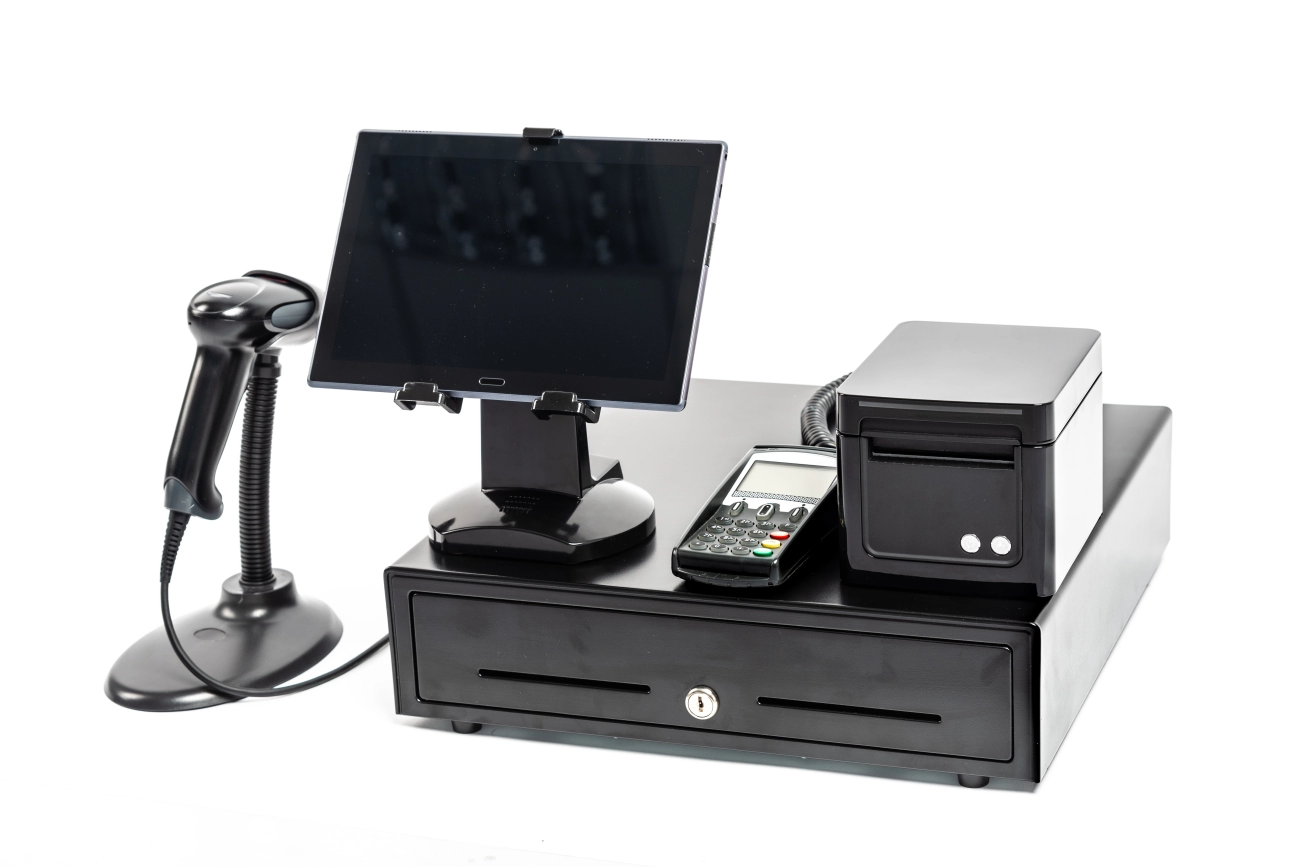
Êtes-vous nouveau dans le monde de matériel POS et vous vous demandez par où commencer ? Choisir le bon équipement peut sembler accablant, surtout avec autant d'options disponibles. Mais ne vous inquiétez pas — comprendre solidement les bases du matériel POS pour débutants est plus facile que vous ne le pensez. Que vous soyez propriétaire d'une petite entreprise, caissier ou gestionnaire de commerce de détail, comprendre les composants clés et leur fonctionnement ensemble vous préparera à des transactions fluides et efficaces.
Dans ce guide, vous apprendrez ce que matériel POS est exactement, les appareils essentiels qui composent un système, et ce qu'il faut considérer lors du choix de la configuration adaptée à votre entreprise. De plus, vous recevrez des conseils pratiques sur l'entretien de votre équipement et pourquoi travailler avec un fournisseur local de confiance comme SDLPOS peut faire toute la différence.
Prêt à commencer ? Plongeons dans tout ce que vous devez savoir sur les bases du matériel POS — rendu simple, pratique, et adapté aux débutants comme vous.
Qu'est-ce que les bases du matériel POS pour les débutants
Lorsqu'on se lance dans les bases du matériel POS pour débutants, it’s important to start with a clear definition. matériel POS fait référence aux appareils physiques utilisés dans un système de point de vente pour réaliser des transactions commerciales. Ces appareils travaillent ensemble pour soutenir les processus de vente, la gestion des stocks, l'interaction avec les clients, et l'acceptation des paiements dans les environnements de commerce de détail ou d'hospitalité.
Différence entre matériel et logiciel de point de vente
Pour comprendre pleinement les systèmes POS, il faut distinguer entre le matériel POS et le logiciel POS.
- matériel POS comprend des équipements tangibles comme les caisses enregistreuses, les scanners de codes-barres, les imprimantes de reçus, et les terminaux de paiement.
- logiciel de point de vente est le programme numérique fonctionnant sur le matériel, gérant des opérations telles que le suivi des ventes, les mises à jour de l'inventaire, et le traitement des transactions.
Considérez le matériel comme le corps et le logiciel comme le cerveau de votre système POS — tous deux essentiels mais ayant des rôles différents.
Rôle du matériel POS dans les transactions commerciales
Dans les transactions commerciales quotidiennes, le matériel POS joue un rôle crucial en :
- Capturer rapidement les détails des articles via des scanners de codes-barres.
- Enregistrement précis des ventes via des caisses enregistreuses ou des terminaux.
- Traitement sécurisé des paiements via des lecteurs de cartes.
- Communication avec les clients via des affichages et des reçus imprimés.
Cette couche d'interaction physique garantit des transactions fluides, rapides et fiables, renforçant la confiance des clients et l'efficacité opérationnelle.
Pour une introduction à la façon dont le matériel s'intègre au logiciel, consultez ce guide utile sur l'intégration du matériel POS.
Comprendre ces bases pose les fondations pour choisir le bon matériel POS adapté aux besoins de votre entreprise.
Composants principaux du matériel POS pour les débutants

Comprendre le composants du matériel de point de vente sont essentiels si vous souhaitez que vos transactions commerciales se déroulent sans problème. Chaque partie joue un rôle clé dans le processus de vente, il est donc vital de savoir ce qu'elles font et comment elles fonctionnent ensemble.
Terminal de caisse
C'est l'appareil central où les transactions sont gérées. Le terminal de caisse traite les ventes, calcule les totaux et communique avec d'autres matériels. Il exécute souvent le logiciel POS mais constitue lui-même le centre physique. Que vous disposiez d'une caisse traditionnelle ou d'un terminal POS moderne, c'est là que la vente commence et se termine.
Imprimante de reçus
Le imprimante de reçus produit la preuve physique d'achat que les clients attendent. Il imprime les détails de la transaction comme les articles achetés, les prix et le mode de paiement. Une impression de reçu rapide et fiable améliore la satisfaction client et facilite la tenue de registres, ce qui est particulièrement important pour les retours ou les audits.
Scanner de codes-barres
Le lecteur de codes-barres est un incontournable dans les environnements de vente au détail. Il lit rapidement les codes-barres des produits, accélérant le processus de paiement tout en réduisant les erreurs. La numérisation élimine la saisie manuelle, économisant un temps précieux et améliorant la précision lors des ventes.
Lecteur de cartes pour terminaux de paiement
Ce matériel accepte les cartes de paiement des clients, qu'il s'agisse d'une carte de crédit, d'une carte de débit ou d'un portefeuille mobile. Le lecteur de cartes du terminal de paiement traite les paiements en toute sécurité, prenant en charge la puce EMV, la bande magnétique et les transactions sans contact NFC, garantissant la conformité aux normes de sécurité.
Écran client
A Affichage client affiche les détails de la transaction en temps réel, permettant aux acheteurs de voir les articles qu’ils achètent et le montant total. Cette transparence renforce la confiance et minimise les litiges lors du paiement, ce qui en fait un ajout utile pour le personnel et les clients.
Tiroir-caisse
Le tiroir-caisse stocke en toute sécurité l’argent liquide provenant des transactions. Il se connecte à la caisse enregistreuse et ne s’ouvre que lorsqu’une vente est effectuée ou qu’une override par un gestionnaire a lieu. Disposer d’un tiroir robuste et fiable aide à garder l’argent organisé et à prévenir le vol.
Clavier POS Écran Tactile
claviers de caisse or moniteurs tactiles fiables et réactifs fournit l’interface que le personnel utilise pour saisir des données et naviguer dans le système POS. Les écrans tactiles ont largement remplacé les autres périphériques car ils sont intuitifs, rapides et réduisent le besoin de périphériques supplémentaires. Ils permettent une recherche rapide d’articles, des ajustements de prix et l’accès aux rapports de vente.
Comment chaque composant fonctionne ensemble
Dans une vente typique, le lecteur de codes-barres lit les articles, envoyant les données au terminal de caisse ou au système POS. Le système calcule les totaux et applique les remises ou taxes. Le lecteur de cartes du terminal de paiement termine le processus de paiement tandis que le tiroir-caisse s’ouvre pour la gestion de l’argent liquide. Enfin, le imprimante de reçus génère un reçu cadeau ou d’achat, et le Affichage client tiendra le client informé tout au long. Cette intégration fluide du matériel et du logiciel maintient les transactions efficaces et précises.
En connaissant ces composants de base, vous êtes mieux préparé à choisir le matériel POS adapté à votre entreprise. Que vous débutiez ou que vous amélioriez votre équipement, chaque pièce joue un rôle essentiel pour offrir une expérience de paiement fluide.
Comment fonctionne le matériel POS : aperçu étape par étape
Comprendre comment composants matériels POS essentiels collaborent lors d’une vente peut aider les débutants à mieux visualiser le processus. Voici une explication simple d’une transaction de vente typique utilisant du matériel POS, du début à la fin, ainsi qu’un aperçu rapide de l’intégration entre le matériel et le logiciel.
Étape 1 : Scanner les articles
Le processus commence généralement par le lecteur de codes-barres. Lorsqu'un article est scanné, le scanner lit le code-barres et envoie les informations du produit au terminal POS. Cela affiche instantanément le prix, la description et le statut d'inventaire depuis le logiciel POS connecté.
Étape 2 Affichage et Confirmation
Une fois les articles scannés, le Affichage client shows the list of products and totals, so customers can easily verify what they’re buying. On the staff side, the écran tactile POS ou le clavier permet au caissier de revoir la vente et d'apporter des ajustements si nécessaire.
Étape 3 Traitement du Paiement
Lorsque l'achat est confirmé, l'étape suivante concerne le lecteur de cartes du terminal de paiement. Les clients glissent, insèrent ou tapent leur carte de crédit/débit ou utilisent des options de paiement mobile ici. Ce terminal communique en toute sécurité avec le processeur de paiement, autorisant ou refusant la transaction.
Étape 4 Impression des Reçus
Après approbation, le imprimante de reçus kicks in and prints the customer’s receipt, detailing the purchase, payment method, and any return policies. This step also helps keep records for the business.
Étape 5 Gestion de l'Argent Liquide
Pour les paiements en espèces, le tiroir-caisse s'ouvre automatiquement une fois le paiement accepté. Il stocke l'argent en toute sécurité et aide le caissier à rendre la monnaie correcte.
Notions de base de l'intégration matériel-logiciel
Dans les coulisses, le matériel POS fonctionne en étroite collaboration avec logiciel de point de vente. Le matériel envoie des données (comme les articles scannés et les informations de paiement) au logiciel, qui traite les transactions, met à jour l'inventaire et enregistre les ventes. Cette intégration garantit la précision et accélère le passage en caisse.
Pourquoi l'intégration est importante
- Suivi des stocks en temps réel prévenir les problèmes de stock.
- Rapports de ventes aident les propriétaires d'entreprise à prendre des décisions éclairées.
- Traitement fluide des paiements réduit les temps d'attente.
En résumé, chaque pièce matérielle POS joue un rôle crucial, mais c’est la connexion transparente avec le logiciel qui fait fonctionner tout le système sans problème pour les entreprises, notamment dans les environnements de vente au détail ou de restauration très fréquentés.
Facteurs à considérer lors du choix du matériel POS pour les débutants
La sélection de la bonne matériel POS est une étape critique pour toute entreprise, surtout si vous débutez ou si vous mettez à niveau votre système actuel. Voici les facteurs clés à garder à l’esprit pour garantir que votre achat soutient vos opérations en douceur.
Type et taille de l'entreprise
Chaque entreprise a des besoins uniques. Une petite boutique de vente au détail, un café très fréquenté ou un supermarché de grande taille nécessitent tous des composants du matériel de point de vente:
- Petites entreprises et startups profitent généralement de terminaux POS compacts tout-en-un ou de systèmes basés sur des tablettes qui économisent de l’espace et réduisent l’encombrement.
- Entreprises de taille moyenne à grande ont souvent besoin d’un matériel plus robuste avec des imprimantes plus rapides, des scanners de codes-barres avancés et plusieurs terminaux de paiement.
- Besoins spécifiques à l’industrie sont également importants. Par exemple, les restaurants peuvent avoir besoin d’écrans tactiles avec un logiciel spécialisé, tandis que les magasins de détail se concentrent davantage sur les scanners de codes-barres et les imprimantes de reçus.
Comprendre la taille et le secteur de votre entreprise vous aide à choisir un matériel qui ne sera pas excessif mais qui soutiendra vos opérations quotidiennes sans accroc.
Compatibilité avec le logiciel de point de vente
Le matériel et le logiciel doivent fonctionner en harmonie. Choisir un matériel POS qui est entièrement compatible avec votre logiciel POS évite frustration et coûts supplémentaires par la suite. Certains matériels ne fonctionnent qu’avec certaines marques ou versions de logiciels, donc :
- Vérifiez si votre fournisseur de logiciel recommande des modèles matériels spécifiques.
- Recherchez Intégration du matériel et du logiciel POS .
- Assurez la capacité de supporter les mises à jour logicielles et les éventuelles améliorations.
La compatibilité est indispensable pour rationaliser vos transactions de vente et la gestion de votre inventaire.
Durabilité et Fiabilité
Dans tout environnement commercial dynamique, durabilité est essentielle. Vous souhaitez un matériel POS qui dure et qui fonctionne de manière cohérente dans le temps. Concentrez-vous sur :
- Des matériaux de haute qualité pour les composants matériels tels que les tiroirs-caisses et les scanners.
- Appareils conçus pour des cycles d'utilisation intensive, notamment les imprimantes ou les lecteurs de cartes.
- Résistance aux déversements ou aux dommages accidentels si votre activité concerne la nourriture ou les boissons.
Un matériel fiable minimise les temps d'arrêt et les réparations coûteuses, permettant à votre personnel de travailler en toute confiance pendant les heures de pointe.
Facilité d'utilisation pour le personnel
Le confort de votre équipe est important pour des transactions fluides. Le matériel doit être convivial et intuitif. Considérez :
- Interfaces simples et directes sur écrans tactiles ou claviers.
- Temps de réponse rapides sur les scanners de codes-barres et les terminaux de paiement.
- Formation minimale requise pour réduire les erreurs des employés.
Un personnel capable d'utiliser facilement le matériel POS conduit à des encaissements plus rapides et à un meilleur service client.
Support local et fiabilité du fournisseur
Acheter auprès d'un fournisseur local fiable avec un support solide profite à votre entreprise à long terme. Recherchez :
- Un accès rapide au support technique ou aux pièces de rechange.
- Une garantie fiable et des accords de service.
- Des avis positifs de la part d'entreprises locales sur le marché français.
Avoir un support local facilite le dépannage et maintient votre système opérationnel.
Considérations budgétaires
Enfin, soyez réaliste quant à votre budget. Bien que vous ne souhaitiez pas dépenser inutilement pour des fonctionnalités superflues, investir dans du matériel POS de qualité permet souvent d'économiser de l'argent à long terme en réduisant les pannes et en améliorant l'efficacité.
- Comparez les prix entre les types de matériel de caisse traditionnels et les terminaux POS modernes.
- Envisagez des options de financement ou des offres groupées pour une meilleure valeur.
- Prévoyez un budget pour les futures mises à niveau ou besoins en matériel supplémentaire.
Équilibrer le coût et la qualité vous garantit d'obtenir le meilleur équipement de PDV pour votre petite entreprise.
Pour un guide débutant plus détaillé sur le matériel de PDV et comment choisir le bon système, consultez notre Les bases du matériel de PDV pour les petits détaillants et la guide complet des systèmes de caisses enregistreuses. Ces ressources vous aident à prendre des décisions éclairées adaptées aux besoins de votre entreprise.
Types courants de systèmes de matériel de PDV disponibles

En ce qui concerne matériel POS, il existe plusieurs types de systèmes conçus pour répondre à différents besoins commerciaux. Comprendre ces options peut vous aider à choisir la configuration adaptée à votre magasin ou restaurant.
Caisses enregistreuses traditionnelles vs terminaux PDV modernes
Caisses enregistreuses traditionnelles ont longtemps été la colonne vertébrale du paiement en magasin. Ils gèrent les transactions de base, stockent l'argent en toute sécurité et impriment des reçus. Ils sont simples mais limités en fonctionnalités.
D'autre part, terminaux PDV modernes vont bien au-delà de la gestion de l'argent. Ils s'intègrent avec des logiciels pour gérer l'inventaire, les données de vente, les informations clients, et même les horaires des employés. Ces terminaux disposent souvent d'écrans tactiles, de scanners de codes-barres plus rapides et de systèmes de paiement intégrés, améliorant l'efficacité et la précision lors du paiement.
Besoins matériels pour PDV mobile et systèmes sur tablette
Systèmes de POS mobile (mPOS) et configurations PDV sur tablette se développent rapidement, notamment avec les petits détaillants et les food trucks, grâce à leur portabilité et leur flexibilité. Ils utilisent du matériel comme :
- Scanners de codes-barres compacts
- Lecteurs de cartes de paiement Bluetooth ou Wi-Fi
- Imprimantes de reçus portables
- Tablettes ou smartphones légers et durables
Cette configuration vous permet de traiter les paiements partout dans le magasin ou en déplacement, offrant une meilleure portée client et réduisant les temps d'attente.
Matériel de PDV spécialisé pour des industries spécifiques
Différentes industries ont parfois besoin d'options matérielles sur mesure adaptées à leur flux de travail spécifique :
- Restaurants: Matériel comme les systèmes d'affichage en cuisine, les terminaux de commande tactile et les appareils de paiement intégrés en face du client.
- Commerce de détail: Scanners de codes-barres avancés, vérificateurs de prix et écrans destinés aux clients.
- Hôtellerie: Terminaux de point de vente liés aux systèmes de réservation, lecteurs de cartes-clés et options de paiement mobile.
Choisir matériel POS spécialisé assure un fonctionnement fluide et un meilleur service client dans votre environnement commercial spécifique.
Pour en savoir plus sur le choix du bon système POS, vous pouvez consulter notre guide sur comment choisir du matériel de caisse ou explorer des solutions adaptées aux petits détaillants sur les solutions matérielles SDLPOS pour les petits détaillants.
Conseils d'entretien pour le matériel POS

Maintenir votre matériel POS en parfait état est essentiel pour un fonctionnement fluide de l'entreprise. Un entretien régulier permet d'éviter les temps d'arrêt, de réduire les coûts et d'assurer la fiabilité de votre système.
Nettoyage et entretien réguliers
- Nettoyez les écrans et les claviers quotidiennement avec un chiffon doux et sans peluche pour éliminer la poussière, les empreintes digitales et les éclaboussures.
- Utilisez air comprimé pour éliminer les débris des scanners de codes-barres, des claviers et des imprimantes à reçus.
- Maintenez la caisse enregistreuse exempte de poussière et de débris pour éviter qu'elle ne colle ou ne se bloque.
- Évitez les produits chimiques agressifs ; utilisez des solutions de nettoyage douces conçues pour l'électronique.
- Planifiez des nettoyages plus approfondis mensuels pour vérifier tous les ports et connexions pour l'accumulation de saleté.
Dépannage des problèmes courants du matériel POS
- Si un barcode scanner isn’t reading, vérifiez la saleté sur la lentille, et assurez-vous que le scanner est correctement connecté.
- Bavures sur les imprimantes à reçus? Éliminez les morceaux de papier restants et utilisez du papier thermique de bonne qualité.
- Lorsque la Le lecteur de carte du terminal de paiement ne fonctionne pas, redémarrez l'appareil et vérifiez les connexions réseau.
- Si le l'affichage client devient noir, vérifiez les connexions de câble et l'alimentation électrique.
- Mettez régulièrement à jour le firmware si applicable pour corriger les bugs et améliorer la compatibilité matérielle.
Quand remplacer les pièces matérielles du POS
- La qualité d'impression de l'imprimante de reçus diminue: des lignes ou des impressions pâles sont un signe qu'il est temps de changer la tête d'impression ou l'imprimante entière.
- Faites attention si un lecteur de cartes échoue à plusieurs reprises après des réinitialisations — le remplacement est généralement plus rapide et moins coûteux que la réparation.
- Les écrans tactiles perdent leur réactivité ou présentent des zones mortes, cela signifie souvent qu'il est temps de mettre à niveau.
- Si le Le verrou ou les ressorts du tiroir-caisse s'usent, le remplacement de pièces tôt peut éviter des problèmes plus importants.
- Envisagez le remplacement du matériel lorsque les coûts de réparation approchent ou dépassent le prix d'un nouvel équipement.
Profiter du support de votre fournisseur
- Travaillez avec un fournisseur qui offre un support technique rapide et peut fournir des pièces de rechange rapidement.
- Utilisez leur ressources de formation pour renforcer la formation de votre personnel sur le dépannage et la maintenance de base.
- Profitez de Les services de garantie et poser des questions sur les plans étendus pour couvrir d'éventuels problèmes matériels.
- Demandez à votre fournisseur à propos de options de service local pour des réparations plus rapides et un temps d'arrêt minimal.
- Maintenez une bonne relation avec votre fournisseur de matériel POS pour recevoir des mises à jour continues et des recommandations adaptées à votre entreprise.
Gérer votre l’entretien du matériel POS de manière efficace signifie moins de perturbations, des transactions plus fluides et une meilleure expérience client. Ne négligez pas les bases, et collaborez avec des fournisseurs qui vous soutiennent.
Pourquoi choisir SDLPOS pour vos besoins en matériel POS
Lorsqu'il s'agit de choisir un matériel POS, SDLPOS se distingue comme un fournisseur de confiance sur le marché français. Que vous soyez une petite entreprise ou une opération de vente au détail en croissance, SDLPOS propose des solutions adaptées à une large gamme de besoins.
À propos de la marque SDLPOS
SDLPOS est un fournisseur leader spécialisé dans composants du matériel de point de vente conçu pour des transactions commerciales fluides. Connu pour sa qualité et sa cohérence, la marque se concentre sur la livraison d'équipements qui fonctionnent parfaitement avec divers systèmes logiciels POS. Cela facilite la mise en place et la gestion efficace de vos processus de vente, aussi bien pour les débutants que pour les utilisateurs expérimentés.
Points clés de vente
- Qualité en laquelle vous pouvez avoir confiance: Leurs produits sont conçus pour durer, avec des composants durables qui résistent à une utilisation quotidienne dans le commerce de détail ou l'hôtellerie.
- Gammes de produits complètes: De types de matériel de caisse to solutions matérielles POS mobiles, SDLPOS couvre tout ce dont vous avez besoin pour faire fonctionner vos opérations sans souci.
- Support client exceptionnel: SDLPOS offre une assistance compétente pour vous aider à choisir, installer et entretenir votre matériel, en veillant à ce que votre système fonctionne à son meilleur.
Disponibilité locale et livraison rapide
SDLPOS comprend l'importance d'un accès rapide au matériel POS sur le marché français. Ils fournissent disponibilité locale et des options de livraison rapide, garantissant un temps d'arrêt minimal et un processus de déploiement fluide que vous ouvriez un nouveau magasin ou que vous mettiez à niveau votre système actuel.
Témoignages clients et succès dans le monde réel
De nombreuses entreprises dans les secteurs de la vente au détail et de l'hôtellerie comptent sur SDLPOS pour leurs équipements essentiels pour les points de vente (POS) au détail. Les clients soulignent souvent comment l'intégration du matériel SDLPOS avec leur logiciel POS a amélioré la rapidité et la précision des transactions. Par exemple, une chaîne de franchises locale a constaté une augmentation de l'efficacité après être passée aux terminaux robustes et aux scanners à codes-barres SDLPOS.
Si vous souhaitez en savoir plus sur des solutions POS fiables ou explorer Conseils d'entretien du matériel POS, consultez le guide de maintenance SDLPOS ici ou explorez leurs packs complets de matériel ici. Ces ressources peuvent vous aider à tirer le meilleur parti de votre investissement dans un POS.
Choisir SDLPOS signifie opter pour un matériel durable, compatible et convivial composants du matériel de point de vente soutenu par un support local solide—des facteurs clés pour une opération commerciale fluide et rentable.


