







Hardware POS con integración en la nube para una gestión confiable en tiempo real

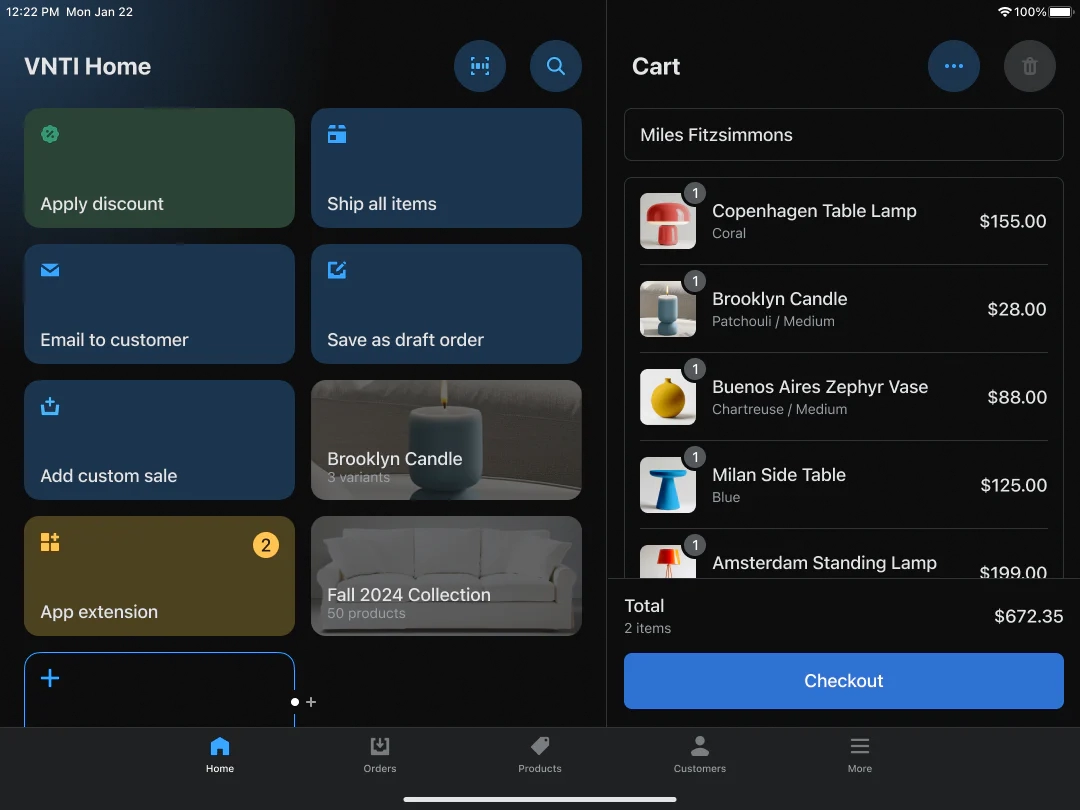
Si estás explorando formas de hacer que las operaciones de tu negocio sean más suaves y eficientes, entonces hardware POS con integración en la nube es exactamente lo que necesitas saber. Las empresas modernas de hoy en día exigen más que solo una caja registradora: quieren información en tiempo real, sincronización perfecta y flexibilidad dondequiera que vayan. Ahí es donde los sistemas POS integrados en la nube toman protagonismo.
En esta guía, descubrirás cómo combinar hardware POS con potentes capacidades en la nube puede transformar tus ventas, inventario y gestión de clientes. Ya seas un minorista que busca actualizarse o un pequeño empresario curioso sobre los beneficios, quédate para aprender cómo soluciones confiables y preparadas para el futuro como las de el hardware y las soluciones de SDLPOS pueden ayudarte a mantenerte a la vanguardia en la era digital. ¡Comencemos!
¿Qué es el hardware POS con integración en la nube?

Definición de hardware POS
El hardware POS se refiere a los dispositivos físicos que las empresas utilizan para procesar transacciones de venta en el punto de venta. Esto incluye todo desde cajas registradoras, lectores de código de barras, impresoras de tickets, respondidas, a lectores de tarjetas. Estos dispositivos capturan y registran datos de transacción, ayudando a minoristas, restaurantes y otros negocios a gestionar pagos e interacciones con los clientes de manera eficiente.
Explicación de la integración en la nube y el software POS basado en la nube
La integración en la nube significa conectar el hardware POS con sistemas de software basados en la nube que almacenan y gestionan datos en línea en lugar de en servidores locales. Software POS basado en la nube funciona en servidores remotos accesibles a través de internet, permitiendo a las empresas gestionar ventas, inventario y datos de clientes en cualquier momento y lugar.
A diferencia de los sistemas POS tradicionales locales, la integración en la nube permite sincronizar datos en tiempo real en múltiples dispositivos y ubicaciones. Esta configuración reduce la necesidad de una infraestructura de TI extensa y ofrece mayor flexibilidad y escalabilidad.
Cómo se comunican el hardware POS y el software en la nube
El hardware POS y los sistemas POS basados en la nube trabajan juntos mediante una conexión fluida que depende de la conectividad a internet, ya sea por cable o inalámbrica. Así es como interactúan:
- Captura de datos: El hardware recopila detalles de la transacción, como información del producto y datos de pago.
- Transmisión de datos: Estos datos se envían de forma segura a través de internet al software de punto de venta en la nube.
- Almacenamiento Centralizado: La nube almacena todos los registros de transacciones, actualizaciones de inventario e información de clientes.
- Sincronización en tiempo real: Las actualizaciones desde cualquier terminal de punto de venta se reflejan instantáneamente en el sistema en la nube, disponible para gerentes y otros dispositivos.
- Bucle de Retroalimentación: El software en la nube puede enviar actualizaciones de precios, promociones y señales de autorización al hardware de punto de venta.
Esta comunicación continua permite a las empresas monitorear ventas, rastrear inventario y generar informes desde cualquier lugar. También soporta entornos de múltiples tiendas y operaciones de punto de venta móvil.
El hardware de punto de venta con integración en la nube combina dispositivos físicos confiables con un potente software en línea para ofrecer una solución minorista flexible, escalable y eficiente.
Componentes Clave del Hardware de Punto de Venta con Integración en la Nube

Al analizar hardware POS con integración en la nube, it’s important to know which devices work seamlessly with cloud-based systems and what features make them cloud-ready.
Tipos de Hardware de Punto de Venta Compatible con Sistemas en la Nube
Varias piezas clave de hardware están diseñadas para sincronizarse sin problemas con el software de punto de venta en la nube:
- Cajas registradoras conectadas a la nube: Cajas registradoras modernas que actualizan los datos de ventas en tiempo real a la nube para un acceso fácil.
- Escáneres de código de barras: Esenciales para escanear artículos de manera rápida y precisa, estos dispositivos deben soportar conexiones inalámbricas o USB para sincronizarse al instante.
- Impresoras de tickets: Compatibles con sistemas en la nube para imprimir recibos directamente desde el software basado en la nube sin retrasos.
- Pantallas táctiles y terminales: Pantallas interactivas y fáciles de usar que sirven como centro de control para las operaciones de punto de venta en la nube.
- Hardware de punto de venta inalámbrico: Terminales móviles y tablets que se sincronizan de forma inalámbrica con sistemas POS en la nube para facilitar pagos flexibles.
Características críticas de hardware para compatibilidad con la nube
Para que los dispositivos POS funcionen bien con software basado en la nube, necesitan algunas características vitales:
- Conectividad a internet confiable: El hardware debe soportar conexiones Wi-Fi, Ethernet o celulares para sincronización continua con la nube.
- Capacidades de procesamiento rápidas: Para gestionar intercambios de datos en la nube sin retrasos.
- Protocolos de seguridad robustos: El hardware debe soportar cifrado y autenticación segura para proteger datos sensibles durante la transferencia a la nube.
- Escalabilidad: Opciones de hardware modular que puedan expandirse fácilmente a medida que crecen las necesidades del negocio.
- Durabilidad y fiabilidad: Especialmente en entornos minoristas o de restauración concurridos, la disponibilidad constante es crucial.
- Compatibilidad con APIs: Esto garantiza que el hardware se integre sin problemas con diversos sistemas en la nube y aplicaciones de terceros.
Ejemplos de hardware de primera categoría para integración en la nube SDLPOS
SDLPOS ofrece una gama de hardware POS de alta calidad diseñado específicamente para integración en la nube, que satisface las necesidades de minoristas y negocios de servicios en España:
- Cajas registradoras conectadas a la nube SDLPOS: Estos dispositivos ofrecen seguimiento de ventas en tiempo real y gestión de inventario mediante sincronización fluida con la nube.
- Escáneres de código de barras de alta velocidad: Diseñados para escaneo rápido y carga instantánea de datos en su sistema en la nube.
- Impresoras de tickets térmicos: Impresoras confiables que se conectan directamente con el software de punto de venta en la nube para ofrecer una impresión rápida de recibos sin retraso en el dispositivo.
- Terminales todo en uno con pantalla táctil: Combinando control de hardware y software en una unidad duradera, optimizada para el rendimiento en la nube.
Para empresas que consideran compras al por mayor o necesidades especializadas, SDLPOS ofrece soluciones de hardware personalizadas que soportan perfectamente la integración en la nube. Puedes explorar más sobre sus ofertas, como hardware de caja registradora compatible con la nube para operaciones más grandes aquí.
Al enfocarte en estos componentes y características, tu negocio estará preparado para acceso eficiente a datos en tiempo real y operación fluida del punto de venta en la nube.
Beneficios de combinar hardware de POS con integración en la nube
Integrar hardware de POS con sistemas basados en la nube ofrece varias ventajas poderosas que facilitan y hacen más eficiente la gestión de un negocio. Aquí te explicamos por qué la combinación de hardware de sistema POS en la nube con integración en la nube destaca para las empresas en España hoy en día.
Acceso a datos en tiempo real y análisis en cualquier lugar y en cualquier momento
Una de las mayores ventajas es acceso en tiempo real a datos de ventas e inventario desde cualquier dispositivo, en cualquier momento y lugar. Ya sea en casa, en la tienda o en la carretera, el hardware de POS conectado a la nube te permite:
- Monitorizar ventas diarias
- Seguir el comportamiento de los clientes
- Analizar el rendimiento de la tienda al instante
Esto te ayuda a tomar decisiones más rápidas e inteligentes respaldadas por datos precisos — sin necesidad de esperar los informes de fin de día.
Mejor gestión de inventario y ventas
La integración en la nube simplifica el seguimiento del inventario sincronizando automáticamente los cambios en todos los dispositivos. Tu compatibilidad del hardware de punto de venta minorista en la nube significa:
- Actualizaciones instantáneas del nivel de stock
- Alertas automáticas de reorden
- Menores posibilidades de errores o agotamientos de stock
Esta gestión de inventario sin fisuras reduce pérdidas y garantiza que siempre tengas lo que los clientes desean.
Reducción de la complejidad de TI y costos de infraestructura
Con hardware de punto de venta en la nube, reduces la necesidad de configuraciones de TI pesadas en las instalaciones. No es necesario contar con servidores locales ya que todos los datos se almacenan de forma segura en la nube. Esto significa:
- Costes iniciales más bajos en equipos y configuración
- Menor necesidad de personal de TI dedicado o mantenimiento
- Tiempo de inactividad mínimo por fallos de hardware
Es perfecto para pequeñas y medianas empresas enfocadas en operaciones eficientes y rentables.
Seguridad mejorada y respaldo de datos
La integración en la nube proporciona características de seguridad robustas y respaldo automático de los datos de tu negocio. A diferencia de los sistemas POS tradicionales, los dispositivos conectados a la nube:
- Encriptan datos sensibles de pago y clientes
- Almacenan copias de seguridad fuera del sitio para prevenir pérdidas por fallos o robos del dispositivo
- Cumplen con estándares de la industria como PCI DSS, garantizando tranquilidad
Mantener la seguridad de la información de tu negocio y clientes es más fácil con esta configuración moderna.
Escalabilidad para negocios en crecimiento
A medida que tu negocio crece, el hardware POS en la nube crece contigo. Añadir nuevas terminales o ubicaciones es sencillo ya que el sistema está diseñado con flexibilidad en mente. Obtienes:
- Fácil incorporación de nuevos dispositivos sin configuraciones complejas
- Gestión centralizada en varias tiendas
- Actualizaciones que funcionan en todos los terminales al instante
Esta escalabilidad ayuda a evitar costosas renovaciones cuando te expandes.
Actualizaciones de software fáciles e integraciones
El hardware POS conectado a la nube permite actualizaciones automáticas de software y una integración fluida con otras herramientas empresariales como plataformas de contabilidad, nómina y marketing. Los beneficios incluyen:
- Siempre con las últimas funciones y parches de seguridad
- Sincronización perfecta con aplicaciones que te ayudan a vender más y gestionar mejor
- Sin descargas manuales ni instalaciones complicadas que interrumpen las operaciones
Mantiene tu sistema actualizado y eficiente sin esfuerzo adicional.
Combinar hardware POS con integración en la nube ya no es un lujo — es una necesidad inteligente para minoristas y restaurantes en España que buscan mantenerse competitivos y ágiles. Desde conocimientos en tiempo real hasta un crecimiento escalable, los sistemas POS en la nube ofrecen las herramientas para que tu negocio prospere hoy y en el futuro.
Cómo elegir el hardware POS adecuado para la integración en la nube
Elegir el hardware POS con integración en la nube es crucial para el éxito de tu negocio. Esto es lo que necesitas considerar para tomar una decisión inteligente que se adapte a tus necesidades y te ayude a crecer.
Tamaño del negocio y ajuste a la industria
Primero, piensa en el tamaño de tu negocio y la industria. Una boutique pequeña o un food truck no necesitarán el mismo conjunto de hardware para sistemas POS en la nube que una tienda minorista más grande o un restaurante. Por ejemplo:
- Las pequeñas empresas pueden beneficiarse de terminales POS compactas e inalámbricas con sincronización en la nube para una movilidad sencilla.
- Las empresas más grandes suelen requerir configuraciones más robustas con varias cajas registradoras y escáneres de código de barras y impresoras de tickets integrados que funcionan perfectamente con hardware de punto de venta basado en la nube.
Combinar el hardware con el entorno de su negocio significa operaciones diarias más fluidas y un mejor servicio al cliente.
Compatibilidad con sistemas y software existentes
Su hardware debe funcionar bien con su configuración actual. Si ya utiliza software POS en la nube, asegúrese de que el hardware de la terminal POS lo soporte o pueda integrarse fácilmente. Busque:
- Hardware POS minorista compatible con la nube certificaciones.
- Soporte para la gestión de inventario basada en la nube a través del POS en la nube.
- Dispositivos que sincronizan datos en tiempo real entre hardware y software para informes precisos.
Esto evita reemplazos costosos en el futuro y mantiene su flujo de trabajo sin interrupciones.
Durabilidad y fiabilidad del hardware Enfoque en la calidad SDLPOS
La durabilidad es importante, especialmente en entornos concurridos. SDLPOS es conocido por hardware duradero y fiable diseñado para uso a largo plazo. Cosas a verificar:
- Cajas registradoras resistentes y pantallas táctiles que soporten el desgaste diario.
- Hardware de POS inalámbrico confiable con sincronización en la nube para evitar tiempos de inactividad.
- Hardware diseñado específicamente para una conexión continua a la nube.
Elegir hardware de calidad significa menos averías y menores costos de reemplazo.
Análisis de costo versus valor
It’s tempting to pick the cheapest option, but el valor supera al costo en cada ocasión. Considera:
- Precio de compra inicial versus ahorros a largo plazo por soporte y mantenimiento reducidos.
- Servicios de soporte y garantía incluidos.
- Escalabilidad—¿puede el hardware crecer con su negocio sin actualizaciones costosas frecuentes?
Invertir en sistemas sólidos de caja registradora conectados a la nube diseñados para las necesidades de su negocio compensa con eficiencia y menos dolores de cabeza.
Calidad del soporte y servicio al cliente
Cuando las cosas salen mal, la ayuda rápida es clave. Elija un proveedor conocido por su fuerte atención al cliente y soporte como SDLPOS, que ofrece:
- Acceso fácil a soporte técnico familiarizado tanto con hardware como con la integración del software de POS en la nube.
- Actualizaciones regulares de firmware y orientación para hardware de punto de venta basado en la nube.
- Equipos de servicio receptivos que entienden las necesidades y regulaciones comerciales locales.
Un buen soporte mantiene sus sistemas POS en la nube funcionando sin problemas y su negocio en línea sin retrasos.
Elegir el sistema correcto Hardware de POS para integración en la nube significa equilibrar las necesidades de su negocio, compatibilidad del sistema, calidad del hardware, costo y soporte. SDLPOS le respalda con hardware confiable y listo para la nube adaptado al mercado español, asegurando que su negocio se mantenga eficiente y competitivo.
Desafíos comunes con la integración en la nube del hardware de POS y cómo SDLPOS los resuelve
Manejo de problemas de conectividad y modos offline
Uno de los mayores dolores de cabeza con el hardware de POS basado en la nube es mantenerse conectado. Las interrupciones en Internet pueden interrumpir ventas, actualizaciones de inventario y atención al cliente — especialmente para negocios locales ocupados que dependen de pagos rápidos. SDLPOS aborda esto construyendo hardware con modos offline confiables. Cuando la conexión se cae, tu terminal POS continúa procesando ventas y sincronizando datos localmente. Una vez que la red vuelve, los dispositivos SDLPOS automáticamente sincronizan todas las transacciones y actualizaciones en la nube, asegurando que no se pierdan ni dupliquen datos. De esta manera, tu negocio sigue funcionando sin problemas incluso cuando la señal Wi-Fi o celular es débil.
Garantizando una integración fluida de hardware y software
La comunicación sin fisuras entre el hardware del POS y el software en la nube es fundamental. Muchas configuraciones tienen problemas de compatibilidad, retrasos o actualizaciones de software que afectan las funciones del hardware. SDLPOS diseña hardware de terminal POS específicamente optimizado para sistemas POS basados en la nube, incluyendo escáneres de código de barras, impresoras de recibos y pantallas táctiles que son plug-and-play con el software en la nube más popular. El resultado es:
- Mínimos problemas de configuración
- Reconocimiento instantáneo del hardware por parte del software POS
- Sincronización de datos confiable y rápida entre dispositivos y la nube
- Actualizaciones fáciles de firmware y software sin tiempo de inactividad
Esta integración estrecha significa que tu hardware de POS minorista con soporte en la nube funciona como una sola unidad, sin complicaciones.
Privacidad de datos y cumplimiento con regulaciones
Manejar los datos de los clientes de forma segura y cumplir con las regulaciones españolas como PCI-DSS es innegociable para cualquier hardware de sistema POS en la nube. SDLPOS entiende los riesgos y incorpora funciones de seguridad avanzadas en sus productos:
- Transmisión de datos cifrada entre el hardware y el software de punto de venta en la nube protege información sensible.
- Herramientas de controles de acceso seguros prevenir el uso no autorizado de dispositivos.
- Las actualizaciones de seguridad regulares mantienen el hardware resistente a las amenazas cibernéticas en evolución.
- El soporte de cumplimiento ayuda a las empresas a cumplir con las leyes locales de privacidad de datos sin carga adicional.
Esto le brinda tranquilidad de que los datos de pago de sus clientes y la información de su negocio permanecen seguros, ya sea almacenados localmente o en la nube.
Con SDLPOS, las empresas locales en toda España obtienen cajas registradoras conectadas a la nube y hardware de punto de venta minorista que abordan problemas del mundo real. Desde fiabilidad offline to sincronización fluida con la nube y medidas de seguridad sólidas, SDLPOS hace que los sistemas de punto de venta basados en la nube funcionen sin los problemas típicos.
Las soluciones SDLPOS hacen que el hardware POS compatible con la nube sea resistente en el futuro con integración en la nube
Resumen de la línea de productos SDLPOS que soporta integración en la nube
SDLPOS ofrece una amplia gama de hardware de punto de venta conectado a la nube diseñado específicamente para empresas en España que buscan optimizar sus operaciones. Su línea incluye terminales POS inalámbricos, escáneres de código de barras compatibles con la nube, impresoras de recibos habilitadas para la nube y cajas registradoras táctiles construidos para sincronizarse perfectamente con el software POS en la nube. Cada dispositivo está diseñado para una configuración rápida y una comunicación confiable con sistemas basados en la nube, asegurando que su negocio minorista o de restauración permanezca conectado dondequiera que esté.
Puntos de venta únicos Durabilidad Asequibilidad Tecnología avanzada
Lo que distingue hardware SDLPOS a su, asegurando que el equipo funcione bien incluso en entornos concurridos y de alto tráfico. Esta resistencia reduce el tiempo de inactividad y los costos de reemplazo, algo imprescindible para cualquier negocio local. Además, SDLPOS mantiene los precios competitivos sin escatimar en funciones, haciendo asequibilidad un gran punto de venta. Todos los dispositivos vienen cargados con la tecnología más reciente como sincronización automática en la nube, transmisión segura de datos y componentes de bajo consumo energético. Este enfoque tecnológico significa que su inversión se mantiene relevante a medida que su negocio crece.
Estudios de caso y testimonios de negocios que utilizan hardware SDLPOS
Muchos negocios pequeños y medianos en España reportan una mejora en el seguimiento de ventas y una gestión de inventario más fluida tras cambiar a hardware POS en la nube SDLPOS. Por ejemplo, un dueño de una tienda de conveniencia local señaló que el acceso a datos en tiempo real a través del hardware SDLPOS redujo las rupturas de stock en un 30%. Un café concurrido compartió cómo el tiempo de inactividad disminuyó porque sus dispositivos SDLPOS manejaron interrupciones de red con modo offline, manteniendo las ventas en marcha. Estas historias demuestran que SDLPOS no es solo hardware confiable, sino un verdadero socio que ayuda a los negocios a tener éxito.
Cómo SDLPOS apoya a los negocios locales con soluciones personalizadas
SDLPOS entiende que no hay dos negocios iguales, especialmente en mercados diversos en España. Ofrecen soluciones personalizadas adaptadas al tamaño, industria y necesidades específicas de minoristas y proveedores de servicios locales. Ya sea que necesite un sistema POS en la nube compacto para una pequeña boutique o una configuración multi-dispositivo para una cadena de restaurantes concurrida, SDLPOS ofrece opciones de hardware flexibles con integración sencilla en la nube. Su equipo de soporte dedicado también ayuda con la configuración, resolución de problemas y actualizaciones continuas, asegurando que su sistema se mantenga preparado para el futuro y listo para lo que venga.
Guía paso a paso para configurar hardware POS integrado en la nube
Configurar su hardware POS con integración en la nube no tiene por qué ser complicado. Aquí tienes una guía sencilla para poner en marcha tu sistema rápidamente, asegurando una sincronización fluida con tu software POS en la nube.
Desembalaje y configuración del hardware
Cuando recibas tu hardware POS basado en la nube, empieza por:
- Verificar todos los componentes: Asegúrate de tener tu caja registradora, escáner de código de barras, impresora de tickets, pantalla táctil, cables de alimentación y cualquier accesorio adicional.
- Colocación del hardware: Configura tus dispositivos en un lugar seguro y conveniente para tu mostrador de caja o espacio de trabajo.
- Encendido: Conecta todos los dispositivos a las fuentes de alimentación y enciéndelos. El hardware de POS inalámbrico a menudo necesita cargarse o insertar la batería antes de comenzar.
Conectando hardware al software POS en la nube
A continuación, conecta tus dispositivos al sistema POS en la nube:
- Conexión a Internet: Asegúrate de tener una conexión a Internet estable, ya que la sincronización en la nube depende de esto.
- Instalar aplicaciones de software: Descarga e instala el software o la aplicación de POS en la nube recomendada por tu proveedor de hardware—por ejemplo, SDLPOS, que ofrece aplicaciones adaptadas para una integración fluida.
- Emparejar dispositivos: Usa Bluetooth o Wi-Fi para conectar tus escáneres de código de barras, impresoras de recibos y cajas registradoras directamente al software POS en la nube.
- Crear cuentas y sincronizar: Inicia sesión o crea tu cuenta de POS en la nube, luego sincroniza tu hardware con el software para comenzar a procesar ventas y gestionar inventario en tiempo real.
Consejos para una integración fluida y resolución de problemas
Para evitar contratiempos comunes y mantener tu caja registradora en la nube y periféricos funcionando sin problemas:
- Verifica la estabilidad de Internet: Usa una conexión Wi-Fi o Ethernet cableada fuerte para evitar retrasos en la sincronización.
- Mantén el software actualizado: Las actualizaciones regulares mejoran la compatibilidad y seguridad del hardware de tu sistema POS en la nube.
- Habilitar modo offline si está disponible: Esto permite que tu POS funcione offline temporalmente, sincronizando los datos cuando vuelvas a conectarte.
- Probar cada dispositivo: Escanee códigos de barras, imprima recibos y abra la caja registradora antes de poner en marcha para detectar posibles problemas temprano.
- Reinicie los dispositivos periódicamente: Un reinicio rápido puede resolver pequeños fallos de conectividad.
- Contacte con soporte: Utilice su servicio de atención al cliente SDLPOS para obtener ayuda experta en desafíos de integración o compatibilidad de hardware/software.
Siguiendo estos pasos y consejos, asegurará que su hardware de punto de venta minorista con integración en la nube esté configurado para operaciones rápidas, confiables y gestión en tiempo real en cualquier lugar.


