







Mejores características del sistema POS para caja registradora para pequeñas empresas 2025

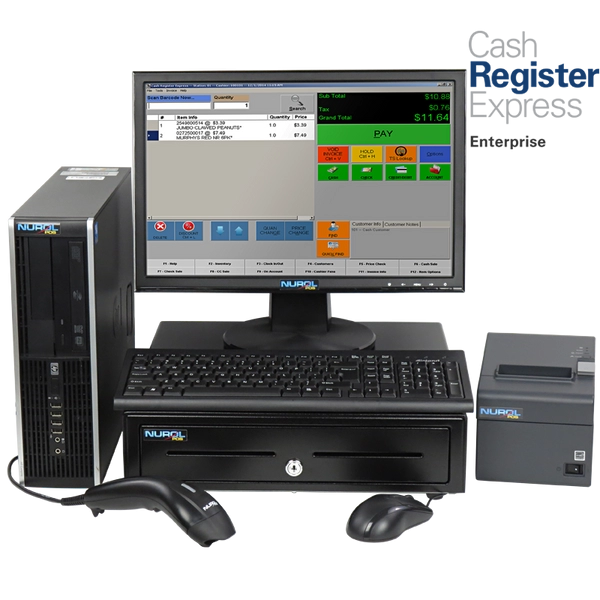
¿Te cuesta elegir lo mejor Sistema POS caja registradora para tu pequeña empresa? La opción adecuada sistema de punto de venta puede agilizar tus transacciones, aumentar la eficiencia y mantener a tus clientes regresando.
Como propietario de un negocio, sé que invertir en soluciones confiables hardware POS es un cambio radical para tiendas minoristas, restaurantes y más. Con años de experiencia ayudando a negocios a actualizarse desde sistemas obsoletos cajas registradoras, comparto consejos internos para simplificar tu decisión.
En esta guía, descubrirás por qué los sistemas modernos sistemas POS superan a los tradicionales cajas registradoras, las características clave a priorizar y cómo SDLPOS ofrece soluciones asequibles, escalables y adaptadas a tus necesidades.
¿Listo para transformar tu proceso de caja? ¡Vamos a ello!
¿Qué es un sistema POS Caja Registradora
Si te preguntas qué exactamente es una caja registradora con sistema POS, no estás solo. Muchos propietarios de pequeñas empresas todavía imaginan la caja registradora clásica y el teclado cuando escuchan “caja registradora”. Pero los sistemas POS de hoy han evolucionado mucho más allá de eso, y entender la diferencia puede ayudarte a ver por qué actualizar en 2025 tiene sentido.
Definición y evolución desde las cajas registradoras tradicionales
A caja registradora con sistema POS (Punto de Venta) es una combinación de hardware y software diseñado para procesar transacciones de venta de manera eficiente. A diferencia de la caja registradora tradicional, que era principalmente hardware mecánico o electrónico básico usado solo para registrar ventas y almacenar efectivo, los sistemas POS modernos integran múltiples funciones empresariales.
La evolución fue desde simples cajones de dinero y impresoras de recibos hasta terminales inteligentes con:
- Pantallas táctiles
- Lectores de tarjetas que soportan chip EMV, NFC y monederos móviles
- Escáneres de código de barras
- Software que rastrea inventario, ventas y datos de clientes en tiempo real
Esta combinación crea una herramienta poderosa que actúa como caja registradora y centro de gestión empresarial.
Componentes clave de un sistema POS Caja Registradora
Los sistemas POS modernos incluyen:
- Terminales de hardware para pagos rápidos de los clientes
- Lectores de tarjetas que manejan múltiples tipos de pago de forma segura
- Módulos de software que gestionan los niveles de inventario
- Gestión de relaciones con clientes (CRM) herramientas
- Herramientas de informes para análisis profundos de ventas y precios
Estos componentes trabajan juntos de manera fluida para simplificar su proceso de cobro y ofrecerle información valiosa para su negocio.
Diferencias entre las cajas registradoras tradicionales y los sistemas POS modernos
Cajas registradoras tradicionales solo gestionan el intercambio monetario y la impresión básica de recibos. Carecen de controles digitales de inventario, almacenamiento de datos o seguimiento de clientes. En cambio, los sistemas POS modernos son basados en la nube o en red, ofreciendo:
- Actualizaciones de inventario en tiempo real para prevenir agotamientos de stock
- Procesamiento de pagos seguro para tarjetas y monederos digitales
- Programas de fidelización de clientes integrado
- Integración con comercio electrónico, software de contabilidad y más
Están diseñados para crecer con su negocio, algo que las cajas tradicionales no podían hacer.
Por qué las empresas están actualizando a sistemas POS en 2025
Actualizar a una caja registradora POS moderna en 2025 se está volviendo esencial por varias razones:
- Velocidad y conveniencia: Los clientes esperan opciones de pago rápidas y flexibles como Apple Pay o Google Wallet
- Precisión en el inventario: Evita ventas perdidas con alertas de stock instantáneas y notificaciones de reorden
- Mejora de la experiencia del cliente: Programas de fidelidad y servicio personalizado aumentan la repetición de negocios
- Datos accionables: Comprende las tendencias de ventas y optimiza los precios basándote en cifras reales
- Cumplimiento y seguridad: Los sistemas modernos cumplen con los estándares PCI DSS, protegiéndote a ti y a tus clientes
La conclusión es que las cajas registradoras con sistema POS ya no son solo para ventas—son herramientas inteligentes que te ayudan a gestionar un negocio más eficiente y rentable.
Si aún utilizas una caja registradora antigua, es momento de ver cómo cambiar a un sistema POS moderno puede darte una ventaja en 2025 y más allá.
Beneficios de usar una caja registradora con sistema POS

Cambiar a una Sistema POS caja registradora ofrece una serie de ventajas que van mucho más allá de lo que ofrecen las cajas registradoras tradicionales. Aquí tienes por qué muchas empresas en España están haciendo la actualización, especialmente con proveedores confiables como SDLPOS.
Transacciones más rápidas y seguras
El terminales automatizadas en los sistemas POS manejan los pagos de forma rápida y segura. Características como Lectores de tarjetas con chip EMV, NFC para pagos sin contacto, y incluso opciones de pago móvil (piensa en Apple Pay o Google Pay) hacen que la compra sea sencilla y segura. Esto reduce los tiempos de espera y aumenta la satisfacción del cliente.
Gestión de Inventario en Tiempo Real
Una gran ventaja es el seguimiento en tiempo real. El sistema actualiza automáticamente el inventario con cada venta, así siempre sabes qué hay en stock. Además, envía alertas de bajo stock, ayudándote a evitar quedarte sin artículos populares o tener exceso de stock. Esto ahorra dinero y previene ventas perdidas.
Mejor experiencia del cliente con programas de fidelidad y CRM
Los sistemas POS van más allá de las transacciones al integrar sistema de gestión de relaciones con clientes (CRM) herramientas. Puedes rastrear fácilmente el historial de compras y preferencias, y luego ofrecer recompensas de fidelidad o promociones personalizadas. Este tipo de servicio mantiene a los clientes regresando.
Potentes conocimientos de datos para decisiones más inteligentes
Una gran ventaja de los sistemas POS es el acceso a informes de ventas detallados y análisis. Estos datos revelan tendencias de ventas, horas punta y rendimiento de productos para que puedas ajustar precios, planificar inventario o realizar promociones dirigidas. Con el tiempo, estos conocimientos te ayudan a optimizar tu negocio para obtener mayores beneficios.
Historia de éxito real con SDLPOS
Toma un minorista local en España que cambió a los sistemas SDLPOS el año pasado. Reportaron un aumento del 14.51% en ventas en seis meses gracias a un mejor control de inventario y marketing dirigido impulsado por su software POS. Los procesos de pago simplificados y los programas de fidelidad también ayudaron a fortalecer las relaciones con los clientes.
Usando un Sistema POS caja registradora Desde SDLPOS equipa a tu negocio con las herramientas para funcionar de manera más fluida, vender de forma más inteligente y mantener a los clientes más satisfechos. Ya seas una pequeña tienda minorista o un café concurrido, estos beneficios ofrecen mejoras reales y medibles.
Características clave a buscar en un sistema POS Caja Registradora
Elegir el sistema correcto Sistema POS caja registradora para tu negocio significa centrarse en funciones que aumenten la eficiencia, seguridad y flexibilidad. Esto es lo que debes priorizar:
Componentes esenciales de hardware
Un sistema POS confiable necesita hardware resistente diseñado para mantener las transacciones rápidas y sin problemas. Busca:
- Cajas de dinero que almacene de forma segura el efectivo y solo abra cuando esté autorizado
- Impresoras de tickets con velocidades de impresión rápidas y texto claro
- Escáneres de código de barras para escaneo de productos rápido y preciso en la caja
- Terminales de procesamiento de pagos que aceptan tarjetas con chip EMV, NFC (contactless) y monederos móviles
Características imprescindibles del software
El software POS moderno debe ofrecer más que solo registro de transacciones. Los beneficios clave del software incluyen:
- Acceso en la nube para que puedas gestionar ventas, inventario e informes desde cualquier lugar
- Compatibilidad con múltiples dispositivos permitiendo su uso en tablets, smartphones o terminales tradicionales para opciones de pago flexibles
- Interfaces fáciles de usar que facilitan la formación del personal y aceleran el servicio al cliente
Capacidades de integración
Una caja registradora POS de primera categoría se integra perfectamente con tus herramientas existentes como:
- plataformas de comercio electrónico para ventas en línea y en tienda
- Software de contabilidad para simplificar la contabilidad y la preparación de impuestos
- Aplicaciones de terceros para marketing, fidelización de clientes y gestión de inventario
Escalabilidad para negocios en crecimiento
Tu sistema POS debe crecer a medida que crece tu negocio. Busca soluciones que permitan:
- Agregar más terminales o dispositivos POS móviles
- Ampliar las funciones de gestión de inventario
- Actualizar planes de software sin perder datos ni funcionalidad
Características de Seguridad
Proteger los datos de los clientes y las finanzas de tu negocio es fundamental:
- Asegurar La conformidad con PCI DSS para cumplir con los estándares de seguridad de pago
- Usar cifrado de datos durante transacciones y almacenamiento
- Busca sistemas con controles de permisos del usuario para limitar el acceso a información sensible
Al centrarse en estos aspectos esenciales de hardware y software, opciones de integración, escalabilidad y seguridad robusta, puedes encontrar un sistema POS con caja registradora que no solo simplifica las operaciones diarias sino que también apoya el crecimiento y el cumplimiento. Para una visión más profunda sobre las opciones de hardware, consulta opciones de hardware para cajas registradoras.
Elegir el sistema POS adecuado con caja registradora para el tipo de negocio
Seleccionar el Sistema POS caja registradora depende mucho del tipo de negocio que operas. Diferentes industrias tienen necesidades únicas, por lo que encontrar una solución flexible y adaptada es clave. Aquí tienes un desglose rápido para tipos de negocios comunes y qué buscar:
Sistemas POS para comercio minorista con hardware flexible
Los negocios minoristas suelen necesitar un sistema POS versátil que funcione tanto para puntos de venta en tiendas fijas como para configuraciones móviles como tiendas temporales o puestos en mercados. Busca:
- Terminales compactas que puedan moverse fácilmente
- Escáneres de código de barras y impresoras de recibos para pagos rápidos
- Soporte para múltiples tipos de pago incluyendo tarjetas con chip EMV y monederos NFC/móviles
Un sistema enfocado en el comercio minorista también debe ofrecer un buen software de gestión de inventario para mantener el inventario actualizado en tiempo real y alertarte de inventario bajo al instante. SDLPOS ofrece opciones de hardware diseñadas para minoristas que desean tanto fiabilidad como movilidad.
Cajas registradoras POS para restaurantes
Los restaurantes exigen un sistema POS que maneje gestión de pedidos suavemente. Las características principales incluyen:
- Mapeo de mesas para rastrear pedidos por asiento y mesa
- Fácil de usar sistemas de impresión o visualización en cocina
- División de cuentas y cálculos de propinas
- Integración con sistemas POS móviles para que los camareros tomen pedidos junto a la mesa
Este software especializado ayuda a reducir errores y acelera el servicio. Las configuraciones personalizadas de SDLPOS soportan estas necesidades para que los restauradores puedan centrarse en los clientes, no en los problemas tecnológicos.
Negocios basados en servicios y soluciones POS móviles
Negocios como salones de belleza, servicios de reparación o empresas de reparto necesitan un sistema POS móvil que funcione en cualquier lugar. Para ellos, las funcionalidades importantes son:
- Ligero, de mano hardware de caja registradora
- Acceso en la nube a información de ventas y clientes para transacciones en movimiento
- Procesamiento rápido de pagos mediante lectores de tarjetas móviles
- Integración con sistemas CRM para gestionar citas y datos de clientes
Esta configuración facilita cerrar ventas donde sea que se realice el trabajo. SDLPOS apoya a los proveedores de servicios con opciones de POS móvil duraderas que mantienen el negocio en marcha sin problemas.
Cómo SDLPOS personaliza soluciones para diferentes industrias
Lo que distingue a SDLPOS es cómo adaptamos el Sistema POS caja registradora experience to your business. Whether you’re running a retail store, a busy restaurant, or a service start-up, SDLPOS offers:
- Paquetes de hardware flexibles adaptados a tu volumen y espacio
- Compatibilidad de software con plataformas POS populares en comercio minorista y restauración
- Opciones de integración robustas para comercio electrónico, contabilidad y programas de fidelización
- Soporte localizado diseñado para empresas en toda España, asegurando que recibas ayuda práctica cuando la necesites
Si quieres profundizar en la elección del hardware y sistema operativo adecuados para tu configuración, consulta nuestra guía detallada sobre Sistemas POS Android vs Windows que te ayuda a adaptar las necesidades de tu negocio a la tecnología adecuada.
Elegir la caja registradora POS correcta significa adaptar las demandas de tu negocio a hardware y software que crezcan contigo. Con SDLPOS, obtienes asesoramiento experto y productos confiables diseñados exactamente para tu sector.
Comparación de costos de caja registradora POS vs cajas registradoras tradicionales

Cuando se trata de elegir entre un Sistema POS caja registradora y una caja registradora tradicional, entender el panorama completo de costos es importante. Desglosamos los gastos iniciales, las tarifas continuas y lo que puedes ahorrar a largo plazo.
Costos iniciales Hardware, Software e Instalación
- Cajas registradoras tradicionales generalmente tienen un precio inicial más bajo ya que son principalmente la máquina en sí con funciones básicas.
- Sistemas POS requieren una inversión mayor desde el principio. Estás pagando por:
- Cables hardware de caja registradora (terminales, lectores de tarjetas)
- Suscripciones de software para inventario y procesamiento de pagos
- Configuración y servicios de instalación—especialmente si se incluyen acceso en la nube o integraciones de comercio electrónico.
Aunque el costo de inicio es mayor, las soluciones modernas de POS minorista te ofrecen mucha más flexibilidad y funciones desde el primer día.
Costos continuos Mantenimiento de transacciones y Actualizaciones
- Las cajas registradoras tradicionales tienen costos continuos mínimos pero ofrecen pocas o ninguna actualización o mejora de funcionalidad.
- Los sistemas POS conllevan gastos continuos como:
- Tarifas de transacción para pagos con tarjeta de crédito y monederos móviles (EMV, NFC)
- Mantenimiento de hardware y software
- Actualizaciones actualizaciones que añaden capas de seguridad y nuevas funciones
Debido a las mejoras continuas, un sistema POS mantiene su negocio actualizado con las tendencias de ventas y las necesidades de los clientes.
Ahorros a largo plazo y retorno de inversión con sistemas POS
Una gran ventaja de los sistemas POS es la ahorros a largo plazo gracias a una gestión más inteligente del inventario y las ventas. Por ejemplo, las empresas que utilizan un sistema como SDLPOS han visto hasta un reducción del 28% en costos de inventario. Eso se traduce en menos stock desperdiciado, mejores decisiones de compra y más dinero ahorrado en general.
Opciones de hardware SDLPOS asequibles para presupuestos pequeños
SDLPOS ofrece una gama de hardware de caja registradora rentable y paquetes de software adaptados para pequeñas y medianas empresas. Esto significa que puedes actualizar a un sistema de punto de venta sin gastar una fortuna. Los beneficios clave incluyen:
- Paquetes de hardware flexibles que eliges según tus necesidades
- Suscripciones de software escalables para que pagues solo por lo que usas
- Soporte local confiable para evitar costosos tiempos de inactividad
Invertir en un sistema POS hoy significa un mejor control de los costos mañana y un crecimiento empresarial más inteligente en los mercados minoristas y de servicios.
Cómo configurar tu sistema POS de caja registradora
Configurar tu Sistema POS caja registradora que esté en funcionamiento no tiene que ser complicado. Con los pasos adecuados, puedes tener todo instalado y tu equipo capacitado rápidamente para mantener tu negocio funcionando sin problemas.
Instalación y configuración paso a paso
Desembale y conecte el hardware
Comienza conectando tu hardware de caja registradora como el terminal táctil, terminal de procesamiento de pagos, escáner de códigos de barras, impresora de recibos y caja registradora. Asegúrate de que todos los cables estén seguros y la energía sea estable.
Instalar Software POS
Ya sea que utilice una conexión POS en la nube o software local, sigue las instrucciones del proveedor para instalarlo y activarlo. Para los usuarios de SDLPOS, el software suele venir preinstalado o está disponible mediante enlaces de descarga simples.
Configurar los Ajustes de tu Sistema
Personaliza tu inventario, tasas de impuestos, opciones de pago y formatos de recibos. Este paso ayuda a adaptar el sistema a las necesidades comerciales locales y a las normas de cumplimiento.
Conectar a tu Red
Una conexión a internet estable es esencial para funciones como gestión de inventario en tiempo real y procesamiento de pagos, especialmente para sistemas POS móviles y pagos NFC.
Capacitar al Personal para una Adopción Sin Problemas
- Mantenlo simple — Enfócate en las funciones principales como registrar ventas, procesar pagos y gestionar alertas de inventario.
- Práctica práctica — Permite que tu equipo practique en el sistema para ganar confianza.
- Crear guías rápidas — Recordatorios de una página o hojas de trucos ayudan a los empleados a evitar errores comunes.
- Programa sesiones de capacitación continuas para mantenerse actualizado sobre cualquier actualización de software o nuevas funciones.
Solución de Problemas Comunes
La mayoría de los problemas iniciales son fáciles de solucionar si sabes qué revisar:
- Problemas de conectividad — Asegúrate de que las conexiones Wi-Fi o Ethernet sean estables. Reinicia los enrutadores o cambia a redes de respaldo si es necesario.
- Sobretensiones de energía — Utilice protectores contra sobretensiones para proteger su hardware POS de problemas eléctricos inesperados que puedan causar daños o tiempo de inactividad.
- Fallos en periféricos — Verifique las conexiones de escáneres, impresoras y cajones de efectivo. Reinicie los dispositivos si se congelan o no responden.
Soporte SDLPOS para una configuración sin complicaciones
SDLPOS destaca por ofrecer soporte local dedicado, lo que significa que la ayuda está a solo una llamada o correo electrónico cuando la necesite. Su equipo ayuda con:
- Guía de instalación paso a paso
- Respuestas rápidas a problemas de resolución
- Asesoramiento personalizado para la configuración adaptado a pequeñas empresas en España, incluyendo soluciones para entornos minoristas y de restauración
Este soporte facilita que su solución POS minorista funcione rápidamente, minimizando el tiempo de inactividad para que pueda centrarse en hacer crecer su negocio.
Por qué elegir SDLPOS para su sistema POS de caja registradora
Cuando se trata de elegir un Sistema POS caja registradora que se adapta a su pequeña empresa, SDLPOS destaca por varias razones sólidas. Aquí le explicamos por qué los minoristas locales en España confían en SDLPOS para sus necesidades de sistemas de punto de venta.
Hardware duradero diseñado para pequeñas empresas
SDLPOS ofrece hardware de caja registradora de alta calidad y duradero construido para manejar el uso diario en minoristas o restaurantes sin fallar. Ya gestione una tienda concurrida o un sistema móvil, sus terminales de procesamiento de pagos confiables y cajones de efectivo están diseñados pensando en las demandas de las pequeñas empresas. Esto significa menos tiempo de inactividad, menos reparaciones y equipos de mayor duración que mantienen su negocio en marcha sin problemas.
Funciona perfectamente con los principales software POS
Una gran ventaja de SDLPOS es su amplio compatibilidad con los principales proveedores de software POS. Esto incluye soluciones POS basadas en la nube, software de gestión de inventario y funciones populares de POS para restaurantes. Al soportar integraciones multiplataforma, SDLPOS te ayuda a personalizar tu sistema para que coincida con tu flujo de trabajo específico—ya sea gestionar programas de fidelidad, seguir tendencias de ventas o sincronizar pagos de comercio electrónico.
Soporte local adaptado a tu mercado
Si estás en [insertar ciudad de la región], SDLPOS ofrece soporte local y soluciones personalizadas que entienden los desafíos únicos de tu mercado. Esta experiencia local significa ayuda más rápida y efectiva al configurar tu hardware o solucionar problemas como conectividad o actualizaciones de software. Es un soporte en el que puedes confiar sin quedarte en espera o lidiar con centros de llamadas lejanos.
Confiado por clientes reales
SDLPOS tiene un historial sólido demostrado por testimonios de clientes y casos de éxito. Por ejemplo, minoristas locales que actualizaron a hardware de SDLPOS reportaron procesos de pago más fluidos, mayor precisión en inventario y un aumento en ventas—todo gracias a sus soluciones integradas de POS minorista y sistemas de caja fáciles de usar. Estos resultados del mundo real muestran por qué SDLPOS sigue siendo una opción principal para pequeñas empresas que buscan crecer.
salvó sus operaciones durante períodos de ventas concurridos, como las temporadas de vacaciones o durante actividades comerciales fuera de horario. Estas historias de éxito destacan no solo la calidad del hardware sino también el valor de un respaldo técnico receptivo y las 24 horas. sistemas POS robustos con cajas registradoras, respaldados por compatibilidad de software, conocimiento local y éxito comprobado. Para cualquier pequeña empresa enfocada en la fiabilidad y las integraciones inteligentes, SDLPOS ayuda a hacer que la experiencia de pago sea más sencilla y tus operaciones más eficientes



Pensamientos sobre “Best POS System Cash Register Features for Small Business 2025”