







Las soluciones POS con pantalla para clientes mejoran la transparencia y la experiencia del cliente

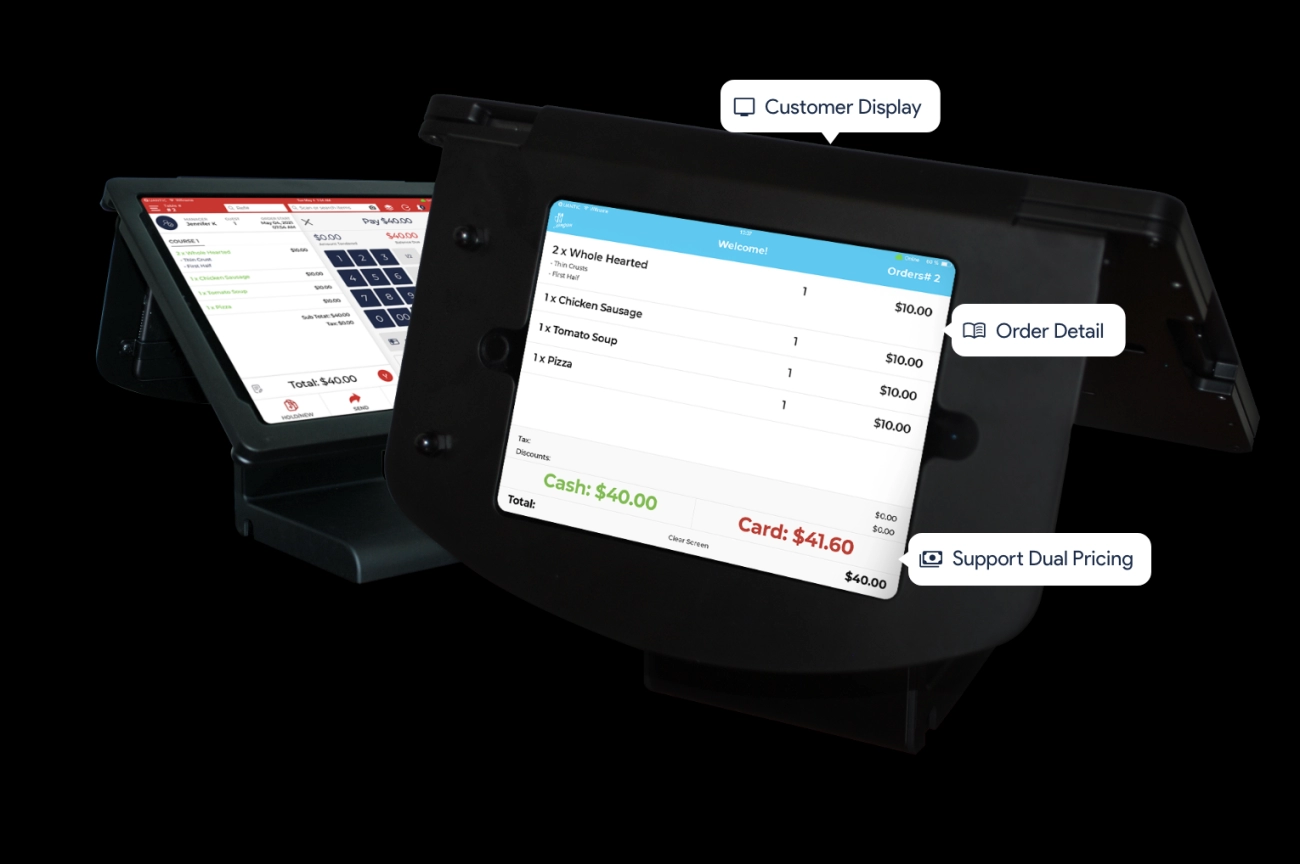
¿Estás buscando el terminal de punto de venta inalámbrico perfecto pantalla de cliente POS ¿para impulsar tu negocio? Elegir la correcta pantalla de cliente POS puede transformar tus transacciones, encantar a tus clientes y optimizar las operaciones. Como experto en retail, he visto de primera mano cómo la correcta . Las pantallas claras y receptivas ayudaron a los cajeros a procesar las ventas más rápido, reduciendo los tiempos de espera. La tienda también destacó la construye confianza y eleva la experiencia en la caja. En esta guía, desglosaremos todo lo que necesitas saber sobre sistemas de pantalla de cliente POS, desde funciones hasta beneficios, y por qué SDLPOS es tu opción preferida para hardware de primera categoría. ¡Comencemos!
¿Qué es una pantalla de cliente POS?
Definición y descripción general
A pantalla de cliente POS es una pantalla especializada adjunta a un sistema de punto de venta que mira hacia el cliente durante el pago. Su función principal es mostrar la información de la transacción de manera clara y transparente, incluyendo precios de artículos, cantidades, totales y, a veces, mensajes promocionales. Al proporcionar actualizaciones visuales en tiempo real, mejora la confianza y la comunicación entre el negocio y el cliente.
Las pantallas de cliente son una parte esencial de los entornos minoristas modernos, permitiendo interacciones fluidas y reduciendo errores durante el pago. Mejoran la experiencia del cliente al confirmar los detalles de la transacción a medida que ocurren, lo que puede ayudar a minimizar disputas y retrasos en la caja.
Tipos de pantallas de cliente POS
Existen varios tipos de monitores de pantalla para clientes utilizados en configuraciones POS, cada uno adaptado a diferentes necesidades comerciales:
Pantallas alfanuméricas de 2 líneas
Las más tradicionales y ampliamente utilizadas, estas pantallas muestran texto básico como nombres de artículos y precios en dos líneas. Son rentables y sencillas, ideales para pequeños negocios que desean información simple y clara.
Pantallas gráficas
Ofrecen capacidades de visualización más versátiles, incluyendo logotipos, animaciones y múltiples líneas de texto. Muestran contenido más completo, como detalles del producto u ofertas promocionales, mejorando así la participación del cliente.
Pantallas táctiles
Estas pantallas interactivas permiten a los clientes interactuar directamente—seleccionar artículos, verificar compras o firmar electrónicamente. Las unidades de pantalla táctil para puntos de venta (POS) son comunes en la hostelería y en industrias de servicio rápido donde una interacción mejorada es valiosa.
Características y Funcionalidades Comunes
El hardware de pantalla para clientes en POS, independientemente del tipo, generalmente incluye estas características clave:
- Actualizaciones de transacciones en tiempo real mostrando nombres de artículos, cantidades, precios y totales en curso.
- Compatibilidad con múltiples sistemas de software y hardware POS, asegurando una integración fluida.
- Opciones de conectividad como conexiones USB, seriales o inalámbricas para instalaciones flexibles.
- Mensajes y promociones personalizables que pueden mostrarse a los clientes durante la espera o en la caja.
- Construcción duradera diseñado para manejar entornos minoristas o de hostelería concurridos.
Al incorporar estas características, las pantallas dirigidas a clientes ayudan a las empresas a mantener la claridad en la caja mientras fomentan una experiencia de compra mejorada y transparente.
Beneficios clave de usar pantallas de cliente en POS en su negocio

Usando un pantalla de cliente POS ofrece varias ventajas claras que pueden mejorar la forma en que gestiona su negocio y cómo se sienten sus clientes respecto a sus compras. Aquí está por qué invertir en una pantalla de POS de calidad para clientes tiene sentido:
Mayor confianza del cliente y transparencia en las transacciones
Una pantalla para clientes en las cajas registradoras muestra detalles de la transacción en tiempo real, permitiendo a los clientes ver precios, artículos y totales a medida que se escanean. Esta visibilidad genera confianza, ya que los clientes sienten que se les está cobrando correctamente. También añade una capa adicional de transparencia, reduciendo la confusión durante la caja.
Mejora de la experiencia del cliente y eficiencia operativa
Los monitores de exhibición para clientes aceleran el proceso de pago al facilitar que los clientes verifiquen su compra sin hacer preguntas o detener al cajero para verificar precios. Esto suaviza el flujo de transacciones, reduciendo filas y tiempos de espera. Además, ayuda a los cajeros a concentrarse en sus tareas, aumentando la eficiencia en el punto de venta.
Facilita la exhibición precisa de precios y la visualización de información en tiempo real
Una función clave de las pantallas para clientes en POS es mostrar precios precisos y detalles de los artículos al instante. Esto significa que hay menos margen para errores, como escanear doble o artículos omitidos. También permite actualizar promociones o descuentos en vivo, para que los clientes siempre vean las ofertas actuales.
Ayuda a reducir disputas y reclamaciones fraudulentas
Al mostrar claramente los detalles de la compra, estas pantallas LED para clientes en POS reducen las disputas por cargos incorrectos o reembolsos faltantes. Los clientes pueden confirmar su compra allí mismo, lo que reduce la posibilidad de reclamaciones fraudulentas y mejora la satisfacción general.
Tener una pantalla para clientes confiable en tu sistema POS no solo se trata de tecnología, sino de una forma práctica de aumentar la confianza, precisión y rapidez en tus transacciones diarias. Para negocios enfocados en procesos de pago fluidos y clientes satisfechos, es una herramienta inteligente para tener a mano.
Para más detalles sobre productos de calidad adecuados para diferentes tamaños y sectores empresariales, consulta nuestra gama de monitores de exhibición para clientes en POS.
Cómo funciona la exhibición para clientes en POS con tu sistema

A pantalla de cliente POS se conecta directamente a tu sistema de punto de venta, mostrando información en tiempo real que mantiene informados a los clientes y genera confianza. Aquí te explicamos cómo funciona típicamente y qué necesitas saber:
Métodos de integración para la exhibición para clientes en POS
Las pantallas para clientes se conectan a su sistema POS de varias maneras, dependiendo de sus opciones de configuración y espacio:
- Conexiones cableadas: Estas incluyen USB, serie (RS-232), o cables Ethernet. Las configuraciones cableadas ofrecen conexiones estables y consistentes—ideales para lugares de comercio minorista o hostelería concurridos.
- Conexiones inalámbricas: Algunas pantallas para clientes modernas utilizan Wi-Fi or Bluetooth para conectarse, brindándole mayor flexibilidad en la colocación y reduciendo el desorden.
Elegir la conexión adecuada es importante para la fiabilidad y la facilidad de instalación.
Compatibilidad con Software y Hardware POS
No todas las pantallas para clientes funcionan perfectamente con cada sistema de punto de venta. Es fundamental:
- Verificar si su software POS soporta el monitor para atención al cliente en cajas registradoras que desea.
- Confirmar que el hardware, ya sea una caja registradora tradicional o un POS basado en iPad, sea compatible.
- Buscar pantallas que funcionen con las principales marcas de POS utilizadas en los sectores minorista y de servicios de alimentación en España.
Qué contenido aparece en las pantallas para clientes
Una pantalla para clientes en un POS no es solo para mostrar precios. Puede mostrar:
- Detalles de precios – total preciso, impuestos y cualquier descuento.
- Descripciones de artículos – nombre, cantidad y opciones como tamaño o color.
- Mensajes promocionales – ofertas especiales, puntos de fidelidad o próximas rebajas.
- Estado de la transacción – indicaciones como “Desliza tu tarjeta” o “Cambio debido”.”
Esta transparencia ayuda a los clientes a seguir la transacción, reduciendo la confusión y mejorando la satisfacción.
Usar la conexión adecuada y garantizar la compatibilidad hará que tu pantalla de punto de venta para clientes sea una parte fluida y útil de tu proceso de pago. Esta configuración impulsa una mejor experiencia del cliente y mantiene tu negocio funcionando de manera eficiente.
Elegir la pantalla de punto de venta para clientes adecuada para tu negocio
Seleccionar el pantalla de cliente POS es crucial para mejorar tu experiencia de pago y satisfacer las necesidades de tu negocio. Aquí tienes en qué enfocarte:
Factores Clave a Considerar
Tamaño y tipo de pantalla
Elige un tamaño que se ajuste al espacio de tu mostrador y a la línea de visión del cliente. Las opciones van desde pantallas alfanuméricas compactas de 2 líneas hasta pantallas gráficas o táctiles más grandes. Por ejemplo, pantalla táctil para clientes en punto de venta unidades ofrecen funciones interactivas, ideales para involucrar a los clientes en hostelería o servicios rápidos.
Opciones de conectividad
Ensure the display supports your POS system’s connections. Most common are Pantalla para clientes en punto de venta con USB, opciones cableadas seriales o inalámbricas. El USB suele ser preferido por su simplicidad de conexión, especialmente en entornos minoristas.
Resolución y legibilidad
Las pantallas deben tener pantallas claras y brillantes con buena resolución para mostrar precios, descripciones de artículos y mensajes promocionales. Los monitores LED y LCD diseñados para el comercio minorista garantizan la visibilidad incluso en diversas condiciones de iluminación.
Durabilidad y calidad de construcción
Dado que las pantallas para clientes se utilizan a diario, elija hardware duradero que pueda soportar entornos ajetreados. Busque modelos con carcasas resistentes y componentes fiables diseñados para una larga vida útil.
Recomendaciones específicas de la industria
Minorista
Priorice la información clara de precios y productos con una fácil integración. Las pantallas alfanuméricas o gráficas básicas suelen ser suficientes, pero las pantallas LED más grandes pueden mejorar la confianza del cliente.
Hostelería y Servicio Rápido
Considere opciones interactivas. pantalla táctil para clientes en punto de venta Estas pueden acelerar los pedidos, mostrar mensajes personalizados o mostrar recompensas de fidelización, mejorando la experiencia general del cliente.
Presupuesto y Garantía de Calidad
Equilibrio entre Coste y Calidad
Si bien las opciones asequibles pueden parecer tentadoras, invertir en marcas de confianza garantiza menos problemas y una vida útil más larga. El precio de la pantalla para el cliente en el punto de venta debe reflejar la durabilidad y la compatibilidad.
Elija Proveedores Fiables
Asóciese con proveedores de hardware de pantallas para clientes de buena reputación que ofrezcan garantías, soporte y garantías de compatibilidad. Esto reduce los riesgos de tiempo de inactividad y proporciona tranquilidad.
Para una gama fiable de pantallas para clientes de calidad profesional diseñadas pensando en las empresas de España, consulte Monitores de Pantalla TPV SDLPOS. Ofrecen una excelente calidad, un soporte sólido y opciones de personalización que se adaptan a una variedad de industrias y presupuestos.
Por qué elegir SDLPOS para su hardware TPV de pantalla para clientes
Cuando se trata de seleccionar el hardware TPV de pantalla para clientes, adecuado, SDLPOS destaca como un socio de confianza para las empresas de toda España. Aquí le mostramos por qué SDLPOS debería ser su proveedor de referencia para monitores de pantalla para clientes minoristas y soluciones de pantalla orientadas al cliente.
Amplio catálogo de productos y estándares de calidad
SDLPOS ofrece una gran variedad de pantallas de visualización para clientes, incluyendo pantallas alfanuméricas de 2 líneas, pantallas gráficas, pantallas táctiles para clientes, pantallas USB para clientes en sistemas POS, y pantallas LED para clientes. Esta amplia selección significa que puedes encontrar fácilmente el mejor display para clientes para configuraciones de pequeñas empresas o entornos de retail y hostelería más grandes.
Todos sus productos cumplen estándares de alta calidad con materiales confiables diseñados para durar en entornos de retail concurridos o de servicio rápido. Ya sea que necesites algo compacto para espacios de mostrador reducidos o una pantalla duradera para uso intensivo, SDLPOS te tiene cubierto.
Garantías de soporte y compatibilidad
Un desafío común con el hardware de pantallas para clientes en POS es asegurarse de que se integre sin problemas con tu sistema POS existente. Con SDLPOS, obtienes confianza en la compatibilidad—sus pantallas funcionan bien con las principales marcas de software y hardware POS, asegurando una configuración rápida y sin complicaciones.
SDLPOS también respalda sus productos con soporte al cliente receptivo, ayudándote a solucionar problemas o guiándote durante la instalación. Este soporte se extiende a conexiones cableadas, inalámbricas, USB y seriales, por lo que no estás limitado en cómo conectar tu pantalla para clientes en cajas registradoras o puntos de venta.
Personalización y servicios postventa
Cada negocio es diferente. SDLPOS entiende esto ofreciendo Opciones de personalización soluciones adaptadas a tus necesidades únicas. Ya sea que desees pantallas de visualización con marca propia o tamaños y resoluciones específicas, pueden adaptarse a ti.
Más allá de la venta, SDLPOS proporciona servicios postventa incluyendo consejos de mantenimiento, actualizaciones de firmware y piezas de repuesto. Este compromiso ayuda a garantizar que su pantalla de cliente POS funcione sin problemas durante años, reduciendo el tiempo de inactividad y protegiendo su inversión.
Elegir SDLPOS para su pantalla de cliente POS hardware significa productos confiables, soporte sólido y opciones flexibles adaptadas a empresas españolas que buscan confianza y eficiencia en el punto de venta.
Consejos de Instalación y Mantenimiento para Pantalla de Cliente POS
Configurar su pantalla de cliente POS instalarla correctamente y mantenerla en óptimas condiciones es esencial para un funcionamiento fluido y una excelente experiencia para el cliente. Aquí le mostramos cómo comenzar y mantener las cosas en marcha.
Mejores Prácticas para Configurar Pantallas de Cliente
- Elija el lugar adecuado: Coloque la pantalla donde los clientes puedan verla fácilmente durante el pago. Por lo general, esto significa orientarla directamente hacia el cliente cerca de la caja registradora o terminal POS.
- Conexiones seguras: Ya sea que utilice una conexión Pantalla para clientes en punto de venta con USB, serial o inalámbrica, asegúrese de que los cables estén firmemente conectados y evite cables sueltos que puedan causar interrupciones.
- Siga las pautas de compatibilidad: Verifique que su software y hardware POS sean completamente compatibles con su pantalla. La mayoría de las pantallas soportan sistemas POS comunes, pero es recomendable confirmarlo, especialmente si utiliza software personalizado o heredado.
- Fuente de alimentación: Utilice configuraciones de suministro de energía estables y evite conectar las pantallas en tomas de corriente sobrecargadas para prevenir interrupciones de energía.
- Posición para durabilidad: Asegúrese de que la pantalla sea estable y no esté propensa a golpes accidentales o derrames, especialmente en entornos de venta minorista o de servicio rápido.
Rutinas de mantenimiento para garantizar longevidad y rendimiento
- Limpie regularmente: Utilice un paño suave y sin pelusas para limpiar la pantalla y el cuerpo de la pantalla. Evite productos químicos agresivos; un limpiador suave para pantallas o alcohol isopropílico diluido funciona muy bien en pantallas táctiles de cliente POS.
- Verifique cables y conexiones: Inspeccione regularmente los cables USB o serial en busca de desgaste. Los cables dañados pueden causar fallos o fallos en la pantalla.
- Actualizar software: Mantén actualizados los controladores de tu sistema POS y del monitor del cliente para evitar problemas de compatibilidad o errores.
- Monitoriza el entorno: Evita exponer las pantallas a temperaturas extremas, humedad o luz solar directa, ya que esto puede deteriorar la calidad de la pantalla o los componentes del hardware con el tiempo.
- Reinicia periódicamente: Un simple reinicio del sistema POS y del monitor del cliente puede prevenir muchos fallos comunes en el software.
Solución de problemas comunes de la pantalla del cliente en POS
- Pantalla en blanco o tenue: Primero verifica las conexiones de energía y cables. Si todo parece correcto, prueba la pantalla en otro sistema POS o prueba con un cable diferente para descartar problemas de hardware.
- La pantalla no se sincroniza con el POS: Confirma que el software POS soporta la pantalla para atención al cliente y que las configuraciones para la salida de pantalla del cliente en POS están activadas.
- Imágenes parpadeantes o distorsionadas: Inspecciona los cables en busca de daños o interferencias, y asegúrate de que la configuración de resolución de la pantalla coincida con la recomendada para tu modelo.
- Pantalla táctil que no responde: Si utilizas una pantalla táctil en el POS, asegúrate de que el controlador táctil esté instalado y actualizado. Calibra la pantalla si es necesario.
- Preocupaciones sobre seguridad de datos: Asegúrate de que la pantalla del cliente solo muestre información relevante y no sensible para evitar exponer datos confidenciales.
Seguir estos consejos de instalación y mantenimiento mantendrá tus monitores de pantalla para clientes en retail funcionando sin problemas, ayudándote a proporcionar información clara y en tiempo real a los clientes mientras minimizas interrupciones. Un cuidado adecuado significa menos dolores de cabeza, menores costos de reparación y una mejor experiencia en el proceso de pago.
Tendencias futuras en soluciones POS con pantalla para clientes
A medida que la tecnología continúa evolucionando, sistemas de pantalla de cliente POS cada vez son más inteligentes e interactivas. Estas nuevas tendencias están diseñadas para mejorar la forma en que las empresas interactúan con sus clientes y hacer que las transacciones sean más fluidas.
Pantallas táctiles y pantallas interactivas
El cambio de pantallas alfanuméricas básicas a pantalla táctil para clientes en punto de venta unidades está ganando impulso. Las pantallas táctiles permiten a los clientes interactuar directamente con la pantalla — por ejemplo, seleccionando promociones, revisando información detallada del producto o firmando digitalmente para los recibos. Este enfoque práctico aumenta el compromiso y hace que el proceso de pago sea más transparente.
Señalización digital e integración promocional
Las pantallas modernas orientadas al cliente ya no solo muestran precios. Muchas tiendas están integrando señalización digital en sus monitores de pantalla para clientes en el punto de venta (POS). Estos pueden mostrar:
- Promociones y descuentos dirigidos
- Recompensas del programa de fidelidad
- Mensajes personalizados basados en el historial de compras
Esta integración ayuda a las empresas a aumentar las ventas captando la atención de los clientes justo en la caja.
Conectividad inalámbrica y basada en la nube
El auge de Pantallas para clientes USB para sistemas POS con opciones inalámbricas como Bluetooth y Wi-Fi permiten una instalación más sencilla y mayor flexibilidad. El hardware de pantalla para clientes inalámbrica en POS reduce el desorden y puede sincronizarse fácilmente con el software POS basado en la nube para actualizaciones y análisis en tiempo real.
Mejoras en análisis de datos y conocimientos del cliente
El futuro de las pantallas para clientes en POS también incluye mejores capacidades de análisis de datos Las pantallas interactivas pueden recopilar datos sobre:
- Preferencias del cliente
- Promociones más vistas
- Velocidad de transacción
Esta información ayuda a las empresas a adaptar las estrategias de marketing y mejorar las experiencias en la tienda.
Impacto en la participación del cliente
La combinación de pantallas táctiles interactivas, señalización digital y análisis inteligentes aumenta la confianza del cliente y hace que el proceso de compra sea más transparente. Los clientes valoran ver actualizaciones de precios en tiempo real y contenido personalizado, lo que reduce la confusión y ayuda a evitar disputas.
Aspectos clave:
- Las pantallas táctiles y las pantallas interactivas para clientes están convirtiéndose en estándar.
- La integración con señalización digital permite contenido promocional dirigido.
- La conectividad inalámbrica simplifica la configuración y mejora la flexibilidad del sistema de pantallas para puntos de venta.
- Los análisis de datos avanzados mejoran la participación del cliente y las ideas comerciales.
- Estas tendencias en conjunto mejoran la transparencia, aumentan las ventas y reducen los problemas en las transacciones.
Mantenerse a la vanguardia con estas innovaciones en tecnología de pantallas para puntos de venta para clientes hace que su negocio sea más competitivo y amigable para el cliente en el mercado de España.
Preguntas frecuentes sobre pantallas para puntos de venta y su integración
¿Cuál es la vida útil promedio de una pantalla para puntos de venta para clientes?
La mayoría pantalla de cliente POS las unidades duran entre 3 a 7 años, dependiendo de factores como la calidad de construcción, la intensidad de uso y el mantenimiento. Invertir en un pantalla de cliente LED para POS con componentes de buena calidad puede prolongar esta vida útil. La limpieza regular y evitar ambientes agresivos ayudan a mantener la pantalla funcionando bien con el tiempo.
¿Puede funcionar con mi caja registradora actual?
Sí, muchas precio de la pantalla para el cliente en el punto de venta las opciones están diseñadas para ser compatibles con una amplia gama de cajas registradoras y sistemas POS existentes. Ya sea que su configuración utilice pantallas de cliente USB para sistema POS o conexiones seriales, la integración suele ser sencilla. Antes de comprar, verifique la compatibilidad con su hardware y software actuales para asegurar una configuración sin problemas.
¿Cuáles son los tamaños de pantalla más populares para POS de atención al cliente?
Los tamaños más comunes para monitores de pantalla para clientes en retail son:
- pantallas alfanuméricas de 2 líneas: Compactas y claras para información básica de precios y artículos.
- pantallas gráficas de 7 a 10 pulgadas: Ofrecen más espacio para contenido detallado y promocional.
- Opciones de pantalla táctil para POS que generalmente comienzan alrededor de 7 pulgadas para funciones interactivas.
Elegir el tamaño adecuado depende de las necesidades de su negocio, el espacio en el mostrador y la cantidad de información que desea mostrar a sus clientes.
¿Qué tan segura es la información mostrada en la pantalla de cliente POS?
Las pantallas de cliente muestran solo detalles de la transacción como precio, cantidad y descripción del artículo, lo que presenta riesgos de seguridad mínimos. No almacenan datos sensibles como información de tarjetas de crédito o datos personales de los clientes. Sin embargo, para mantener la seguridad general de su sistema POS:
- Usar pantalla de cliente POS dispositivos de proveedores confiables como SDLPOS.
- Mantén tu software actualizado.
- Asegura una seguridad adecuada en la red si tus pantallas son inalámbricas.
De esta manera, tanto tu negocio como tus clientes obtienen transparencia en las transacciones sin comprometer la seguridad de los datos.


